
Arbortech PWC.FG.900.20
ARBORTECH Power Carving Unit Instruction Manual
Model: PWC.FG.900.20 | Brand: Arbortech
1. Introduction
The ARBORTECH Power Carving Unit (PCU) is a versatile variable speed angle grinder specifically designed for woodworking applications. It serves as an ideal power source for a wide range of Arbortech attachments, enabling tasks from aggressive wood removal to fine sanding and shaping. This manual provides essential information for the safe and effective operation, setup, maintenance, and troubleshooting of your PCU.

Figure 1: The ARBORTECH Power Carving Unit with included accessories, showcasing its compact design and various components for woodworking tasks.
2. Safety Information
WARNING: Always read and understand all safety warnings, instructions, illustrations, and specifications provided with this power tool. Failure to follow all instructions listed below may result in electric shock, fire, and/or serious injury.
2.1 General Power Tool Safety
- Work Area Safety: Keep work area clean and well lit. Cluttered or dark areas invite accidents.
- Electrical Safety: Do not expose power tools to rain or wet conditions. Water entering a power tool will increase the risk of electric shock.
- Personal Safety: Always wear appropriate personal protective equipment (PPE) including safety glasses, hearing protection, and a dust mask. Secure loose clothing and long hair.
- Tool Use and Care: Do not force the power tool. Use the correct power tool for your application. It will do the job better and safer at the rate for which it was designed.
- Maintenance: Maintain power tools and accessories. Check for misalignment or binding of moving parts, breakage of parts, and any other condition that may affect the power tool’s operation.
3. Components
The ARBORTECH Power Carving Unit comes with several key components and accessories to enhance its functionality for various woodworking tasks.

Figure 2: Exploded view illustrating the main components of the Power Carving Unit, including the motor housing, handle, and various attachments.
3.1 Main Unit
- Motor Housing: Contains the 960-watt, 110-volt motor and variable speed control.
- Side Handle: Provides additional grip and control during operation.
- Spindle: The rotating shaft where attachments are mounted.
3.2 Included Accessories
- Leveling Guide: For precise depth control and flat planing.
- Chip Catcher: Designed for efficient chip extraction, ensuring a cleaner working environment.
- Sanding Pad: A slightly flexible, high-performance sanding pad for enhanced sanding capabilities.
- Sanding Discs: Various grits for different sanding stages.
4. Setup
Before operating your ARBORTECH Power Carving Unit, ensure all components are correctly assembled and secured.
4.1 Attaching the Side Handle
- Locate the threaded hole on the side of the motor housing.
- Screw the side handle clockwise into the threaded hole until it is securely tightened.
4.2 Installing the Leveling Guide / Chip Catcher
- Align the mounting points of the Leveling Guide or Chip Catcher with the corresponding slots on the grinder head.
- Slide the guide/catcher onto the grinder head until it clicks into place.
- Ensure the attachment is firmly seated and does not wobble.

Figure 3: The Power Carving Unit with the leveling guide attached, ready for precise depth control during planing operations.
4.3 Attaching the Sanding Pad and Discs
- Ensure the spindle is clean and free of debris.
- Thread the sanding pad onto the spindle and tighten it securely using the provided wrench.
- Attach the desired sanding disc to the hook-and-loop surface of the sanding pad. Ensure it is centered and firmly pressed.
5. Operating Instructions
The ARBORTECH Power Carving Unit offers variable speed settings and specialized attachments for diverse woodworking tasks.
5.1 Variable Speed Control
The PCU features 6 variable speed settings, allowing you to adjust the rotational speed to suit the material and the specific task. Lower speeds are ideal for fine control and delicate work, while higher speeds are suitable for aggressive material removal.
5.2 Using the Leveling Guide for Planing
Attach the Leveling Guide for precise depth control when planing flat surfaces. Adjust the guide to the desired depth before beginning work. This feature is particularly useful for achieving consistent material removal and smooth finishes.
5.3 Sanding Capabilities
The high-performance, slightly flexible sanding pad allows for enhanced sanding capabilities, conforming to contours and curves. Use different grit sanding discs for various stages of sanding, from initial shaping to final finishing.

Figure 4: A user demonstrating the sanding capabilities of the Power Carving Unit on a wooden surface, highlighting its effectiveness in achieving smooth finishes.
5.4 Chip Catcher for Clean Working
The Chip Catcher attachment helps maintain a clean working environment by collecting wood chips and dust. For optimal dust control, connect the Chip Catcher to a vacuum system.
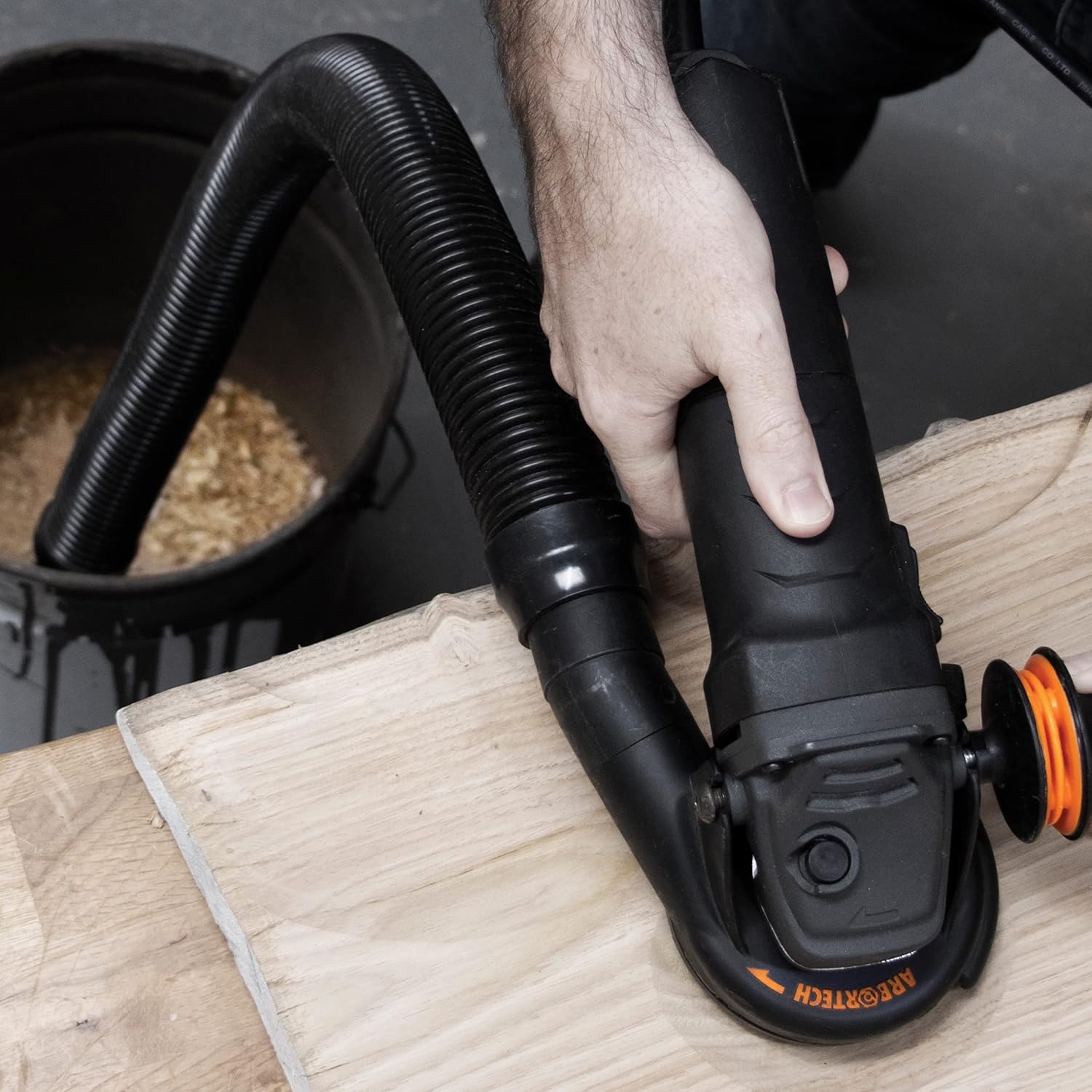
Figure 5: The Power Carving Unit in use with the Chip Catcher and a vacuum hose, illustrating its ability to manage wood debris effectively.
5.5 Product Demonstration Video
Video 1: Official demonstration of the Arbortech Power Carving Unit, showcasing its features, various attachments, and applications in woodworking. Duration: 3 minutes, 21 seconds.
6. Maintenance
Regular maintenance ensures the longevity and optimal performance of your ARBORTECH Power Carving Unit.
- Cleaning: After each use, disconnect the tool from power and clean off any dust and debris, especially from the air vents, using a soft brush or compressed air.
- Inspection: Periodically inspect the power cord for damage, and check all attachments for wear or damage. Replace worn parts immediately.
- Storage: Store the tool in a dry, secure location, out of reach of children.
7. Troubleshooting
This section addresses common issues you might encounter with your Power Carving Unit.
| Problem | Possible Cause | Solution |
|---|---|---|
| Tool does not start | No power supply; Damaged power cord; Faulty switch | Check power outlet and circuit breaker; Inspect power cord for damage; Contact authorized service center. |
| Excessive vibration | Loose attachment; Worn bearings; Damaged accessory | Ensure attachment is securely fastened; Contact authorized service center for inspection; Replace damaged accessory. |
| Poor performance / Overheating | Overloading the tool; Blocked air vents; Worn motor brushes | Reduce load; Clean air vents; Contact authorized service center for brush replacement. |
8. Specifications
| Feature | Detail |
|---|---|
| Brand | Arbortech |
| Model Number | PWC.FG.900.20 |
| Power Source | Corded Electric |
| Voltage | 110 Volts |
| Wattage | 960 Watts |
| Maximum Rotational Speed | 11,000 RPM |
| Item Weight | 11.6 Pounds |
| Product Dimensions | 18.5"L x 13.2"W x 5.3"H |
| Special Features | Variable-speed |
| Material | Nylon |
| Color | Black |
9. Warranty & Support
For warranty information, product registration, or technical support, please visit the official Arbortech website or contact their customer service department. Keep your purchase receipt as proof of purchase for any warranty claims.
Arbortech Official Website: Arbortech Store on Amazon
Ask a question about this manual
Ask about setup, troubleshooting, compatibility, parts, safety, or missing instructions. Manuals+ will review the question and use this page’s manual context to help answer it.