
ULANZI Select MT-16
ULANZI MT-16 Extendable Mini Camera Tripod
Instruction Manual
Model: MT-16 | Brand: ULANZI Select
1. Introduction
The ULANZI MT-16 is a versatile and portable mini tripod designed for a wide range of cameras and devices, including DSLRs, action cameras, and webcams. It functions as an extendable tripod, a handle grip, and a selfie stick, making it an ideal accessory for vlogging, travel, and everyday content creation. Its compact design and robust features provide stable support and flexible positioning for your equipment.
Key Features:
- 4-level extendable design for adjustable height.
- 360° rotatable ball head for versatile angle adjustment, including vertical shooting.
- Integrated cold shoe mount for attaching microphones or LED video lights.
- Lightweight and compact for easy portability.
- Universal 1/4" screw compatibility for various cameras and accessories.
- Rubberized handle for comfortable and anti-slip grip.
2. Product Overview
Familiarize yourself with the components of your ULANZI MT-16 tripod.
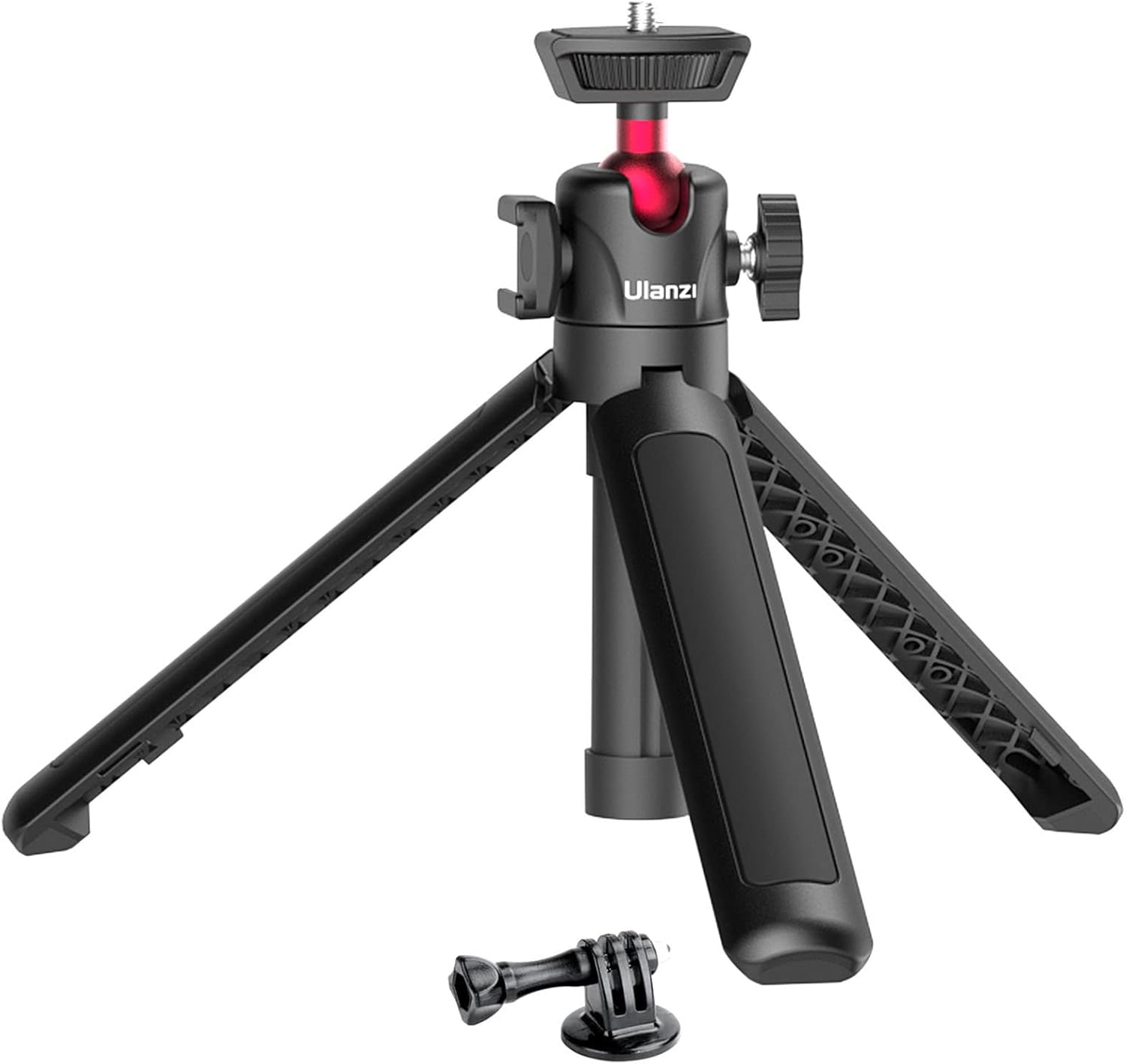
Figure 2.1: ULANZI MT-16 Extendable Mini Camera Tripod with included action camera mount.
The MT-16 features a main body with extendable sections, a foldable tripod base, and a ball head with a 1/4" screw and a cold shoe mount.

Figure 2.2: The MT-16 in various configurations, demonstrating its universal compatibility with smartphones, cameras, and webcams, and the cold shoe for accessories.
3. Setup
Follow these steps to set up your MT-16 tripod for use.
3.1 Unfolding the Tripod Legs
- Hold the main body of the tripod.
- Gently pull the three legs outwards until they click into their fully extended position. The legs will form a stable base.
3.2 Extending the Tripod Height
The MT-16 features 4 adjustable levels for extension.

Figure 3.1: Illustration of the 4-level extension mechanism, showing various heights from 22.5cm to 44cm.
- To extend, pull the top section of the tripod upwards. Each section will extend and lock into place.
- Extend to your desired height, up to 4 levels.
- To retract, push each section back down until it is fully collapsed.
3.3 Attaching Your Device
The MT-16 is equipped with a universal 1/4" screw mount.
- Locate the 1/4" screw on the top of the ball head.
- Align the screw with the mounting hole on your camera, phone holder (not included), or other compatible device.
- Rotate your device clockwise onto the screw until it is securely fastened. Do not overtighten.
4. Operating Instructions
4.1 Adjusting the Ball Head
The 360° rotatable ball head allows for flexible positioning of your device.

Figure 4.1: The ball head allows for 360-degree rotation and tilting to achieve various shooting angles, including vertical orientation.
- Loosen the locking knob on the side of the ball head.
- Adjust your device to the desired angle (horizontal, vertical, or tilted).
- Tighten the locking knob firmly to secure the position.
4.2 Using the Cold Shoe Mount
The integrated cold shoe mount allows you to attach external accessories.
- Locate the cold shoe slot on the side of the ball head.
- Slide your microphone, LED light, or other cold shoe compatible accessory into the slot until it is secure.
4.3 Using as a Handle Grip or Selfie Stick
The compact design allows for handheld use.

Figure 4.2: The MT-16's compact size makes it easy to carry in a bag and use as a handheld selfie stick or grip.
- Collapse the tripod legs to form a comfortable handle.
- For selfie stick functionality, extend the main body to your desired length.
4.4 Using as a Desktop Tripod
The MT-16 provides stable support for tabletop use.

Figure 4.3: The MT-16 can be used as a stable desktop tripod for cameras, projectors, GoPros, and webcams.
- Unfold the tripod legs to create a stable base.
- Place the tripod on a flat, stable surface.
- Adjust the height and angle as needed using the extension and ball head.
5. Maintenance
To ensure the longevity and optimal performance of your ULANZI MT-16 tripod, follow these maintenance guidelines:
- Cleaning: Wipe the tripod with a soft, dry cloth after each use to remove dust and debris. For stubborn dirt, use a slightly damp cloth and then dry thoroughly. Avoid using harsh chemicals or abrasive cleaners.
- Storage: Store the tripod in a cool, dry place away from direct sunlight and extreme temperatures. Ensure it is fully collapsed and clean before storage.
- Inspection: Periodically check all moving parts, screws, and joints for any signs of wear or looseness. Tighten any loose screws if necessary.
- Avoid Overloading: Do not exceed the recommended weight capacity of the tripod (refer to specifications). Overloading can damage the tripod and your equipment.
6. Troubleshooting
If you encounter any issues with your ULANZI MT-16 tripod, refer to the following common problems and solutions:
- Tripod feels unstable: Ensure the legs are fully extended and locked into place. Make sure the surface you are using the tripod on is flat and stable. For vertical mode, note that the maximum bearable weight is 500g. For heavier cameras, consider tripods with higher load capacities.
- Ball head does not hold position: Ensure the locking knob on the ball head is tightened sufficiently. If the issue persists, check for any debris obstructing the ball joint.
- Extension sections slide down: Ensure each extension section is fully pulled out and locked into its position. If the issue occurs with heavy cameras, it might be due to exceeding the weight limit for extended heights.
- Accessory missing: If any accessory, such as a phone holder, is missing, please note that the phone holder is not included with the MT-16. If other expected accessories are missing, please contact ULANZI customer support.
7. Specifications
| Feature | Detail |
|---|---|
| Model Number | MT-16 |
| Product Dimensions | 3.94 x 3.94 x 1.97 inches (collapsed) |
| Item Weight | 6 ounces (approx. 170g) |
| Material | ABS & Aluminum Alloy |
| Extension Length | 22.5cm (8.5in) to 44cm (17.2in) |
| Mounting Screw | Universal 1/4" |
| Cold Shoe Mount | Yes |
| Ball Head Rotation | 360° |
| Vertical Mode Weight Capacity | 500g |
8. Warranty and Support
ULANZI Select products are designed for quality and reliability. For any questions, technical support, or warranty inquiries, please contact ULANZI customer service through their official channels or visit the ULANZI Select Store on Amazon.
Please retain your proof of purchase for any warranty claims.
Ask a question about this manual
Ask about setup, troubleshooting, compatibility, parts, safety, or missing instructions. Manuals+ will review the question and use this page’s manual context to help answer it.