
NKF RC-1189
Instruction Manual
NKF RC-1189 Remote Control
Introduction
This manual provides instructions for the NKF RC-1189 Replacement Remote Control, designed to operate various Denon AV Receiver models. This remote control is a direct replacement and requires no programming or pairing for most compatible devices.
Package Contents
- 1 x RC-1189 Remote Control
Please note: Batteries and user manual are not included in the package. This document serves as the user manual.
Setup
Battery Installation
The RC-1189 remote control requires two (2) AAA batteries for operation. Follow these steps to install the batteries:
- Locate the battery compartment on the back of the remote control.
- Slide the battery compartment cover downwards to open it.
- Insert two AAA batteries, ensuring the positive (+) and negative (-) terminals align correctly with the markings inside the compartment.
- Slide the battery compartment cover back into place until it clicks securely.
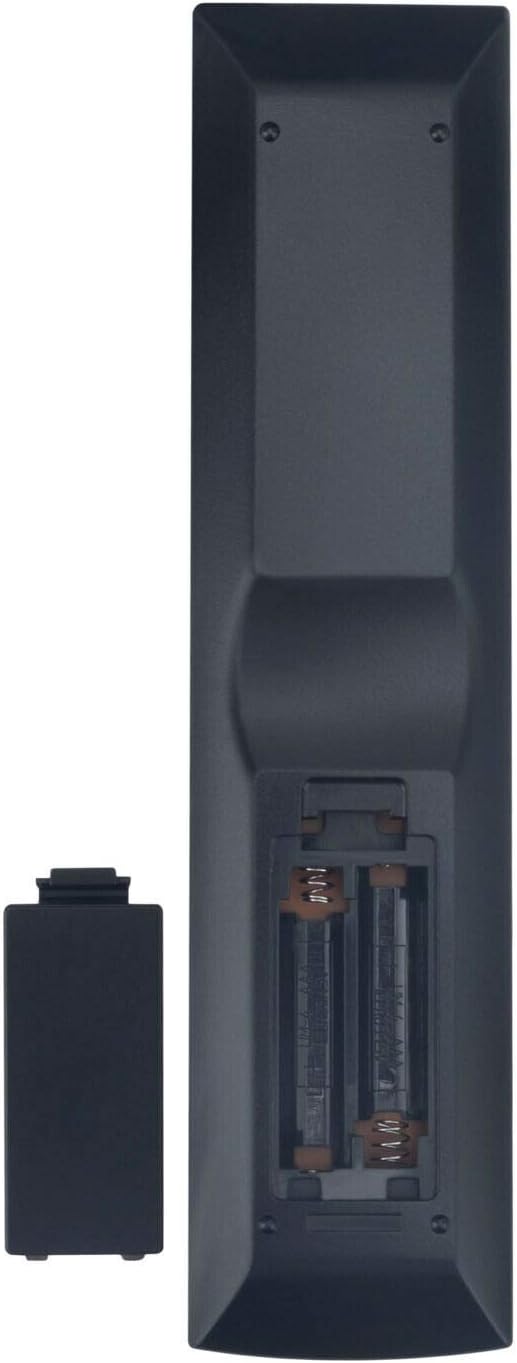
Image: Back view of the RC-1189 remote control with the battery compartment open, illustrating the battery insertion process.
Once batteries are installed, the remote control is ready for use with compatible Denon AV Receivers without additional programming.
Operating Instructions
The RC-1189 remote control is designed to replicate the functions of the original Denon AV Receiver remote. Most buttons will correspond directly to the functions on your receiver.

Image: Front view of the RC-1189 remote control, displaying the layout of all control buttons.
Key Functions Overview
- POWER: Turns the AV Receiver on or off.
- SOURCE: Selects the input source (e.g., CBL/SAT, DVD/Blu-ray, Game, AUX, Media Player, TV Audio, Tuner, iPod/USB, Online Music, Bluetooth, Internet Radio).
- VOLUME +/-: Adjusts the master volume level.
- MUTE: Toggles sound muting on or off.
- Navigation Buttons (Up, Down, Left, Right, ENTER): Used for menu navigation and selection.
- INFO: Displays information about the current input or settings.
- OPTION: Accesses context-sensitive options.
- SOUND MODE (MOVIE, MUSIC, GAME, PURE): Selects different audio processing modes.
- CHANNEL +/-: Changes channels (if applicable to the selected source).
- BACK: Returns to the previous menu or screen.
- SETUP: Accesses the receiver's main setup menu.
- QUICK SELECT (1-4): Allows for quick recall of preferred settings or input configurations.
- Playback Controls (Play/Pause, Stop, Skip Forward/Backward): Controls media playback.
For detailed functionality of specific buttons, refer to your Denon AV Receiver's original user manual.
Compatibility
This RC-1189 remote control is compatible with the following Denon AV Receiver models:
- AVR-X1200W
- AVR-S700W
- AVR-S710W
- AVR-S720W
- AVR-X1100W
It is designed to work immediately with these models upon battery insertion, requiring no additional setup or programming.
Maintenance
To ensure the longevity and proper functioning of your remote control, follow these maintenance guidelines:
- Cleaning: Wipe the remote control with a soft, dry cloth. Do not use liquid cleaners or abrasive materials, as they may damage the surface or internal components.
- Battery Replacement: Replace batteries when the remote control's response becomes sluggish or stops working. Always replace both batteries at the same time with new ones of the same type (AAA).
- Storage: Store the remote control in a cool, dry place away from direct sunlight, extreme temperatures, and high humidity.
- Avoid Drops: Protect the remote control from physical shocks and drops, which can damage internal circuitry.
Troubleshooting
If you experience issues with your RC-1189 remote control, try the following troubleshooting steps:
| Problem | Possible Cause / Solution |
|---|---|
| Remote control is not working. |
|
| Some buttons are not responding. |
|
| Remote control range is reduced. |
|
If the problem persists after trying these steps, please contact the seller for further assistance.
Specifications
- Model: RC-1189
- Brand: NKF
- Connectivity Technology: Infrared (IR)
- Power Source: 2 x AAA Batteries (not included)
- Product Dimensions: 9.06 x 3.15 x 0.79 inches (approximately)
- Item Weight: 3.2 ounces (approximately)
- Compatible Devices: Denon AV Receivers (AVR-X1200W, AVR-S700W, AVR-S710W, AVR-S720W, AVR-X1100W)
Support
For any questions or issues not covered in this manual, please contact the seller or manufacturer directly. Refer to your purchase documentation for contact information.
Ask a question about this manual
Ask about setup, troubleshooting, compatibility, parts, safety, or missing instructions. Manuals+ will review the question and use this page’s manual context to help answer it.