Introduction
The Garmin STRIKER Vivid 7sv is an easy-to-use 7-inch color fishfinder designed to provide clear views of fish and underwater structures. This device features high-contrast color palettes for enhanced visibility beneath the surface. It supports Garmin CHIRP traditional sonar, CHIRP ClearVü, and CHIRP SideVü scanning sonars (requires compatible transducer). Integrated high-sensitivity GPS allows for marking waypoints, creating routes, and monitoring boat speed. The built-in Quickdraw Contours software enables users to create and save maps with 1-foot contours. Wi-Fi connectivity facilitates connection to the ActiveCaptain app on compatible smartphones for waypoint transfer, smart notifications, and access to the Garmin Quickdraw Community.
What's in the Box
Upon opening the package, verify that all components are present:
- STRIKER Vivid 7sv fishfinder unit
- GT52HW-TM transducer
- Power/data cable
- 12-pin to dual 4-pin transducer adapter cable
- Tilt/swivel mount
- Mounting hardware
- Garmin bumper sticker
- Documentation (this manual and other guides)
Setup Instructions
Proper installation is crucial for optimal performance. This section outlines general setup steps. Refer to the detailed installation guide included with your product for specific instructions and safety warnings.
1. Mounting the Device
The STRIKER Vivid 7sv unit can be mounted using the included tilt/swivel mount. Common mounting locations include the boat's console or dashboard. Ensure the mounting surface is stable and provides clear visibility of the screen from your operating position.
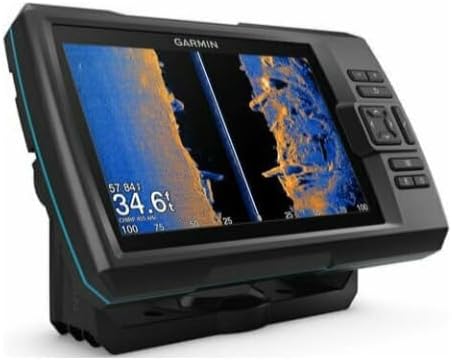
Image: Angled view of the Garmin STRIKER Vivid 7sv fishfinder, showing its display and physical buttons.
2. Transducer Installation
The GT52HW-TM transducer supports both transom mount and trolling motor mount installations. Select the appropriate mounting method for your vessel. Ensure the transducer is positioned correctly to avoid interference and achieve optimal sonar readings. Connect the transducer cable to the back of the STRIKER Vivid 7sv unit using the provided 12-pin to dual 4-pin adapter cable.

Image: Rear view of the Garmin STRIKER Vivid 7sv unit, highlighting the connection ports for power and transducer cables.
3. Power Connection
The device operates on Direct DC Power. Connect the power/data cable to a 12V DC power source on your boat. Ensure proper wiring and fuse protection as specified in the detailed installation manual to prevent damage to the unit or your vessel's electrical system.
Operating Instructions
This section provides an overview of the STRIKER Vivid 7sv's primary functions and how to operate them.
Powering On/Off
Press and hold the power button (usually marked with a power symbol) to turn the device on or off. A short press typically accesses backlight settings or other quick menu options.
Sonar Display Modes
The STRIKER Vivid 7sv offers multiple sonar views to help you interpret underwater environments:
- Traditional CHIRP Sonar: Provides clear target separation and definition.
- CHIRP ClearVü Scanning Sonar: Shows a photographic view of fish and structure below your boat.
- CHIRP SideVü Scanning Sonar: Displays a clear image of what is to the sides of your boat.
You can switch between these views or use split-screen options to display multiple sonar types simultaneously. The device features vivid scanning sonar color palettes, allowing you to select the best color scheme for distinguishing fish and structure in various conditions.

Image: Front view of the Garmin STRIKER Vivid 7sv displaying a detailed sonar image with vibrant color palettes, showing underwater structure and potential fish targets.

Image: Garmin STRIKER Vivid 7sv screen showing a split display with different sonar views, including traditional and scanning sonar, for comprehensive underwater analysis.
GPS Functions
The integrated high-sensitivity GPS enables precise navigation and location tracking:
- Marking Waypoints: Save specific locations (e.g., fishing spots, hazards) as waypoints for future reference.
- Creating Routes: Plan and navigate custom routes between waypoints.
- Viewing Speed: Monitor your boat's speed directly on the display.
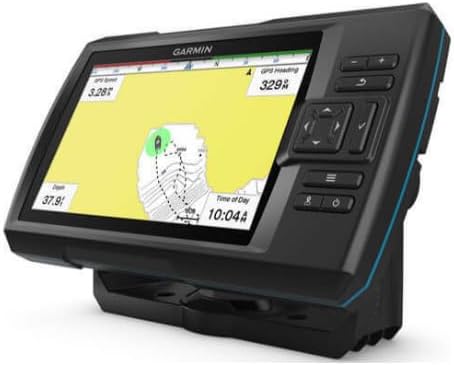
Image: Angled view of the Garmin STRIKER Vivid 7sv displaying a GPS map, showing boat heading, speed, and marked waypoints.

Image: Garmin STRIKER Vivid 7sv screen showing a split display with both sonar data and a GPS map, allowing simultaneous monitoring of underwater conditions and navigation.
Quickdraw Contours
Utilize the built-in Quickdraw Contours software to create personalized fishing maps with 1-foot contours as you navigate. These maps can be saved and are useful for identifying depth changes and underwater features in your preferred fishing areas.
Wi-Fi Connectivity and ActiveCaptain App
The STRIKER Vivid 7sv features Wi-Fi connectivity, allowing it to connect with the Garmin ActiveCaptain app on a compatible smartphone. Through the app, you can:
- Transfer waypoints and routes.
- Receive smart notifications directly on your fishfinder.
- Access the Garmin Quickdraw Community to share and download maps.
- Receive software update notifications.
Maintenance
Regular maintenance ensures the longevity and optimal performance of your STRIKER Vivid 7sv.
- Cleaning the Unit: Wipe the screen and casing with a soft, damp, lint-free cloth. Avoid abrasive cleaners or solvents that could damage the display or plastic components.
- Transducer Care: Regularly inspect the transducer for marine growth or damage. Clean it gently with a soft brush and mild soap if necessary. Ensure it is free from obstructions for accurate readings.
- Cable Inspection: Check all cables for signs of wear, cuts, or corrosion. Replace damaged cables immediately.
- Storage: When not in use for extended periods, store the unit in a dry, cool environment, away from direct sunlight and extreme temperatures.
Troubleshooting
If you encounter issues with your STRIKER Vivid 7sv, consider the following common troubleshooting steps:
- No Power: Verify that the power cable is securely connected to both the unit and the power source. Check the fuse in the power cable. Ensure the boat's battery has sufficient charge.
- No Sonar Readings: Confirm the transducer is properly connected and submerged in water. Check for obstructions or marine growth on the transducer face. Ensure the correct transducer type is selected in the device settings.
- Inaccurate GPS: Ensure the unit has a clear view of the sky. Move away from tall buildings or dense foliage that might obstruct satellite signals.
- Screen Freezes: Try restarting the device by holding the power button. Ensure the software is up to date via the ActiveCaptain app.
- Wi-Fi Connection Issues: Ensure your smartphone's Wi-Fi is enabled and within range. Restart both the fishfinder and your smartphone.
For more detailed troubleshooting or persistent issues, refer to the comprehensive owner's manual or contact Garmin customer support.
Specifications
| Brand | Garmin |
| Model Name | STRIKER Vivid 7sv |
| Item Model Number | 010-02553-00 |
| Screen Size | 7 Inches |
| Display Type | LCD |
| Power Source | Direct DC Power |
| Connectivity | Wi-Fi |
| Mounting Type | Transom Mount, Trolling Motor Mount |
| Product Dimensions | 11.4"L x 8.9"W x 8.2"H |
| Item Weight | 454 Grams (1 pound) |
| UPC | 753759268381, 753759268404 |
| Date First Available | October 27, 2020 |
Warranty and Support
Garmin products are designed for reliability and performance. For information regarding the warranty coverage for your STRIKER Vivid 7sv, please refer to the warranty card included in your product packaging or visit the official Garmin website. For technical support, product registration, or to access additional resources, please visit garmin.com/support.


