
LST LST 12V 500W
LST 12V 500W Car Power Inverter Instruction Manual
Model: LST 12V 500W | Brand: LST
Introduction
Thank you for purchasing the LST 12V 500W Car Power Inverter. This device is designed to convert 12V DC power from your vehicle's battery into stable 100V AC power, allowing you to operate various electronic devices on the go. Its pure sine wave output ensures minimal noise interference and makes it suitable for sensitive electronics. This inverter is essential for car camping, emergency power during outages, and other situations where standard AC power is unavailable. Please read this manual thoroughly before use to ensure safe and optimal operation.
Important Safety Instructions
- Read all instructions: Before operating the inverter, carefully read and understand all safety warnings and operating instructions in this manual.
- Ventilation: Ensure adequate ventilation around the inverter. Do not block ventilation openings. Overheating can cause damage or fire.
- Dry environment: Do not expose the inverter to rain, moisture, or water. Operate in a dry environment only.
- Proper connection: Connect the inverter only to a 12V DC power source. Ensure correct polarity (+ to + and - to -). Incorrect connection can damage the inverter and the battery.
- Avoid overloading: Do not exceed the inverter's rated output power of 500W. Overloading can cause the inverter to shut down or be damaged.
- Children and pets: Keep the inverter out of reach of children and pets.
- Flammable materials: Do not operate the inverter near flammable liquids or gases.
- Maintenance: Do not attempt to disassemble or modify the inverter. Refer all servicing to qualified personnel.
- Protection features: The inverter includes protection against overload, overvoltage, short circuit, and abnormal temperature. It also features low voltage automatic shutdown to protect your vehicle's battery.
Product Features
Pure Sine Wave Output

The inverter provides a pure sine wave output, which is identical to household AC power. This ensures minimal noise interference and makes it safe for use with sensitive electronic devices such as laptops, medical equipment, and audio systems.
Multiple Output Ports
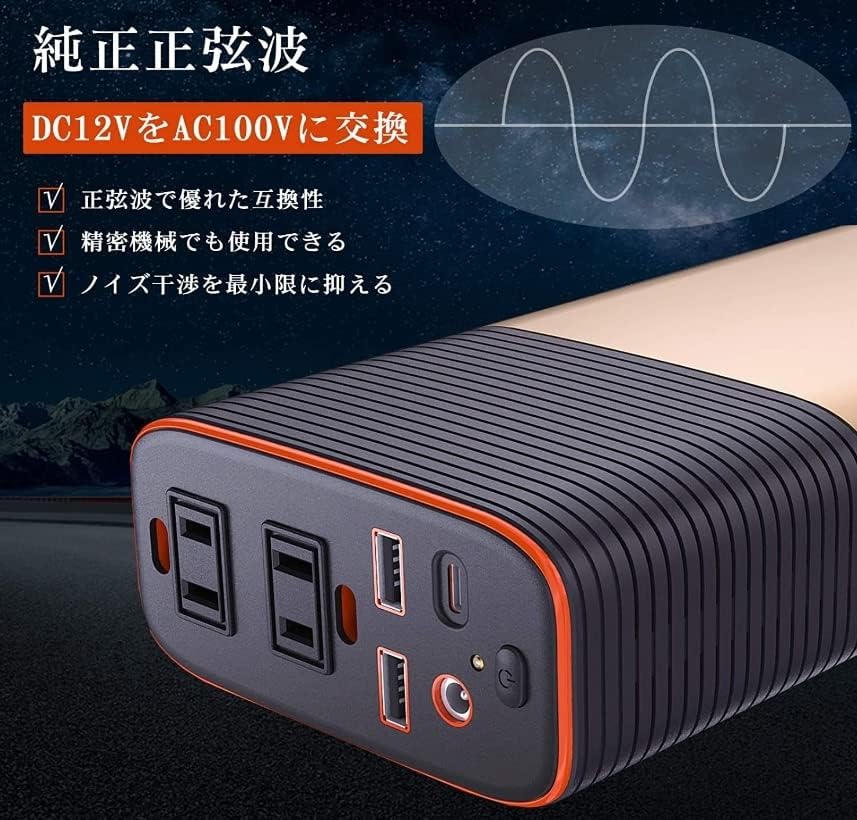
Equipped with 2 AC outlets, 2 USB ports (2.4A), 1 Type-C port (5V3A/9V2A/12V1.5A, PD18W Max), and 1 audio jack. This versatile array of ports allows you to power and charge a wide range of devices simultaneously.
Comprehensive Protection
Built-in protection circuits safeguard against overload, overvoltage, short circuits, and abnormal temperatures. The inverter also features an automatic low-voltage shutdown to prevent your vehicle's battery from being completely drained, ensuring both device and battery longevity.
Efficient Cooling System

Equipped with a smart cooling fan and additional heat dissipation vents to maintain optimal operating temperature and prevent overheating, ensuring stable performance and extended product life.
Package Contents
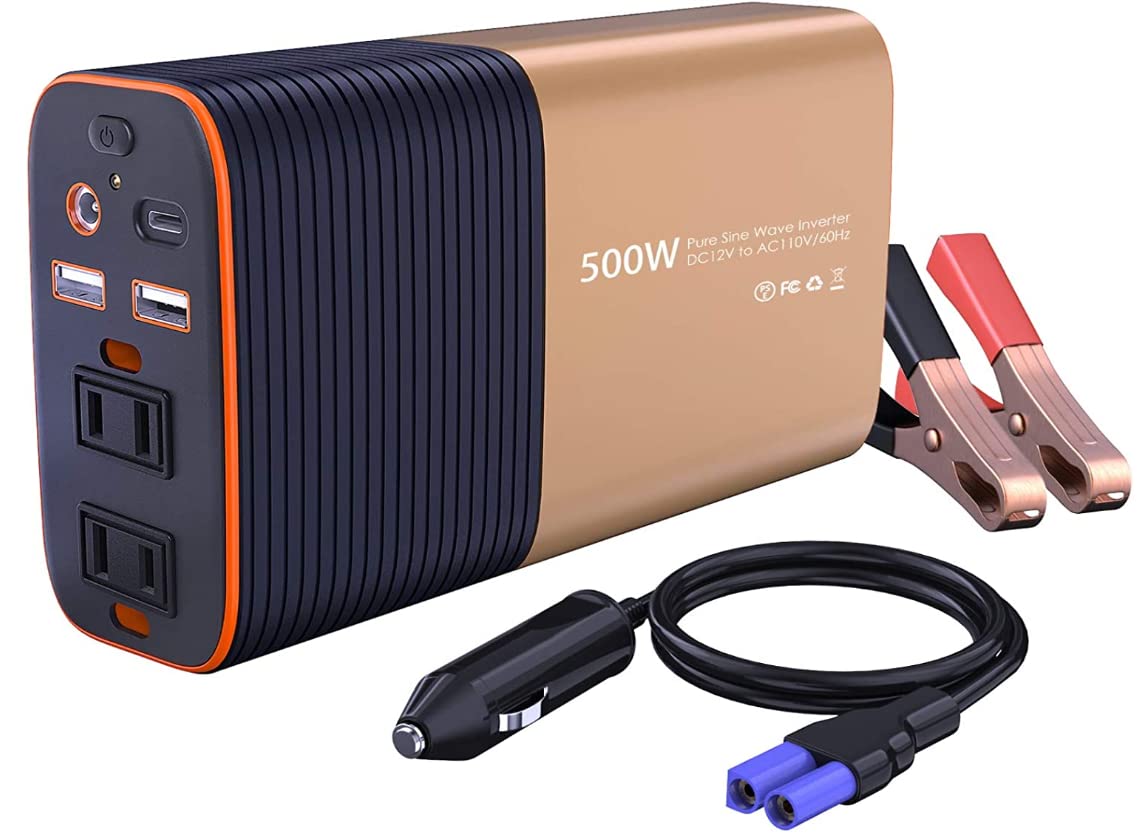
- LST 12V 500W Car Power Inverter
- Cigarette Lighter Plug Cable
- Alligator Clip Cables
- Instruction Manual (This document)

Image showing the LST Car Power Inverter along with its included cigarette lighter plug cable and alligator clip cables for different connection methods.
Setup
Connecting the Inverter to Your Vehicle's Power Source
The LST 12V 500W Car Power Inverter offers two methods for connecting to your vehicle's 12V DC power source:
- Using the Cigarette Lighter Plug Cable (for loads up to 150W):
This method is suitable for lower power devices. Ensure the total power consumption of your devices does not exceed 150W when using this connection.
- Insert the cigarette lighter plug cable into the inverter's DC input port.
- Plug the other end of the cable into your vehicle's 12V cigarette lighter socket.
- Ensure a secure connection.
- Using the Alligator Clip Cables (for loads up to 500W):
For higher power devices or when the total load exceeds 150W, use the alligator clip cables to connect directly to your vehicle's battery terminals. This method provides a more stable and higher current connection.
- Connect the red alligator clip cable to the positive (+) terminal of your vehicle's battery.
- Connect the black alligator clip cable to the negative (-) terminal of your vehicle's battery.
- Ensure the connections are tight and secure to prevent sparks or poor contact.
- Connect the other end of the alligator clip cables to the inverter's DC input port, matching polarity (red to red, black to black).
Warning: Always ensure the inverter is switched off before connecting or disconnecting from the power source. Incorrect polarity can cause severe damage to the inverter and your vehicle's electrical system.
Operating Instructions
- Power On: After connecting the inverter to your vehicle's 12V DC power source using either the cigarette lighter plug or alligator clips, press the power switch on the inverter to turn it on. The LED indicator light will illuminate, showing the operational status.
- Connect Devices: Plug your AC-powered devices into the AC outlets, or your USB-powered devices into the USB/Type-C ports.
- Monitor Power Consumption: Ensure the total power consumption of all connected devices does not exceed the inverter's rated output of 500W. For devices with high startup current (e.g., motors), ensure their peak power is also within the inverter's capacity.
- Power Off: When you are finished using the inverter, first turn off and unplug all connected devices. Then, press the power switch on the inverter to turn it off. Finally, disconnect the inverter from your vehicle's power source.

The inverter can power a variety of devices such as smartphones, laptops, and small appliances.
LED Indicator Lights
The inverter features LED indicator lights that provide visual feedback on its operational status:
- Green Light: Indicates normal operation.
- Red Light: Indicates a fault or protection mode (e.g., overload, overvoltage, low voltage, overheating). Refer to the Troubleshooting section.
Maintenance
- Cleaning: Regularly clean the exterior of the inverter with a dry, soft cloth. Do not use liquid cleaners or solvents.
- Ventilation: Ensure the cooling fan and ventilation openings are free from dust and debris. Blocked vents can lead to overheating.
- Storage: When not in use for extended periods, store the inverter in a cool, dry place away from direct sunlight and extreme temperatures.
- Cable Inspection: Periodically inspect the power cables for any signs of damage, fraying, or corrosion. Replace damaged cables immediately.
Troubleshooting
| Problem | Possible Cause | Solution |
|---|---|---|
| Inverter does not turn on. |
|
|
| Red LED indicator is on. |
|
|
| No output from AC outlets/USB ports. |
|
|
| Fan is noisy or constantly running. |
|
|
Specifications
| Brand | LST |
| Model | LST 12V 500W |
| Input Voltage | DC 12V |
| Output Voltage | AC 100V |
| Rated Output Power | 500W |
| Output Waveform | Pure Sine Wave |
| AC Outlets | 2 |
| USB Output | 2 x 2.4A |
| Type-C Output | 1 x 5V3A/9V2A/12V1.5A (PD18W Max) |
| Audio Jack | 1 |
| Protection Features | Overload, Overvoltage, Short Circuit, Over-temperature, Low Voltage Shutdown |
| UPC/GTIN | 712424111131 |
Warranty and Support
Warranty Information
This LST 12V 500W Car Power Inverter comes with a 1 Year Warranty Against Manufacturer Defects from the date of purchase. This warranty covers defects in materials and workmanship under normal use. It does not cover damage caused by misuse, abuse, accident, unauthorized modification, or improper installation.
Customer Support
If you encounter any issues or have questions regarding your LST Car Power Inverter, please contact our customer support team. For the fastest service, please have your product model and purchase date available.
Contact information for support can typically be found on the product packaging or the retailer's website where the product was purchased.
Ask a question about this manual
Ask about setup, troubleshooting, compatibility, parts, safety, or missing instructions. Manuals+ will review the question and use this page’s manual context to help answer it.