
Introduction
This manual provides comprehensive instructions for the safe and efficient operation, maintenance, and troubleshooting of your LEICESTERCN Automatic Trickle Battery Charger Maintainer. Please read this manual thoroughly before use and retain it for future reference.

Image: A pack of four LEICESTERCN Automatic Trickle Battery Charger Maintainers, showcasing their compact design and LED indicators.
Important Safety Information
Always observe the following safety precautions to prevent injury or damage to the charger or battery.
- Ensure proper ventilation when charging batteries.
- Avoid contact with battery acid.
- Do not expose the charger to rain or excessive moisture.
- Always disconnect the AC power before connecting or disconnecting battery leads.
- This charger is designed for 12V lead-acid batteries only. Do not use with other battery types.
- Keep out of reach of children.

Image: A visual representation highlighting the multi-safety features of the charger, including protection against over-charge, over-voltage, short-circuit, and reverse polarity, along with a 3A fuse on O-ring connectors.
Setup and Connection
Follow these steps to properly connect the battery charger to your battery.
- Ensure the charger is disconnected from the AC power outlet.
- Identify the battery terminals: positive (+) and negative (-).
- Connect the red (+) alligator clip or ring terminal to the positive (+) battery terminal.
- Connect the black (-) alligator clip or ring terminal to the negative (-) battery terminal.
- Ensure connections are secure and free from corrosion.
- Plug the charger into a standard 120V AC power outlet.

Image: A person demonstrating the easy operation of the charger by connecting the alligator clips to a vehicle battery.
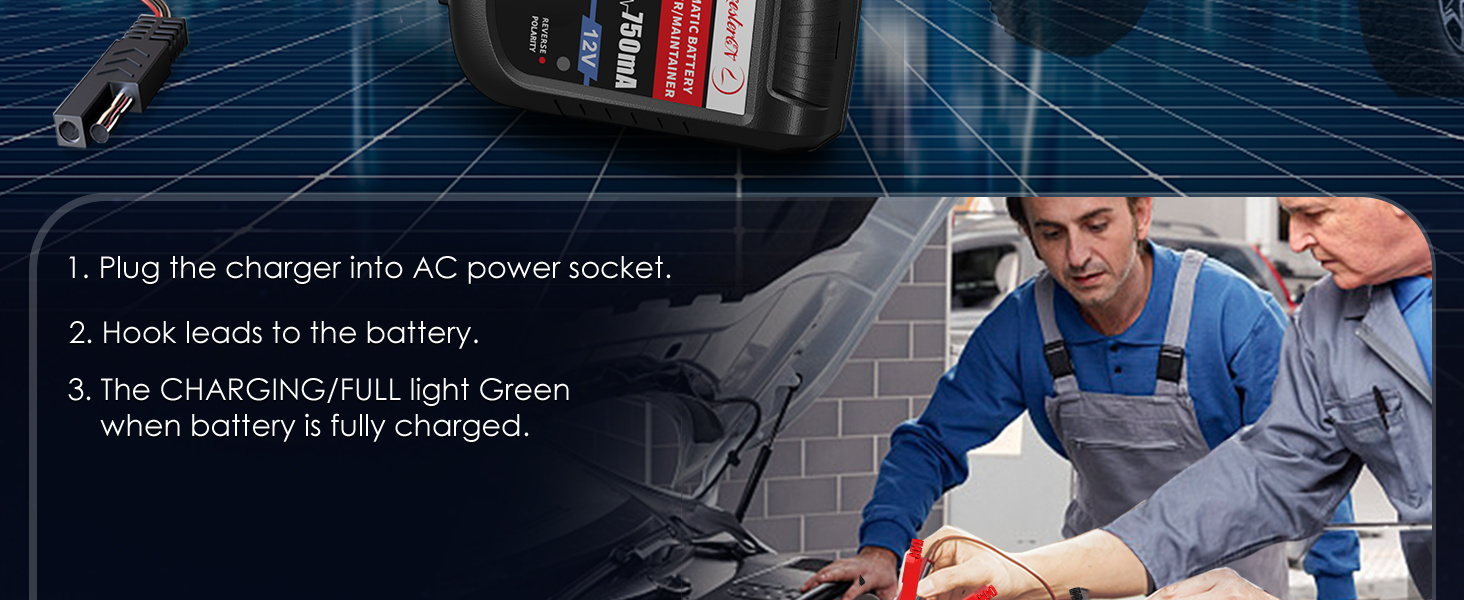
Image: A visual guide showing three steps for connecting the charger: plugging into AC, hooking leads to the battery, and observing the green light when fully charged.

Image: Close-up view of the SAE Quick Release Connectors, showing both alligator clips for alternate connection and a fused ring terminal harness for hard-to-reach spaces.
Operating Instructions
3-Stage Smart Charging Process
The LEICESTERCN charger utilizes an advanced 3-stage charging process to optimize battery charging and maintenance:
- Constant Current (CC) Charge: The charger delivers a constant current to the battery until its voltage reaches a predetermined level. This stage rapidly charges the battery.
- Constant Voltage (CV) Charge: Once the battery reaches the set voltage, the charger maintains a constant voltage while the current gradually decreases. This ensures the battery is fully charged without overcharging.
- Float/Maintenance Charge: After the battery is fully charged, the charger automatically switches to a float mode. In this stage, a small, constant voltage is applied to keep the battery at full charge, compensating for self-discharge and preventing sulfation. This allows the charger to be left connected indefinitely.

Image: A graphical representation of the automatic 3-stage charging process: Constant Current Charge, Constant Voltage Charge, and Floating Charge, showing battery icons filling up.
Image: Another visual diagram detailing the transition through Constant Current, Constant Voltage, and Float/Maintain stages of the charging process.
LED Indicators
The charger features intuitive LED indicators to provide real-time status feedback:
- Yellow LED (CHARGING/FULL): Illuminates yellow when the battery is actively charging.
- Green LED (CHARGING/FULL): Illuminates green when the battery is fully charged and the charger is in float/maintenance mode.
- Red LED (REVERSE POLARITY): Illuminates red if the battery leads are connected incorrectly (reverse polarity). Disconnect immediately and correct the connection.

Image: A detailed view of the charger's LED indicators, explaining that yellow signifies charging, green signifies fully charged/floating, and red signifies reverse polarity.
Video: An official product video demonstrating the LEICESTERCN 12V 750mA Automatic Trickle Battery Charger Maintainer in use, highlighting its features and ease of operation.
Battery Maintenance
Regular use of the LEICESTERCN charger helps extend the life of your 12V lead-acid batteries. For optimal battery health:
- Keep battery terminals clean and free of corrosion.
- Ensure battery fluid levels are appropriate for flooded batteries (if applicable).
- Store batteries in a cool, dry place when not in use.
- For vehicles or equipment stored for extended periods, connect the charger in float mode to prevent self-discharge.
Troubleshooting
| Problem | Possible Cause | Solution |
|---|---|---|
| Charger not turning on / No LED indication. | No AC power; Faulty outlet; Loose connection. | Check AC power outlet; Ensure charger is securely plugged in. |
| Red "REVERSE POLARITY" LED is on. | Battery leads connected incorrectly. | Immediately disconnect from AC power. Reconnect red clip to positive (+) and black clip to negative (-). |
| Charger remains in "CHARGING" (yellow) mode for a long time. | Battery is deeply discharged; Battery capacity is large; Battery may be faulty. | Allow more time for charging. For very large batteries, charging will take longer. Test battery health if issue persists. |
| Charger does not switch to "FULL" (green) mode. | Battery may be sulfated or damaged; Significant load on battery during charging. | Ensure no significant load is drawing power from the battery during charging. Consider having the battery professionally tested. |
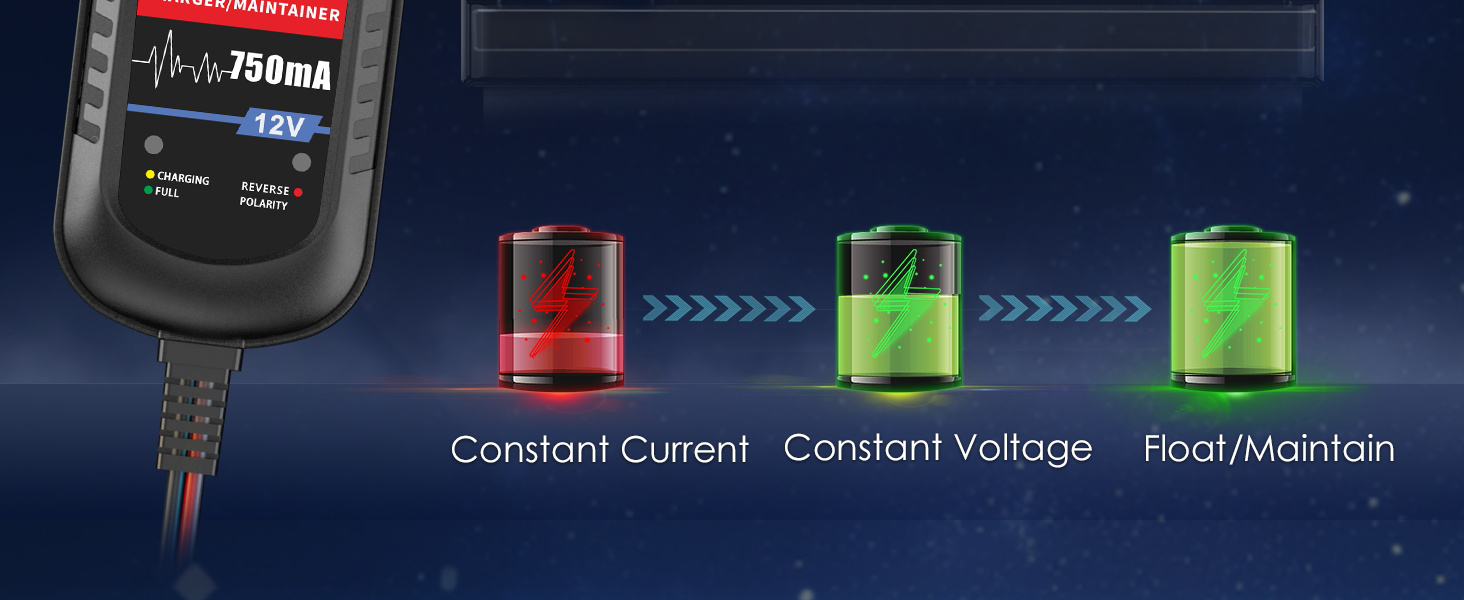
Image: A diagram illustrating the charger's output short protection (all LEDs off, then green light) and reverse polarity protection (red light for reverse polarity).
Product Specifications
| Feature | Detail |
|---|---|
| Model Number | LST-US-BC02 |
| Input Voltage | 100-240V AC, 50/60Hz (Standard) |
| Output Voltage | 12 Volts (DC) |
| Output Current | 750mA |
| Recommended Battery Capacity | 4-18AH |
| Product Dimensions | 2.8 x 3.6 x 2 inches (7.1 x 9.1 x 5.1 cm) |
| Item Weight | 9.6 ounces (272 grams) |
| Certifications | ETL, CE, FCC, RoHS |
| Applicable Battery Types | 12V Lead-Acid (Flooded, Sealed Maintenance Free, AGM, Gel Cell) |
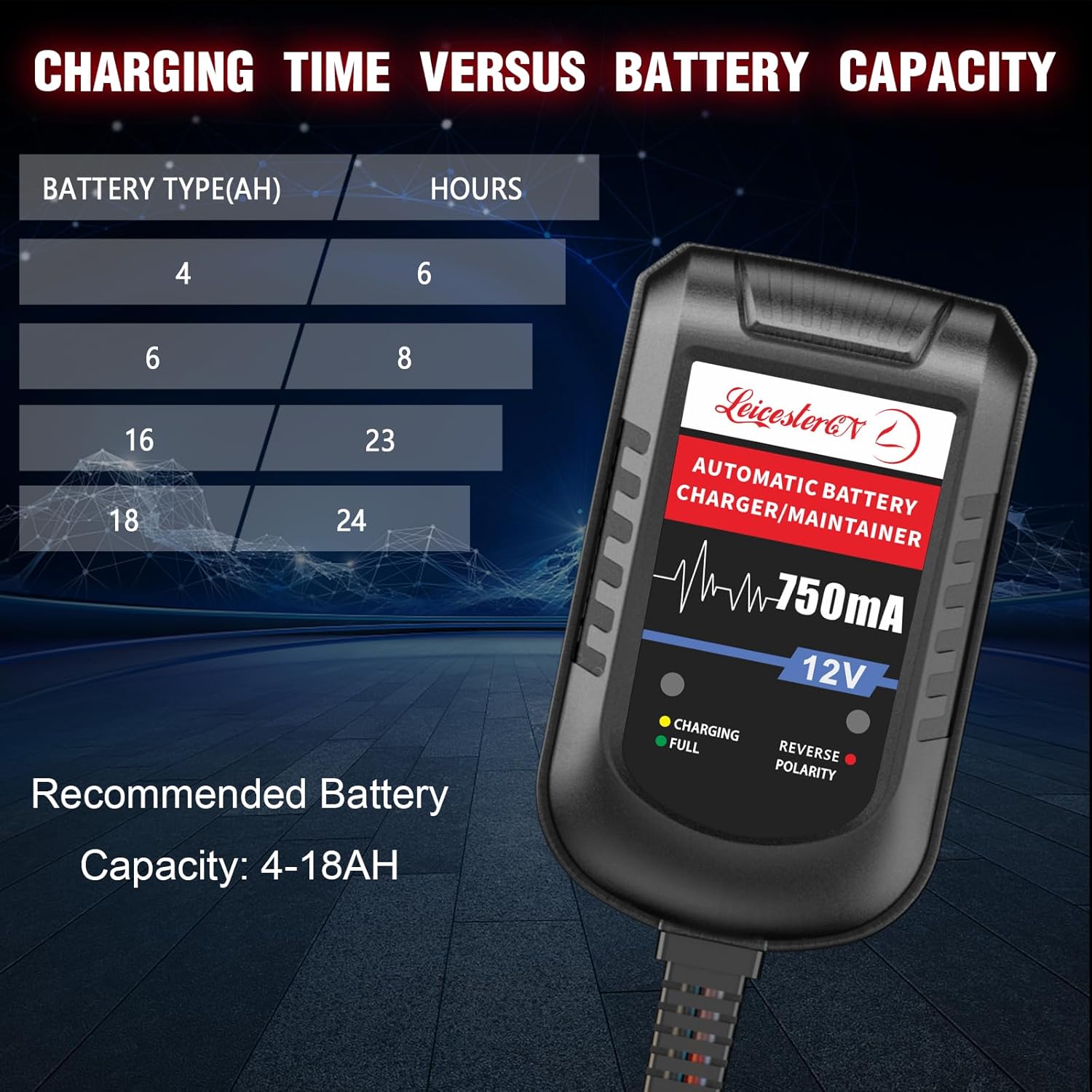
Image: A table indicating approximate charging times for different battery capacities (AH) in hours, with a recommended battery capacity range of 4-18AH.
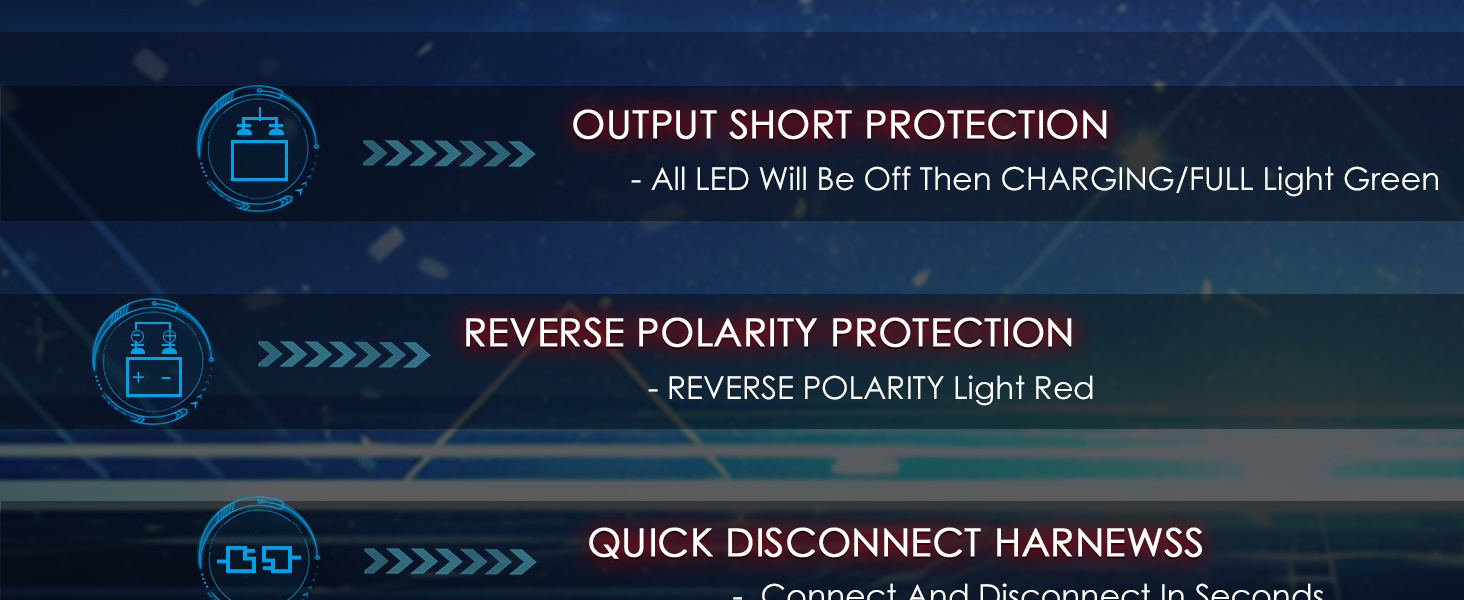
Image: A bar graph visually representing charging time in hours against various battery capacities (AH), reinforcing the recommended capacity range.

Image: Illustrations showing various applications for the 12V lead-acid battery charger, including automotive, motorcycle, snowmobile, truck, lawn mower, and boat batteries.
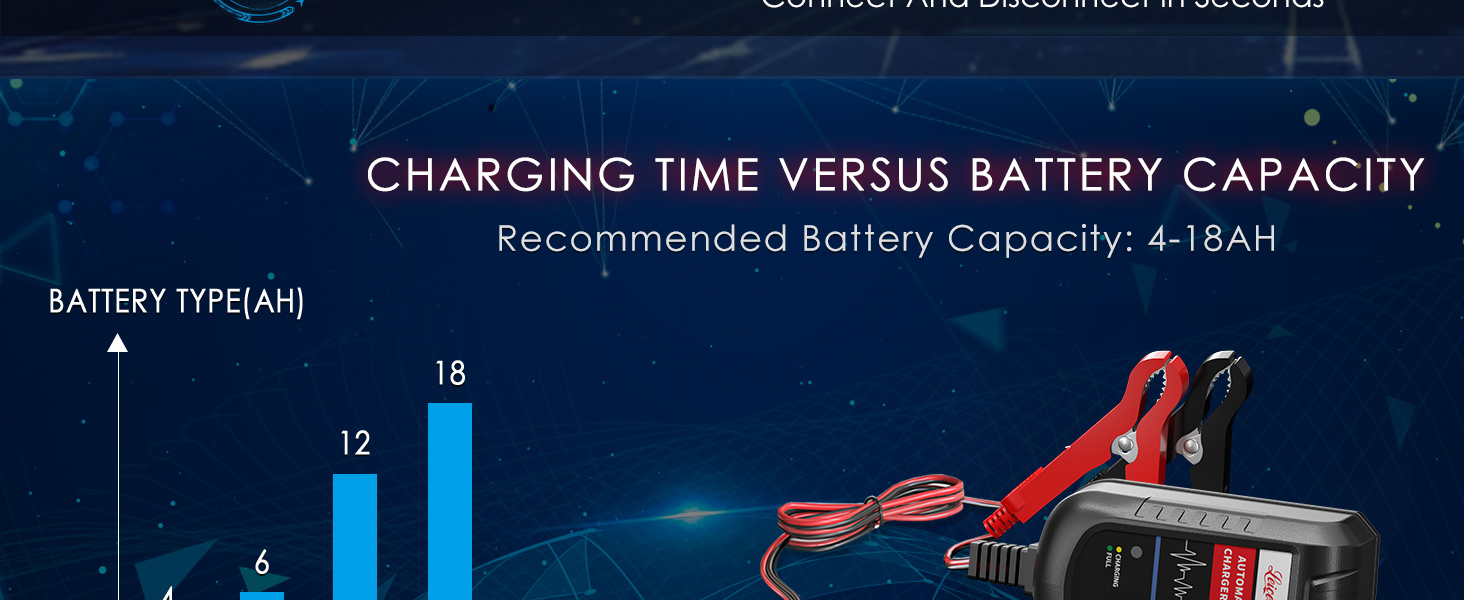
Image: A banner showcasing the wide application of the charger across different vehicles such as lawn mowers, cars, motorcycles, and snowmobiles.
Warranty Information
The LEICESTERCN Automatic Trickle Battery Charger Maintainer comes with a 3-Year quality assurance. This warranty covers defects in materials and workmanship under normal use. For warranty claims or issues, please contact customer service.
Hassle-free return or refund is available for any product issue.
Customer Support
For any questions, technical assistance, or support regarding your LEICESTERCN product, please refer to the following:
- Online Support: Visit the official LEICESTERCN store on Amazon for FAQs and product information. LEICESTERCN Amazon Store
- User Manual (PDF): A downloadable PDF version of the user manual is available for your convenience. Download PDF Manual
- Customer Service: 24/7 timely customer service is available to address your concerns.
