
1. Introduction
The BTF-LIGHTING 5-in-1 WB5 LED Controller is a versatile device designed to manage various types of PWM LED strips, including monochrome, CCT (Dual White), RGB, RGBW, and RGBCCT. It offers multiple control methods, ensuring flexibility and convenience for your lighting setup. This manual provides detailed instructions for installation, operation, and troubleshooting to help you maximize the functionality of your controller.

Figure 1.1: BTF-LIGHTING 5-in-1 WB5 LED Controller
Video 1.1: Overview of the 5-in-1 LED Strip Controller's capabilities and features.
2. Key Features
- 5-in-1 Compatibility: Supports PWM monochrome, CCT, RGB, RGBW, and RGBCCT LED strips.
- Wide Voltage Range: Operates on DC12V-24V, with a total output max of 15A (6A/Channel).
- Multiple Control Methods: Compatible with 2.4GHz RF Remotes (WR01RF, WR02RF, etc.), Tuya Smart/Smart Life APP (2.4GHz Wi-Fi), and voice control via Alexa/Google Home Assistant. All methods can be used simultaneously.
- Extensive Color Options: Offers 16 million RGB colors and dual white adjustment.
- Brightness & Saturation Control: Fine-tune light intensity and color vibrancy.
- Group & Multi-Zone Control: Manage multiple controllers and lighting zones efficiently.
- Smart Functions: Timer settings, countdown, biorhythm, Tap-to-Run and Automation, scene customization, sleep/wakeup plans, and device sharing.
- Auto-Transmitting Function: Extends remote control distance by relaying signals between controllers (within 30 meters).
- Auto-Synchronization Function: Ensures different controllers work synchronously even when started at different times, maintaining consistent dynamic modes and speeds.

Figure 2.1: The WB5 controller supports 5 different LED strip types.

Figure 2.2: Overview of the controller's main features.
3. Product Specifications
| Specification | Detail |
|---|---|
| Model Number | WB5 |
| Input Voltage | DC12V-24V |
| Output Current | 6A/Channel |
| Total Output Max | 15A |
| Max Power (12V) | 180W |
| Max Power (24V) | 360W |
| Working Temperature | -20~60°C |
| Dimensions | 4.92 x 1.38 x 1.1 inches |
| Weight | 2.4 ounces |
| Connectivity | 2.4GHz WiFi, Bluetooth, RF |
| Material | Plastic+FPCB |
4. Setup & Installation
4.1 Package Contents
Verify that your package contains the following items:
- BTF-LIGHTING 5-in-1 WB5 LED Controller
- User Manual (this document)
Note: LED strips, power supply, and remote controls are sold separately.
4.2 Wiring Instructions
Ensure the power supply is disconnected before wiring. Connect your LED strip to the controller's output terminals and the power supply to the input terminals. The controller supports DC12V-24V input, which should match your LED strip's voltage requirements.

Figure 4.1: Overall System Diagram for the WB5 Controller.

Figure 4.2: Power Input and LED Strip Terminal Details.
The WB5 controller supports various LED strip configurations. Ensure you connect the correct wires to the corresponding terminals (V+, R, G, B, W, CW, WW) based on your LED strip type:
- Single Color LED Strip (2 wires): Connect to V+ and W.
- CCT LED Strip (3 wires): Connect to V+, CW, and WW.
- RGB LED Strip (4 wires): Connect to V+, R, G, and B.
- RGBW LED Strip (5 wires): Connect to V+, R, G, B, and W.
- RGBCCT LED Strip (6 wires): Connect to V+, R, G, B, CW, and WW.

Figure 4.3: Wiring for Single Color LED Strip.

Figure 4.4: Wiring for CCT LED Strip.

Figure 4.5: Wiring for RGB LED Strip.

Figure 4.6: Wiring for RGBW LED Strip.

Figure 4.7: Wiring for RGBCCT LED Strip.
4.3 Powering On
After completing the wiring, connect the power supply to a suitable electrical outlet. The controller's pilot lamp will illuminate, indicating it is powered on.
4.4 App Installation & Pairing
The WB5 controller can be controlled via the Tuya Smart or Smart Life mobile applications. Follow these steps to install the app and pair your device:
- Download the Tuya Smart or Smart Life app from your smartphone's app store (iOS App Store or Google Play Store). You can also scan the QR code on the controller or in Figure 4.8.
- Register or log in to your account.
- Ensure your smartphone is connected to a 2.4GHz Wi-Fi network. The controller only supports 2.4GHz Wi-Fi.
- On the app's home screen, tap the "+" icon (Add Device) in the top right corner.
- Select "Lighting" or "Light Source (Wi-Fi)" from the device categories.
- Power on the controller. Then, press and hold the "SET" button on the controller until the pilot lamp starts blinking rapidly. This indicates it's in pairing mode.
- Follow the on-screen instructions in the app to connect the controller to your Wi-Fi network. You may need to confirm the blinking status and enter your Wi-Fi password.
- Once successfully added, you can rename the device for easier identification.

Figure 4.8: App Compatibility and QR Code for Installation. Download Tuya Smart App

Figure 4.9: Smartphone App and Voice Control Support.
4.5 Remote Control Pairing (WR01RF/WR02RF)
The WB5 controller can be paired with compatible 2.4GHz RF remotes like WR01RF and WR02RF. These remotes offer direct control over your LED strips.
- Linking Instructions:
- Switch off the LED strip light. Switch it on again after 10 seconds.
- When the light is on, short press any zone of '-' (dim down) button on the remote 3 times within 3 seconds.
- The light blinking 3 times slowly means the linking is done successfully.
- Unlinking Instructions:
- Switch off the LED strip light. Switch it on again after 10 seconds.
- When the light is on, short press any zone of '-' (dim down) button on the remote 5 times within 3 seconds. Note: Unlinking must be the same zone used for linking.
- The light blinking 10 times quickly means the unlinking is done successfully.

Figure 4.10: Compatible 2.4GHz RF Remote Controls.
Video 4.1: Instructions on how to pair LED Strips with WR01RF/WR02RF LED Panels.
5. Operating Instructions
5.1 App Control (Tuya Smart / Smart Life)
Once paired, use the Tuya Smart or Smart Life app to control your LED strips. The app provides a comprehensive interface for various functions:
- Brightness/Saturation: Adjust the light intensity and color saturation using sliders.
- Color Selection: Choose from 16 million RGB colors or adjust CCT (color temperature) for white light.
- Scenes: Select from pre-set scenes or create custom scenes to match your mood or activity.
- Timer & Schedule: Set specific times for lights to turn on/off, or create daily/weekly schedules.
- Biorhythm: Configure lighting to adapt to natural light cycles.
- Group Control: Group multiple controllers to control them simultaneously.
- Device Sharing: Share control of the device with family members.
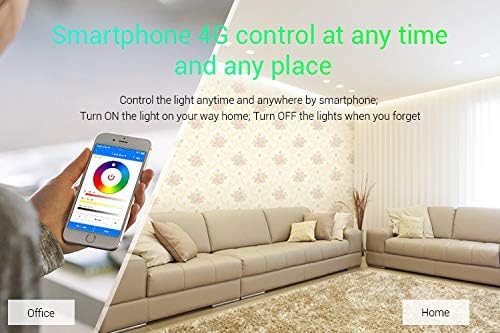
Figure 5.1: Remote control via smartphone app.

Figure 5.2: Timer Function in the app.

Figure 5.3: Switching LED strip output modes in the app.
5.2 Voice Control (Alexa / Google Home)
Integrate your WB5 controller with Amazon Alexa or Google Home Assistant for convenient voice control. After linking the Tuya Smart/Smart Life app to your voice assistant, you can use commands such as:
- "Alexa, turn on [Device Name]"
- "Hey Google, set [Device Name] to blue"
- "Alexa, dim [Device Name] to 50%"
5.3 Remote Control (WR01RF / WR02RF)
Use the paired RF remote control to adjust brightness, color, and modes directly. Refer to the remote's specific manual for detailed button functions.
5.4 Advanced Functions
The WB5 controller includes advanced features for enhanced lighting control:
- Auto-Transmitting Function: This feature allows one controller to transmit signals from the remote control to another controller within 30 meters. As long as there is a controller within 30 meters, the remote control distance can be limitless, creating a mesh network for extended range.

Figure 5.4: Auto-Transmitting Function Diagram.
Video 5.1: Demonstration of the Auto Synchronization Function.
- Auto-Synchronization Function: Different controllers can work synchronously when they are started at different times, controlled by the same remote control, and set to the same dynamic mode and speed. This ensures consistent lighting effects across multiple units.

Figure 5.5: Group Setting and Group Control.
6. Maintenance
The BTF-LIGHTING WB5 LED Controller requires minimal maintenance. To ensure optimal performance and longevity:
- Keep the controller in a dry environment, away from moisture and extreme temperatures.
- Avoid exposing the device to direct sunlight or corrosive substances.
- Clean the exterior with a soft, dry cloth. Do not use harsh chemicals or abrasive cleaners.
- Ensure proper ventilation around the controller to prevent overheating.
7. Troubleshooting
If you encounter issues with your BTF-LIGHTING WB5 LED Controller, refer to the following troubleshooting guide:
| Problem | Possible Cause | Solution |
|---|---|---|
| Controller not powering on | No power supply; incorrect voltage; loose connection | Check power adapter connection; ensure voltage matches (DC12V-24V); verify all wires are securely connected. |
| Cannot connect to Wi-Fi / App | Incorrect Wi-Fi band (not 2.4GHz); incorrect password; controller not in pairing mode; Wi-Fi signal too weak | Ensure your phone and controller are on a 2.4GHz Wi-Fi network; re-enter Wi-Fi password carefully; put controller into pairing mode (hold SET button); move controller closer to router. |
| Remote control not responding | Remote not paired; remote battery low; interference | Re-pair the remote control following the linking instructions; replace remote battery; reduce potential interference sources. |
| LED strip not lighting up or incorrect colors | Incorrect wiring; incompatible LED strip type; faulty LED strip | Verify LED strip wiring matches the controller's terminals for your specific strip type; ensure your LED strip is PWM type (not SPI); test with a different LED strip if possible. |
| Lights flicker or buzz | Incompatible power supply; low quality LED strip; electrical interference | Ensure power supply provides stable voltage and sufficient current; use high-quality LED strips; check for nearby devices causing electrical interference. |
8. Warranty & Support
For warranty information and technical support, please refer to the product packaging or visit the official BTF-LIGHTING website. You may also contact the seller directly through your purchase platform for assistance.


