
1. Introduction
This manual provides instructions for the VINABTY BN59-01175Q replacement remote control. This remote is designed to function as a direct replacement for your original Samsung TV remote, offering compatibility with various Samsung TV models. No programming is required; simply insert batteries for immediate use.
2. Setup
2.1 Battery Installation
The VINABTY BN59-01175Q remote control requires two (2) AAA alkaline batteries for operation. Follow these steps to install the batteries:
- Locate the battery compartment on the back of the remote control.
- Slide the battery compartment cover downwards or outwards to open it.
- Insert two AAA batteries, ensuring that the positive (+) and negative (-) terminals align correctly with the markings inside the compartment.
- Slide the battery compartment cover back into place until it clicks securely.
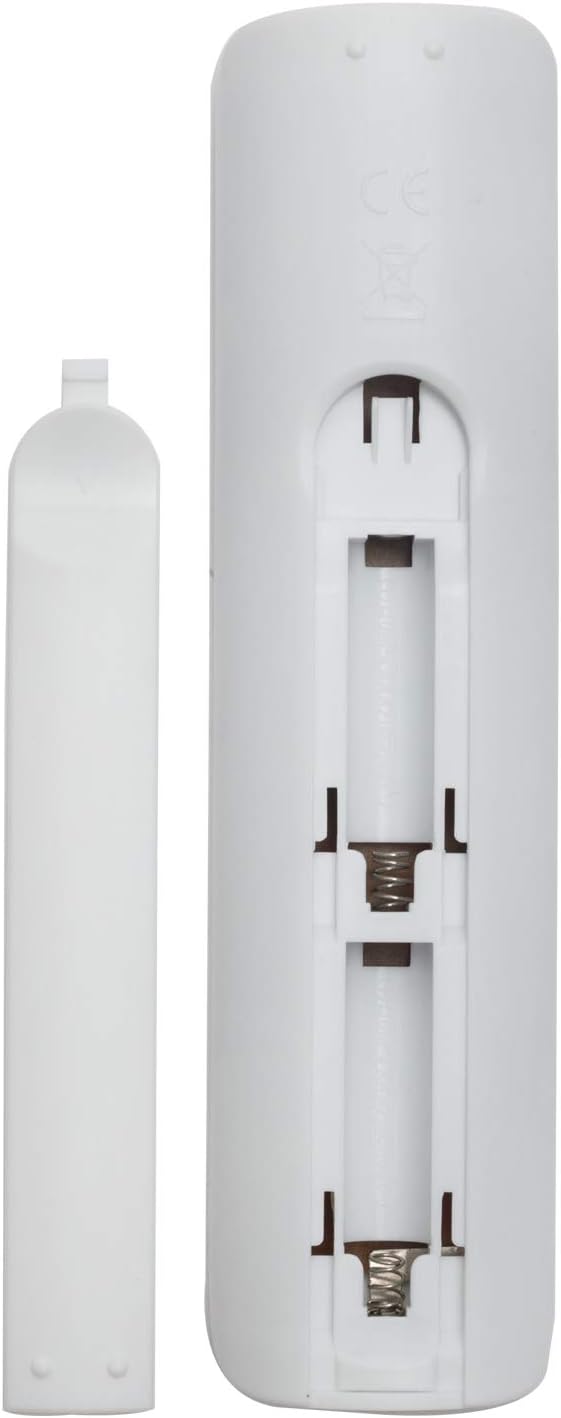
Figure 2.1: Battery compartment with cover removed, showing slots for two AAA batteries.
Once batteries are installed, the remote control is ready for use with your compatible Samsung TV.
3. Operating Instructions
The VINABTY BN59-01175Q remote control is designed for intuitive operation. Below is an overview of the remote's layout and common button functions.
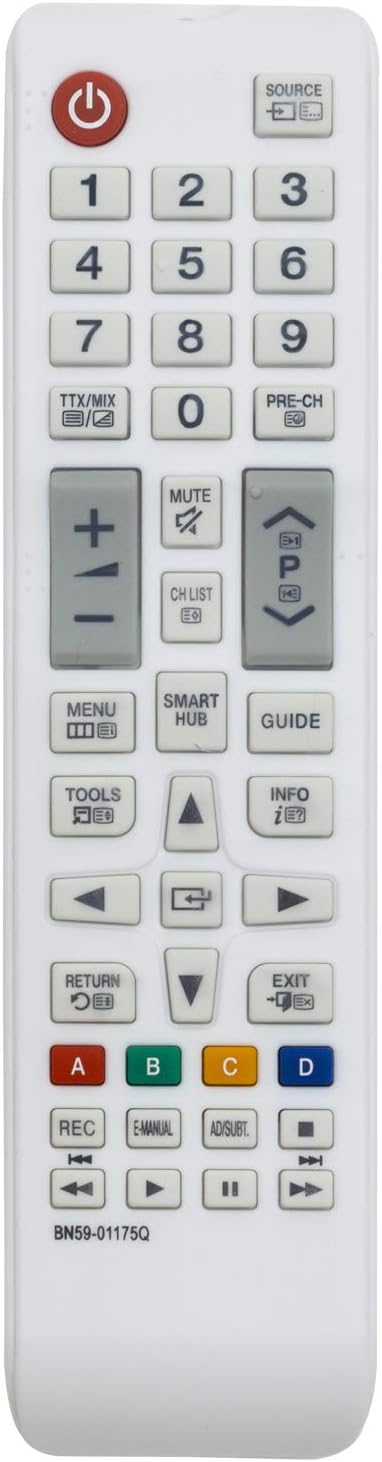
Figure 3.1: Front view of the VINABTY BN59-01175Q remote control.

Figure 3.2: Angled view of the remote control.
3.1 Basic Functions
- Power Button (⏻): Turns the TV on or off.
- Number Keys (0-9): Directly select TV channels.
- Volume Up/Down (+ / -): Adjusts the TV volume.
- Channel Up/Down (▲ / ▼): Changes TV channels sequentially.
- Mute Button: Mutes or unmutes the TV audio.
- Source Button: Selects input sources (e.g., HDMI, AV).
- Menu Button: Accesses the TV's main menu.
- Smart Hub Button: Opens the Samsung Smart Hub for apps and streaming services.
- Guide Button: Displays the electronic program guide (EPG).
- Navigation Pad (Up, Down, Left, Right, Enter): Navigates through menus and selects options.
- Return Button: Returns to the previous screen or menu.
- Exit Button: Exits the current menu or application.
- Color Buttons (Red, Green, Yellow, Blue): Provide additional functions depending on the TV menu or application.
- Playback Controls (Play, Pause, Stop, Fast Forward, Rewind): Controls media playback.
For specific functions related to your Samsung TV model, refer to your TV's original user manual.
4. Maintenance
Proper care and maintenance will extend the life of your remote control.
4.1 Cleaning
- Wipe the remote control with a soft, dry cloth.
- For stubborn dirt, lightly dampen the cloth with water or a mild, non-abrasive cleaner.
- Do not use harsh chemicals, solvents, or abrasive cleaning pads, as these can damage the remote's surface or internal components.
4.2 Battery Care
- Replace batteries when the remote's response becomes sluggish or stops working.
- Always replace both batteries at the same time with new ones of the same type (AAA alkaline).
- If the remote control will not be used for an extended period, remove the batteries to prevent leakage and potential damage.
- Dispose of used batteries according to local regulations.
5. Troubleshooting
If you encounter issues with your remote control, try the following troubleshooting steps:
- Remote not responding: Ensure the batteries are inserted correctly with the correct polarity. Replace old batteries with new AAA alkaline batteries.
- Limited range or intermittent response: Check for any obstructions between the remote control and the TV's infrared receiver. Ensure the remote is pointed directly at the TV. The maximum effective range is approximately 10 meters.
- Specific buttons not working: Clean the remote control, especially around the unresponsive buttons, to remove any dirt or debris that might be interfering with their function.
- Remote still not working: If the issue persists after trying the above steps, the remote control may be faulty.
6. Specifications
| Model Number | BN59-01175Q |
| Brand | VINABTY |
| Connectivity Technology | Infrared |
| Number of Buttons | 25 |
| Controller Type | Button Control |
| Maximum Range | 10 Meters |
| Compatible Devices | Television |
| Battery Type | 2 x AAA Alkaline Batteries |
| Color | White |
7. Warranty and Support
Information regarding product warranty and customer support is not provided within this manual. For warranty details or technical assistance, please refer to the seller or the product's packaging at the time of purchase.