
LTQ Vapor KP4
LTQ Vapor KP-4 Rosin Press Machine User Manual
Model: KP-4 | Brand: LTQ Vapor
Introduction
This manual provides comprehensive instructions for the safe and efficient operation, setup, and maintenance of your LTQ Vapor KP-4 Rosin Press Machine. The KP-4 is a 4-ton, 600W manual heat press designed for extracting rosin from dried flowers, featuring dual heating plates and precise temperature control.

Figure 1: Front view of the LTQ Vapor KP-4 Rosin Press Machine.
Safety Information
Please read all safety warnings and instructions carefully before operating the machine to prevent injury or damage. Keep this manual for future reference.
- Always operate the press on a stable, heat-resistant surface.
- Do not touch the heating plates during or immediately after operation, as they will be extremely hot. Use heat-resistant gloves if necessary.
- Ensure the machine is properly grounded.
- Keep children and pets away from the operating area.
- Do not immerse the machine in water or any other liquid.
- Unplug the machine from the power outlet when not in use or before cleaning.
- Do not attempt to modify or repair the machine yourself. Contact qualified personnel for service.
- Ensure proper ventilation in the operating area.
Product Components and Configuration
The LTQ Vapor KP-4 Rosin Press Machine comes with the following components:

Figure 2: Included components with the KP-4 Rosin Press Machine.
- 1. Heat Press Machine (KP-4): The main unit.
- 2. Power Cable: For connecting the machine to a power source.
- 3. Stainless Steel Dab Tool: For handling rosin.
- 4. Baking Paper (10 sheets): For collecting rosin.
- 5. Rosin Filter Bags (5 bags): For containing material during pressing.
- 6. Silicone Box: For storing rosin.
- 7. Magnets (4 pieces): For securing accessories.
- 8. Timer: For precise timing of the press cycle.
- 9. User Manual: This document.
- 10. Stickers (6 pieces): Decorative items.

Figure 3: Key components of the KP-4 Rosin Press Machine.
Setup
- Unpacking: Carefully remove all components from the packaging. Inspect for any damage during transit.
- Placement: Place the rosin press on a sturdy, level, and heat-resistant surface. Ensure there is adequate space around the machine for ventilation and operation.
- Power Connection: Connect the provided power cable to the machine's power inlet and then plug it into a suitable 220V power outlet. Ensure the power switch on the back of the machine is in the OFF position before plugging in.
- Initial Inspection: Before first use, ensure the heating plates are clean and free of debris.
Operating Instructions
1. Powering On and Initial Settings
- Flip the power switch on the back of the machine to the ON position. The digital display will illuminate.
- The KP-4 features dual heating plates with separate temperature controls. Use the control panel to set your desired temperature for both plates. The recommended temperature for rosin extraction is approximately 225°F (108°C), but this can be adjusted from ambient up to 300°F (149°C).
- The machine includes a voice prompt feature that will announce temperature settings as you adjust them.
- Set the desired pressing time using the individual timer. The timer can be set from 0 to 999 seconds.
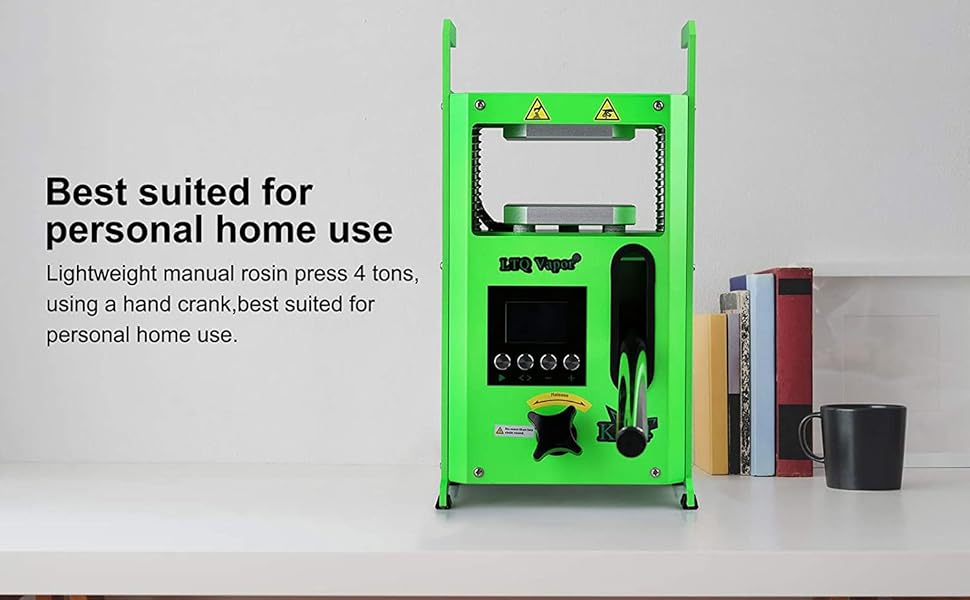
Figure 4: Digital control panel for temperature and timer settings.
2. Preparing Material for Pressing
- Place your dried flowers or material inside a rosin filter bag.
- Fold a piece of baking paper around the filter bag, ensuring the material is fully enclosed. This will collect the extracted rosin.
3. Pressing Process
- Once the heating plates reach the set temperature, carefully place the folded baking paper with the material between the two heating plates.
- Slowly turn the hand crank clockwise to apply pressure. The KP-4 can apply up to 4 tons of pressure. Apply pressure gradually and steadily.
- The 4x4 inch (101.6 x 101.6 mm) press plates ensure even pressure distribution.
- Once the desired pressure is reached, start the timer. Allow the material to press for the set duration.
- When the timer alerts, slowly turn the hand crank counter-clockwise to release the pressure.
- Carefully remove the baking paper from between the plates. Be cautious as the plates will still be hot.

Figure 5: Material placed between the 4x4 inch heating plates for pressing.
4. Collecting Rosin
- Allow the baking paper and extracted rosin to cool down.
- Once cooled, use the stainless steel dab tool to carefully scrape the rosin from the baking paper.
- Store the collected rosin in the provided silicone box.
Maintenance
- Cleaning the Heating Plates: After each use, ensure the machine is unplugged and completely cooled. Use a soft cloth or paper towel to wipe down the heating plates. For stubborn residue, a small amount of isopropyl alcohol can be used, but ensure no liquid enters the machine's internal components.
- General Cleaning: Wipe the exterior of the machine with a damp cloth. Do not use abrasive cleaners or solvents.
- Storage: Store the machine in a dry, cool place away from direct sunlight and moisture.
Troubleshooting
| Problem | Possible Cause | Solution |
|---|---|---|
| Machine does not power on. | Power cable not connected; Power switch off; Power outlet issue. | Ensure power cable is securely connected. Flip power switch to ON. Test power outlet with another device. |
| Heating plates not heating. | Temperature not set; Machine not powered on; Internal fault. | Check temperature settings on the control panel. Ensure machine is powered on. If problem persists, contact support. |
| Insufficient pressure. | Hand crank not fully engaged; Material too thick. | Ensure hand crank is turned fully clockwise to apply maximum pressure. Adjust material quantity or thickness. |
| Rosin yield is low. | Incorrect temperature; Insufficient pressure; Incorrect pressing time; Material quality. | Adjust temperature and pressure settings. Experiment with pressing times. Ensure material is of good quality and properly prepared. |
Specifications
| Feature | Detail |
|---|---|
| Model Number | KP-4 |
| Power | 600W (220V) |
| Voltage | 220V |
| Product Dimensions (L x W x H) | 192 x 145 x 370 mm (7.56 x 5.7 x 14.57 inches) |
| Heating Plate Size | 101.6 x 101.6 mm (4 x 4 inches) |
| Maximum Pressure | 4 Tons |
| Temperature Range | Ambient to 149°C (300°F) |
| Weight | 12 kg (26.4 lbs) |
| Material | Aluminum |
| UPC | 749652536429 |

Figure 6: The compact design of the KP-4, suitable for personal home use.
Warranty and Support
Specific warranty information for the LTQ Vapor KP-4 Rosin Press Machine is not provided in the product details. For warranty claims, technical support, or service inquiries, please contact the seller or manufacturer directly through their official channels.
No official product videos from the seller were available for embedding in this manual.
Ask a question about this manual
Ask about setup, troubleshooting, compatibility, parts, safety, or missing instructions. Manuals+ will review the question and use this page’s manual context to help answer it.