
1. Introduction
This manual provides detailed instructions for the safe and effective operation, setup, and maintenance of your TOAUTO DS882 2-in-1 Soldering Station and Hot Air Rework Station. Please read this manual thoroughly before using the device to ensure proper function and to prevent damage or injury.

Image 1.1: The TOAUTO DS882 Soldering Station with its included soldering iron, hot air gun, and various accessories.
2. Safety Precautions
Always observe the following safety guidelines to prevent electric shock, fire, or personal injury:
- Electrical Safety: Ensure the power supply matches the station's requirements (110V). Do not operate with wet hands or in damp environments. Disconnect power before cleaning or maintenance.
- Heat Hazard: The soldering iron tip and hot air gun nozzle reach very high temperatures. Avoid direct contact with skin or flammable materials. Allow tools to cool completely before storing.
- Fumes: Soldering produces fumes. Always work in a well-ventilated area or use a fume extractor.
- ESD Protection: The station features an anti-static design. However, always take additional ESD precautions when working with sensitive electronic components.
- Tool Handling: Always place the soldering iron and hot air gun in their respective holders when not in use.
- Children and Pets: Keep the device out of reach of children and pets.

Image 2.1: The TOAUTO DS882 is designed with anti-static features for safe handling of sensitive electronic components.
3. Package Contents
Verify that all items are present in your package:
- TOAUTO DS882 Main Power Unit (650 Watt)
- 90 Watt Soldering Iron
- Hot Air Gun
- Deluxe Upright Tower Hot Air Gun Holder
- Soldering Iron Holder with Wet Sponge
- 5 Extra Styles of Soldering Tips
- 2 Extra Sizes of Hot Air Nozzles
- Solder Sucker Pen
- Anti-static Tweezers
- Roll of Lead-free Solder Wire (0.8mm, 12g)
- Brass Tip Cleaner
- Sponge Tip Cleaner
- Instruction Manual
4. Product Features
The TOAUTO DS882 combines a soldering station and a hot air rework station into one compact unit, offering versatility and precision for various electronic tasks.

Image 4.1: Overview of the DS882's key features, including LCD display, PID control, and safety functions.
4.1. Two-in-One Design
The DS882 integrates a 90W soldering station and a 650W hot air station, allowing for independent or simultaneous use. This design is suitable for SOIC, PLCC, SOJ, PCB, and SMD rework, desoldering, and soldering applications.
4.2. Powerful and Precise Heating
- Soldering Iron: 90W output with rapid heating, reaching 572°F (300°C) in approximately 9 seconds. Features a ceramic heating core for stable temperature.
- Hot Air Gun: 650W output utilizing high-frequency eddy current heating technology, reaching 896°F (480°C) in approximately 7 seconds.
Both tools incorporate PID temperature sensors for quick and efficient temperature control and stabilization (±3.6°F).

Image 4.2: Close-up of the soldering iron's ceramic heating core and the hot air gun's heating element.
4.3. Large LCD Display and User-Friendly Functions
The unit features a 2.9-inch LCD display for clear temperature readings and settings. Key functions include:
- Temperature Presets: Three programmable memory buttons for quick recall of frequently used temperatures.
- Password Lock: Secures temperature settings to prevent accidental changes.
- Cool Air / Hot Air Conversion: Allows switching between modes for different applications.
- C/F Function: Easy conversion between Celsius and Fahrenheit temperature units.
- Auto Standby & Sleep: Intelligent power-saving modes to extend tool lifespan.
- Digital Temperature Calibration: For precise temperature adjustments.
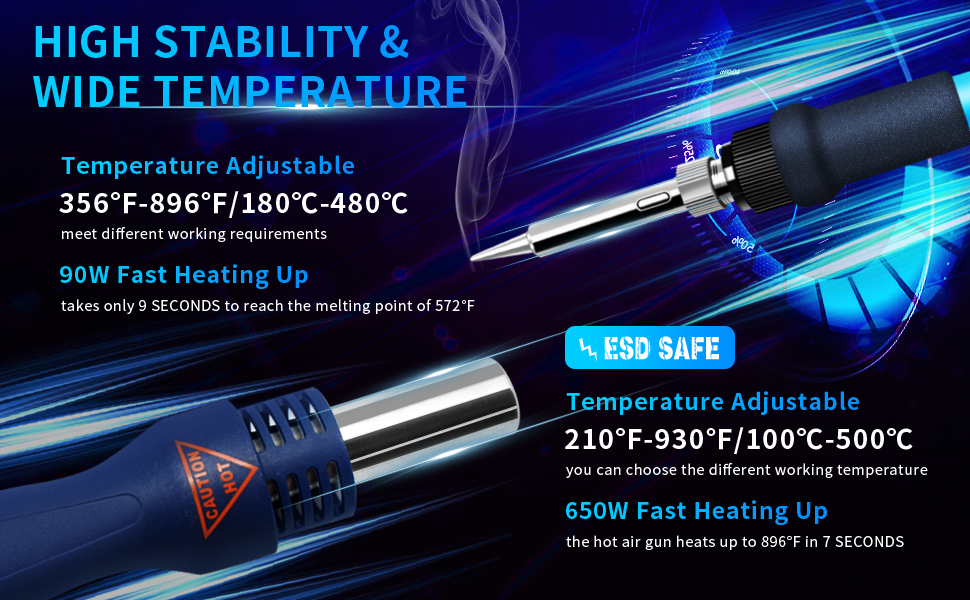
Image 4.3: The LCD display showing simultaneous soldering and rework temperatures.
5. Setup Instructions
- Unpack: Carefully remove all components from the packaging.
- Placement: Place the main unit on a stable, heat-resistant surface. Ensure adequate ventilation around the unit.
- Connect Soldering Iron: Plug the soldering iron cable into the designated port on the main unit. Place the soldering iron in its holder.
- Connect Hot Air Gun: Plug the hot air gun cable into its designated port. Place the hot air gun in its holder.
- Prepare Holders: Ensure the soldering iron holder sponge is slightly damp for tip cleaning. The brass tip cleaner can be used dry.
- Power Connection: Connect the power cord to the main unit, then plug it into a grounded 110V AC outlet.
- Initial Power On: Flip the main power switch. The LCD display will illuminate.
6. Operating Instructions
6.1. General Operation
- Power On/Off: Use the main power switch on the unit.
- Temperature Adjustment: Use the up/down arrow buttons to adjust the desired temperature for both the soldering iron and hot air gun.
- C/F Conversion: Press the 'C/F' button to switch between Celsius and Fahrenheit display modes.

Image 6.1: The LCD display illustrating the conversion between Celsius and Fahrenheit temperature units.
6.2. Soldering Iron Operation
- Select the desired soldering temperature using the arrow buttons.
- Wait for the iron to reach the set temperature (indicated on the display).
- Clean the tip using the wet sponge or brass cleaner before and after each use.
- Apply solder as needed.
- When finished, place the iron back in its holder. The unit will enter auto-standby mode.
6.3. Hot Air Gun Operation
- Select the desired hot air temperature and airflow using the respective controls.
- Wait for the hot air gun to reach the set temperature.
- Direct the hot air nozzle towards the component to be reworked.
- When finished, place the hot air gun back in its holder. The unit will automatically initiate a cool-down cycle before entering standby.
6.4. Memory Functions (CH1, CH2, CH3)
The DS882 allows you to save and recall three preset temperature and airflow configurations:
- Set the desired temperature and airflow for both the soldering iron and hot air gun.
- Press and hold one of the memory buttons (CH1, CH2, or CH3) until the display confirms the setting is saved.
- To recall a saved setting, simply press the corresponding memory button (CH1, CH2, or CH3).

Image 6.2: The control panel highlighting the memory preset buttons for quick temperature recall.
6.5. Password Lock
To prevent unauthorized changes to settings, you can activate the password lock function. Refer to the detailed instructions in the full manual for setting and disabling the password.
6.6. Auto Standby & Sleep
The unit features intelligent auto standby and sleep modes, adjustable from 10 to 60 minutes. When the tools are placed in their holders for the set duration, the unit will automatically reduce temperature or enter sleep mode to conserve energy and extend the lifespan of the heating elements.

Image 6.3: The DS882 display indicating auto standby mode after a period of inactivity.
7. Maintenance
Regular maintenance ensures optimal performance and longevity of your soldering station:
- Soldering Tip Cleaning: Regularly clean the soldering iron tip with the wet sponge or brass cleaner. Re-tin the tip with solder after cleaning to prevent oxidation. Replace tips when they become excessively worn or oxidized.
- Hot Air Nozzle Cleaning: Ensure hot air nozzles are free from debris. Clean gently with a soft brush if necessary.
- Unit Cleaning: Wipe the main unit with a soft, dry cloth. Do not use abrasive cleaners or solvents.
- Cord Inspection: Periodically check power cords and tool cables for any signs of damage.

Image 7.1: Illustration of the soldering iron's durable non-slip handle, high-quality wire, and replaceable stainless steel tip.
8. Troubleshooting
This section addresses common issues and error messages:
| Problem/Error Code | Possible Cause | Solution |
|---|---|---|
| H-E on display | Heating element error (e.g., short circuit in soldering iron). | Check the connection of the soldering iron. If the error persists, the heating element may need replacement. Contact support. |
| S-E on display | Sensor error (e.g., temperature sensor malfunction). | Check the connection of the respective tool. If the error persists, the sensor may be faulty. Contact support. |
| No power/Display off | Power cord disconnected, power switch off, or internal fuse blown. | Ensure power cord is securely connected and switch is on. Check the power outlet. If still no power, contact support. |
| Temperature not stable | Worn out tip, faulty heating element/sensor, or incorrect calibration. | Clean or replace the tip. Perform digital temperature calibration. If issue persists, contact support. |

Image 8.1: The DS882 display indicating error codes H-E (Heating Element error) and S-E (Sensor error).
9. Specifications
| Feature | Specification |
|---|---|
| Model | DS882 |
| Input Voltage | 110 Volts AC |
| Soldering Iron Power | 90 Watts |
| Hot Air Gun Power | 650 Watts (Maximum) |
| Soldering Temperature Range | 180-480°C (356-896°F) |
| Hot Air Temperature Range | 100-500°C (212-932°F) |
| Temperature Stability | ±3.6°F (±2°C) |
| Air Flow Capacity | 120 Liters Per Minute (Max) |
| Display Type | LCD |
| Dimensions (L x W x H) | 10.28 x 5.71 x 5.71 inches (261 x 145 x 145 mm) |
| Item Weight | 4.18 pounds (1.9 kg) |
| Cord Length | 1 Meter |
| Special Features | PID Control, C/F Conversion, 3 Temperature Presets, Password Lock, Auto Standby & Sleep, Short Circuit Protection, Anti-static Design, Digital Temperature Correction |
10. Warranty and Support
TOAUTO products are manufactured to high-quality standards. For warranty information, technical support, or replacement parts, please contact TOAUTO customer service through the retailer where the product was purchased or visit the official TOAUTO website. Please have your model number (DS882) and purchase date available when contacting support.
