
1. Introduction
The Williams AV IR SY11 D IR Plus Complete Assistive Listening System with Dante Input is designed to provide high-quality audio transmission for individuals requiring assistive listening in various environments. This system utilizes infrared technology to deliver clear sound directly to compatible receivers, ensuring an inclusive audio experience. The integrated Dante input allows for seamless integration into existing Dante audio networks.
This manual provides essential information for the proper setup, operation, and maintenance of your IR SY11 D system. Please read all instructions carefully before using the product to ensure optimal performance and safety.
2. Safety Information
- Electrical Safety: Always connect the system to a grounded power outlet. Do not expose the unit to rain or moisture. Disconnect power before cleaning or servicing.
- Hearing Safety: Avoid prolonged exposure to high volume levels, especially when using headphones with receivers, to prevent hearing damage.
- Placement: Ensure proper ventilation around the IR transmitter to prevent overheating. Do not block ventilation openings.
- Servicing: Refer all servicing to qualified service personnel. Do not attempt to open or repair the unit yourself.
3. Package Contents
Verify that all components are present in the package:
- IR SY11 D IR Plus Transmitter
- Power Supply
- IR Radiators (quantity may vary by system configuration)
- Assistive Listening Receivers (quantity may vary by system configuration)
- Headphones/Earphones for receivers
- Mounting Hardware (if applicable)
- User Manual (this document)
4. System Overview
The IR SY11 D system consists of a central transmitter unit, one or more IR radiators, and multiple portable receivers. The transmitter processes audio signals, including Dante input, and converts them into infrared light signals. These signals are then broadcast by the IR radiators throughout the listening area. Users with receivers can then pick up these signals and listen to the audio through headphones.
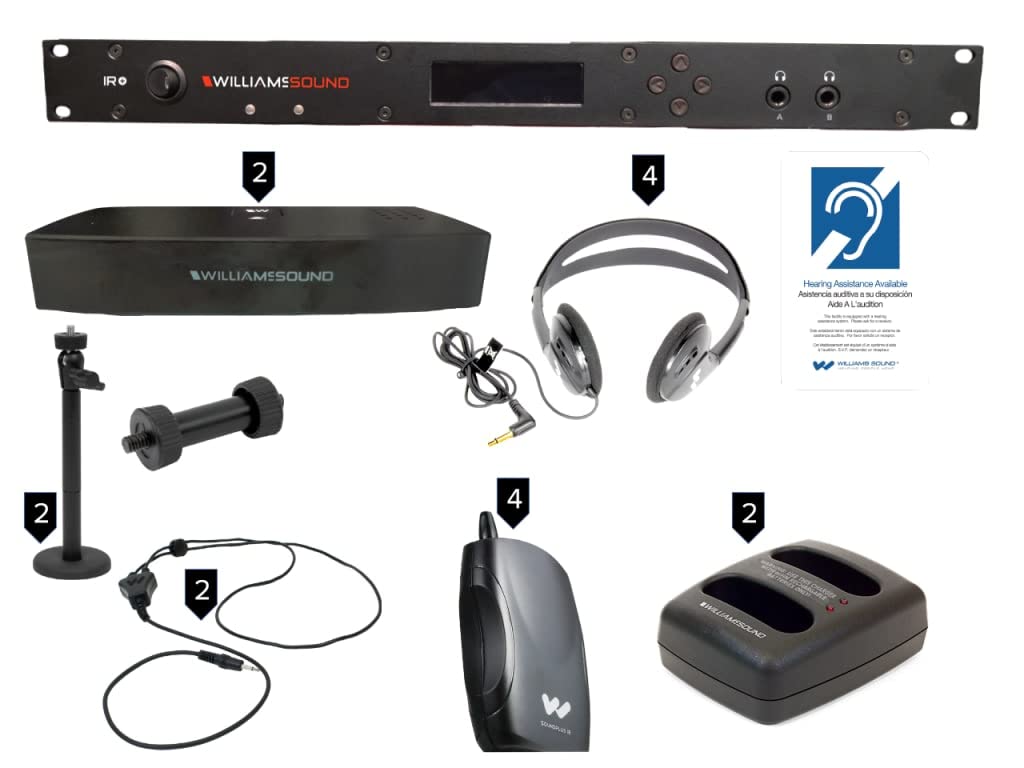
Image: The Williams AV IR SY11 D IR Plus Complete Assistive Listening System with Dante Input. This image shows the main transmitter unit and associated components, illustrating the overall product design.
5. Setup
5.1 Unpacking and Placement
- Carefully remove all components from the packaging.
- Place the IR SY11 D transmitter in a central location within the intended listening area, ensuring it has clear line-of-sight to the areas where receivers will be used. Avoid placing it near strong light sources or obstructions.
- Mount IR radiators as per their specific instructions, ensuring they cover the desired listening area effectively.
5.2 Connecting Power
Connect the provided power supply to the transmitter's power input. Plug the power supply into a standard AC outlet. The power indicator on the transmitter should illuminate.
5.3 Connecting Audio Sources (Dante Input)
The IR SY11 D features a Dante input for digital audio integration. Connect an RJ45 Ethernet cable from your Dante network switch to the Dante input port on the transmitter. Ensure your Dante network is properly configured to route audio to the IR SY11 D transmitter.
5.4 Connecting IR Radiators
Connect the IR radiators to the designated IR output ports on the transmitter using appropriate cabling. Refer to the radiator's specific manual for daisy-chaining or individual connection instructions.
5.5 Receiver Setup
Insert batteries into each receiver (if not already installed). Connect headphones or earphones to the receiver's audio output jack.
6. Operating Instructions
6.1 Powering On/Off
Press the power button on the transmitter to turn the system on. The status indicators will illuminate. To power off, press the power button again.
6.2 Adjusting Transmitter Settings
Use the controls on the transmitter's front panel or a remote control (if applicable) to select the desired audio channel and adjust input levels. Ensure the input level is optimized to prevent distortion without being too low.
6.3 Using Receivers
- Turn on the receiver.
- Select the desired channel on the receiver to match the transmitter's broadcast channel.
- Adjust the volume on the receiver to a comfortable listening level.
- Ensure a clear line of sight between the receiver and the IR radiators for optimal reception.
7. Maintenance
7.1 Cleaning
Wipe the exterior of the transmitter, radiators, and receivers with a soft, dry cloth. Do not use liquid cleaners or solvents. Ensure all units are powered off before cleaning.
7.2 Battery Care (Receivers)
For receivers using rechargeable batteries, follow the manufacturer's guidelines for charging. For disposable batteries, replace them when the low battery indicator appears. Remove batteries from receivers if they will not be used for an extended period to prevent leakage.
7.3 Storage
Store the system components in a cool, dry place away from direct sunlight and extreme temperatures when not in use.
8. Troubleshooting
- No Audio from Receivers:
- Check if the transmitter is powered on and its indicators are active.
- Verify the audio source is active and connected correctly to the transmitter (Dante input).
- Ensure the receiver is powered on, has fresh batteries, and the volume is turned up.
- Confirm the receiver's channel matches the transmitter's broadcast channel.
- Check for obstructions between the receiver and IR radiators.
- Poor Audio Quality/Interference:
- Ensure IR radiators are properly positioned and cover the listening area.
- Check for strong light sources (e.g., direct sunlight, certain types of lighting) that might interfere with IR signals.
- Verify input audio levels on the transmitter are not too high (causing distortion) or too low.
- Transmitter Not Powering On:
- Check the power cable connection and ensure the power outlet is functional.
- Verify the power supply is correctly connected to the transmitter.
9. Specifications
| Feature | Specification |
|---|---|
| Brand | Williams AV |
| Model | IR SY11 D |
| Item Weight | 10 pounds |
| ASIN | B08L89ZC55 |
| Manufacturer | Williams AV |
| Controller Type | Ring |
| Connector Type | RJ45 (for Dante) |
| Surround Sound Channel Configuration | 4 Channel |
| Number of Channels | 4 |
| Control Method | Remote |
| Audio Output Type | Headphones |
10. Warranty Information
Warranty terms and conditions for the Williams AV IR SY11 D IR Plus system are provided separately with the product or can be found on the official Williams AV website. Please retain your proof of purchase for warranty claims. A 3-Year Protection Plan may be available for purchase separately.
11. Support
For technical assistance, product inquiries, or service, please visit the official Williams AV website or contact their customer support. Contact details and additional resources are typically available on the manufacturer's website.


