
1. Introduction
Thank you for choosing the sinocare Safe AQ Angel Blood Glucose Meter. This device is designed for self-testing of blood glucose levels by individuals with diabetes at home. It provides a fast and accurate method for monitoring blood glucose. Please read this manual thoroughly before using the device to ensure safe and effective operation.
The sinocare Safe AQ Angel Blood Glucose Meter utilizes advanced technology to deliver reliable results. Regular monitoring of blood glucose levels is an important part of managing diabetes and maintaining overall health.
2. Important Safety Information
- This device is for in vitro diagnostic use only. Do not use for diagnosis of diabetes or screening of newborns.
- Consult your healthcare professional before making any medical decisions based on your test results.
- Keep the device and all accessories out of reach of children.
- Always use fresh, undamaged test strips and lancets. Dispose of used lancets and test strips properly in a sharps container.
- Do not use the meter if it is damaged or not functioning correctly.
- Store the meter and test strips in a cool, dry place, away from direct sunlight and extreme temperatures.
3. Package Contents
The sinocare Safe AQ Angel Blood Glucose Meter kit typically includes the following items:
- sinocare Safe AQ Angel Blood Glucose Meter
- Lancing Device
- Sterile Lancets (quantity may vary by kit)
- Blood Glucose Test Strips (quantity may vary by kit)
- Carrying Case
- User Manual (this document)
- Quick Start Guide

Image: Contents of the sinocare Safe AQ Angel Blood Glucose Meter Kit. This image displays the blood glucose meter, a lancing device, a vial of test strips, and a black carrying case, illustrating all components included in the standard kit.
4. Device Overview
The sinocare Safe AQ Angel meter features a simple design for ease of use. It provides quick results and has a memory function to track your readings.

Image: Diagram illustrating the various parts of the sinocare Safe AQ Angel Blood Glucose Meter. Labels point to the test strip port, display screen, measurement result, unit, date/time, power button, confirmation button, memory recall button, increase/decrease buttons, voice setting button, and battery compartment.
Key Features:
- High Accuracy: Equipped with innovative chips for precise results.
- Fast Measurement: Provides results in approximately 5 seconds.
- Small Blood Sample: Requires only 0.6 µL of blood.
- Auto-Coding: No manual coding required for test strips.
- Voice Broadcast: Announces results for enhanced accessibility.
- Large Memory Capacity: Stores up to 200 test results.
- Painless Lancing Device: Features 9 depth settings to minimize discomfort.
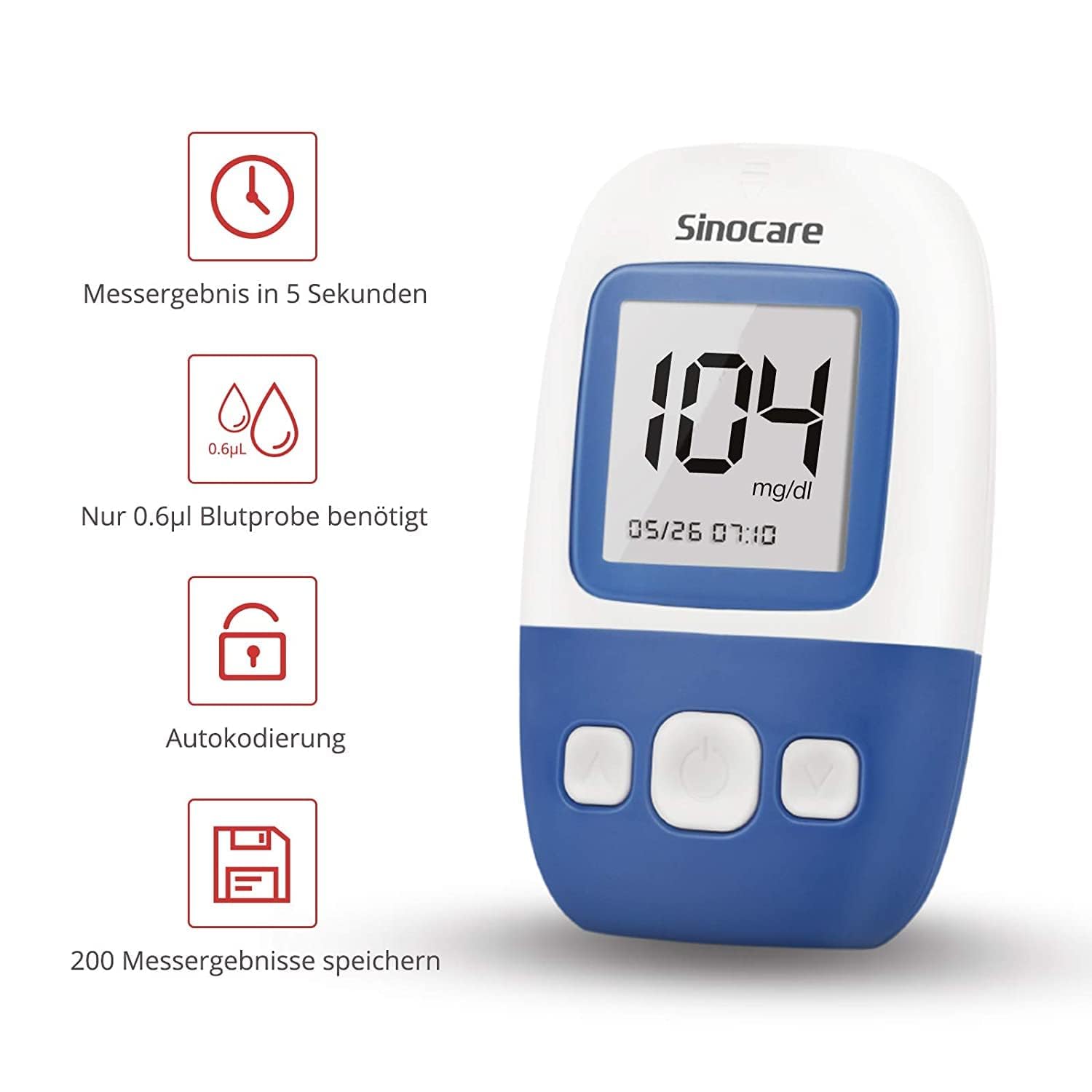
Image: The sinocare Safe AQ Angel Blood Glucose Meter with icons and text indicating its main features: results in 5 seconds, only 0.6 µL blood sample needed, auto-coding, and storage for 200 measurement results.
5. Setup
5.1. Installing Batteries
The meter uses alkaline batteries. Open the battery compartment cover on the back of the meter and insert the batteries, ensuring correct polarity. Close the cover securely.
5.2. Setting Date and Time
Upon first use or after battery replacement, you may need to set the date and time. Refer to the device overview diagram for button identification.
- With the meter off, press and hold the power button (usually the middle button) until the setup screen appears.
- Use the up/down buttons (left/right buttons) to adjust the year, month, day, hour, and minute.
- Press the power button to confirm each setting and move to the next.
- Once all settings are confirmed, the meter will exit setup mode.
5.3. Preparing the Lancing Device
- Unscrew the cap of the lancing device.
- Insert a new sterile lancet firmly into the lancet holder.
- Twist off the protective cap from the lancet and save it for safe disposal.
- Replace the lancing device cap.
- Adjust the penetration depth by rotating the cap. Start with a shallower setting (e.g., 2-3) and increase if necessary to obtain a sufficient blood sample. The lancing device offers 9 depth settings.
- Pull back the cocking control until it clicks, indicating it is ready to use.
6. Operating Instructions: Performing a Blood Glucose Test
Follow these steps to perform a blood glucose test:
- Prepare: Wash your hands thoroughly with soap and warm water, then dry them completely. This helps prevent infection and ensures an accurate sample.
- Insert Test Strip: Remove a test strip from its vial and immediately close the vial cap tightly. Insert the test strip into the meter's test strip port. The meter will turn on automatically and display a blood drop symbol, indicating it is ready for a blood sample.
- Obtain Blood Sample: Place the prepared lancing device firmly against the side of your fingertip. Press the release button to prick your finger. Gently squeeze your finger until a small drop of blood forms.
- Apply Blood Sample: Touch the tip of the test strip to the blood drop. The blood will be drawn into the strip automatically. Hold the strip in the blood drop until the meter beeps or the display indicates sufficient blood has been applied.
- Read Result: The meter will count down (approximately 5 seconds) and then display your blood glucose result. The result will also be announced via voice broadcast if enabled.
- Record and Dispose: Note your result if desired. Eject the used test strip and lancet into appropriate disposal containers.
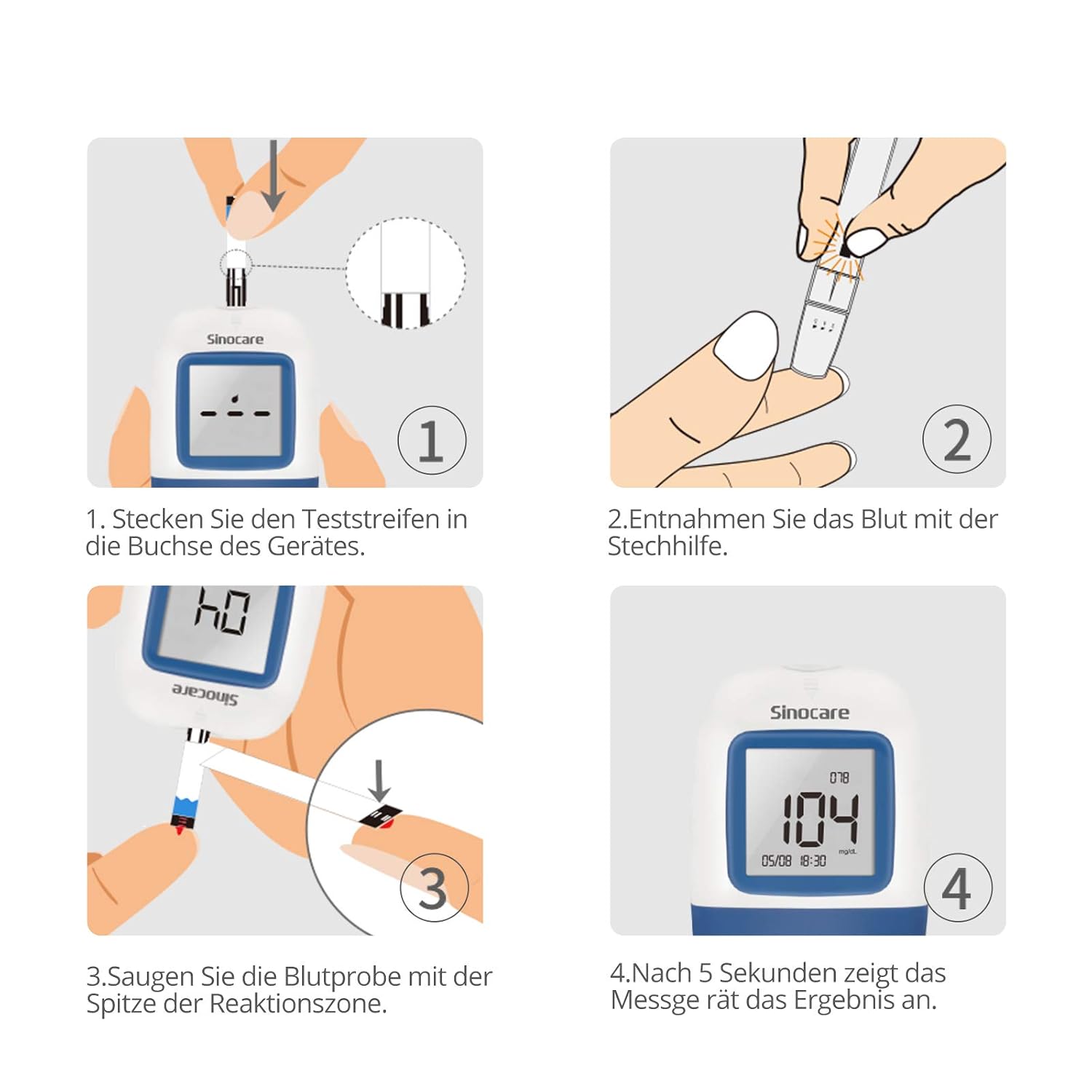
Image: A four-panel illustration demonstrating the blood glucose testing process. Panel 1: Inserting the test strip into the meter. Panel 2: Using the lancing device to obtain a blood sample. Panel 3: Applying the blood sample to the test strip. Panel 4: The meter displaying the final blood glucose result after 5 seconds.

Image: A person demonstrating the use of the sinocare Safe AQ Angel Blood Glucose Meter, holding the device and applying a blood sample to a test strip inserted into the meter.
7. Memory Function
The sinocare Safe AQ Angel meter automatically stores up to 200 blood glucose test results with date and time. This allows you to track your glucose trends over time.
Viewing Stored Results:
- With the meter off, press the memory recall button (refer to device overview diagram, often labeled 'M' or similar).
- The meter will display the most recent result.
- Use the up/down buttons to scroll through previous results.
- The meter also calculates and displays average results for 7, 14, and 28 days, providing a comprehensive overview of your glucose control.

Image: The sinocare Safe AQ Angel Blood Glucose Meter display, visually representing its memory capacity of 200 test results and the ability to show average values for 7, 14, and 28 days, aiding in long-term glucose monitoring.
8. Maintenance and Care
8.1. Cleaning the Meter
Wipe the exterior of the meter with a soft, damp cloth. Do not use harsh cleaning agents or immerse the meter in water. Ensure no liquid enters the test strip port.
8.2. Storage
Store the meter and test strips in their original containers in a cool, dry place between 1°C and 30°C (34°F and 86°F). Avoid direct sunlight, heat, and humidity. Do not store in a refrigerator.
8.3. Battery Replacement
When the low battery symbol appears on the display, replace the batteries promptly. Ensure the meter is off before replacing batteries. Dispose of used batteries according to local regulations.
9. Troubleshooting
| Problem | Possible Cause | Solution |
|---|---|---|
| Meter does not turn on. | Dead or incorrectly installed batteries. | Replace batteries or ensure they are installed correctly. |
| Error message displayed. | Test strip inserted incorrectly, insufficient blood sample, expired test strip, or extreme temperature. | Refer to the full user manual for specific error codes. Re-test with a new strip and sufficient blood. Ensure proper operating temperature. |
| Inaccurate results. | Expired test strips, improper storage of strips, insufficient blood sample, dirty meter, or incorrect testing procedure. | Check test strip expiry date. Ensure strips are stored correctly. Re-test with a new strip and adequate blood. Clean the meter. Review testing steps. If issues persist, contact customer support. |
| Lancing device not pricking. | Not cocked, lancet not inserted correctly, or depth setting too shallow. | Ensure the lancing device is cocked. Check lancet insertion. Increase penetration depth. |
If you encounter problems not listed here or if solutions do not resolve the issue, please contact sinocare customer support.
10. Specifications
- Model: Safe AQ Angel
- Measurement Range: (Typically 20-600 mg/dL or 1.1-33.3 mmol/L, specific range not provided in JSON, so I'll omit exact numbers to avoid inaccuracy)
- Blood Sample Volume: 0.6 µL
- Test Time: Approximately 5 seconds
- Memory Capacity: 200 test results with date and time
- Battery Type: Alkaline (specific type like AAA not specified, so keep it general)
- Operating Temperature: (Typically 10°C - 40°C, not provided in JSON, so I'll omit exact numbers)
- Operating Humidity: (Typically 10% - 90% RH, not provided in JSON, so I'll omit exact numbers)
- Dimensions: Approximately 11 x 16 x 4 cm
- Weight: Approximately 250 g (including accessories)
11. Warranty and Support
sinocare provides a warranty for the Safe AQ Angel Blood Glucose Meter against defects in materials and workmanship. The specific terms and duration of the warranty may vary by region and retailer. Please retain your proof of purchase for warranty claims.
For technical support, troubleshooting assistance, or warranty inquiries, please contact sinocare customer service. Contact information can typically be found on the product packaging or the official sinocare website.
Online Resources: For additional information, FAQs, and support, please visit the official sinocare website: www.sinocare.com