
1. Introduction
Thank you for choosing the SOBO T-240F 9L Aquarium. This manual provides essential information for the safe and efficient setup, operation, and maintenance of your new aquarium. Please read these instructions carefully before use and retain them for future reference.
2. Safety Instructions
- Always unplug all electrical components before performing any maintenance or cleaning.
- Ensure your hands are dry when handling electrical plugs and outlets.
- Do not operate any appliance with a damaged cord or plug.
- Place the aquarium on a sturdy, level surface capable of supporting its full weight when filled with water (approximately 9 kg or 20 lbs).
- Keep the aquarium out of direct sunlight to prevent excessive algae growth and temperature fluctuations.
- Do not immerse the pump or LED light unit in water beyond their designated waterproof levels.
- This product is intended for indoor use only.
- Keep out of reach of children and pets to prevent accidents.
3. Package Contents
Carefully unpack your SOBO T-240F aquarium and check that all components are present and undamaged. The package should include:
- 1 x SOBO T-240F Aquarium Tank (White Color)
- 1 x Integrated Filter with Water Pump
- 1 x LED Light Unit
- 1 x Fish Net
- 1 x TOYA 100g Fish Food
- 1 x Scuba Diver Decoration
- 1 x Artificial Plant (color may vary)

Image: The SOBO T-240F aquarium with the internal filter pump visible.
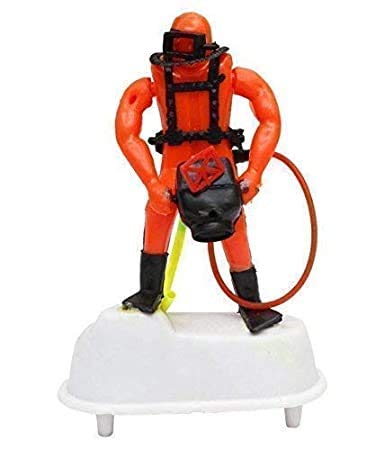
Image: Included scuba diver decoration.
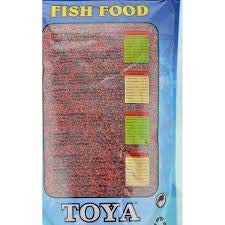
Image: TOYA 100g fish food packaging.
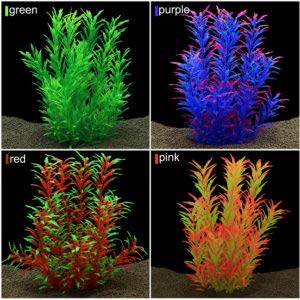
Image: Examples of artificial plant decorations.
4. Setup Instructions
4.1. Placement
Choose a stable, level surface for your aquarium, away from direct sunlight, heat sources, and drafts. Ensure the location has access to an electrical outlet with a drip loop for safety.
4.2. Cleaning the Tank
Rinse the aquarium thoroughly with clean water. Do not use soap or detergents, as residues can be harmful to aquatic life.
4.3. Installing the Filter Pump and LED Light
- Locate the integrated filter system within the aquarium.
- Ensure the water pump is securely placed in its designated compartment.
- Position the LED light unit on the top edge of the aquarium, ensuring it is stable and illuminates the tank evenly.
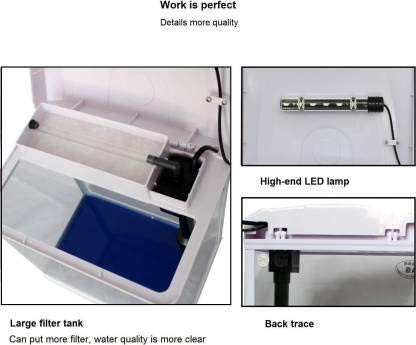
Image: Detailed view of the filter system and LED light unit.
4.4. Adding Substrate and Decorations
If using substrate (gravel or sand), rinse it thoroughly before adding it to the bottom of the tank. Arrange your artificial plant and scuba diver decorations as desired. Ensure decorations do not obstruct the filter intake or outflow.
4.5. Filling with Water
Slowly fill the aquarium with dechlorinated water. Use a plate or plastic bag on the substrate to minimize disturbance. Fill the tank to the recommended water level, typically just below the top edge of the filter compartment.
4.6. Initial Power-Up
Once filled, plug in the filter pump and LED light. Ensure the pump is submerged and starts circulating water. The LED light should illuminate the tank.

Image: A fully assembled SOBO T-240F aquarium.
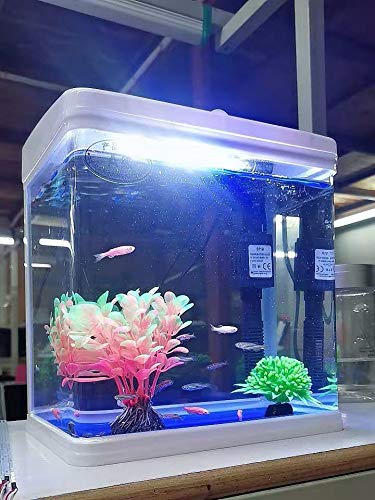
Image: An example of the aquarium with fish and decorations.
5. Operating Instructions
5.1. Filter Operation
The integrated filter pump should run continuously to maintain water circulation and filtration. This helps remove debris and maintain water quality.
5.2. LED Lighting
The LED light provides illumination for your aquarium. For optimal fish health and to prevent excessive algae, it is recommended to keep the light on for 8-10 hours per day. A timer can be used for consistent light cycles.
5.3. Feeding Fish
Feed your fish small amounts of food, such as the included TOYA fish food, once or twice a day. Only feed what they can consume within 2-3 minutes to avoid overfeeding and water pollution.
6. Maintenance
6.1. Water Changes
Perform a partial water change of 25-30% every 1-2 weeks. Use a gravel vacuum to remove debris from the substrate. Always use dechlorinated water that is temperature-matched to the aquarium water.
6.2. Filter Cleaning
Rinse the filter media (sponge) in old aquarium water during a water change to remove accumulated debris. Do not rinse with tap water, as chlorine can kill beneficial bacteria. Replace filter media as recommended by the manufacturer or when it becomes heavily clogged.
6.3. Tank Cleaning
Wipe the inside glass surfaces with an aquarium-safe scraper or magnet cleaner to remove algae. Clean the exterior of the tank with a damp cloth.
7. Troubleshooting
- Pump Not Working: Check if the pump is plugged in. Ensure the impeller is not blocked by debris. Clean the impeller if necessary.
- Cloudy Water: This can be caused by overfeeding, insufficient filtration, or a new tank cycle. Reduce feeding, perform a partial water change, and ensure the filter is clean and running correctly.
- Excessive Algae: Too much light or nutrients can cause algae. Reduce lighting duration, perform water changes, and avoid overfeeding.
- LED Light Not Working: Check the power connection. Ensure the light unit is properly seated.
8. Specifications
| Feature | Specification |
|---|---|
| Model | SOBO T-240F |
| Brand | SOBO (Manufacturer), AQUAPETZWORLD (Distributor) |
| Material | Glass |
| Tank Volume | 9 Litres |
| Dimensions (LxWxH) | 27 x 19.5 x 31 cm |
| Color | White |
| Lighting System | T-4-LED-5W |
| Pump Power | 3W |
| Pump Flow Rate | 300 L/H |
| Special Feature | Durable, Integrated Top Filter System |
9. Warranty and Support
For warranty information and customer support, please refer to the documentation provided at the point of purchase or contact your retailer. Keep your proof of purchase for any warranty claims.
