
Introduction
This manual provides detailed instructions for the setup, operation, and maintenance of your Reflexion WMR01BK portable cassette player. Please read this manual thoroughly before using the device to ensure proper function and longevity. This device allows you to listen to your favorite cassette tapes and FM radio stations wherever you go.
Package Contents
The following items are included in your package:
- Reflexion WMR01BK Portable Cassette Player
- Earphones
- Belt Clip
- User Manual

Image: The included earphones and the cover of the user manual, which is also part of the package contents.
Product Overview
Familiarize yourself with the main components and controls of your portable cassette player.
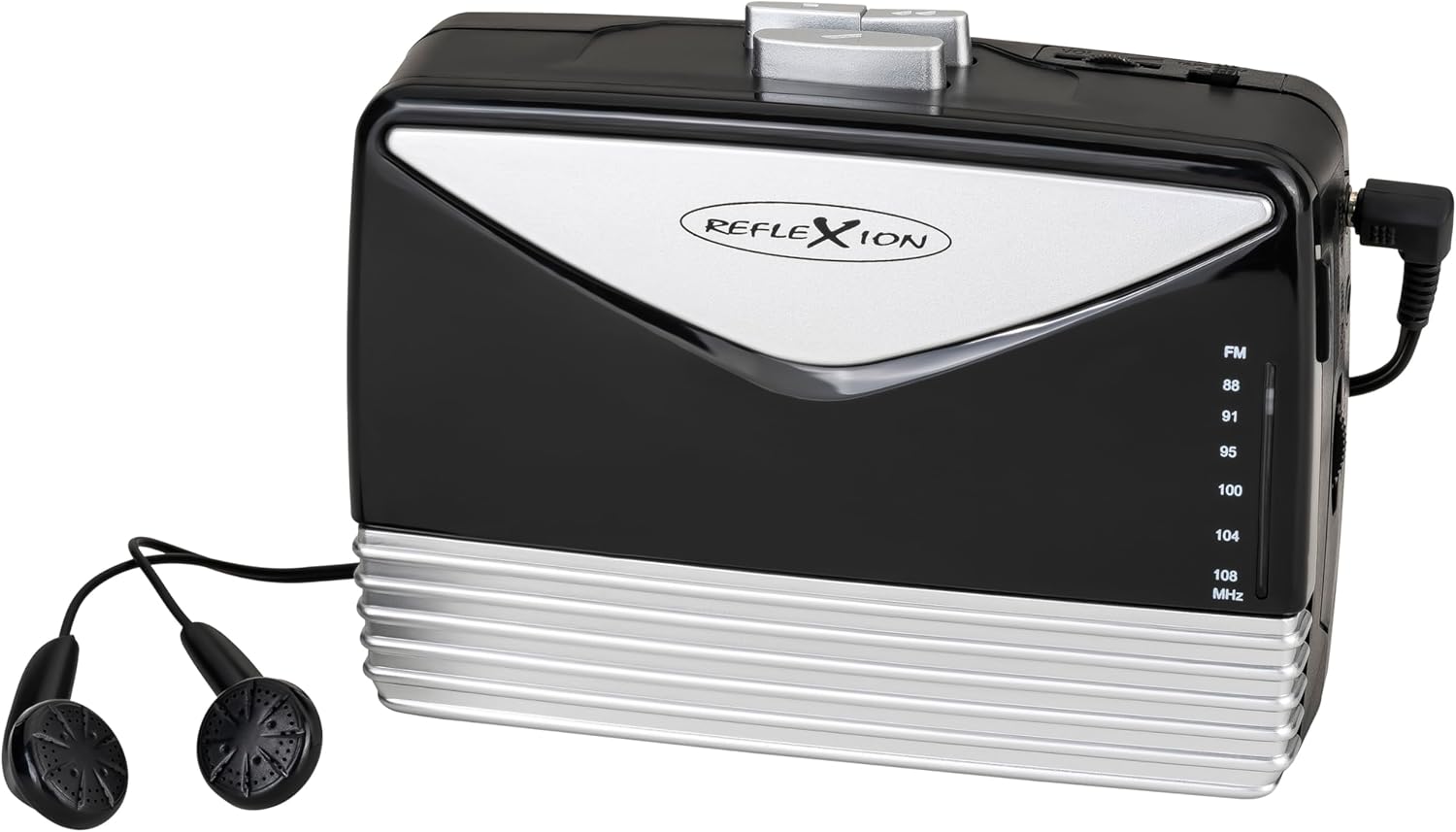
Image: Front and side view of the Reflexion WMR01BK portable cassette player, showcasing its black and silver design and connected earphones.

Image: Side view of the cassette player, highlighting the playback controls (Play, Stop, Fast Forward), volume dial, and various input/output ports.
Setup
Power Supply
The Reflexion WMR01BK can be powered by two (2) UM-3 "AA" batteries (not included) or an external DC 3V power adapter (not included).
Battery Installation
- Locate the battery compartment on the back of the device.
- Open the battery compartment cover.
- Insert two (2) UM-3 "AA" batteries, ensuring correct polarity (+/-) as indicated inside the compartment.
- Close the battery compartment cover securely.
External Power Connection
- Connect a compatible DC 3V power adapter (not included) to the DC IN jack on the device.
- Plug the power adapter into a standard wall outlet.
Operating
Cassette Playback
- Open the cassette compartment door.
- Insert a cassette tape with the open edge facing upwards and the tape side facing the player.
- Close the cassette compartment door.

Image: A hand carefully inserting a cassette tape into the open compartment of the Reflexion WMR01BK player.
- Connect the included earphones or external headphones to the headphone jack.
- Press the "PLAY" button to start playback.
- Use the "STOP" button to stop playback.
- Use the "FF" (Fast Forward) button to advance the tape quickly.
- The auto-stop function will automatically stop playback when the tape reaches its end.
FM Radio Operation
- Connect the earphones, as they also function as the FM antenna.
- Switch the function selector to "RADIO" or "FM".
- Use the tuning dial to select your desired FM radio station.
- Adjust the volume using the volume control.
Headphone and Line Out
Connect headphones to the 3.5mm headphone jack for private listening. The device also features a Line Out port for connecting to external audio systems.
Microphone Input
The device includes a microphone input for recording purposes. Refer to the specific recording instructions if available in the full manual.
Maintenance
Cleaning
Wipe the exterior of the player with a soft, dry cloth. Do not use abrasive cleaners or solvents. For internal components like the tape head, use a specialized tape head cleaning kit to ensure optimal sound quality and tape longevity.
Battery Care
Remove batteries if the device will not be used for an extended period to prevent leakage and potential damage to the unit.
Troubleshooting
No Power
- Check battery installation and ensure correct polarity.
- Replace old batteries with new ones.
- If using an adapter, ensure it is properly connected and the wall outlet is functional.
Poor Sound Quality (Cassette)
- Clean the tape head and pinch rollers using a specialized cleaning kit.
- Ensure the cassette tape itself is in good condition and not damaged.
- Adjust the volume control.
Poor Radio Reception
- Ensure earphones are properly connected, as they act as the FM antenna.
- Adjust the position of the player or earphones for better reception.
- Carefully tune the radio dial to find the clearest signal.
Specifications
General
- Model: WMR01BK
- Dimensions (L x W x H): 12 x 9 x 5 cm (4.72 x 3.54 x 1.97 inches)
- Weight: 150 grams (0.33 lbs)
- Color: Black and Silver
- Material: Plastic
Power
- Power Source: Battery powered (2x UM-3 "AA" batteries, not included) or DC 3V external power adapter (not included)
Audio
- Cassette Playback: Yes, with auto-stop and fast forward functions
- Radio Bands: FM
- Connectivity: Auxiliary (Line Out, Headphone Out, Microphone In)
Included Components
- Portable Cassette Player
- Earphones
- Belt Clip
- User Manual
Warranty and Support
Warranty Information
This product comes with a 1-year availability for spare parts. For specific warranty terms and conditions, please refer to the documentation provided at the time of purchase or contact your retailer.
Customer Support
For further assistance or technical support, please contact your retailer or the manufacturer's customer service channels as provided in your purchase documentation.

