
Introduction
The EPOS Expand 80T is a premium, scalable Bluetooth speakerphone designed for conference calls with up to 16 in-room participants. It features six adaptive, beamforming microphones for clear voice pickup and a high-quality speaker for natural sound reproduction. This manual provides essential information for setting up, operating, and maintaining your device.

Image: EPOS Expand 80T speakerphone, showcasing its sleek black and silver design from an angled top-down perspective.
What's in the Box
Verify that all components are present in the packaging:
- EPOS Expand 80T Speakerphone
- USB-C cable
- BTD 800 USB dongle
- Universal power supply unit
- USB-C to USB-A adapter
- Safety guide
- Quick guide
- Compliance sheet

Image: The underside of the EPOS Expand 80T, illustrating the integrated cable management system and connection ports.
Product Overview
The Expand 80T features intuitive touch controls and a robust design suitable for various meeting environments.

Image: Front view of the EPOS Expand 80T speakerphone, highlighting the control panel and speaker grille.
Key Features:
- Adaptive Microphones: Six beamforming microphones isolate voices and reduce ambient noise.
- Superior Speaker: Delivers rich, natural sound for clear communication.
- Connectivity: Bluetooth and USB-C for versatile connection options.
- Microsoft Teams Certified: Optimized for seamless integration with Microsoft Teams.
- Scalable: Suitable for up to 16 in-room participants.

Image: A close-up view of the EPOS Expand 80T's touch controls and the EPOS brand logo, showing the detailed texture of the speaker grille.
Setup
1. Power Connection
- Connect the universal power supply unit to the speakerphone's power input.
- Plug the power supply into a wall outlet. The device will power on automatically.
2. USB Connection (PC/Soft Phone)
- Connect the supplied USB-C cable to the speakerphone.
- Connect the other end of the USB-C cable to your computer's USB-C port. If your computer only has USB-A ports, use the provided USB-C to USB-A adapter.
- The speakerphone will be recognized as an audio device by your operating system.
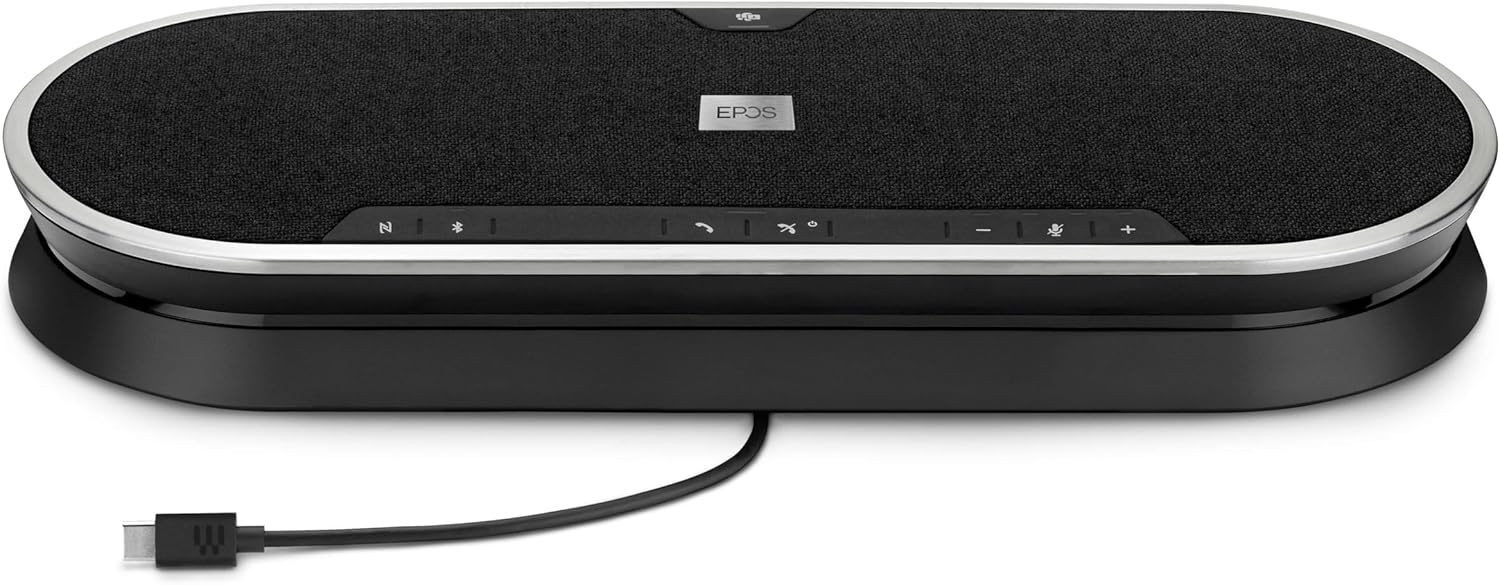
Image: The EPOS Expand 80T speakerphone with its USB-C cable connected, ready for wired communication.
3. Bluetooth Pairing (Mobile Phone/Tablet)
- Press and hold the Bluetooth button on the speakerphone until the LED indicator flashes blue. This indicates pairing mode.
- On your mobile phone or tablet, go to Bluetooth settings and select "EPOS Expand 80T" from the list of available devices.
- Once connected, the LED indicator will turn solid blue.
4. Using the BTD 800 USB Dongle
- Plug the BTD 800 USB dongle into a USB port on your computer.
- The dongle will automatically pair with the Expand 80T. The LED on the dongle will turn solid blue when connected.
- This provides a dedicated, optimized Bluetooth connection for your PC.
Operating the Speakerphone
The EPOS Expand 80T features touch-sensitive controls for easy management of calls and audio.

Image: Side profile of the EPOS Expand 80T speakerphone, showcasing its slim design and subtle curves.
Call Management:
- Answer/End Call: Tap the Call button.
- Mute/Unmute Microphone: Tap the Mute button. The LED will indicate mute status.
- Volume Up/Down: Tap the + or - buttons.
- Microsoft Teams Button: Tap the Teams button to launch Microsoft Teams or bring it to the foreground (when connected to a PC with Teams installed).
Audio Playback:
- When connected via Bluetooth or USB, the Expand 80T can play audio from your connected device.
- Use the volume controls on the speakerphone or your connected device to adjust playback volume.
Maintenance
To ensure the longevity and optimal performance of your EPOS Expand 80T, follow these maintenance guidelines:
- Cleaning: Use a soft, dry cloth to clean the surface of the speakerphone. Do not use liquid cleaners or abrasive materials.
- Storage: Store the device in a cool, dry place away from direct sunlight and extreme temperatures.
- Avoid Moisture: The device is not waterproof. Keep it away from liquids and high humidity.
- Cable Care: Handle cables gently. Avoid sharp bends or excessive pulling.
Troubleshooting
If you encounter issues with your EPOS Expand 80T, refer to the following common solutions:
- No Power:
- Ensure the power supply is securely connected to both the speakerphone and a working wall outlet.
- Check if the power outlet is functional.
- No Audio/Poor Audio Quality:
- Verify that the speakerphone is selected as the default audio output/input device in your computer's sound settings or conferencing application.
- Adjust the volume on both the speakerphone and your connected device.
- If using Bluetooth, ensure the device is within range (up to 10 meters) and there are no obstructions.
- Try reconnecting the USB cable or re-pairing the Bluetooth device.
- Microphone Not Working:
- Ensure the microphone is not muted on the speakerphone or in your conferencing software.
- Check microphone input settings on your computer or device.
- Bluetooth Disconnection:
- Move the speakerphone closer to the connected device.
- Remove any potential sources of interference (e.g., other wireless devices).
- Forget the device in your phone/PC's Bluetooth settings and re-pair.
Specifications
| Model Name | EXPAND 80T |
| Item Model Number | 1000203 |
| Brand | EPOS |
| Connectivity Technology | Bluetooth, USB |
| Wireless Communication Technology | Bluetooth |
| Bluetooth Range | 10 Meters |
| Maximum Range | 30 Meters (for certain connections, e.g., with BTD 800 dongle) |
| Speaker Type | Multimedia or Conference |
| Speaker Maximum Output Power | 80 Watts |
| Audio Output Mode | Stereo |
| Special Feature | Built-in Microphone, USB connectivity, Universal, Speakerphone |
| Compatible Devices | Mobile phone, Desk phone, PC / Soft phone, Tablet |
| Control Method | Touch |
| Product Dimensions (LxWxH) | 12.4" x 4.7" x 1.8" (31.5 cm x 11.9 cm x 4.6 cm) |
| Item Weight | 2.19 pounds (approx. 0.99 kg) |
| Power Source | Corded Electric |
| Included Components | USB-C cable, BTD 800 USB dongle, power supply unit (universal), USB-C to USB-A adapter, safety guide, quick guide, compliance sheet |
Warranty and Support
The EPOS Expand 80T comes with a manufacturer's warranty. For specific warranty terms and conditions, please refer to the included safety guide or visit the official EPOS website.
For technical support, troubleshooting assistance, or to inquire about replacement parts, please contact EPOS customer support through their official channels. Keep your product model number (1000203) and proof of purchase readily available when seeking support.
You can find more information and support resources on the EPOS Store on Amazon.


