Introduction
The Line 6 HX Stomp XL is an advanced amp and effects processor designed for guitarists and bassists seeking versatile tone shaping and performance control. It features the same HX modeling technology found in Line 6's flagship Helix products, offering a comprehensive collection of amplifiers, cabinets, and effects. With its expanded footswitch layout, the HX Stomp XL provides enhanced real-time control and flexibility for live performances and studio applications.
Setup Guide
Follow these steps to set up your HX Stomp XL for optimal performance:
- Power Connection: Connect the included 9V DC, 3A power supply to the "DC IN" port on the rear panel. Ensure the power outlet is stable.
- Instrument Connection: Connect your instrument (guitar or bass) to the "INPUT L/MONO" jack using a standard 1/4-inch instrument cable. For stereo input, connect a second instrument or stereo source to the "INPUT R" jack.
- Output Connection: Connect the "OUTPUT L/MONO" and "OUTPUT R" jacks to your amplifier, audio interface, or PA system. The outputs are switchable between line and instrument level, allowing for flexible integration into various setups.
- USB Connection: For computer connectivity, firmware updates, and using the HX Stomp XL as an audio interface, connect a USB cable from the "USB" port to your computer.
- MIDI Connections: Utilize the MIDI IN and OUT/THRU ports for external MIDI control or integration with other MIDI-compatible devices.
- Expression Pedal/Footswitch: For additional real-time control, connect up to two external footswitches or expression pedals to the "EXP 1/2" and "FS 1/2" jacks.

Figure 1: Rear panel connections of the HX Stomp XL. This view highlights the comprehensive connectivity options, including stereo inputs and outputs, MIDI I/O, USB, and external expression pedal/footswitch inputs.
Operating Modes
The HX Stomp XL offers several operating modes to suit different performance and editing needs:
- Preset Mode: In this mode, the footswitches allow you to navigate through banks of four presets. This provides quick access to your saved sounds during a performance.
- Stomp Mode: Pressing the "MODE" footswitch enters Stomp Mode. Here, the footswitches are assigned to individual effects blocks within your current preset, allowing you to toggle them on/off. The color LCD screen displays the assigned blocks and their parameters, which can be edited directly using the knobs.
- Snapshot Mode: By pressing the Up and Down footswitches simultaneously, you can access Snapshot Mode. This mode allows you to store and recall up to four different variations of a single preset, enabling seamless transitions between different sounds or effects configurations without changing the entire preset.
- Pedal Edit Mode: This advanced mode allows you to edit the parameters of any amp or effect using only your feet. Hold down the "MODE" footswitch, then select a block and a parameter to adjust its value using the footswitches.
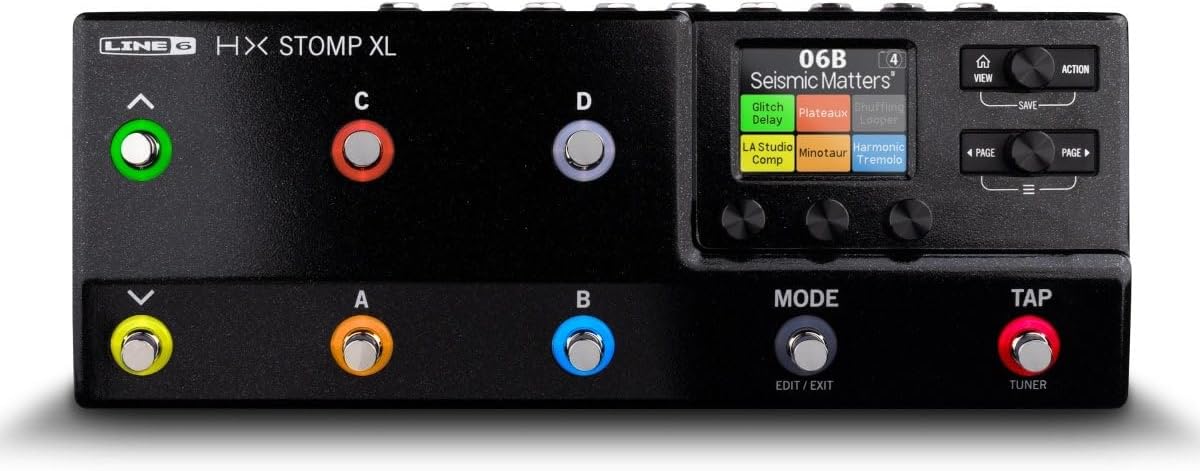
Figure 2: Top view of the HX Stomp XL. This image displays the main display screen, navigation buttons, and the eight capacitive-touch footswitches, which are central to navigating the device's various operating modes.
Video 1: An introductory overview of the Line 6 HX Stomp XL. This video demonstrates the key features and functionalities of the device, including its expanded footswitch control, sound capabilities, and various operating modes. It provides a visual guide to understanding the product's core aspects.
Key Features
- Authentic Tone: Utilizes the same SHARC DSP chip and HX modeling technology as the flagship Helix products, delivering over 300 amp models and effects.
- Expanded Control: Features eight capacitive-touch footswitches, providing extensive real-time control over effects and presets.
- Dynamic DSP: Capable of running up to eight blocks of dynamic DSP simultaneously on two parallel stereo paths, allowing for complex signal routing and dual amp setups.
- Preset Compatibility: Fully interchangeable presets with other HX/Helix family products, enabling seamless transfer of tones between devices using the HX Edit software.
- Bass Amps & Cabs: Includes a full range of bass amps and cabs, with official Ampeg models, making it suitable for bass players.
- Stereo Effects Loop: Allows integration of up to two external effects pedals into your preset, or enables a 4-cable method connection with a traditional amplifier.
- USB Audio Interface: Functions as a computer interface with built-in re-amping capabilities, ideal for recording and re-amping tracks.
- MIDI Control: Comprehensive MIDI In/Out/Thru capabilities for sending and receiving MIDI commands, offering extensive control over external gear.
- Built-in Looper: Features a looper with a 6-switch looper option for creative looping and performance.
Maintenance
Proper maintenance ensures the longevity and optimal performance of your HX Stomp XL:
- Cleaning: Use a soft, dry cloth to clean the exterior of the unit. Avoid abrasive cleaners, solvents, or waxes.
- Storage: Store the unit in a cool, dry place away from direct sunlight, extreme temperatures, and high humidity.
- Firmware Updates: Regularly check the Line 6 website for firmware updates. Updates often include new features, bug fixes, and performance enhancements. Use the HX Edit software to perform updates via USB.
- Cable Management: Ensure all cables are securely connected and not under undue strain. Avoid bending cables sharply, especially near connectors.
- Power Supply: Always use the original or a Line 6 approved power supply to prevent damage to the unit.
Troubleshooting
If you encounter issues with your HX Stomp XL, refer to the following common troubleshooting tips:
| Problem | Possible Cause | Solution |
|---|---|---|
| No Sound Output | Incorrect cable connections, incorrect output level setting, volume knob turned down, effects bypassed. | Check all cable connections. Ensure output level is set correctly (Line vs. Instrument). Increase the volume. Check if effects are bypassed (Analog Bypass message on screen). |
| Unit Freezes/Unresponsive | Firmware issue, temporary software glitch. | Power cycle the unit (turn off and on again). Ensure firmware is up to date using HX Edit. |
| Noise/Hum | Ground loop, faulty cables, interference from other electronics. | Try a different power outlet. Use high-quality shielded cables. Move the unit away from other electronic devices. |
| Footswitches Unresponsive | Temporary software glitch, calibration issue. | Power cycle the unit. Refer to the full manual for footswitch calibration procedures if the issue persists. |
For more detailed troubleshooting, consult the comprehensive user manual available on the Line 6 website or contact Line 6 customer support.
Specifications
| Feature | Detail |
|---|---|
| Model Number | HX Stomp XL |
| Brand | Line 6 |
| Dimensions (L x W x H) | 12.44" x 4.72" x 2.67" (31.6 cm x 12 cm x 6.8 cm) |
| Item Weight | 1 pounds (0.454 kg) |
| Color | Black |
| Hardware Interface | 1/4-inch Audio, USB, MIDI |
| Signal Format | Analog |
| Voltage | 9 Volts |
Warranty Information
The Line 6 HX Stomp XL comes with a manufacturer's warranty. For detailed information regarding warranty coverage, terms, and conditions, please refer to the official Line 6 website or the warranty card included with your product. Keep your proof of purchase for warranty claims.
Additionally, extended protection plans may be available for purchase. Please check with your retailer or Amazon for options such as:
- 3-Year Protection Plan
- 4-Year Protection Plan
- Complete Protect (monthly subscription covering eligible purchases)
Customer Support
For further assistance, technical support, or service inquiries, please contact Line 6 customer support through their official website. You can also visit the Line 6 Store on Amazon for product information and community forums.


