
Introduction
This manual provides detailed instructions for the installation, use, and maintenance of your Spigen Glas.tR EZ Fit Tempered Glass Screen Protector designed for the Apple iPhone 12 Mini. This screen protector features a blue light filter, anti-fingerprint, and anti-scratch coatings to enhance your device's screen protection and viewing experience.
What's in the Box
- 1 x Spigen Glas.tR EZ Fit Tempered Glass Screen Protector
- 1 x EZ Fit Installation Tray
- Cleaning Kit (includes wet wipe, microfiber cloth, dust removal sticker)
Setup: Installation Guide
Follow these steps carefully for a bubble-free and perfectly aligned installation using the EZ Fit tray.
Step 1: Prepare Your Device
- Turn off your iPhone 12 Mini.
- Use the included wet wipe to thoroughly clean the screen surface, removing all smudges and oils.
- Dry the screen completely with the microfiber cloth, ensuring no lint remains.
- Use the dust removal sticker to dab the screen and lift any remaining dust particles. Ensure the screen is completely clean and dust-free before proceeding.
Step 2: Position the EZ Fit Tray

Image: The Spigen Glas.tR EZ Fit applicator tray positioned over an iPhone 12 Mini, ready for screen protector application.
- Place your iPhone 12 Mini into the EZ Fit installation tray. Ensure the phone is securely seated and aligned within the tray.
- The tray is designed for precise alignment, minimizing errors during application.
Step 3: Apply the Screen Protector
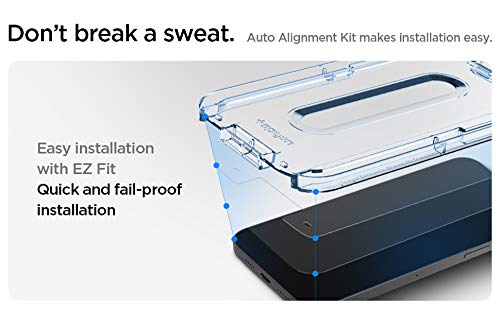
Image: A close-up of the Spigen EZ Fit tray, illustrating the simple and quick application process for the screen protector.
- Remove the protective film from the adhesive side of the tempered glass. Handle the screen protector by its edges to avoid touching the adhesive.
- Carefully lower the screen protector onto the phone screen, guided by the EZ Fit tray. The tray will ensure perfect alignment.
- Once the protector makes contact with the screen, gently press down on the center of the screen protector. The adhesive will begin to spread automatically.
Step 4: Remove Air Bubbles and Finish
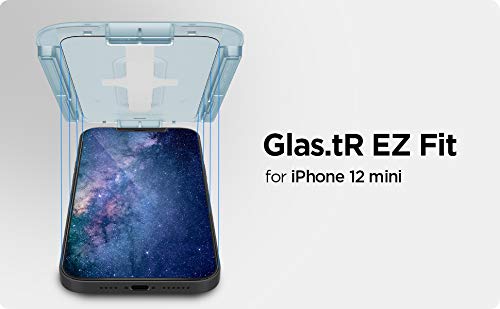
Image: The Spigen EZ Fit installation process, showing the screen protector being gently pressed onto the phone screen within the alignment tray.
- After the adhesive has spread, gently remove the EZ Fit tray.
- If any small air bubbles remain, use the microfiber cloth to gently push them towards the nearest edge of the screen. Most bubbles will disappear within 24-48 hours.
- Wipe the screen protector with the microfiber cloth to remove any fingerprints.
Operating: Key Features and Usage
The Spigen Glas.tR EZ Fit screen protector is designed to provide robust protection and enhanced viewing for your iPhone 12 Mini.
- Blue Light Filter: This protector incorporates a blue light filtering layer to reduce eye strain during prolonged screen use.
- Scratch and Impact Resistance: Made from tempered glass, it offers superior protection against scratches, scuffs, and minor impacts, preserving your phone's original screen.
- High Touch Sensitivity: The ultra-thin design ensures that your iPhone's touch screen responsiveness remains unaffected, providing a seamless user experience.
- Anti-Fingerprint Coating: An oleophobic coating helps resist fingerprints and smudges, keeping your screen cleaner and clearer.

Image: An illustration demonstrating the Spigen Glas.tR Slim Anti BlueLight feature, showing a phone screen with reduced blue light emission.
Maintenance
To maintain the clarity and effectiveness of your screen protector:
- Regularly wipe the screen protector with a clean, soft microfiber cloth to remove dust and fingerprints.
- For stubborn smudges, lightly dampen the microfiber cloth with water or a screen-safe cleaning solution. Avoid harsh chemicals or abrasive materials.
- Do not attempt to peel off and reapply the screen protector, as this can compromise the adhesive and introduce dust.
Troubleshooting
Common Issues and Solutions:
- Air Bubbles:
Small bubbles often disappear naturally within 24-48 hours. For larger bubbles, gently push them towards the nearest edge using a microfiber cloth or a soft card (like a credit card wrapped in cloth). If bubbles persist due to dust, it may indicate improper cleaning during installation, and reinstallation with a new protector might be necessary.
- Misalignment:
The EZ Fit tray is designed to prevent misalignment. If the protector is misaligned immediately after application, it is generally not possible to reposition it without damaging the adhesive or introducing dust. Ensure the phone is correctly seated in the tray during installation.
- Reduced Touch Sensitivity:
Ensure the screen protector is fully adhered to the screen without any gaps or large air pockets. If the issue persists, check your phone's touch settings. This is rare with Spigen Glas.tR protectors.
Specifications
| Brand | Spigen |
| Model Series | Glas.tR EZ Fit |
| Compatible Devices | Apple iPhone 12 Mini |
| Material | Tempered Glass |
| Special Features | Blue Light Filter, Anti-Fingerprint Coating, Anti-Scratch Coating, Easy Application (EZ Fit) |
| Screen Size Compatibility | 5.4 Inches |
| Color | Transparent |
| Item Weight | 0.03 Kilograms |
| Model Number | AGL01814, iP12-5475722601 |
Warranty Information
This Spigen product comes with a carry-in warranty that covers manufacturing defects. Please retain your proof of purchase for warranty claims. The warranty does not cover physical damage or damage resulting from improper installation or misuse.
Customer Support
For further assistance or inquiries, please contact Spigen customer support:
- Customer Support Number: 7207666000
- Customer Support Email: customersupport@croma.com
Manufacturer/Importer/Marketer Name & Address: Spigen
Country of Manufacture: China
Country of Brand Origin: South Korea