
Pure 248482
Pure Elan Connect Portable DAB+ Radio User Manual
Model: 248482
Brand: Pure
1. Introduction
The Pure Elan Connect is a versatile portable radio offering a wide range of listening options including DAB+, FM, and Internet Radio. It features Bluetooth 5.0 connectivity for streaming audio from external devices, a clear TFT color display, and can be powered by mains or batteries for portability. This manual provides detailed instructions for setting up, operating, and maintaining your Elan Connect radio.
2. Safety Information
- Do not expose the unit to rain or moisture to prevent fire or electric shock.
- Ensure proper ventilation. Do not block ventilation openings.
- Use only power adapters specified by the manufacturer. The unit does not include a power adapter; use a standard USB charger (5V, 0.5A to 2A output).
- Do not attempt to disassemble or modify the unit. Refer all servicing to qualified personnel.
- Keep away from direct sunlight, heat sources, and strong magnetic fields.
- When using batteries, ensure they are inserted with correct polarity. Remove batteries if the unit will not be used for a long period.
- Dispose of batteries responsibly according to local regulations.
3. Package Contents
Please check that all items are present:
- Pure Elan Connect Radio
- USB Charging Cable (Power adapter not included)
- User Manual (this document)
4. Product Overview
Familiarize yourself with the main components of your Pure Elan Connect radio.
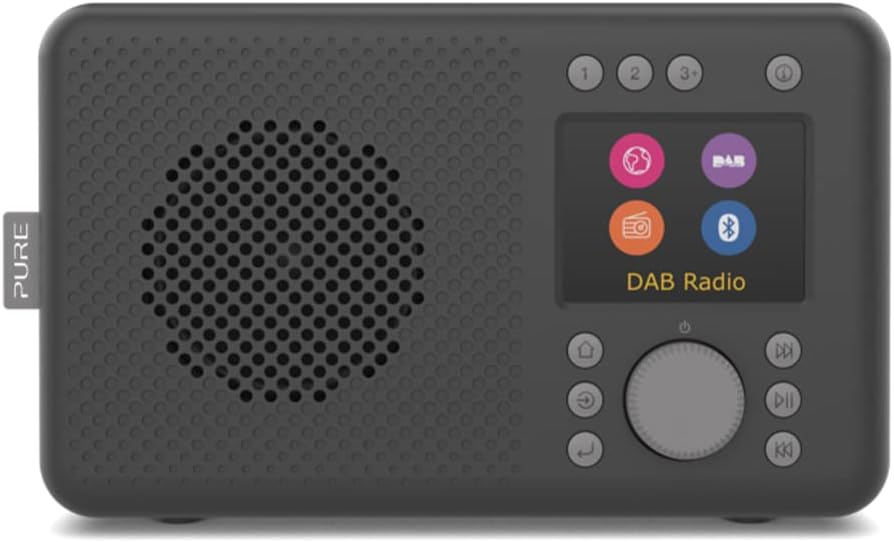
Figure 4.1: Front view of the Pure Elan Connect radio in Charcoal Black. It features a speaker grille on the left, a color TFT display on the right, and control buttons and a rotary dial below the display.

Figure 4.2: Rear view of the Pure Elan Connect radio. It shows the extendable telescopic antenna, a battery compartment cover, a 3.5mm headphone jack, and a micro USB power input port.

Figure 4.3: Dimensions of the Pure Elan Connect radio. The radio measures approximately 21.2 cm in length, 8.9 cm in width, and 12 cm in height.
5. Setup
5.1 Powering On
The Elan Connect can be powered using the supplied USB cable connected to a USB power adapter (not included) or by inserting 4 AA batteries (not included) into the battery compartment on the rear of the unit.
- Mains Power: Connect the micro USB end of the cable to the 'Input 5V 2.0A' port on the back of the radio and the other end to a suitable USB power adapter. Plug the adapter into a wall socket.
- Battery Power: Open the battery compartment cover on the rear. Insert 4 AA batteries, ensuring correct polarity. Close the cover securely.
5.2 Initial Setup Wizard
The first time you power on the radio, it will guide you through an initial setup wizard.
- Language Selection: Use the rotary dial to scroll through the available languages and press the dial to confirm your selection.
- Network Setup (for Internet Radio): The radio will prompt you to connect to a Wi-Fi network.
- Select 'Scan' to find available networks.
- Choose your Wi-Fi network from the list.
- Enter the Wi-Fi password using the rotary dial to navigate characters and press to select.
- Once connected, the radio will confirm the connection.
- Time and Date: The radio can automatically set the time and date via DAB or Internet connection. You can also set it manually.
6. Operating Instructions
Video 6.1: This video demonstrates the physical overview of the Pure Elan Connect radio, including its compact size, the extendable antenna, and the basic interaction with the rotary dial and display for selecting modes and adjusting volume.
6.1 Switching Between Modes
The Elan Connect supports multiple listening modes: Internet Radio, DAB+, FM, and Bluetooth. Press the 'Mode' button (usually labeled with a house icon or 'Menu') to cycle through the available modes or access the main menu to select your desired source.
6.2 Internet Radio
Access thousands of internet radio stations from around the world.
- Select 'Internet Radio' from the mode menu.
- You can browse stations by location, genre, or search for specific stations.
- Use the rotary dial to navigate and select stations.
- To save a station as a preset, press and hold one of the preset buttons (1, 2, 3+) until the display confirms the save.
6.3 DAB+ Radio
Enjoy high-quality digital radio broadcasts.
- Extend the telescopic antenna fully for optimal reception.
- Select 'DAB+' from the mode menu.
- The radio will automatically scan for available DAB+ stations.
- Use the rotary dial to browse and select stations.
- Save stations to presets as described for Internet Radio.
6.4 FM Radio
Tune into traditional FM broadcasts.
- Extend the telescopic antenna fully.
- Select 'FM' from the mode menu.
- Use the rotary dial to manually tune or press the 'Scan' button to auto-scan for stations.
- Save stations to presets as described previously.
6.5 Bluetooth Connectivity
Stream audio wirelessly from your smartphone, tablet, or other Bluetooth-enabled device.
- Select 'Bluetooth' from the mode menu. The radio will enter pairing mode and become discoverable.
- On your external device, enable Bluetooth and search for 'Pure Elan Connect'.
- Select the radio from the list to pair. Once paired, you can play audio through the radio's speaker.
6.6 Using Presets
The Elan Connect allows you to save up to 20 presets for each source (DAB+, FM, Internet Radio).
- Saving a Preset: While listening to a station, press and hold one of the numbered preset buttons (1, 2, or 3+). If you press 3+, the display will show a list of available preset slots (3-20). Use the rotary dial to select a slot and press to confirm.
- Recalling a Preset: Briefly press the corresponding numbered preset button (1, 2, or 3+). If you press 3+, use the rotary dial to select the desired preset from the list and press to confirm.
6.7 Display and Volume Control
- Volume: Rotate the main dial to adjust the volume level.
- Display Brightness: Navigate to 'System Settings' > 'Display' to adjust the brightness level of the TFT color display.
7. Maintenance
- Cleaning: Use a soft, dry cloth to clean the radio's surface. Do not use abrasive cleaners or solvents.
- Antenna: Handle the telescopic antenna with care to avoid bending or breaking.
- Software Updates: The radio supports over-the-air software updates. Check for updates periodically via 'System Settings' > 'Software Update' to ensure optimal performance and access to new features.
8. Troubleshooting
| Problem | Possible Cause / Solution |
|---|---|
| No power / Unit does not turn on. |
|
| No sound. |
|
| Poor DAB+/FM reception. |
|
| Cannot connect to Wi-Fi / Internet Radio not working. |
|
| Bluetooth pairing issues. |
|
9. Specifications
| Feature | Specification |
|---|---|
| Model Number | 248482 |
| Dimensions (L x W x H) | 21.2 x 8.9 x 12 cm |
| Weight | 460 grams |
| Radio Tuners | DAB+, FM, Internet Radio |
| Bluetooth Version | 5.0 |
| Display | 2.4-inch TFT Color Display |
| Presets | 20 per source (DAB+, FM, Internet Radio) |
| Audio Output | Integrated Speaker, 3.5mm Headphone Jack |
| Power Source | Micro USB (5V, 0.5A-2A), 4x AA Batteries |
10. Warranty and Support
Pure products are designed and manufactured to the highest standards. For warranty information and technical support, please refer to the official Pure website or contact your local retailer.
Official Pure Website: www.pure.com
Please retain your proof of purchase for warranty claims.
Related documents248482


Ask a question about this manual
Ask about setup, troubleshooting, compatibility, parts, safety, or missing instructions. Manuals+ will review the question and use this page’s manual context to help answer it.