
Pure 248481
Pure Elan Connect Portable DAB+ Radio User Manual
Model: 248481
1. Introduction
Thank you for choosing the Pure Elan Connect portable DAB+ radio. This manual provides comprehensive instructions for setting up, operating, and maintaining your device. The Elan Connect offers a versatile listening experience with DAB/DAB+ and FM radio, Bluetooth 5.0 connectivity, and a clear TFT colour display. Enjoy your music and radio stations wherever you go, powered by mains or batteries.
2. Important Safety Information
- Do not expose the unit to dripping or splashing liquids.
- Do not place objects filled with liquids, such as vases, on the apparatus.
- Ensure proper ventilation. Do not block any ventilation openings.
- Use only the power supply specified in this manual or on the product label.
- When using batteries, ensure they are inserted with correct polarity. Remove batteries if the unit will not be used for a long period.
- Avoid extreme temperatures.
- Do not attempt to disassemble or modify the unit. Refer all servicing to qualified personnel.
3. Package Contents
Please check the box for the following items:
- Pure Elan Connect Portable DAB+ Radio
- USB Power Cable (Note: Power adapter not included, requires 5V 1-2A USB power adapter)
- Owner's Manual (This document)
4. Product Overview
Familiarize yourself with the main components and controls of your Pure Elan Connect radio.

Figure 4.1: Front View of Pure Elan Connect
This image displays the front of the Pure Elan Connect radio. On the left is the speaker grille. To the right, a TFT colour display is visible, surrounded by various control buttons and a central rotary dial for navigation and selection.

Figure 4.2: Rear View of Pure Elan Connect
The rear view of the radio shows the telescopic antenna, which can be extended for better signal reception. Below it, a battery compartment cover is visible. To the left of the battery compartment, there is a USB power input port and a 3.5mm AUX jack for headphones or external audio input.
Controls and Display:
- TFT Colour Display: Shows station information, menus, and settings.
- Rotary Dial: Used for navigating menus, adjusting volume, and selecting options. Press to confirm.
- Preset Buttons (1, 2, 3+): Quickly access your favourite stations.
- Power Button: Turns the radio on/off or puts it into standby.
- Menu Button: Accesses the main menu.
- Back Button: Returns to the previous screen or menu.
- Source Button: Switches between DAB, FM, Bluetooth, and Internet Radio modes.
- Info Button: Displays additional information about the current station or track.
5. Setup
5.1 Powering Your Radio
The Pure Elan Connect can be powered by mains electricity or 4x AA batteries (not included).
Mains Power:
- Connect the supplied USB power cable to the USB input port on the back of the radio.
- Plug the other end of the USB cable into a compatible USB power adapter (5V, 1-2A, not supplied) and then into a wall socket.
- The radio will power on or enter standby mode.
Battery Power:
- Open the battery compartment cover on the back of the radio.
- Insert 4x AA batteries, ensuring correct polarity (+/-) as indicated inside the compartment.
- Close the battery compartment cover securely.
Note: For optimal battery life, it is recommended to remove batteries when the radio is primarily used with mains power, especially if using rechargeable batteries, to prevent potential drainage when in standby.
5.2 Antenna Setup
For optimal DAB/DAB+ and FM reception, extend the telescopic antenna located on the back of the radio. Adjust its position for the best signal quality.
5.3 Initial Setup Wizard
The first time you power on your Elan Connect, or after a factory reset, a setup wizard will guide you through initial configurations.
- Language Selection: Use the rotary dial to select your preferred language and press to confirm.
- Privacy Policy: Review the privacy policy information. Press the rotary dial to continue.
- Network Configuration (for Internet Radio):
- The radio will scan for available Wi-Fi networks.
- Select your network from the list.
- Enter your Wi-Fi password using the rotary dial to select characters and press to confirm each character.
- Once connected, the radio will confirm the network status.
- Time and Date: The radio can automatically set the time and date via DAB or Internet connection. Confirm your time zone.
Video 5.1: Product Demonstration Video
This video provides a visual guide to the initial setup and key features of the Pure Elan Connect radio, including connecting power, extending the antenna, and navigating the setup wizard. It demonstrates the physical aspects and basic functionality of the device.
6. Operating Instructions
6.1 Switching On/Off
Press the Power button to turn the radio on or off (standby mode).
6.2 Selecting a Source
Press the Source button repeatedly to cycle through available modes: DAB Radio, FM Radio, Internet Radio, and Bluetooth.
6.3 DAB/DAB+ Radio
- Select "DAB Radio" using the Source button.
- The radio will perform a full scan for available DAB stations. This may take a few moments.
- Use the rotary dial to browse the list of stations. Press the dial to select a station.
- To perform a full scan manually, go to Menu > Scan.
6.4 FM Radio
- Select "FM Radio" using the Source button.
- Use the rotary dial to tune to a frequency.
- To auto-scan for the next available station, press and hold the rotary dial.
6.5 Internet Radio
Access thousands of internet radio stations from around the world.
- Select "Internet Radio" using the Source button.
- Navigate through categories such as "Local Stations", "Stations", "Podcasts", or "Search".
- Use the rotary dial to select and confirm your choice.
6.6 Bluetooth Connectivity
Connect your smartphone or other Bluetooth-enabled device to stream audio wirelessly.
- Select "Bluetooth" using the Source button. The radio will enter pairing mode.
- On your Bluetooth device, search for "Pure Elan Connect" in the Bluetooth settings.
- Select the radio to pair. Once connected, you can stream audio from your device.
6.7 Presets
Store and recall your favourite stations quickly.
Saving a Preset:
- Tune to the desired station.
- Press and hold one of the preset buttons (1, 2, or 3+) until "Preset Saved" appears on the display.
- For presets 4-20, press and hold the "3+" button, then use the rotary dial to select a memory slot and press to confirm.
Recalling a Preset:
- Press the desired preset button (1, 2, or 3+) briefly to recall the stored station.
- For presets 4-20, briefly press the "3+" button, then use the rotary dial to select the desired preset and press to confirm.
6.8 Audio Settings (Equalizer)
Adjust the sound profile to your preference.
- Press the Menu button.
- Navigate to Audio Settings or Equalizer.
- Choose from preset equalizer modes (e.g., Normal, Flat, Jazz, Rock, Classical, Pop, News) or select "My EQ" to customize bass and treble levels.
7. Maintenance and Care
- Cleaning: Wipe the radio with a soft, dry cloth. Do not use abrasive cleaners or solvents.
- Storage: If storing for an extended period, remove batteries and store in a cool, dry place.
- Antenna: Handle the telescopic antenna carefully to avoid bending or breaking.
8. Troubleshooting
| Problem | Possible Cause | Solution |
|---|---|---|
| No power / Radio won't turn on. |
|
|
| Poor DAB/FM reception. |
|
|
| Cannot connect to Wi-Fi / Internet Radio not working. |
|
|
| Bluetooth pairing issues. |
|
|
9. Specifications
| Feature | Detail |
|---|---|
| Model Number | 248481 |
| Dimensions (L x W x H) | 8.3 x 3.5 x 4.7 cm |
| Weight | 460 g |
| Tuner Technology | DAB+, FM |
| Connectivity | Bluetooth 5.0, Wi-Fi (for Internet Radio) |
| Display | TFT Colour Display |
| Audio Output | 3.5mm AUX Jack (Headphone) |
| Power Source | Mains (via USB 5V 1-2A adapter, not included), 4x AA Batteries (not included) |
| Station Memory | 20 Presets |
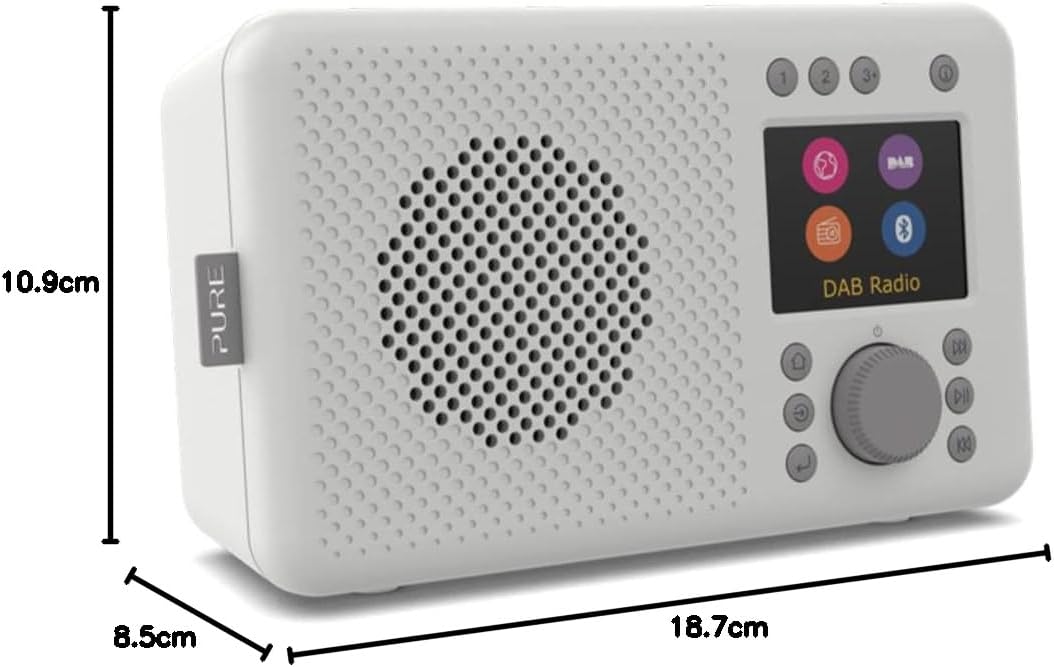
Figure 9.1: Pure Elan Connect Dimensions
This image illustrates the physical dimensions of the Pure Elan Connect radio, indicating a height of 10.9 cm, a depth of 8.5 cm, and a length of 18.7 cm.
10. Warranty and Support
Your Pure Elan Connect radio comes with a standard manufacturer's warranty. Please refer to the warranty card included in your package for specific terms and conditions.
For technical support, troubleshooting assistance, or warranty claims, please visit the official Pure support website or contact their customer service directly. Contact details can typically be found on the Pure website or on the product packaging.
Online Resources: For the latest information, FAQs, and software updates, please visit the Pure official website: www.pure.com
Ask a question about this manual
Ask about setup, troubleshooting, compatibility, parts, safety, or missing instructions. Manuals+ will review the question and use this page’s manual context to help answer it.