
Introduction
Thank you for purchasing the Auna Retro Vintage Stereo System. This versatile audio system combines classic aesthetics with modern functionality, allowing you to enjoy your favorite music from various sources including vinyl records, CDs, cassette tapes, FM/AM radio, USB drives, SD cards, Bluetooth devices, and external AUX sources. This manual provides detailed instructions for setup, operation, and maintenance to ensure optimal performance and longevity of your device.
Safety Instructions
Please read these safety instructions carefully before using the device and keep them for future reference. Incorrect use may result in personal injury or damage to the device.
- Power Source: Ensure the power supply voltage matches the rating label on the unit. Disconnect the power plug from the wall outlet if the unit is not used for a long period.
- Ventilation: Do not block any ventilation openings. Allow sufficient space around the unit for proper airflow.
- Water and Moisture: Do not expose the unit to rain, moisture, or dripping/splashing liquids. Do not place objects filled with liquids, such as vases, on the unit.
- Heat Sources: Keep the unit away from heat sources such as radiators, heat registers, stoves, or other apparatus (including amplifiers) that produce heat.
- Cleaning: Clean only with a dry cloth. Do not use liquid cleaners or aerosol cleaners.
- Servicing: Do not attempt to service this product yourself. Refer all servicing to qualified service personnel.
- Placement: Place the unit on a stable, flat surface. Avoid placing it in direct sunlight or near strong magnetic fields.
- Children: Keep the unit and its accessories out of reach of children.
Package Contents
Please check that all items are present and in good condition upon unpacking:
- 1 x Main Unit (Stereo System)
- 2 x Speakers
- 1 x Remote Control
- 1 x Protection Cover (for turntable)
- 1 x 45 RPM Adapter
- 1 x User Manual (English)
Product Overview
Familiarize yourself with the components and controls of your Auna stereo system.

Image: Front view of the Auna stereo system with turntable, main unit, and two external speakers.
Main Unit Features:
- Turntable: Located on top, with a protective cover and a tone arm. Supports 33 1/3, 45, and 78 RPM records.
- CD Player: Front-loading tray for CDs, CD-R, CD-RW, MP3, WMA discs.
- Cassette Deck: Dual cassette decks for playback and recording.
- Control Panel: Features a blue backlit LCD display, function selector, volume knob, tuning knob, and various playback controls.
- Front Connections: USB port, SD card slot, 3.5mm headphone output.
- Rear Connections: Stereo RCA line output (for external amplifier), RCA jacks for connecting the included speakers, FM antenna.
- Speakers: Two external 2-way speakers with detachable front covers, providing 2 x 5W RMS power.
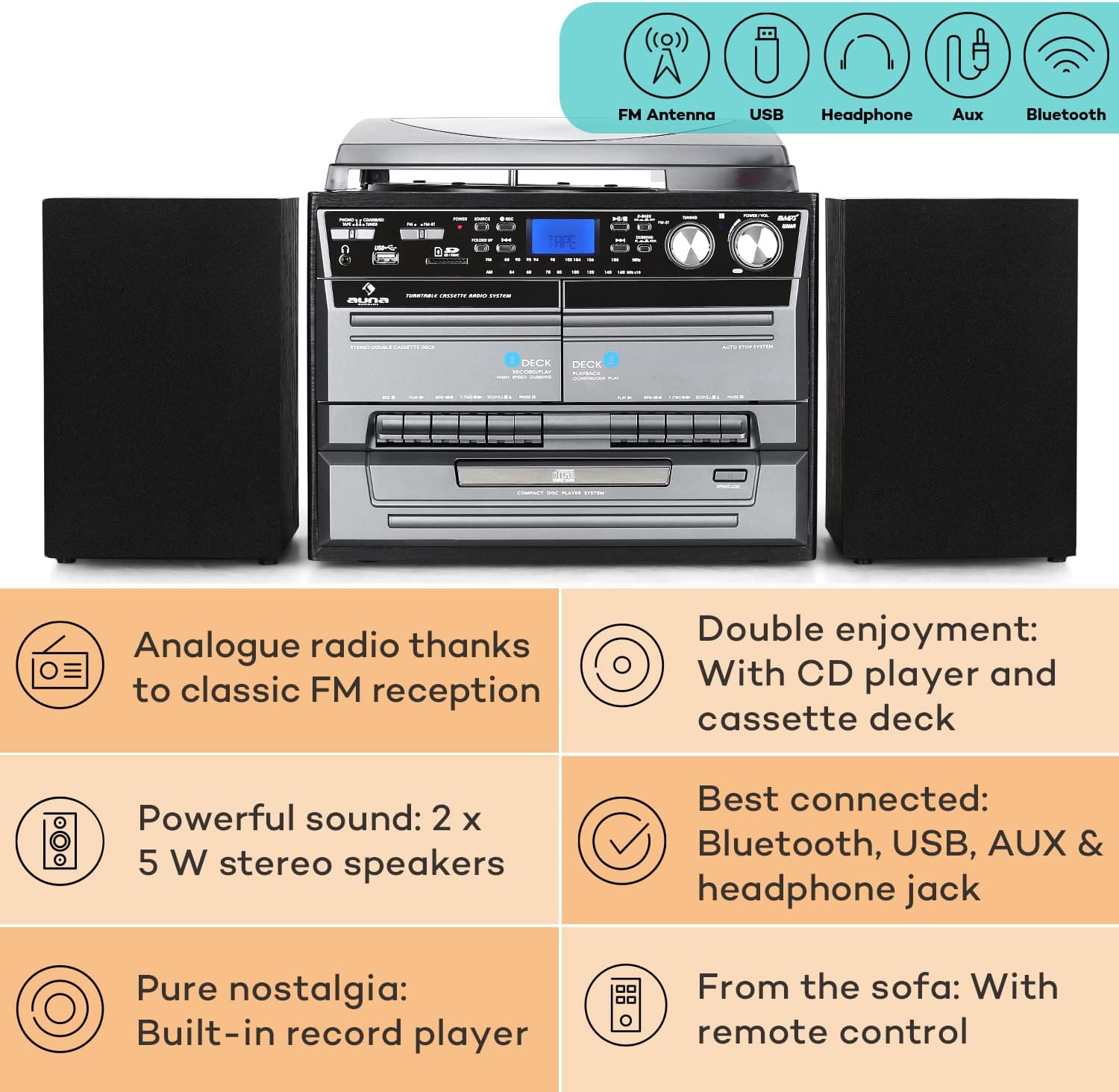
Image: Diagram highlighting key features including FM antenna, USB, Headphone, Aux, Bluetooth, Analog radio, CD player, cassette deck, powerful speakers, built-in record player, and remote control.

Image: Displays the dimensions of the main unit and speakers, along with a detailed view of the rear panel connections including Aux, USB, Headphone, and MP3.
Setup
- Placement: Place the main unit on a stable, level surface. Ensure there is adequate ventilation around the unit.
- Speaker Connection: Connect the two speakers to the RCA speaker output jacks on the rear of the main unit. Ensure correct polarity (red to red, black to black).
- Power Connection: Plug the power cord into a wall outlet.
- Antenna: For FM radio reception, ensure the built-in FM antenna at the rear of the system is extended and positioned for optimal signal.
- Initial Power On: Press the Power button on the unit or remote control to turn on the system.
Operating Instructions
1. Turntable Operation

Image: Detailed view of the turntable with a vinyl record and the CD player tray.
- Open the protective cover.
- Place a record on the turntable platter. For 45 RPM singles, place the included 45 RPM adapter on the center spindle first.
- Select the appropriate speed (33 1/3, 45, or 78 RPM) using the speed selector switch.
- Gently lift the tone arm using the cueing lever and position the stylus over the desired track on the record.
- Lower the tone arm slowly using the cueing lever. The record will begin to play.
- At the end of the record, the turntable will automatically stop spinning due to the auto-stop function. Manually lift the tone arm and return it to its rest.
2. CD Player Operation
- Press the "CD" button on the unit or remote to select CD mode.
- Press the "Open/Close" button to open the CD tray.
- Place a CD (label side up) into the tray and press "Open/Close" again to close the tray.
- The CD will load, and playback will usually start automatically. Use the Play/Pause, Stop, Skip (forward/backward) buttons for control.
- Functions like Repeat (single track/all), Random, and Program (to create a custom playlist) are available via the remote control.
3. Cassette Player Operation
- Press the "TAPE" button to select cassette mode.
- Press the "Eject" button on either Deck 1 or Deck 2 to open the cassette compartment.
- Insert a cassette tape and close the compartment.
- Use the Play, Fast Forward, Rewind, and Stop buttons for control.
- Hi-Speed Dubbing: To copy from Deck 1 to Deck 2, ensure a blank tape is in Deck 2. Start playback on Deck 1 and press the "Record" button on Deck 2.
4. Radio Operation (AM/FM)
- Press the "RADIO" button to select radio mode.
- Use the "Tuning" knob to manually tune to your desired FM or AM station. The frequency will be displayed on the LCD screen.
- Adjust the FM antenna for best reception.
5. USB/SD Playback and Recording

Image: Illustrates wireless music streaming via Bluetooth and the easy operation of the control panel, including USB and SD card slots.
- Insert a USB flash drive into the USB port or an SD card into the SD card slot.
- Press the "USB/SD" button to select the corresponding mode.
- The system will automatically detect and play compatible audio files (MP3, WMA). Use the navigation buttons to browse folders and tracks.
- Recording from Vinyl/CD/Cassette to USB: While playing a source (e.g., vinyl record), press the "Record" button. The audio will be recorded to the connected USB drive. Ensure the USB drive has sufficient free space.
6. Bluetooth Connectivity
- Press the "Bluetooth" button to enter Bluetooth pairing mode. The display will indicate "BT" or "PAIRING".
- On your smartphone, tablet, or other Bluetooth device, enable Bluetooth and search for available devices.
- Select "Auna" (or similar name) from the list of devices. Once paired, the display will show "CONNECTED".
- You can now stream audio wirelessly from your device to the Auna stereo system.
7. AUX Input
- Connect an external audio device (e.g., MP3 player, smartphone) to the AUX input jack on the front or rear of the unit using a 3.5mm audio cable.
- Press the "AUX" button to select AUX mode.
- Audio from the connected device will now play through the system's speakers. Control playback from the external device.
Maintenance
Proper maintenance ensures the longevity and performance of your stereo system.
- Cleaning the Unit: Wipe the exterior of the unit with a soft, dry, lint-free cloth. Do not use abrasive cleaners, waxes, or solvents.
- Cleaning the Stylus: Gently clean the stylus (needle) periodically with a soft brush designed for stylus cleaning, brushing from back to front. A dirty stylus can affect sound quality and damage records.
- Record Care: Keep your vinyl records clean and free of dust. Store them vertically in their sleeves to prevent warping.
- CD/Cassette Care: Handle CDs by the edges. Keep cassette tapes away from strong magnetic fields.
- Dust Cover: Keep the turntable dust cover closed when not in use to protect the platter and stylus.
Troubleshooting
If you encounter issues with your Auna stereo system, please refer to the following common problems and solutions:
| Problem | Possible Cause / Solution |
|---|---|
| No power / Unit does not turn on. |
|
| No sound from speakers. |
|
| Turntable not spinning or playing. |
|
| CD player not reading disc. |
|
| Poor radio reception. |
|
| Bluetooth pairing issues. |
|
Specifications
| Feature | Detail |
|---|---|
| Model Name | Auna Vinyl Record Player |
| Model Number | MG-2500-386WE |
| Brand | AUNA |
| Connectivity Technology | Bluetooth, USB, AUX, Headphone |
| Turntable Speeds | 33 1/3, 45, 78 RPM |
| CD Player Formats | CD, CD-R, CD-RW, MP3, WMA |
| Speaker Output | 2 x 5W RMS |
| Main Unit Dimensions (WxHxD) | 32 x 29 x 29 cm |
| Speaker Dimensions (WxHxD) | 15 x 23 x 15 cm (per speaker) |
| Main Unit Weight | 4.3 kg |
| Speaker Weight | Approx. 950g per piece |
| Power Supply | 230V, 50Hz |
| Included Components | Turntable, 2 Speakers, Protection Cover, Remote Control, 45 RPM Adapter |
Warranty and Support
This product comes with a standard manufacturer's warranty. For detailed warranty information, please refer to the warranty card included in your package or contact Auna customer support.
If you require technical assistance or have questions not covered in this manual, please visit the official Auna website or contact their customer service department. Contact details can typically be found on the manufacturer's website or on your purchase documentation.
For more information, you may visit the AUNA Store on Amazon.
