
1. Introduction
This manual provides essential instructions for the proper use, setup, operation, and maintenance of your Olympus V501024BU000 8-16x40 S Binocular. Please read this manual thoroughly before using the product to ensure optimal performance and longevity. This binocular is designed for various observation activities, including nature, wildlife, birdwatching, sports, and concerts.
2. Package Contents
Verify that all the following items are included in your package:
- Olympus Binocular 8-16x40 S
- Carrying Case
- Neck Strap
- Lens Covers (Objective and Eyepiece)
- Instruction Manual (this document)
3. Setup
3.1 Attaching the Neck Strap
Thread the ends of the provided neck strap through the strap lugs on each side of the binocular body. Secure the strap firmly to prevent accidental drops. Ensure the strap is adjusted to a comfortable length for carrying and quick access.
3.2 Adjusting Eyecups
The eyecups can be adjusted for comfortable viewing. If you wear eyeglasses, twist or push down the eyecups to their lowest position. If you do not wear eyeglasses, twist or pull up the eyecups to a position that allows you to see the full field of view without vignetting.
3.3 Interpupillary Distance Adjustment
Hold the binoculars with both hands and look through them. Adjust the distance between the two barrels by moving them closer together or further apart until you see a single, clear circular field of view. This adjusts the binocular to match the distance between your eyes.
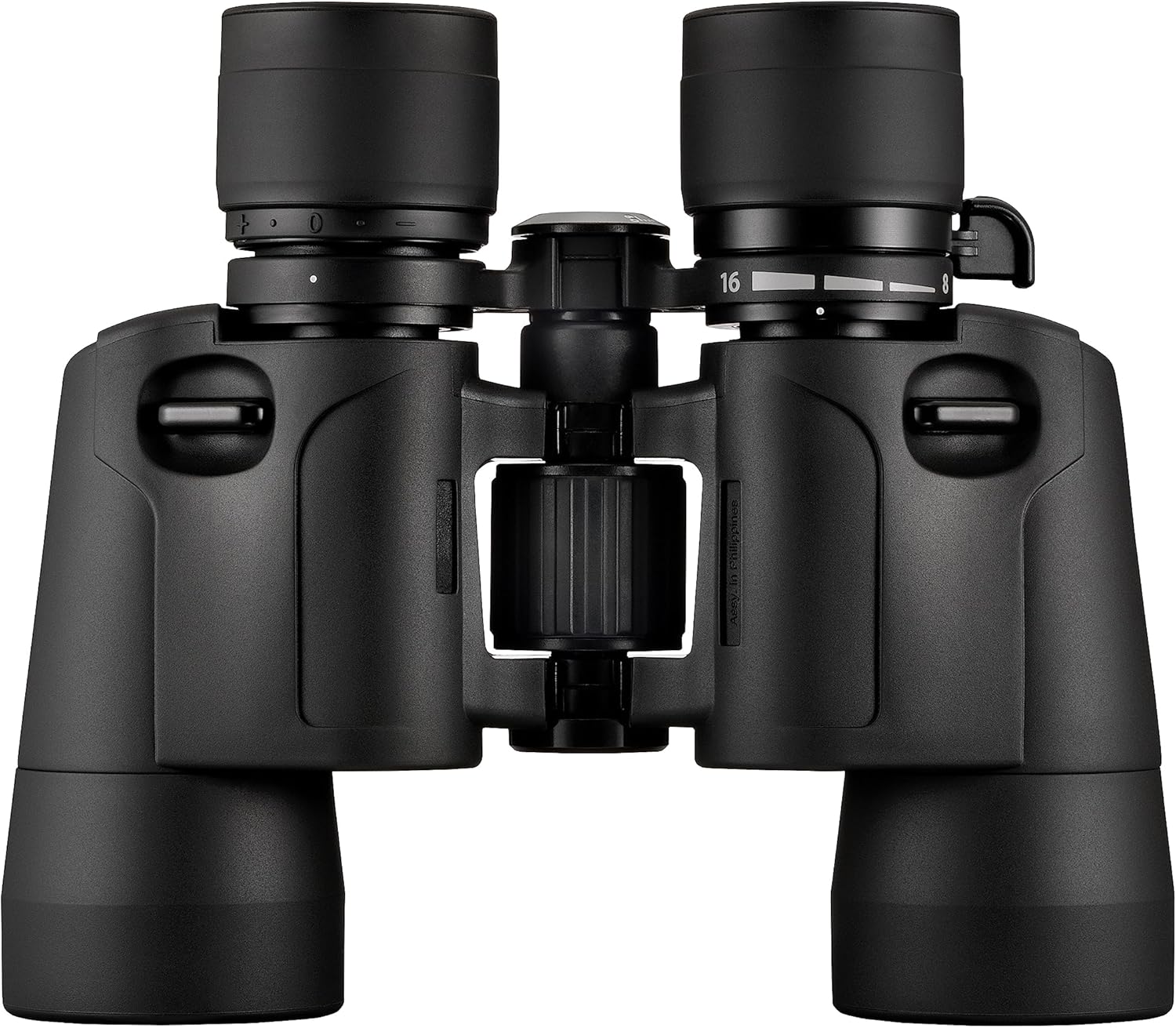
Figure 1: Front view of the Olympus 8-16x40 S Binocular, showing the adjustable eyecups and central focus wheel.
3.4 Diopter Adjustment
To compensate for differences in vision between your left and right eyes:
- Close your right eye or cover the right objective lens.
- Look through the left eyepiece and rotate the central focus wheel until the image is sharp and clear.
- Close your left eye or cover the left objective lens.
- Look through the right eyepiece and rotate the diopter adjustment ring (usually on the right eyepiece) until the image is sharp and clear. Do not use the central focus wheel for this step.
- With both eyes open, the image should now be sharp and clear. From this point on, use only the central focus wheel for focusing on different distances.
4. Operating Instructions
4.1 Focusing
Once the interpupillary distance and diopter are set, use the central focus wheel to bring objects at various distances into sharp focus. Rotate the wheel until the image appears clear.
4.2 Magnification Adjustment (Zoom)
Your Olympus 8-16x40 S binocular features a powerful 8-16x zooming capability. To adjust the magnification, locate the zoom lever or ring, typically near the right eyepiece. Rotate or slide this control to increase or decrease the magnification as desired. Adjust the focus after changing magnification if needed.

Figure 2: Angled view of the Olympus 8-16x40 S Binocular, highlighting the zoom markings (8-16x) and the Olympus branding.
4.3 General Viewing Tips
- For stable viewing, hold the binoculars with both hands. For extended periods, consider resting your elbows on a stable surface or using a tripod adapter (sold separately).
- The large objective lens diameter (40mm) provides bright, high-resolution images, even in low-light conditions.
- The wide field of view assists in quickly locating subjects, especially when observing fast-moving objects like birds or during sports events.
5. Maintenance and Care
5.1 Cleaning Lenses
To clean the lenses, first use a soft brush or a can of compressed air to remove any dust or loose particles. Then, use a clean, soft microfiber cloth specifically designed for optics, along with a small amount of lens cleaning fluid. Wipe gently in a circular motion. Avoid using abrasive cloths or harsh chemicals, as these can scratch the lens coatings.
5.2 Cleaning Body
Wipe the binocular body with a soft, damp cloth. For stubborn dirt, a mild soap solution can be used, but ensure no moisture enters the optical components. The rubber-coated grip provides durability and protection against nature conditions.
5.3 Storage
When not in use, store the binoculars in their protective carrying case in a cool, dry place, away from direct sunlight and extreme temperatures. Always use the provided lens covers to protect the objective and eyepiece lenses from dust and scratches.

Figure 3: A hand holding the Olympus 8-16x40 S Binocular, illustrating its compact size and ergonomic design for comfortable handling.
6. Troubleshooting
If you encounter issues with your binocular, refer to the following common solutions:
- Image is blurry:
- Ensure the central focus wheel is adjusted correctly for your viewing distance.
- Verify that the diopter adjustment is set for your individual eye vision.
- Check that the eyecups are positioned correctly for whether you wear eyeglasses or not.
- Cannot achieve a single circular field of view:
- Adjust the interpupillary distance by moving the binocular barrels closer or further apart until the two images merge into one.
- Image appears dim or unclear:
- Ensure objective and eyepiece lens covers are removed.
- Clean the lenses as described in Section 5.1.
- Confirm that you are observing in sufficient light conditions, although the 40mm objective lens is designed for good performance in low light.
7. Specifications
| Feature | Specification |
|---|---|
| Model Number | V501024BU000 |
| Magnification | 8-16x (Zoom) |
| Objective Lens Diameter | 40 mm |
| Product Dimensions | 7.68 x 7.2 x 0.1 inches |
| Item Weight | 1.75 pounds |
| Brand | Olympus |
| Special Feature | Lightweight |
8. Warranty and Support
For detailed warranty information and customer support, please refer to the official Olympus website or contact your local Olympus authorized dealer. Keep your purchase receipt as proof of purchase for any warranty claims.


