
1. Introduction
Thank you for purchasing the SHARP XL-B512 Stereo Sound System. This micro sound system offers a rich 45-watt sound experience with versatile connectivity options including Bluetooth, CD player, USB, and FM radio. Its elegant design with a wooden speaker housing and LED display complements any living space. This manual provides essential information for setting up, operating, and maintaining your device to ensure optimal performance and longevity.
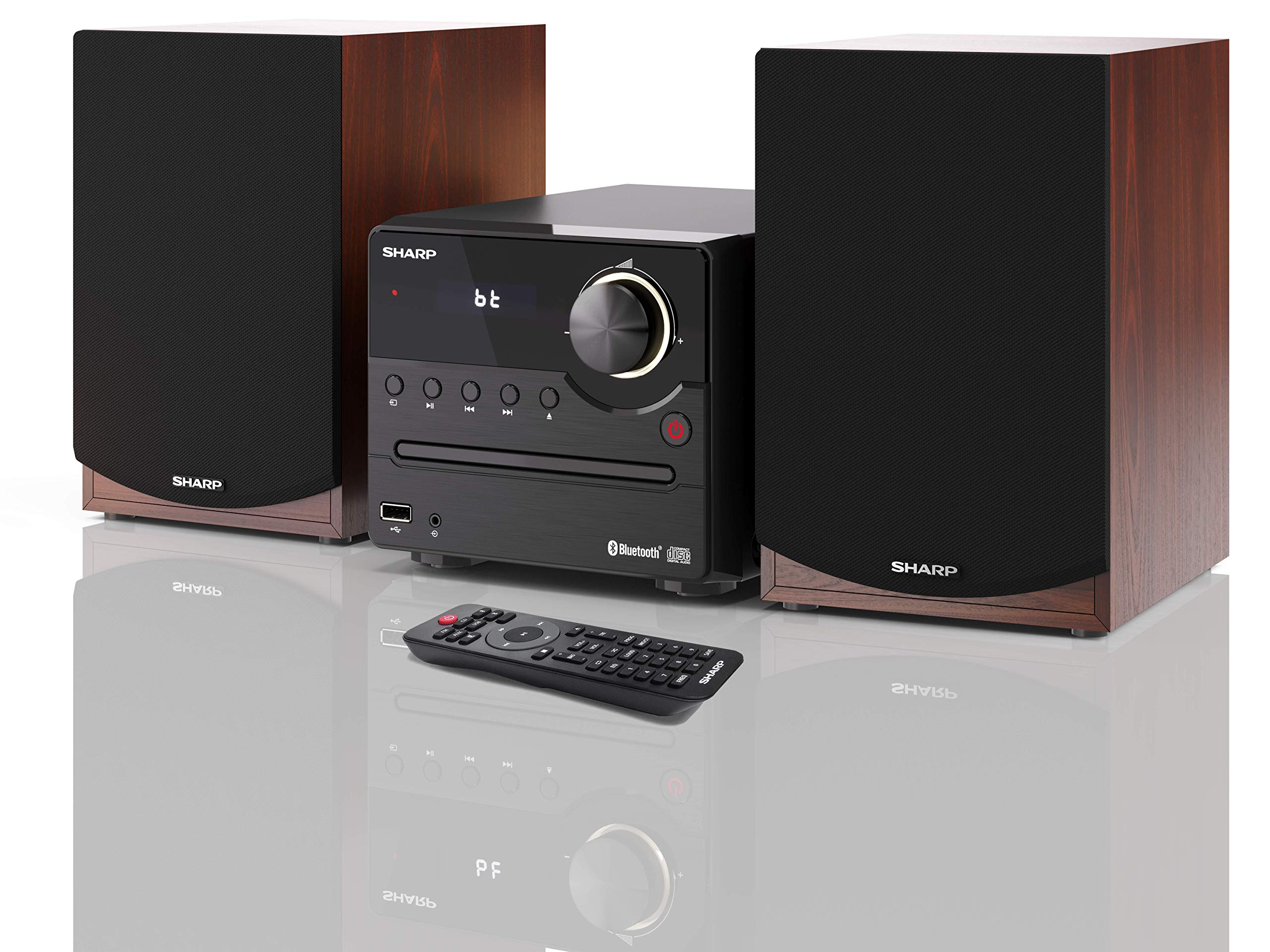
Figure 1: SHARP XL-B512 Stereo Sound System. This image shows the central unit flanked by two wooden-cased speakers, reflecting on a polished surface.
2. Safety Information
Please read all safety instructions carefully before using the product. Keep this manual for future reference.
- Power Source: Use only the specified power supply. Ensure the voltage matches your local power supply.
- Ventilation: Do not block any ventilation openings. Allow adequate space around the unit for proper airflow.
- Water and Moisture: Do not expose the unit to rain, moisture, or dripping/splashing liquids. Do not place objects filled with liquids, such as vases, on the apparatus.
- Heat: Keep the unit away from heat sources such as radiators, heat registers, stoves, or other apparatus (including amplifiers) that produce heat.
- Cleaning: Unplug the unit from the wall outlet before cleaning. Use a dry cloth only.
- Servicing: Do not attempt to service this product yourself. Refer all servicing to qualified service personnel.
3. Package Contents
Verify that all items listed below are included in your package:
- SHARP XL-B512 Micro Sound System (Main Unit)
- Two Speakers (with wooden housing)
- Power Cable
- Remote Control (with batteries)
- Instruction Manual (this document)
- Quick Start Guide
4. Setup
4.1 Speaker Connection
Connect the two speakers to the main unit using the provided speaker cables. Ensure correct polarity (positive to positive, negative to negative) for optimal sound quality.
4.2 Power Connection
Connect the power cable to the AC IN port on the rear of the main unit, then plug it into a wall outlet.

Figure 2: Rear panel connections. This image displays the back of the central unit with ports for speaker wires and the AC power input, alongside the rear of the two speakers.
4.3 Initial Power On
Press the Power button on the main unit or the remote control to turn on the system. The LCD display will illuminate.
5. Operating Instructions
5.1 Front Panel Controls

Figure 3: Front panel controls. This close-up shows the central unit's display, volume knob, and various control buttons for playback and source selection.
- Power Button: Turns the unit on or off.
- Source Button: Cycles through available input sources (CD, FM, Bluetooth, USB, AUX).
- Volume Knob: Adjusts the master volume level.
- Playback Controls: Play/Pause, Stop, Skip Forward/Backward for CD and USB modes.
- USB Port: For connecting USB storage devices for music playback.
- AUX Input: 3.5mm jack for connecting external audio devices.
5.2 CD Playback
- Press the Source button to select 'CD' mode.
- Open the CD tray by pressing the Eject button.
- Place a CD (CD/CD-R/CD-RW/MP3 format) with the label side up into the tray.
- Close the CD tray. The system will read the disc and begin playback automatically or display track information.
- Use the playback controls (Play/Pause, Stop, Skip) to manage your music.
5.3 FM Radio
- Press the Source button to select 'FM' mode.
- The system will automatically search for available stations or you can manually tune.
- To save a station as a preset, tune to the desired station, then press and hold the Preset button (if available on remote) or follow on-screen instructions. The system supports 40 preset memories.
- Use the Preset Up/Down buttons to navigate through saved stations.
5.4 Bluetooth Pairing
- Press the Source button to select 'Bluetooth' mode. The display will show 'bt' and flash, indicating it's in pairing mode.
- On your mobile device, enable Bluetooth and search for available devices.
- Select 'SHARP XL-B512' from the list of devices.
- Once paired, the 'bt' indicator on the system's display will stop flashing. You can now stream audio from your device.
5.5 USB Playback
- Insert a USB storage device into the USB port on the front panel.
- Press the Source button to select 'USB' mode.
- The system will automatically detect and play compatible audio files (MP3).
- Use the playback controls to navigate tracks.
5.6 AUX Input
- Connect an external audio device (e.g., smartphone, MP3 player) to the AUX IN jack on the front panel using a 3.5mm audio cable (not supplied).
- Press the Source button to select 'AUX' mode.
- Play audio from your connected device. The sound will be output through the SHARP XL-B512 system.
5.7 Equalizer Settings
The system features 6 preset equalizers with independent treble and depth control. Use the EQ button on the remote control or main unit to cycle through the presets and adjust sound to your preference.
6. Maintenance
6.1 Cleaning the Unit
Wipe the unit with a soft, dry cloth. Do not use abrasive cleaners, waxes, or solvents as they may damage the finish. Ensure the unit is unplugged before cleaning.
6.2 CD Care
Handle CDs by their edges. Keep them clean and free of scratches. Store CDs in their cases when not in use.
6.3 Speaker Care
The wooden speaker housing can be cleaned with a soft, dry cloth. Avoid placing heavy objects on the speakers or exposing them to direct sunlight or extreme temperatures.
7. Troubleshooting
If you encounter any issues with your SHARP XL-B512 system, refer to the following table for common problems and solutions.
| Problem | Possible Cause | Solution |
|---|---|---|
| No power | Power cable not connected securely; Power outlet not active. | Check power cable connection; Try a different power outlet. |
| No sound | Volume too low; Incorrect source selected; Speaker cables disconnected. | Increase volume; Select correct input source; Check speaker cable connections. |
| Bluetooth not pairing | System not in pairing mode; Device too far; Bluetooth disabled on device. | Ensure system is in Bluetooth pairing mode; Move device closer; Enable Bluetooth on your device. |
| CD not playing | CD inserted incorrectly; CD is dirty or scratched; Incorrect format. | Reinsert CD correctly; Clean CD; Ensure CD is a supported format (CD/CD-R/CD-RW/MP3). |
| Remote control not working | Batteries are dead or inserted incorrectly; Obstruction between remote and unit. | Replace batteries; Ensure correct battery polarity; Remove any obstructions. |
If the problem persists after trying these solutions, please contact customer support.
8. Specifications
Below are the technical specifications for the SHARP XL-B512 Stereo Sound System:
- Model: XL-B512
- Total Output Power: 45 Watts
- Audio Output Mode: Stereo
- Speaker Output Channel Quantity: 2
- Supported Audio Formats: MP3, CD, CD-R, CD-RW
- Tuner Technology: FM PLL Tuner
- FM Frequency Range: 87.5 to 108 MHz
- FM Preset Memory: 40 stations
- Connectivity: Bluetooth, USB, Auxiliary (3.5mm)
- Special Features: 6 Preset Equalizers, LCD Display with white backlight
- Sound System Dimensions (W x H x D): 17 x 22 x 15 cm
- Speaker Dimensions (W x H x D): 14.5 x 17.7 x 22.3 cm (each)
- Item Weight: 4 kg
- Power Source: Corded Electric
- Remote Control: Yes (batteries included)
9. Warranty and Support
Your SHARP XL-B512 Stereo Sound System comes with a standard manufacturer's warranty. Please refer to the warranty card included in your package for specific terms and conditions, including the warranty period and coverage details.
For technical support, service inquiries, or further assistance, please contact your local SHARP customer service center. Contact information can typically be found on the manufacturer's website or in the warranty documentation.


