
1. Product Overview
The SCANGRIP NOVA R is a versatile, rechargeable COB LED floodlight designed for professional use. It offers powerful illumination, a compact design, and practical features for various work environments.

Figure 1: Front view of the SCANGRIP NOVA R floodlight, showcasing its compact and robust design.
Key Features:
- Rechargeable COB LED work light, providing up to 2000 lumens.
- Slim and compact design for portability and ergonomic handling.
- 5-step dimming function to adjust light output.
- Integrated magnetic bracket for flexible positioning.
- Built-in power bank with USB outlet for charging mobile devices.
- Waterproof (IP67) for use in challenging conditions.

Figure 2: The floodlight stored compactly within a tool bag, highlighting its portability.

Figure 3: The floodlight positioned on a workbench in a garage setting, ready for use.
2. Safety Information
Please read these safety instructions carefully before using the SCANGRIP NOVA R floodlight. Failure to follow these instructions may result in electric shock, fire, or serious injury.
- Do not look directly into the light source when it is active. The intense light can cause eye damage.
- Keep the device away from children.
- Do not attempt to open, modify, or repair the device. Refer all servicing to qualified personnel.
- Use only the provided charging cable and charger, or a compatible certified charger.
- Do not expose the device to extreme temperatures, direct sunlight for prolonged periods, or open flames.
- Ensure the charging port cover is securely closed when not charging to maintain IP67 waterproof rating.
- Dispose of the battery responsibly according to local regulations. Do not incinerate.
3. Product Components and Controls
Familiarize yourself with the different parts and controls of your NOVA R floodlight.

Figure 4: Annotated diagram highlighting key features such as the COB LED, battery indicator, dimming controls, built-in power bank, powerful magnets, and flexible stand.
Control Panel (Refer to Figure 4 and Figure 5):
- Power Button: Turns the light on/off.
- Dimming Buttons (+/-): Adjusts light intensity through 5 steps.
- Battery Indicator: Displays current battery charge level.
- USB Output Port: For charging external devices.
- Charging Input Port: For recharging the floodlight.
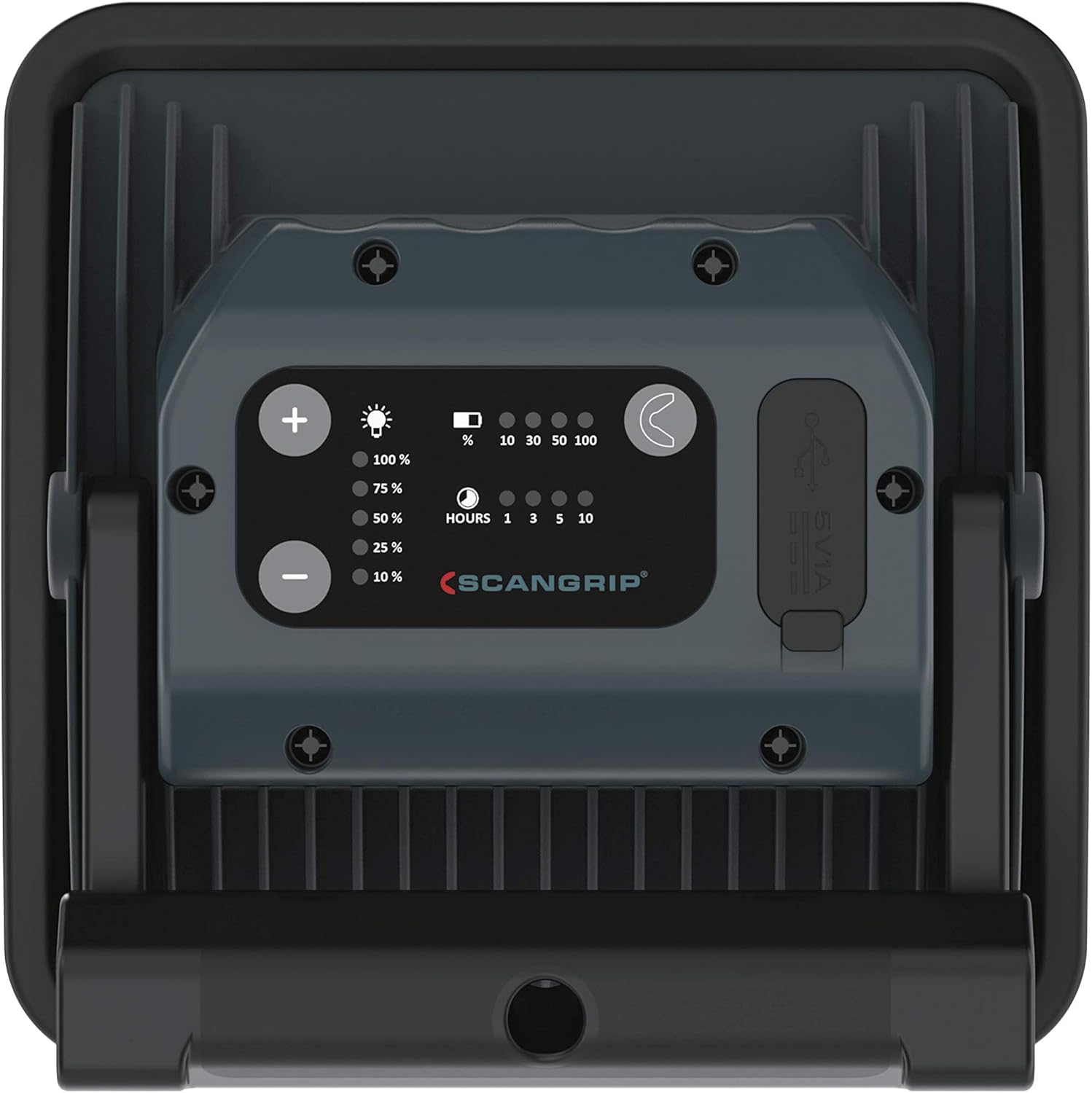
Figure 5: Close-up of the rear control panel, showing the power, dimming buttons, battery indicators, and USB ports.
4. Setup
4.1 Initial Charging
Before first use, fully charge the NOVA R floodlight. This ensures optimal battery performance and longevity.
- Locate the charging input port on the rear of the floodlight.
- Connect the provided charging cable to the floodlight and a suitable power source (e.g., wall adapter, USB port).
- The battery indicator lights will illuminate, showing the charging progress. All lights will be solid when fully charged.
- Once fully charged, disconnect the charging cable and ensure the port cover is sealed.
4.2 Positioning the Floodlight
The NOVA R features a flexible stand and powerful built-in magnets for versatile positioning.
- Flexible Stand: Adjust the stand to tilt the light up to 160 degrees, directing illumination precisely where needed.
- Built-in Magnets: Attach the floodlight to any magnetic surface for hands-free operation. Ensure the surface is stable enough to support the light's weight.

Figure 6: The floodlight magnetically attached to a metal workbench, demonstrating its flexible positioning capabilities.
5. Operating Instructions
5.1 Turning On/Off and Dimming
- Press the power button once to turn the floodlight on.
- Use the '+' and '-' buttons to cycle through the 5 dimming steps to achieve the desired light intensity.
- Press the power button again to turn the floodlight off.

Figure 7: A hand holding the floodlight, illustrating its ergonomic design for handheld use.

Figure 8: A user holding the floodlight to inspect a wall, demonstrating its handheld use and illumination capabilities.
5.2 Using the Power Bank Function
The NOVA R can be used as a power bank to charge your mobile devices.
- Open the cover of the USB output port on the rear of the floodlight.
- Connect your device's USB charging cable to the floodlight's USB output port.
- Charging will begin automatically. Monitor your device's charging status.
- Once charging is complete, disconnect the cable and securely close the USB port cover.

Figure 9: The floodlight actively charging a smartphone via its built-in USB power bank function.
6. Maintenance
6.1 Cleaning
- Ensure the device is turned off and disconnected from any power source before cleaning.
- Wipe the exterior of the floodlight with a soft, damp cloth.
- Do not use abrasive cleaners, solvents, or harsh chemicals, as these can damage the surface.
- Ensure all port covers are closed after cleaning to maintain water resistance.
6.2 Battery Care and Storage
- To prolong battery life, avoid fully discharging the battery frequently.
- If storing the floodlight for an extended period, charge it to approximately 50-70% every few months.
- Store the device in a cool, dry place, away from direct sunlight and extreme temperatures.
7. Troubleshooting
| Problem | Possible Cause | Solution |
|---|---|---|
| Light does not turn on. | Battery is discharged. | Charge the floodlight fully. |
| Light output is dim. | Low battery or dimming setting. | Recharge the battery or increase brightness using the '+' button. |
| Device not charging from USB output. | Floodlight battery is low or cable is faulty. | Ensure floodlight is sufficiently charged. Try a different USB cable. |
| Water ingress despite IP67 rating. | Port covers not properly sealed. | Always ensure all port covers are securely closed before exposure to water. If damage occurred, discontinue use and contact support. |
8. Specifications
| Feature | Detail |
|---|---|
| Model Number | 03.5456US |
| Light Source | COB LED |
| Luminous Flux | Up to 2000 lumens |
| Color Temperature | 6000 Kelvin |
| Dimming Steps | 5 steps |
| Power Source | Battery Powered (1 Lithium Ion battery included) |
| Battery Voltage | 7.3 Volts |
| Operating Time | Up to 20 hours (depending on dimming level) |
| Charging Function | Built-in power bank with USB output |
| Material | Aluminum |
| Ingress Protection | IP67 (Waterproof) |
| Product Dimensions | 6.42 x 2.48 x 6.42 inches |
| Item Weight | 1.74 pounds |
| Operating Temperature | 14 to 104 Degrees Fahrenheit (-10 to 40 Degrees Celsius) |
9. Warranty and Support
For warranty information, technical support, or service inquiries, please refer to the official SCANGRIP website or contact your authorized dealer.
Keep your purchase receipt as proof of purchase for warranty claims.
Manufacturer: ScanGrip
Website: www.scangrip.com


