
ID-COOLING ICEFLOW 240 VGA
ID-COOLING ICEFLOW 240 VGA Graphic Card Cooler Instruction Manual
Model: ICEFLOW 240 VGA
1. Introduction
Thank you for choosing the ID-COOLING ICEFLOW 240 VGA Graphic Card Cooler. This liquid cooling solution is designed to provide superior thermal performance for your graphics card, ensuring stable operation and enhanced longevity. This manual provides detailed instructions for installation, operation, and maintenance to help you get the most out of your new cooler.

Figure 1: ID-COOLING ICEFLOW 240 VGA Graphic Card Cooler
2. Features
- 240mm Radiator: Equipped with a 240mm radiator for efficient heat dissipation.
- Wide Compatibility: Compatible with a broad range of NVIDIA (RTX 20XX, GTX 10XX, 900, GTX 1600 Series) and AMD (RX 200/300 Series) graphic cards.
- Adjustable Copper Base: The aluminum part with a copper base can be adjusted horizontally to match most graphic cards, ensuring optimal heat transfer.

Figure 2: Adjustable copper base for enhanced compatibility.
- Optimized Pump Design: Features a special pump design inside the radiator for improved heat dissipation.
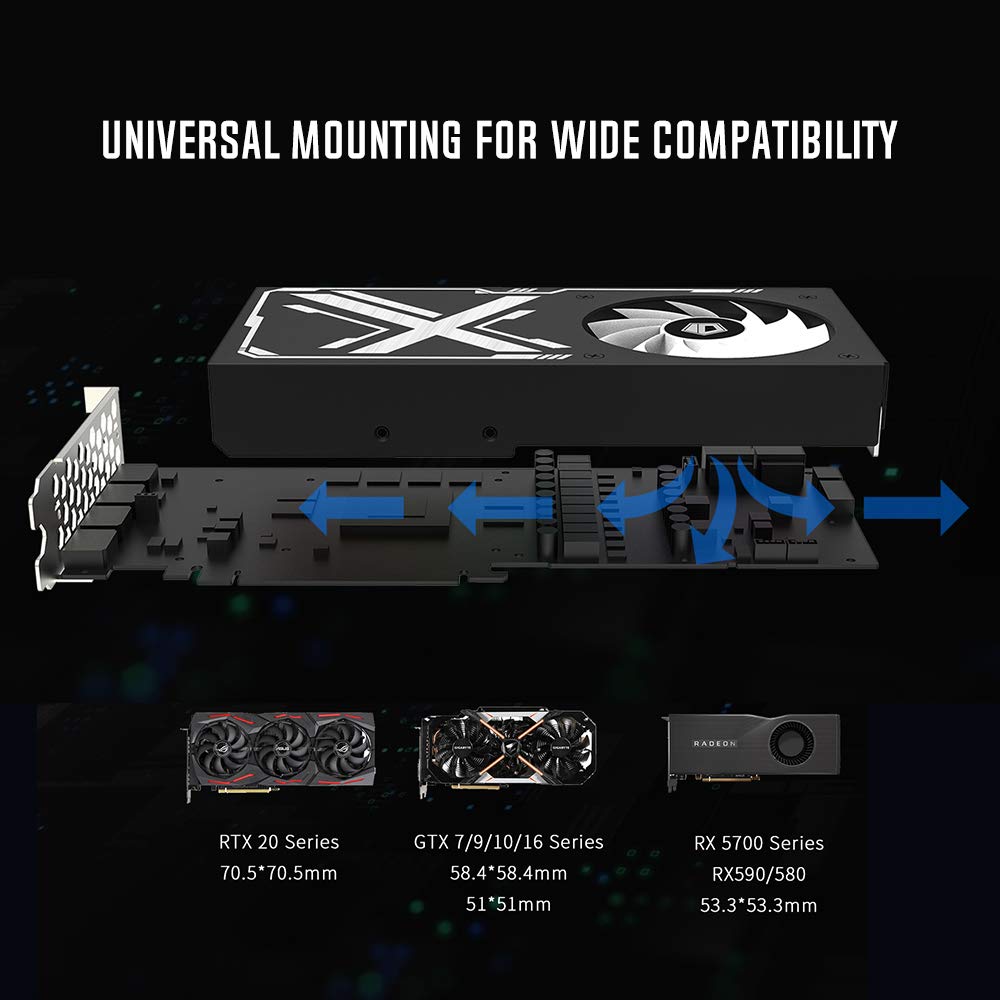
Figure 3: Close-up of the pump mechanism.
- Addressable RGB Lighting: Sync RGB lighting with your motherboard or control it via the included cable controller for personalized aesthetics.

Figure 4: Fans and GPU block featuring Addressable RGB lighting.
- Precise PWM Control: Fan speeds range from 900-2,000 RPM, allowing for precise control over cooling performance and noise levels.
- Low-Noise Operation: Equipped with 4 de-vibration rubber pads on both sides of the fans to minimize noise during operation.
- Universal Mounting: Designed for wide compatibility with various GPU models, ensuring a secure fit.

Figure 5: Diagram illustrating universal mounting compatibility.
3. Package Contents
Please verify that all components are present in your package:
- 1x ICEFLOW 240 VGA Liquid Cooler (Radiator with 2x 120mm fans and GPU block with pump)
- Mounting Brackets for various GPU series (RTX 20 Series, GTX 7/9/10 Series, RX 5700 Series, RX590/580, GTX 16 Series)
- Assorted Screws and Standoffs
- Thermal Paste (syringe)
- Thermal Pads (16 pieces)
- PWM Splitter Cable
- ARGB Cables and Controller

Figure 6: All components included in the ICEFLOW 240 VGA package.
4. Installation Guide
Note: Installation requires careful handling of your graphics card and PC components. If you are unsure, please seek professional assistance.
- Prepare Your Graphics Card:
- Power off your PC and disconnect all cables.
- Carefully remove your graphics card from the PCIe slot.
- Disassemble the existing cooler from your graphics card. This typically involves removing screws from the backplate and around the GPU die.
- Clean the GPU die and surrounding components thoroughly, removing all old thermal paste and thermal pads. Use isopropyl alcohol and a lint-free cloth.
- Apply Thermal Paste and Pads:
- Apply a small amount of the provided thermal paste to the center of the GPU die.
- Carefully place the thermal pads onto the VRAM chips and VRM components as indicated in your GPU's specific layout. Ensure good contact.
- Mount the GPU Block:
- Select the appropriate mounting brackets for your specific graphics card model.
- Attach the chosen brackets to the GPU block.
- Align the GPU block with the mounting holes on your graphics card and gently lower it, ensuring the copper base makes full contact with the GPU die and the thermal pads are compressed.
- Secure the GPU block with the appropriate screws from the back of the graphics card. Tighten screws in a diagonal pattern to ensure even pressure.
- Install the Radiator:
- Determine the optimal mounting location for the 240mm radiator in your PC case (e.g., top, front, or side). Ensure adequate airflow.
- Mount the radiator and its attached fans to the chosen location using the provided screws.
- Connect Cables:
- Connect the pump power cable to an available 4-pin fan header on your motherboard (usually labeled 'CPU_FAN' or 'PUMP_FAN').
- Connect the radiator fans to the provided PWM splitter cable, and then connect the splitter to a motherboard fan header.
- Connect the ARGB cables from the GPU block and fans to the included ARGB controller or directly to a compatible 5V ARGB header on your motherboard.
- Reinstall Graphics Card:
- Carefully reinsert your graphics card into the PCIe slot, ensuring it is fully seated.
- Secure the graphics card to the case with its retaining screw.
- Perform cable management to ensure proper airflow and aesthetics.

Figure 7: Example of the cooler installed within a PC case.
5. Operation
Once installed, the ID-COOLING ICEFLOW 240 VGA operates automatically, managing your GPU's temperature. Fan speeds are controlled via PWM, adjusting based on thermal load. RGB lighting can be customized through your motherboard's software (if connected to an ARGB header) or via the included controller's modes.
6. Maintenance
Regular maintenance ensures optimal performance and longevity of your cooler:
- Dust Cleaning: Periodically clean dust from the radiator fins and fans using compressed air. Ensure the fans are not spinning during cleaning to prevent damage.
- Check Tubing and Connections: Inspect the tubing and connections for any signs of leaks or kinks. Address any issues immediately.
- Thermal Paste: While not frequently required, consider reapplying thermal paste every 1-2 years or if you notice a significant increase in GPU temperatures.
7. Troubleshooting
| Problem | Possible Cause | Solution |
|---|---|---|
| High GPU Temperatures | Improper mounting pressure, insufficient thermal paste, clogged radiator fins, low fan speed settings. | Re-seat GPU block, reapply thermal paste, clean radiator, adjust fan curves in BIOS/software. |
| Pump Noise / Grinding Sound | Air bubbles in the pump, tubes under pressure. | Gently tilt the PC case to help air bubbles move to the radiator. Ensure tubes are not kinked or overly stressed. |
| Fans Not Spinning / RGB Not Working | Loose cable connections, incorrect header connection, software/controller issue. | Check all fan and RGB cable connections. Ensure connected to correct headers (PWM for fans, 5V ARGB for RGB). Restart PC or adjust software settings. |
| Leaking Coolant | Damaged tubing or fittings. | Immediately power off PC. Do not attempt to fix. Contact ID-COOLING support for assistance. |
8. Specifications
| Feature | Specification |
|---|---|
| Model Number | ICEFLOW 240 VGA |
| Brand | ID-COOLING |
| Cooling Method | Water |
| Compatible Devices | Graphic Cards |
| Power Connector Type | 4-Pin |
| Voltage | 12 Volts |
| Noise Level | 30 dB |
| Maximum Rotational Speed | 1600 RPM |
| Package Dimensions | 16.65 x 11.18 x 6.06 inches |
| Item Weight | 2.2 Pounds |
| Date First Available | October 13, 2020 |
9. Warranty and Support
ID-COOLING products are manufactured to the highest quality standards. For warranty information and technical support, please refer to the official ID-COOLING website or contact their customer service directly. Keep your proof of purchase for warranty claims.
Ask a question about this manual
Ask about setup, troubleshooting, compatibility, parts, safety, or missing instructions. Manuals+ will review the question and use this page’s manual context to help answer it.