
1. Introduction
This manual provides essential information for the safe operation, maintenance, and troubleshooting of your Champion Power Equipment 2500-Watt Ultralight Portable Inverter Generator (Model 200951). Please read this manual thoroughly before operating the generator to ensure proper use and to prevent injury or damage.
The Champion 2500-Watt Inverter Generator is designed for portability and efficiency, making it ideal for recreational activities such as camping and tailgating, or for providing temporary power during outages. Its ultralight design and quiet operation are key features, along with its ability to produce clean power suitable for sensitive electronics.

Image: The Champion 2500-Watt Ultralight Portable Inverter Generator, showcasing its compact and robust design.

Image: A person easily carrying the lightweight Champion 2500-Watt Inverter Generator, highlighting its portability.
2. Safety Information
WARNING: Read and understand all safety precautions before operating this generator. Failure to follow these instructions can result in serious injury or death.
2.1 Carbon Monoxide Hazard
- Generator exhaust contains carbon monoxide, a colorless, odorless, poisonous gas.
- Never operate the generator indoors or in partially enclosed areas, even with ventilation.
- Always operate the generator outdoors in an open area, away from windows, doors, and vents.
- Install battery-operated carbon monoxide alarms in your home or RV.
2.2 Fuel Safety
- Gasoline is highly flammable and its vapors are explosive.
- Store fuel in an approved container in a well-ventilated area.
- Never refuel a hot or running engine. Allow the generator to cool before refueling.
- Do not overfill the fuel tank. Leave space for fuel expansion.
2.3 Electrical Safety
- Never operate the generator in wet conditions (rain, snow, wet ground).
- Ensure all electrical connections are secure and in good condition.
- Do not overload the generator. Refer to the wattage ratings.
- Use only grounded extension cords that are rated for outdoor use and the intended load.
2.4 General Safety
- Keep children and pets away from the generator during operation.
- The generator produces heat. Avoid touching hot surfaces.
- Always ensure adequate ventilation around the generator.
- This product contains chemicals known to the State of California to cause cancer and birth defects or other reproductive harm (Proposition 65 warning).
3. Components Overview
Familiarize yourself with the main components and controls of your Champion 2500-Watt Inverter Generator.
3.1 Control Panel
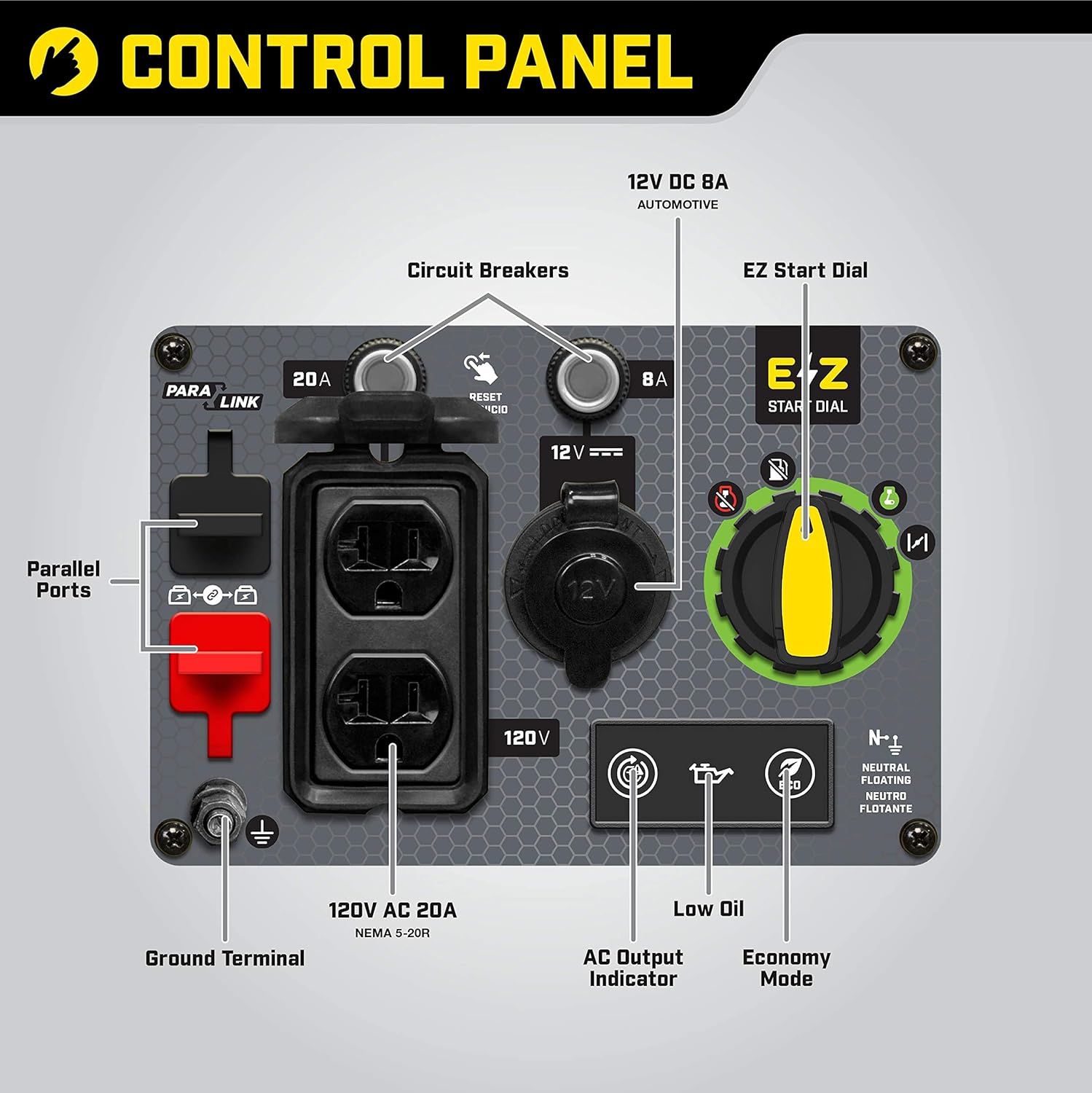
Image: A detailed view of the generator's control panel, showing all outlets, indicators, and the EZ Start Dial.
- EZ Start Dial: Multi-function dial for starting, running, and stopping the engine.
- 120V AC 20A Household Outlets (NEMA 5-20R): Two standard household outlets for connecting electrical devices.
- 12V DC 8A Automotive Outlet: For charging 12V batteries or powering 12V devices.
- Circuit Breakers: Protect the generator from electrical overload.
- AC Output Indicator: Illuminates when the generator is producing power.
- Low Oil Indicator: Illuminates when engine oil is low, triggering automatic shutdown.
- Economy Mode Switch: Reduces engine speed for quieter operation and better fuel economy under light loads.
- Parallel Ports: Allows connection of two Champion 2500-watt inverters for increased power output (requires optional parallel kit).
- Ground Terminal: For connecting a ground wire to prevent electrical shock.
3.2 Included Accessories

Image: A visual representation of the accessories included with the generator: a bottle of 10W-30 engine oil and a dual USB adapter.
- Engine Oil (10W-30)
- Dual USB Adapter
4. Setup
Before first use, the generator requires initial setup, including adding engine oil and fuel.
4.1 Add Engine Oil
- Place the generator on a level surface.
- Remove the oil fill cap/dipstick.
- Carefully pour the provided 10W-30 engine oil into the oil fill opening. The generator has a 0.5-quart (0.47 L) oil capacity. Do not overfill.
- Reinstall the oil fill cap/dipstick securely.
NOTE: The engine is shipped without oil. Do not attempt to start the engine before adding the correct amount of oil.
4.2 Add Fuel
- Ensure the generator is turned off and cool.
- Remove the fuel cap.
- Fill the fuel tank with fresh, unleaded gasoline (minimum 87 octane). The tank capacity is 1.1 gallons (4.2 L).
- Do not fill above the red indicator ring inside the fuel tank.
- Securely replace the fuel cap.
WARNING: Do not use E85 or any other fuel containing more than 10% ethanol. This can damage the engine and void the warranty.
5. Operating Instructions
5.1 Starting the Generator
- Place the generator on a flat, level surface outdoors, away from any structures or vents.
- Ensure all electrical devices are unplugged from the generator.
- Turn the EZ Start Dial to the 'CHOKE' position (for cold starts). For warm starts, turn to 'RUN'.
- Pull the recoil start handle slowly until resistance is felt, then pull quickly and firmly.
- Once the engine starts, slowly turn the EZ Start Dial to the 'RUN' position.
- Allow the generator to run for a few minutes to warm up before connecting electrical loads.
5.2 Connecting Electrical Loads
- Plug in the devices you wish to power. Ensure the total wattage does not exceed the generator's running wattage (1850 watts).
- For sensitive electronics, the generator provides Clean Power (<3% THD).
5.3 Economy Mode
- The Economy Mode switch reduces engine speed when electrical load is low, resulting in quieter operation, extended engine life, and improved fuel efficiency.
- Flip the Economy Mode switch to 'ON' for light loads.
- Flip the switch to 'OFF' when connecting high-wattage appliances or when the generator needs to run at full speed.
5.4 Parallel Operation
The Champion 2500-Watt Inverter Generator is Parallel Ready, allowing you to connect two identical 2500-watt Champion inverters to double your power output. An optional parallel kit (not included) is required for this function.

Image: Two Champion 2500-Watt Inverter Generators linked together, providing enhanced power for an RV setup.

Image: A daytime view of two Champion 2500-Watt Inverter Generators operating in parallel to power a recreational vehicle.
Follow the instructions provided with the parallel kit for safe and correct connection.
5.5 Shutting Down the Generator
- Unplug all electrical loads from the generator.
- Allow the generator to run for a few minutes without load to cool down.
- Turn the EZ Start Dial to the 'OFF' position.
6. Maintenance
Regular maintenance is crucial for the longevity and optimal performance of your generator.
6.1 Maintenance Schedule
| Service Item | Frequency |
|---|---|
| Check Engine Oil Level | Before each use |
| Clean Air Filter | Every 50 hours or annually |
| Change Engine Oil | First 5 hours, then every 50 hours or annually |
| Check Spark Plug | Every 100 hours or annually |
| Clean Fuel Filter | Every 100 hours or annually |
6.2 Engine Oil Change
- Run the engine for a few minutes to warm the oil.
- Turn off the engine and place a drain pan beneath the oil drain plug.
- Remove the oil fill cap/dipstick and the oil drain plug.
- Allow all oil to drain completely.
- Reinstall the oil drain plug and tighten securely.
- Refill with 0.5 quarts (0.47 L) of 10W-30 engine oil.
- Reinstall the oil fill cap/dipstick.
6.3 Air Filter Maintenance
A dirty air filter can reduce engine performance and increase fuel consumption. Clean or replace the air filter as needed.
6.4 Spark Plug Inspection
Inspect the spark plug for wear and proper gap. Replace if necessary with the recommended spark plug type.
7. Troubleshooting
This section provides solutions to common issues you might encounter with your generator. For more detailed troubleshooting, please refer to the official Troubleshooting Guide PDF.
- Engine will not start: Check fuel level, oil level, spark plug condition, and ensure the EZ Start Dial is in the correct position.
- No power output: Check circuit breakers, ensure no overload, and verify the AC Output Indicator is on.
- Engine runs rough: Check fuel quality, air filter cleanliness, and spark plug condition.
- Low oil indicator light is on: Add engine oil to the correct level. The generator will shut down automatically if oil is too low.
For a comprehensive guide, download the Troubleshooting Guide (PDF).
8. Specifications
| Feature | Detail |
|---|---|
| Brand | Champion Power Equipment |
| Model Name | 2500-Watt |
| Item Model Number | 200951 |
| Starting Wattage | 2500 Watts |
| Running Wattage | 1850 Watts |
| Fuel Type | Gasoline |
| Tank Volume | 1.1 Gallons (4.2 L) |
| Runtime (25% load) | Up to 11.5 hours |
| Noise Level (23 ft.) | 53 dBA |
| Engine Type | 4 Stroke |
| Engine Displacement | 79 Cubic Centimeters |
| Oil Capacity | 0.5 Quarts (0.47 L) |
| Voltage | 120 Volts |
| Frequency | 60 Hz |
| THD (Total Harmonic Distortion) | <3% (Clean Power) |
| Item Weight | 39 Pounds |
| Product Dimensions (L x W x H) | 17.3" x 12" x 17.7" |
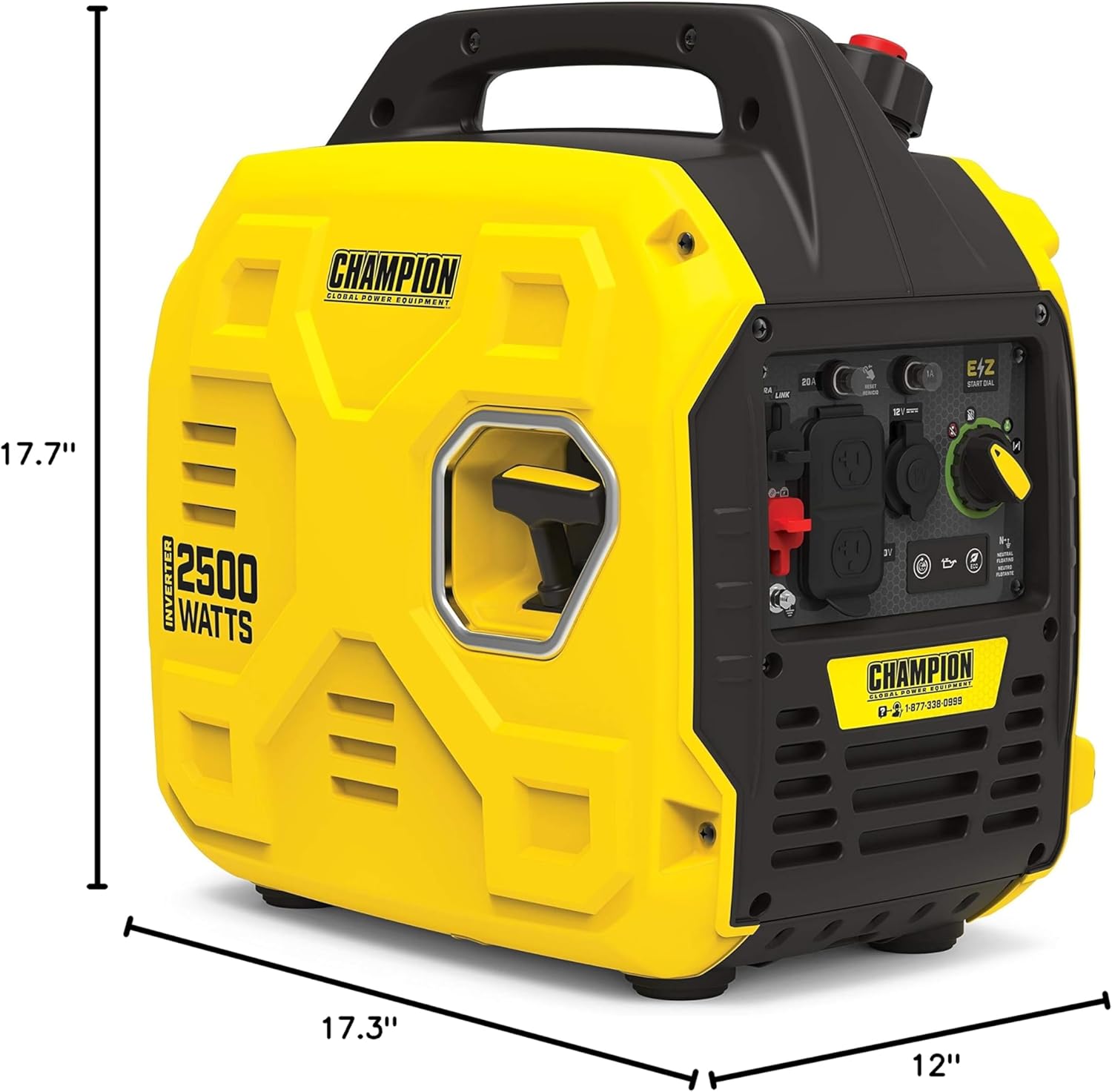
Image: Visual representation of the generator's dimensions for easy reference.
9. Warranty and Support
Champion Power Equipment stands behind its products with comprehensive support.
9.1 Limited Warranty
Your Champion 2500-Watt Ultralight Portable Inverter Generator is backed by a 3-year limited warranty. This warranty covers defects in material and workmanship under normal use and service.
9.2 Technical Support
Champion Power Equipment provides FREE lifetime technical support from dedicated experts. If you have any questions or require assistance, please contact Champion Support.
9.3 Additional Resources
For more detailed information, including safety guidelines, assembly, operation, and maintenance, please refer to the official User Manual: