
1. Introduction
Thank you for choosing the SIRUI AM-223+B-00K Carbon Fiber Travel Tripod. This compact and versatile tripod kit is designed for photographers seeking a lightweight, stable, and highly adjustable support solution for mirrorless cameras, DSLRs, and other photographic equipment. Constructed from durable carbon fiber and featuring a 360° Arca-Swiss compatible ball head, this tripod is ideal for various shooting scenarios, from macro photography to travel and desktop use. Please read this manual carefully to ensure proper setup, operation, and maintenance of your new tripod.
2. Product Overview & Key Features
The SIRUI AM-223+B-00K tripod combines portability with robust performance. Its carbon fiber construction ensures a lightweight yet strong frame, capable of supporting significant loads. The included B-00K ball head offers precise control and compatibility with standard quick release plates.
- Carbon Fiber Construction: Made from premium carbon fiber, providing excellent strength-to-weight ratio.
- Compact & Lightweight: Folded height of 12.1 inches (215mm) and a total weight of approximately 1.62 lbs (0.73 kg) for easy portability.
- Adjustable 3-Section Legs: Features quick-release twist-locks for easy height adjustment from 2.3 inches (58mm) to 13.8 inches (350mm).
- Flexible Leg Angles: Three-position leg angle adjustment system (22°, 55°, 85°) allows for versatile shooting positions, including ultra-low angles.
- B-00K Arca-Swiss Ball Head: A durable aluminum alloy ball head with 360° panoramic rotation, a vertical notch for portrait shooting, and independent locking knobs for precise control.
- High Load Capacity: Tripod supports up to 33 lbs (15 kg), and the ball head supports up to 22.05 lbs (10 kg).
- Convertible Mounting Screw: Features a convertible 1/4" and 3/8" mounting screw for broad compatibility with cameras and accessories.
- Non-slip Design: Equipped with wear-resistant rubber feet and retractable stainless steel spikes for stability on various terrains.
- Accessory Ports: Includes 1/4" accessory ports for attaching microphones, LED lights, monitors, or phone clips.

Image: SIRUI AM-223+B-00K Tripod with a camera mounted, showcasing its compact size and stability.

Image: Detailed view of the SIRUI AM-223+B-00K tripod's ball head, highlighting its smooth panoramic capabilities.
3. What's in the Box
Upon unpacking, please ensure all the following components are present:
- 1 x Mini Tripod AM-223
- 1 x Ball Head B-00K
4. Setup Instructions
4.1 Attaching the Ball Head
The B-00K ball head typically comes pre-attached. If not, align the 3/8" screw on the tripod platform with the threaded hole at the base of the ball head and rotate clockwise until secure. Ensure it is firmly tightened to prevent wobbling.
4.2 Extending and Retracting Legs
Each leg consists of three sections with twist-lock mechanisms. To extend a leg section, twist the lock counter-clockwise to loosen, pull the leg section to the desired length, and then twist clockwise to tighten securely. Repeat for all sections and legs.

Image: Illustration of the 3-section adjustable height of the tripod legs, showing minimum and maximum extensions.
4.3 Adjusting Leg Angles
The tripod legs feature a 3-position angle adjustment system. Press the blue semi-automatic angle adjustment button located at the top of each leg to release the lock. Adjust the leg to one of the three available angles (22°, 55°, or 85°) and ensure the lock engages firmly. This allows for stable positioning on uneven surfaces or for achieving very low shooting angles.

Image: Demonstrates the flexible leg angle adjustments of the tripod, showing different positions for varied shooting needs.
4.4 Changing Feet (Rubber/Spikes)
The tripod comes with wear-resistant rubber feet suitable for most surfaces. For enhanced stability on soft ground, ice, or uneven terrain, the rubber feet can be retracted to reveal stainless steel spikes. Simply twist the rubber foot to expose the spike.
Video: Demonstrates the SIRUI AM223B00K carbon mini tripod, including the twist leg locks and interchangeable stainless steel spikes for different terrains.
4.5 Mounting Your Camera
Attach your camera to the quick release plate by screwing the 1/4" or 3/8" screw into the camera's tripod socket. Ensure the plate is securely fastened. Then, slide the quick release plate with your camera into the ball head's clamp. Tighten the clamp knob firmly. The ball head features a safety lock to prevent accidental sliding.

Image: Illustrates the wide compatibility of the tripod with various devices such as SLR cameras, digital cameras, camcorders, and phone clips.
5. Operating Instructions
5.1 Adjusting Ball Head Angle
Loosen the main locking knob on the B-00K ball head to adjust your camera's angle. You can achieve horizontal, portrait, high-angle, and low-angle shots. Once the desired angle is set, tighten the main locking knob firmly.

Image: Shows the smooth panoramic ball head and its ability to achieve various shooting angles including horizontal, portrait, high-angle, and low-angle.
5.2 Panoramic Shooting
The B-00K ball head features a 360° panorama base. Loosen the panoramic locking knob (usually located at the base of the ball head) to rotate the camera horizontally without affecting the tilt. This is ideal for creating panoramic images. Tighten the knob once your panoramic sequence is complete.
5.3 Macro and Low-Angle Shooting
For macro photography or extremely low-angle shots, adjust the leg angles to their widest position (85°). The tripod's design allows for stable operation very close to the ground, providing unique perspectives.
Video: Highlights the lightweight desktop tripod's features, including its ability to achieve low angles for macro photography.
5.4 Using Accessory Ports
The tripod includes 1/4" accessory ports on the spider. These ports allow you to attach various accessories such as external microphones, LED lights, field monitors, or smartphone holders, expanding your creative possibilities.
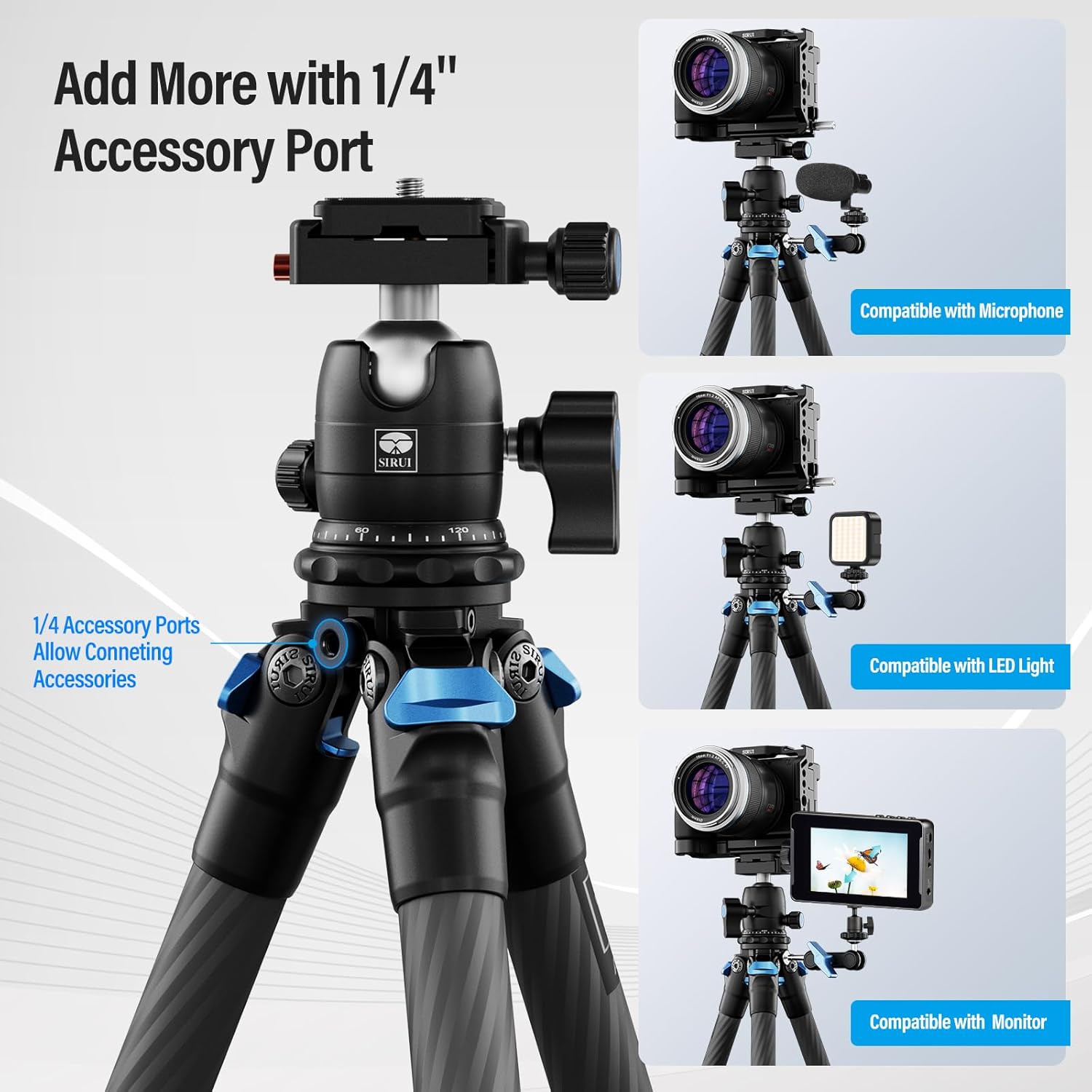
Image: Shows the 1/4" accessory ports on the tripod, demonstrating compatibility with microphones, LED lights, and monitors.
6. Maintenance
To ensure the longevity and optimal performance of your SIRUI tripod, follow these maintenance guidelines:
- Cleaning: After use, especially in dusty or sandy environments, wipe down the tripod legs and ball head with a soft, dry cloth. If necessary, use a slightly damp cloth and mild soap, then dry thoroughly.
- Lubrication: The twist-lock mechanisms and ball head generally do not require lubrication. If movement becomes stiff, consult SIRUI customer support.
- Storage: Store the tripod in a dry, cool place, away from direct sunlight and extreme temperatures. Use the provided carrying bag for protection during transport and storage.
- Inspection: Periodically check all screws, knobs, and leg locks for tightness. Tighten any loose components using the provided Allen key if necessary.
7. Troubleshooting
If you encounter any issues with your tripod, please refer to the following common solutions:
- Tripod is unstable: Ensure all leg sections are fully extended and their twist-locks are securely tightened. Verify that the leg angle locks are engaged. Check that the ball head is firmly attached to the tripod.
- Ball head movement is stiff: Loosen the main locking knob completely. If the issue persists, ensure no sand or debris is obstructing the ball. Clean the area if necessary.
- Camera slides on ball head: Ensure the quick release plate is securely attached to your camera and the ball head's clamp knob is fully tightened. Check that the safety lock mechanism is engaged.
- Leg sections do not extend/retract smoothly: Check for any debris in the twist-lock mechanisms. Clean the leg sections and locks. Avoid over-tightening the twist-locks.
If these solutions do not resolve the issue, please contact SIRUI customer support for further assistance.
8. Specifications
| Feature | Detail |
|---|---|
| Model | AM-223+B-00K |
| Material | Carbon Fiber |
| Sections | 3 |
| Min Tube Diameter | 16mm / 0.63" |
| Max Tube Diameter | 22mm / 0.87" |
| Min Height | 58mm / 2.3" |
| Max Height | 350mm / 13.8" |
| Retracted Height | 215mm / 8.5" |
| Tripod Weight | 1.17 lbs (0.53 kg) |
| Ball Head Weight | 0.45 lbs (0.20 kg) |
| Total Item Weight | 1.65 lbs (0.75 kg) |
| Max Load (Tripod) | 33 lbs (15 kg) |
| Max Load (Ball Head) | 22.05 lbs (10 kg) |
| Tripod Head Type | Ball Head (B-00K) |
| Compatible Devices | Camera |
| Special Features | Compact, Lightweight, Mini, Portable, Tabletop, Twist Leg Lock, 360° Panorama, Arca-Swiss Compatible |
| Product Dimensions | 12 x 3.8 x 3.9 inches |
9. Warranty and Support
SIRUI products are manufactured with high-quality materials and craftsmanship. For warranty information and customer support, please refer to the official SIRUI website or contact your local distributor. Keep your purchase receipt as proof of purchase for any warranty claims.
For direct support, you may contact SIRUI USA, the seller of this product.


