
1. Introduction
This manual provides instructions for the NKF SE32HY19T Remote Control, designed as a replacement for various SEIKI Smart TV models. This remote control requires no programming or pairing; simply install batteries, and it is ready for use.
Package Contents:
- 1 x NKF SE32HY19T Remote Control
- (Batteries and User Manual are not included in the package)

Image 1.1: The NKF SE32HY19T Remote Control, compatible with SEIKI Smart TVs.
2. Setup
Battery Installation
The NKF SE32HY19T Remote Control requires two (2) AAA 1.5V alkaline batteries (not included). Follow these steps to install the batteries:
- Locate the battery compartment on the back of the remote control.
- Press down on the tab and slide the battery cover downwards to open it.
- Insert two AAA batteries, ensuring the positive (+) and negative (-) terminals align correctly with the markings inside the compartment.
- Slide the battery cover back into place until it clicks securely.
Once batteries are installed, the remote control is ready for immediate use with compatible SEIKI Smart TV models. No programming or pairing is required.

Image 2.1: Battery compartment for two AAA batteries.
Video 2.1: Demonstration of battery installation for the remote control. This video shows how to open the battery compartment, insert two AAA batteries, and close the compartment securely.
3. Operating Instructions
The NKF SE32HY19T Remote Control provides full access to all functions of your compatible SEIKI Smart TV. Below is a guide to the main buttons and their functions.

Image 3.1: Overview of remote control buttons and their functions.
Key Functions:
- POWER: Turns the TV on or off.
- MUTE: Mutes or unmutes the TV sound.
- Number Keys (0-9): Direct channel selection.
- VUDU, YouTube, Pandora, Netflix: Direct access buttons for streaming applications.
- MENU: Accesses the TV's main menu.
- SOURCE: Selects input sources (HDMI, AV, etc.).
- Navigation Pad (Up/Down/Left/Right/OK): Navigates menus and confirms selections.
- RETURN/EXIT: Returns to the previous screen or exits a menu.
- VOL +/-: Adjusts volume up or down.
- CH +/-: Changes channels up or down.
- Playback Controls (Play, Pause, Fast Forward, Rewind, Stop): Controls media playback.
- Color Buttons (Red, Green, Yellow, Blue): Functions vary by TV menu or application.
- CH.LIST: Displays the channel list.
- F.MODE: Function Mode.
- S.MODE: Sound Mode.
- V-CHIP: Accesses V-Chip settings for parental controls.
- CC: Activates/deactivates Closed Captions.
- MTS: Multi-channel Television Sound.
- ASPECT: Changes the screen aspect ratio.
- SLEEP: Sets the sleep timer.
- AUTO: Automatic picture adjustment.

Image 3.2: The remote provides simple and intuitive access to TV functions and applications.
4. Specifications
| Feature | Detail |
|---|---|
| Model Number | SE32HY19T |
| Brand | NKF |
| Compatible Devices | SEIKI Smart Televisions (Models: SE40FYP1T, SE58UY06, SE65UY06, SE43FYT, SE32HY19T, SE-50FYT, SE40HYT, SE40FYT, SE50FYT, SE32HY27-D, SE55UET, SE32HYT, SE48UXC4T) |
| Connectivity Technology | Infrared (IR) |
| Power Supply | 2 x 1.5V AAA Batteries (Alkaline recommended) |
| Special Feature | No Programming Required |
| Maximum Range | Up to 10 meters (33 feet) |
| Product Dimensions (L x W x H) | 24.51 x 5.05 x 2.21 cm (9.64 x 1.96 x 0.78 inches) |
| Item Weight | 90.72 g (0.2 lbs) |
| Material | ABS |
| Color | Black |
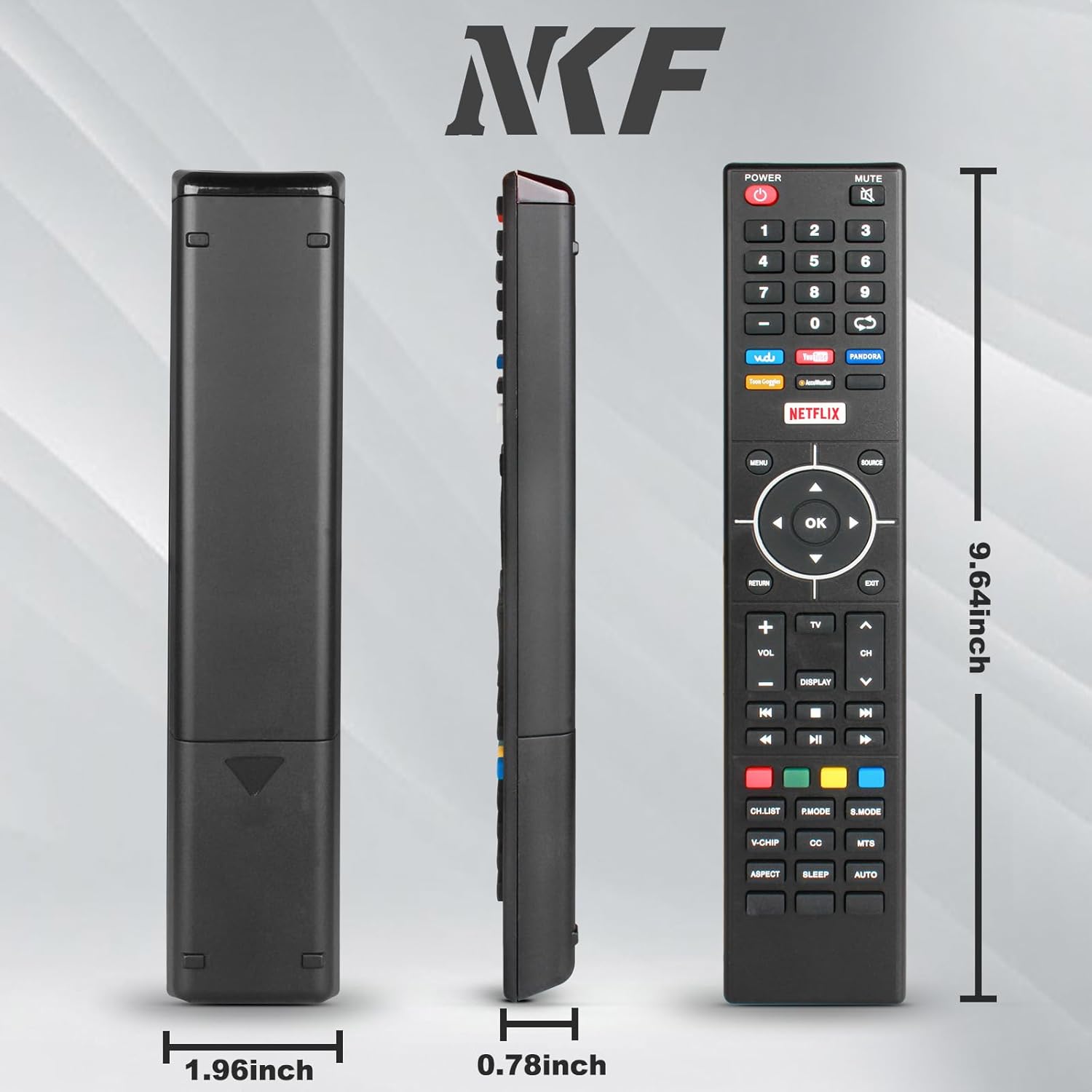
Image 4.1: Remote control dimensions.

Image 4.2: The remote control operates effectively up to 10 meters (33 feet).
5. Troubleshooting
Common Issues and Solutions:
- Remote is not responding:
- Ensure new AAA batteries are correctly installed with the proper polarity (+/-).
- Replace old or depleted batteries with fresh ones.
- Ensure there are no obstructions between the remote control and the TV's infrared sensor.
- Confirm the remote is pointed directly at the TV.
- Specific buttons are not working:
- Check for any physical damage to the buttons.
- Ensure the remote is compatible with your specific SEIKI TV model. While this remote is broadly compatible, some older or very new models might have slight variations.
- Remote range is reduced:
- Replace batteries with fresh ones. Low battery power can reduce the effective range.
- Ensure no strong light sources (like direct sunlight or bright fluorescent lights) are interfering with the IR signal.
This remote control does not require programming or pairing. If issues persist after following these steps, please refer to the support section.
6. Warranty Information
Specific warranty details for this product are typically provided by the retailer or manufacturer at the time of purchase. Please retain your proof of purchase for any warranty claims.
For information regarding returns or replacements, please consult the return policy of your place of purchase.
7. Customer Support
If you encounter any problems with your NKF SE32HY19T Remote Control that cannot be resolved using the troubleshooting guide, please contact the seller or manufacturer for assistance.
When contacting support, please provide your product model number (SE32HY19T) and a detailed description of the issue.
Manufacturer: NKF