
Introduction
This manual provides detailed instructions for the installation, operation, and maintenance of your Signature Hardware 329247 Tub-Wall Mounted Clawfoot Tub Filler Faucet. Please read all instructions carefully before beginning installation to ensure proper function and to prevent damage.
Safety Information
- Always turn off the main water supply before installing or performing any maintenance on the faucet.
- Wear appropriate personal protective equipment, such as safety glasses and gloves, during installation.
- If you are unsure about any part of the installation process, consult a qualified plumber.
- Ensure all connections are secure and leak-free before restoring water supply.
- Do not use harsh chemicals or abrasive cleaners on the faucet finish, as this may cause damage.
Package Contents
Verify that all components are present before beginning installation:
- Tub Filler Faucet Body
- Hot and Cold Handles
- Spout Assembly
- Mounting Hardware
- Rough-in Valve (included)
- Installation Instructions (this manual)
Setup and Installation
This faucet is designed for bridge tub wall-mounted installation with 2 holes and 3-3/8" faucet centers.
Required Tools (Not Included):
- Adjustable Wrench
- Pipe Thread Sealant Tape (Teflon Tape)
- Phillips Head Screwdriver
- Safety Glasses
- Gloves
Installation Steps:
- Turn Off Water Supply: Locate the main water shut-off valve and turn off the water supply to the bathroom. Open nearby faucets to drain any remaining water from the lines.
- Prepare Mounting Surface: Ensure the tub wall has two pre-drilled holes with 3-3/8" centers, suitable for the faucet's mounting posts. Clean the area thoroughly.
- Install Faucet Body: Insert the threaded shanks of the faucet body through the mounting holes on the tub wall. Ensure any gaskets or rubber washers are correctly positioned between the faucet base and the tub wall to create a watertight seal.
- Secure Faucet: From the backside of the tub wall, thread the mounting nuts onto the threaded shanks and tighten them securely with an adjustable wrench. Do not overtighten.
- Connect Water Lines: Connect the hot and cold water supply lines to the corresponding inlets on the faucet body. Use pipe thread sealant tape on all threaded connections to prevent leaks. Tighten connections firmly.
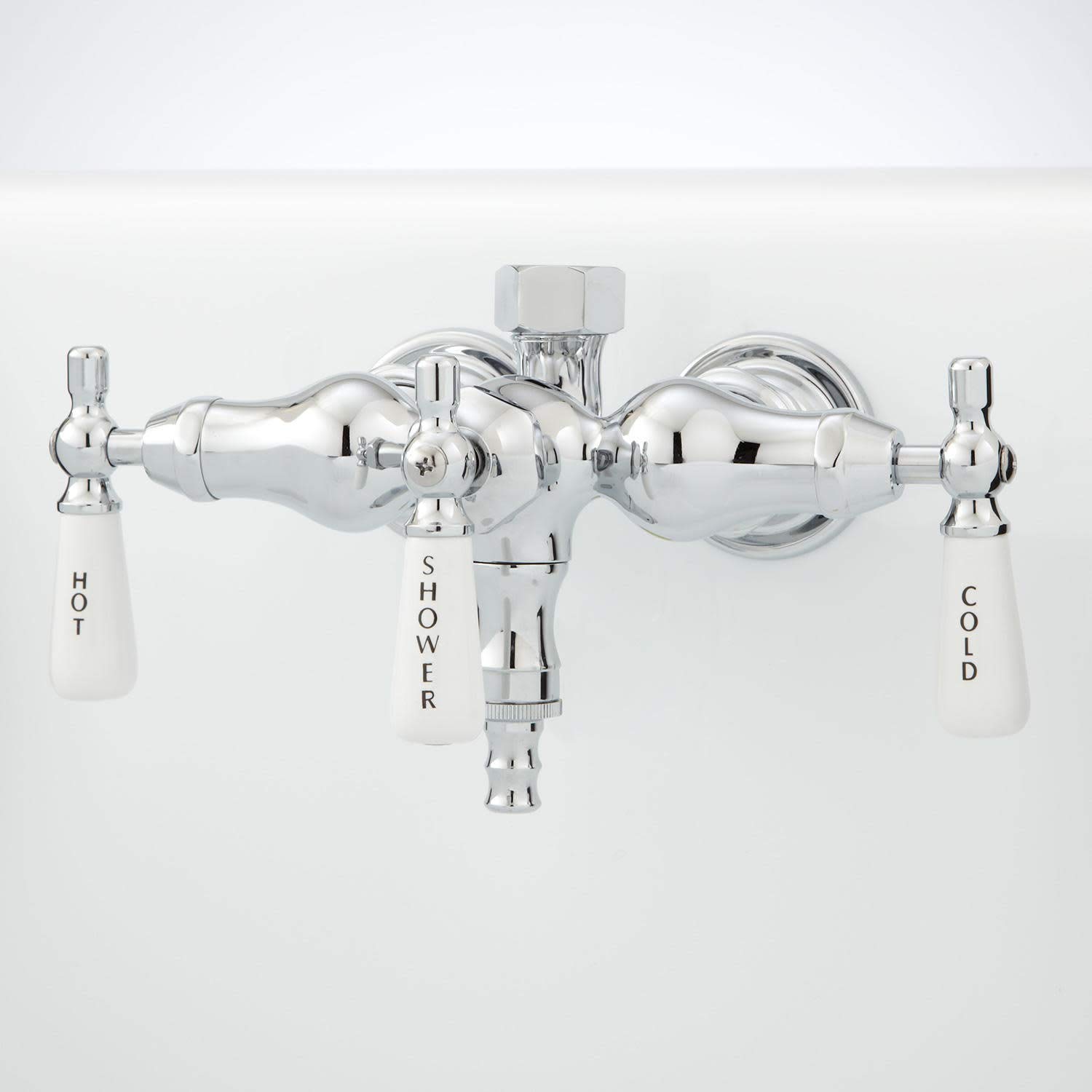
- Install Handles and Spout: Attach the hot and cold handles and the spout assembly according to the specific design of your faucet. Ensure they are properly aligned and secured.
- Test for Leaks: Slowly turn the main water supply back on. Check all connections for leaks. If leaks are detected, turn off the water supply, tighten the affected connections, and retest.
- Flush Faucet: Once installed and leak-free, open both hot and cold handles to flush any debris from the water lines.
Operating Instructions
Your Signature Hardware 329247 faucet features two handles for controlling water flow and temperature.
- Cold Water: Turn the right handle counter-clockwise to open the cold water supply.
- Hot Water: Turn the left handle counter-clockwise to open the hot water supply.
- Temperature Control: Adjust the hot and cold handles simultaneously to achieve the desired water temperature.
- Shut Off: Turn both handles clockwise until the water flow stops completely.
Maintenance
Proper care and maintenance will ensure the longevity and appearance of your faucet.
- Cleaning: Clean the faucet regularly with a soft, damp cloth and mild soap. Rinse thoroughly with clean water and dry with a soft cloth to prevent water spots.
- Avoid Harsh Cleaners: Do not use abrasive cleaners, scouring pads, ammonia-based cleaners, or any cleaners containing bleach, acids, or alcohol, as these can damage the finish.
- Aerator Maintenance: If water flow becomes restricted, the aerator may be clogged. Unscrew the aerator from the spout, clean any debris, and rinse thoroughly before reattaching.
Troubleshooting
| Problem | Possible Cause | Solution |
|---|---|---|
| Leaks at connections | Loose connections; insufficient thread sealant. | Turn off water supply, tighten connections, apply more thread sealant tape if necessary. |
| Low water flow | Clogged aerator; partially closed shut-off valve; debris in water lines. | Clean aerator; ensure shut-off valves are fully open; flush water lines. |
| Dripping from spout | Worn out washer or cartridge. | Contact customer support for replacement parts or professional assistance. |
Specifications
| Brand | Signature Hardware |
| Model Name | 329247 |
| Material | Brass |
| Finish Type | Chrome |
| Mounting Type | Tub Wall Mount |
| Number of Handles | 2 |
| Hole Count | 2 |
| Faucet Centers | 3-3/8 inches |
| Spout Reach | 3.5 inches |
| Item Weight | 5 Pounds |
| Included Components | Valve |
Warranty Information
This Signature Hardware faucet is covered under a 25-year limited warranty. This warranty covers defects in material and workmanship under normal use and service. For full details regarding warranty coverage, terms, and conditions, please refer to the official Signature Hardware warranty documentation or contact customer support.
Support
If you require further assistance, have questions about your product, or need to order replacement parts, please contact Signature Hardware customer support.
- Website: Visit the official Signature Hardware website for product information, FAQs, and contact options.
- Customer Service: Refer to your purchase documentation or the Signature Hardware website for current customer service contact details (phone number, email).