
Smartby SMTB-Sharp-RK-NOW
Smartby Universal Remote Control Instruction Manual
Model: SMTB-Sharp-RK-NOW
For Sharp Roku TVs
Introduction
This manual provides instructions for the Smartby Universal Remote Control, designed for use with various Sharp Roku TV models. This remote offers a straightforward, no-setup solution for controlling your compatible television. Please read this manual carefully to ensure proper use and to understand the remote's features and limitations.
Setup Instructions
1. Battery Installation
The Smartby Universal Remote Control requires two (2) AAA alkaline batteries for operation. No programming or pairing is necessary. Simply install the batteries correctly, and the remote will be ready for use.
- Locate the battery compartment on the back of the remote control.
- Slide the battery cover downwards to open it.
- Insert two (2) new AAA alkaline batteries, ensuring the positive (+) and negative (-) terminals align with the indicators inside the compartment.
- Slide the battery cover back into place until it clicks securely.

The back of the remote control where the battery cover is located. Insert two AAA batteries here.
2. Compatibility Notes
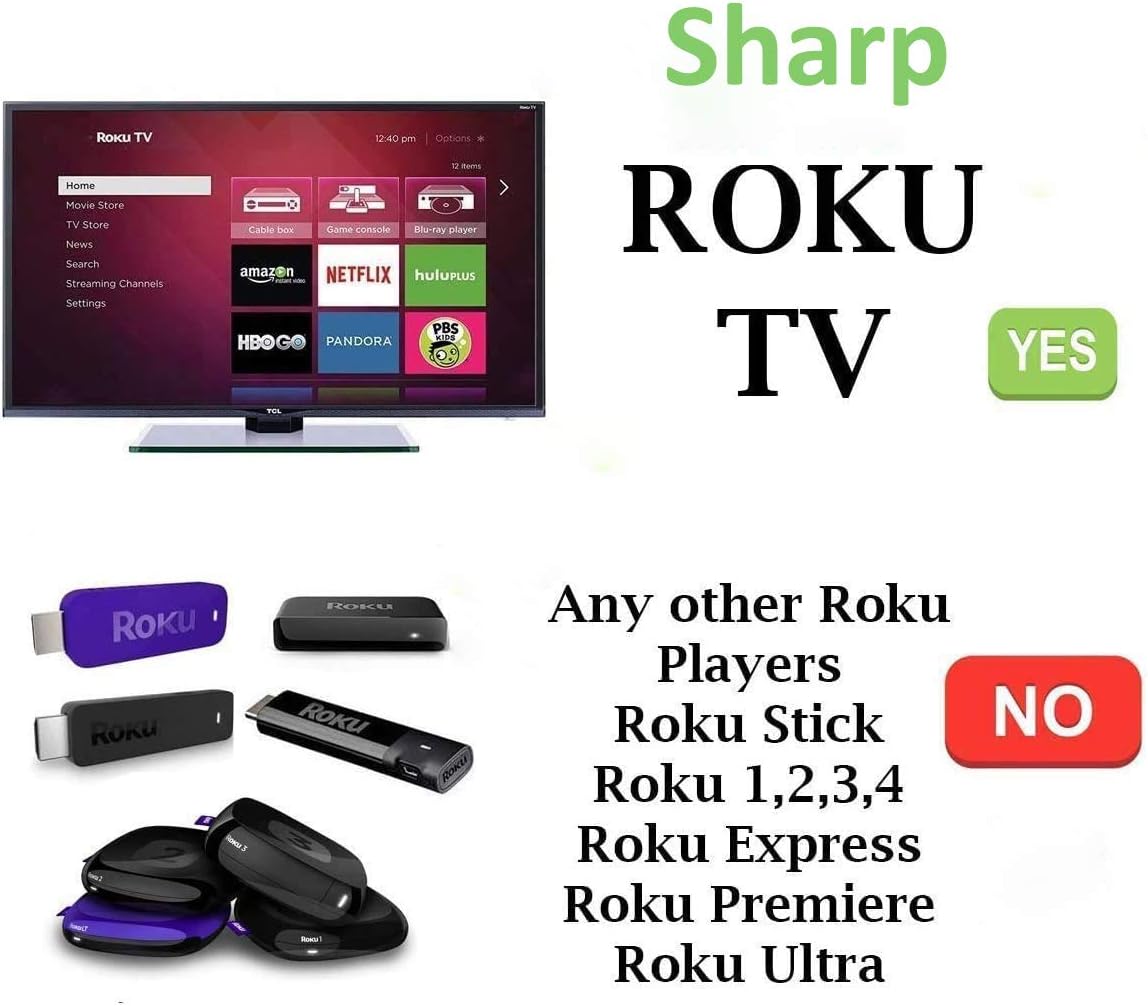
This remote control is specifically designed for Sharp Roku TVs. It operates using infrared (IR) technology. It is not compatible with Roku Players, Roku Sticks (HDMI or MHL), Roku Express, Roku Premiere, Roku Ultra, or other brands of Roku TVs. If your original remote uses RF or Wi-Fi and has a pairing button, this IR remote will not function as a direct replacement for those specific features.
Operating Instructions
Once batteries are installed, point the remote directly at your Sharp Roku TV. The remote functions immediately without any additional setup.
Key Functions:
- Power Button: Turns the TV on or off.
- Navigation Pad (Up, Down, Left, Right, OK): Used to navigate menus and select items.
- Back Button: Returns to the previous screen or menu.
- Home Button: Returns to the Roku TV home screen.
- Volume Up/Down: Adjusts the TV volume.
- Mute Button: Mutes or unmutes the TV audio.
- Instant Replay: Jumps back a few seconds in video playback.
- Rewind/Fast Forward: Controls video playback speed.
- Play/Pause: Controls video playback.
- Shortcut App Keys (Netflix, Hulu, Sling, NOW): Provides direct access to these streaming applications.
The front of the remote control, displaying the power, navigation, volume, mute, and dedicated shortcut buttons for Netflix, Hulu, Sling, and NOW.
Compatibility
Compatible Sharp Roku TV Models:
- LC-24LB601U, LC-32LB601U, LC-40LB601U, LC-43LB601U, LC-50LB601U
- LC-32LB601C, LC-65Q7370U
- LC-43LBU591U, LC-50LBU591U, LC-55LBU591U
- LC-50LBU711U, LC-55LBU711U
Incompatible Devices:
- Roku Player (standalone devices)
- Roku Stick (HDMI or MHL versions)
- Roku Express, Roku Premiere, Roku Ultra
- Roku Game consoles
- Any Roku TV from brands other than Sharp
- Original remotes that use RF or Wi-Fi technology and require a pairing button.

This image clearly shows that the remote is designed for Sharp Roku TVs. It is not compatible with standalone Roku players, Roku Sticks, Roku Express, Roku Premiere, or Roku Ultra devices.
Maintenance
Battery Replacement:
Replace batteries when the remote's response becomes sluggish or stops working. Always replace both AAA batteries at the same time with new ones. Do not mix old and new batteries, or different types of batteries.
Cleaning:
To clean the remote, gently wipe its surface with a soft, dry cloth. Avoid using liquid cleaners, solvents, or abrasive materials, as these can damage the remote's finish or internal components.
Troubleshooting
Remote Not Responding:
- Check Batteries: Ensure batteries are inserted correctly with the correct polarity (+/-). Replace with fresh AAA alkaline batteries if needed.
- Line of Sight: This is an IR remote. Ensure there is a clear line of sight between the remote's emitter and the TV's IR receiver. Obstructions can block the signal.
- TV Compatibility: Verify that your TV is a Sharp Roku TV model listed in the compatibility section. This remote is not designed for other Roku devices or non-Sharp Roku TVs.
- IR vs. RF/Wi-Fi: If your original remote was an RF or Wi-Fi type (often indicated by a pairing button), this IR remote will not function in the same manner.
Specific Buttons Not Working:
- Ensure the remote is pointed directly at the TV.
- Check for low battery power.
- Clean the remote's surface to ensure no debris is obstructing button presses.
Specifications
| Model Number | SMTB-Sharp-RK-NOW |
| Product Dimensions | 5.8 x 1.6 x 0.6 inches |
| Item Weight | 1.76 ounces |
| Power Supply | 2 x AAA Alkaline Batteries (not included) |
| Connectivity Technology | Infrared (IR) |
| Compatible Devices | Sharp Roku Televisions |
Warranty and Support
For any questions or issues not covered in this manual, please refer to the retailer's return policy or contact the seller directly for support. Specific warranty information may vary by purchase location and is typically provided at the point of sale.
Ask a question about this manual
Ask about setup, troubleshooting, compatibility, parts, safety, or missing instructions. Manuals+ will review the question and use this page’s manual context to help answer it.