
1. Introduction
Thank you for choosing the ERAY Rechargeable LED Torch. This manual provides essential information for the safe and effective operation, maintenance, and troubleshooting of your device. Please read it thoroughly before use and retain it for future reference.

Image: The ERAY Rechargeable LED Torch, a powerful and versatile lighting device.
2. Product Overview
2.1 Key Features
- 6 Light Modes: Features front light with 3 brightness levels (High-Low-SOS) and side flood light with 3 brightness levels (High-Low-Red & Blue Flash Light) for diverse lighting needs.
- High Capacity Battery: Equipped with a 10800mAh rechargeable battery, providing up to 10 hours of continuous use in high brightness mode.
- USB Output: Functions as a power bank with a USB output port to charge mobile devices in emergency situations.
- Humanized Design: Includes a comfortable handle and a detachable shoulder strap for easy portability. Can be mounted on a tripod or bicycle holder for hands-free operation.
- Durable & Waterproof: Constructed from high-quality metal alloy and ABS material, offering skid-proof, explosion-proof, and shockproof properties. IPX4 waterproof rating ensures reliability in outdoor environments.
- Long Irradiation Distance: Provides long-range visibility with an irradiation distance of up to 2600 feet (800m).
- Versatile Use: Ideal for outdoor camping, hiking, fishing, walking, car inspection, and emergency situations.
2.2 Package Contents
Please check the package to ensure all items are present:
- 1x ERAY Rechargeable LED Torch Lantern
- 1x USB Cable
- 1x Shoulder Strap
- 1x User Manual

Image: The ERAY LED Torch, USB cable, and shoulder strap included in the package.
2.3 Product Diagram
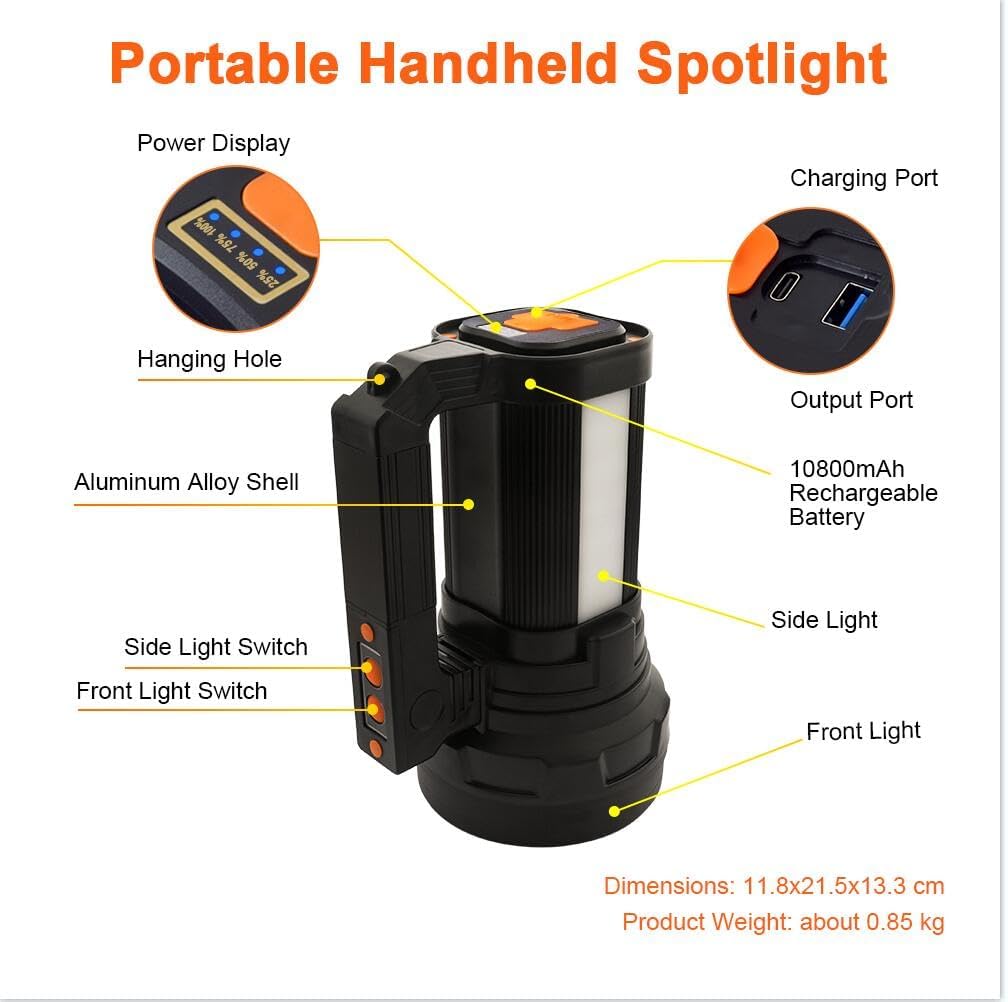
Image: Labeled diagram of the ERAY LED Torch showing components like Power Display, Charging Port, Output Port, Hanging Hole, Aluminum Alloy Shell, Side Light Switch, Front Light Switch, Side Light, and Front Light.
Familiarize yourself with the components:
- Power Display: Indicates remaining battery percentage.
- Charging Port: For recharging the torch.
- Output Port (USB): For charging external devices.
- Hanging Hole: For attaching to a hook or tripod.
- Aluminum Alloy Shell: Durable outer casing.
- Side Light Switch: Controls the side floodlight modes.
- Front Light Switch: Controls the main spotlight modes.
- Side Light: Provides wide-angle illumination.
- Front Light: Provides focused, long-distance illumination.
3. Setup
3.1 Initial Charging
Before first use, fully charge the ERAY LED Torch. This ensures optimal battery performance and longevity.
- Locate the Charging Port on the device.
- Connect the provided USB cable to the Charging Port and plug the other end into a compatible USB power adapter (not included) or a computer USB port.
- The Power Display will show the charging progress (25%, 50%, 75%, 100%).
- Once the display shows 100%, the torch is fully charged. Disconnect the cable.

Image: The ERAY LED Torch connected via USB cable for charging, with a mobile phone also charging from its USB output, demonstrating its power bank function.
4. Operating Instructions
4.1 Light Modes
The ERAY LED Torch offers 6 distinct lighting modes, controlled by separate switches for the front and side lights.
Front Light Modes (Spotlight)
Use the Front Light Switch to cycle through these modes:
- High Brightness: For maximum illumination and long-distance visibility.
- Low Brightness: For energy saving or closer range tasks.
- SOS Flash Mode: For emergency signaling.

Image: Illustration showing the three front light modes: High Brightness, Low Brightness, and SOS Flash Mode, with estimated lighting times.
Side Floodlight Modes
Use the Side Light Switch to cycle through these modes:
- High Brightness: For wide-area illumination.
- Low Brightness: For ambient lighting or extended use.
- Red & Blue Flash Light: For emergency warning or signaling.

Image: Illustration showing the three side light modes: High Brightness, Low Brightness, and Emergency Light (Red & Blue Flash), with estimated lighting times.
4.2 Power Bank Function
The ERAY LED Torch can serve as a portable power bank to charge your mobile devices.
- Locate the USB Output Port on the bottom of the torch.
- Connect your device's charging cable to the USB Output Port.
- The torch will begin charging your device.
- Monitor your device's charging status. Disconnect once charging is complete or if the torch's battery is low.
5. Maintenance
5.1 Cleaning
- Wipe the torch with a soft, damp cloth. Do not use abrasive cleaners or solvents.
- Ensure the charging and output ports are free from dust and debris.
5.2 Storage
- Store the torch in a cool, dry place away from direct sunlight and extreme temperatures.
- If storing for extended periods, charge the battery to approximately 50% every 3-6 months to maintain battery health.
5.3 Battery Care
- Avoid fully discharging the battery frequently.
- Do not expose the battery to fire or high temperatures.
- If the battery appears damaged or swollen, discontinue use immediately and dispose of it properly according to local regulations.

Image: The ERAY LED Torch being splashed with water, demonstrating its IPX4 waterproof rating.
6. Troubleshooting
If you encounter issues with your ERAY LED Torch, please refer to the table below for common problems and solutions.
| Problem | Possible Cause | Solution |
|---|---|---|
| Torch does not turn on | Low battery; Switch malfunction | Charge the torch fully; Ensure switches are pressed firmly. |
| Light is dim or flickers | Low battery; LED issue | Recharge the torch; If problem persists, contact customer support. |
| Torch not charging | Faulty cable/adapter; Dirty charging port | Try a different USB cable and adapter; Clean the charging port gently. |
| Power bank function not working | Torch battery too low; Device cable issue | Ensure torch has sufficient charge; Try a different charging cable for your device. |
7. Specifications
| Feature | Detail |
|---|---|
| Brand | ERAY |
| Model Number | E135 |
| Product Dimensions | 23 x 16 x 13.3 cm |
| Item Weight | 890 g |
| Battery Capacity | 10800mAh Lithium Ion (included) |
| Light Source Type | LED |
| Luminous Flux | 13000 Lumen |
| Irradiation Distance | Up to 800 meters (2600 feet) |
| Waterproof Rating | IPX4 |
| Material | Metal Alloy and ABS |
| Voltage | 5 Volts |
8. Warranty and Support
ERAY products are manufactured to high-quality standards. For information regarding warranty coverage, please refer to the warranty card included with your purchase or contact the retailer where you purchased the product. If you require technical assistance or have questions not covered in this manual, please contact ERAY customer support through the official website or your purchase platform.

