
Product Overview
The Denver MRD-166 is a versatile all-in-one audio system designed to play various media formats, including vinyl records, CDs, cassette tapes, and digital audio via USB, SD card, and Bluetooth. It also features an integrated FM/DAB radio tuner and auxiliary input for external devices. This manual provides detailed instructions to help you set up, operate, and maintain your audio system for optimal performance.

Figure 1: Front view of the Denver MRD-166 audio system with the turntable cover open, showcasing the record player, control panel, dual cassette decks, and CD player. Two external speakers are positioned on either side.
Setup Guide
1. Unpacking
Carefully remove all components from the packaging. Ensure you have the main unit, two speakers, and the power cable. Retain the packaging for future transport or storage.
2. Speaker Connection
Connect the included speakers to the "SPEAKER" output terminals on the rear of the main unit. Ensure the positive (+) and negative (-) terminals on the speakers match those on the unit. The left speaker connects to the 'L' terminal and the right speaker to the 'R' terminal.

Figure 2: Rear panel of the main unit, highlighting the "LINE OUT" RCA ports and "SPEAKER" terminals for connecting external speakers. A power cable is also visible.
3. Power Connection
Plug the power cable into the AC inlet on the rear of the unit and then into a standard wall outlet. The unit will enter standby mode.
4. Initial Power On
Press the STANDBY button on the front panel to turn on the unit. The display will illuminate.
Operating Instructions
Control Panel Overview

Figure 3: Detailed view of the main control panel, showing the display, function buttons (FM/DAB, PHONO, CD/USB/SD, BT/AUX, TAPE), tuning and volume knobs, and playback controls.
1. Source Selection
Use the function buttons (FM/DAB, PHONO, CD/USB/SD, BT/AUX, TAPE) on the front panel to select your desired audio source.
2. Turntable Operation (PHONO)
- Lift the turntable cover.
- Place a record on the platter.
- Select the appropriate speed (33, 45, or 78 RPM) using the speed selector switch.
- Move the tone arm to the desired position on the record and gently lower it using the cueing lever.
- Adjust the volume using the VOLUME knob.

Figure 4: Close-up view of the turntable platter with a vinyl record placed on it and the tone arm positioned over the record's surface.
3. CD Player Operation (CD/USB/SD)
- Press the CD/USB/SD button to select CD mode.
- Press the OPEN/CLOSE button to open the CD tray.
- Place a CD with the label side facing up into the tray.
- Press OPEN/CLOSE again to close the tray. The CD will begin playing automatically.
- Use the PLAY/PAUSE, STOP, SKIP, and SEARCH buttons for playback control.

Figure 5: Detailed view of the CD player tray in the open position, with a compact disc partially inserted.
4. Cassette Deck Operation (TAPE)
The unit features two cassette decks (Deck 1 and Deck 2).
- Press the TAPE button to select cassette mode.
- Press the STOP/EJECT button on either deck to open the cassette door.
- Insert a cassette tape with the open side facing down.
- Close the cassette door.
- Press PLAY to start playback.
- Use REW (rewind), FFWD (fast forward), STOP, and PAUSE buttons for control.
- To record from another source (e.g., CD, Phono, Radio) to tape, ensure the source is playing, then press the RECORD button on Deck 1.
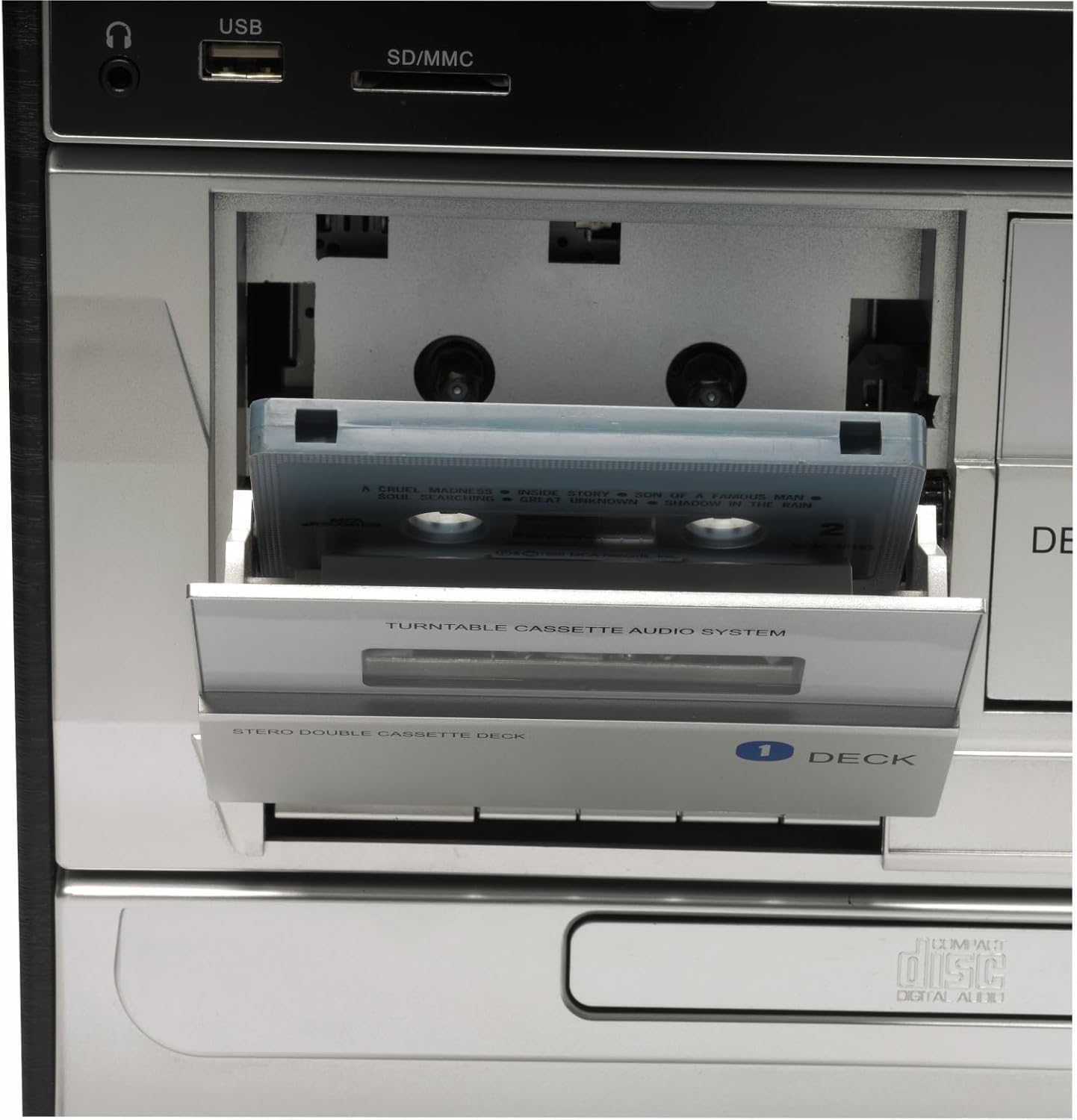
Figure 6: Close-up view of the dual cassette decks, with Deck 1's door open and a cassette tape partially inserted.
5. USB/SD Playback (CD/USB/SD)
- Insert a USB flash drive into the USB port or an SD/MMC card into the SD/MMC slot.
- Press the CD/USB/SD button to select USB or SD mode. The unit will automatically detect and begin playing compatible audio files.
- Use the playback controls (PLAY/PAUSE, STOP, SKIP, SEARCH) to navigate your music.
6. Bluetooth Connectivity (BT/AUX)
- Press the BT/AUX button to select Bluetooth mode. The display will show "BT" and the unit will enter pairing mode.
- On your Bluetooth-enabled device (e.g., smartphone, tablet), search for "MRD-166" in the Bluetooth settings and pair with it.
- Once connected, you can play audio from your device through the MRD-166.
7. Radio Operation (FM/DAB)
- Press the FM/DAB button to select radio mode.
- Use the TUNING knob to manually tune to a station.
- For automatic scanning, press and hold the TUNING knob.
- Extend the FM antenna fully for better reception.
Maintenance
1. Cleaning
- Always unplug the unit from the power outlet before cleaning.
- Wipe the exterior surfaces with a soft, dry cloth. Do not use abrasive cleaners, waxes, or solvents.
- For the turntable, gently brush away dust from the stylus (needle) using a soft brush designed for this purpose.
- Keep the CD tray and cassette decks free of dust and debris.
2. Turntable Needle Care
The stylus is a delicate component. Avoid touching it with your fingers. If the sound quality deteriorates, the stylus may need cleaning or replacement. Consult a professional for stylus replacement.
3. General Care
Place the unit on a stable, level surface away from direct sunlight, heat sources, and excessive dust or moisture. Ensure adequate ventilation around the unit.
Troubleshooting
| Problem | Possible Cause | Solution |
|---|---|---|
| No power | Power cable not connected; Power outlet not active | Ensure power cable is securely plugged in; Try a different outlet |
| No sound from speakers | Speakers not connected; Volume too low; Incorrect source selected | Check speaker connections; Increase volume; Select correct source |
| Turntable not spinning or poor sound | Speed setting incorrect; Stylus dirty or damaged; Belt issue | Check speed (33/45/78 RPM); Clean stylus; Contact support if belt is issue |
| CD not playing | CD inserted incorrectly; CD scratched/dirty; Disc format not supported | Insert CD label side up; Clean CD; Try an audio CD (not data CD) |
| Cassette tape not playing or distorted | Tape inserted incorrectly; Tape damaged; Playback heads dirty | Ensure tape is fully inserted; Try another tape; Clean playback heads |
| Poor radio reception | Antenna not extended; Weak signal | Fully extend FM antenna; Reposition unit for better signal |
Specifications
- Model Name: Denver MRD-166
- Manufacturer Reference: 111201000000
- Dimensions (L x W x H): 12 x 6 x 9 cm (Main unit); 6.7 kg (Total weight)
- Color: Black
- Connectivity Technology: USB, Bluetooth
- Special Features: CD Player, Integrated Stereo Speakers, USB Connectivity, AUX Input, Turntable, Dual Cassette Deck, FM/DAB Radio
- Compatible Devices: Smartphone, Tablet, MP3 Player
- Power Source: AC (Mains)
Warranty and Support
For warranty information and technical support, please refer to the documentation provided with your purchase or visit the official Denver website. This manual does not contain specific warranty terms or direct support contact details.
For further assistance, you may also contact the retailer where the product was purchased.


