
Introduction
The Fostex 6301DT is a compact and versatile 4-inch powered studio monitor, designed for broadcast, production facilities, mobile setups, project studios, and home recording environments. Building upon the legacy of the 6301-series, this model incorporates a D-class power amplifier and a new driver unit, featuring an energy-saving auto stand-by function. The 6301DT integrates Dante network audio capabilities, allowing playback of any two channels of Dante network audio signals, alongside traditional 1/4-inch TS analog inputs. Its ultra-rugged die-cast aluminum enclosure ensures durability for professional use.
Safety Information
- Power Source: Connect the unit only to the specified power supply voltage. Ensure the power cord is securely connected.
- Ventilation: Do not block ventilation openings. Ensure adequate airflow around the unit to prevent overheating.
- Moisture: Do not expose the unit to rain, moisture, or excessive humidity. Avoid placing liquid-filled objects on the unit.
- Foreign Objects: Do not insert any objects into the unit's openings.
- Servicing: Refer all servicing to qualified service personnel. Do not attempt to open or repair the unit yourself.
- Placement: Place the monitor on a stable surface. Avoid locations with excessive vibration, dust, or direct sunlight.
Package Contents
Verify that all items are present in the package:
- Fostex 6301DT Active Monitor Speaker
- IEC Power Cord
Product Overview
Front Panel

Figure 1: Front Panel Controls
- Power Button: Press to turn the unit ON or OFF. An LED indicator shows the power status.
- Volume Knob: Adjusts the output level of the monitor.
Rear Panel
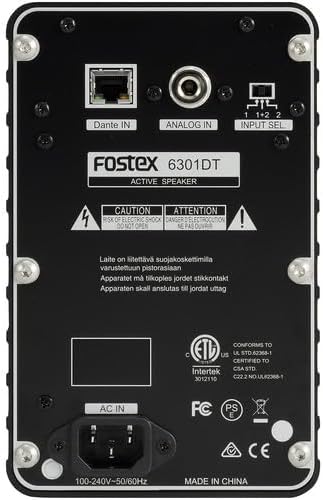
Figure 2: Rear Panel Connections
- Dante IN (RJ45): Connects to a Dante network for digital audio input.
- Analog IN (1/4" TS): Connects to an analog audio source using a 1/4-inch TS cable.
- Input Select Switch: Selects the audio input channel for monitoring (1, 2, or 1+2 mixed).
- AC IN: Connects the supplied IEC power cord.
Setup
Placement
Place the Fostex 6301DT on a stable, flat surface. For optimal sound reproduction, position the monitor at ear level and equidistant from your listening position. An optional EB-6301 mounting bracket (not included) allows for easy surface-mounting at various angles.

Figure 3: Example Application Setup
Power Connection
- Ensure the monitor's power button is in the OFF position.
- Connect the supplied IEC power cord to the AC IN port on the rear panel of the monitor.
- Plug the other end of the power cord into a suitable AC power outlet.
Audio Connections
The 6301DT supports both analog and Dante network audio inputs.
- Analog Input: Connect your analog audio source (e.g., mixer, audio interface) to the 1/4" TS Analog IN port on the rear panel using a 1/4-inch TS cable.
- Dante Network Input: Connect an RJ45 Ethernet cable from your Dante network switch or device to the Dante IN port on the rear panel.
Operating
Powering On/Off
Press the Power button on the front panel to turn the monitor ON. The power indicator LED will illuminate. Press the button again to turn the monitor OFF.
Volume Adjustment
Rotate the Volume knob on the front panel clockwise to increase the output level and counter-clockwise to decrease it. Start with a low volume setting and gradually increase it to a comfortable listening level.
Input Selection
Use the Input Select switch on the rear panel to choose the desired audio source:
- Analog: Selects the 1/4" TS analog input.
- Dante Channel 1: Monitors the first Dante audio channel.
- Dante Channel 2: Monitors the second Dante audio channel.
- Dante Channel 1+2 (Mixed): Monitors a mix of both Dante channels.
Dante Network Configuration
For Dante network operation, you will need to use Audinate's Dante Controller software on a computer connected to the same Dante network. This software allows you to route audio signals to the Fostex 6301DT and configure its network settings. The 6301DT supports sampling frequencies of 44.1 kHz, 48 kHz, 88.2 kHz, and 96 kHz.
Maintenance
- Cleaning: Use a soft, dry cloth to clean the exterior of the monitor. Do not use abrasive cleaners, waxes, or solvents.
- Storage: If storing the unit for an extended period, disconnect it from power and store it in a cool, dry place away from direct sunlight and extreme temperatures.
- Ventilation: Ensure that the ventilation openings are kept clear of dust and debris.
Troubleshooting
| Problem | Possible Cause | Solution |
|---|---|---|
| No sound output |
|
|
| Distorted sound |
|
|
| Dante connection issues |
|
|
Specifications

Figure 4: Product Dimensions
| Feature | Specification |
|---|---|
| Model Number | AMS-6301DT |
| Speaker Type | Powered Studio Monitor |
| Speaker Size | 4 Inches |
| Woofer Diameter | 4 Inches |
| Amplifier Type | Class-D |
| Maximum Output Power | 20 Watts |
| Audio Output Mode | Stereo |
| Number of Audio Channels | 2.0 |
| Connectivity Technology | RJ45 (Dante), 1/4" TS (Analog) |
| Connectivity Protocol | Dante |
| Supported Sampling Frequencies | 44.1/48/88.2/96 kHz |
| Signal-to-Noise Ratio | 85 dB |
| Power Source | Corded Electric |
| Enclosure Material | Die-cast Aluminum |
| Color | Black |
| Item Dimensions (D x W x H) | 4.7" x 7.5" x 4.7" |
| Item Weight | 5.1 Pounds |
| Additional Features | Auto stand-by function, Recessed front-panel controls |
Warranty and Support
Warranty Information
The Fostex 6301DT is covered by a 1-year manufacturer's limited warranty. Please retain your proof of purchase for warranty claims.
Customer Support
For technical assistance, troubleshooting, or warranty service, please contact American Music and Sound, the manufacturer, or your authorized Fostex dealer. Refer to the Fostex official website for the most current support contact information.

