
Introduction
Thank you for choosing the LAPCARE 2D Wired Laser Barcode Scanner. This manual provides essential information for the proper setup, operation, and maintenance of your device. Please read this manual thoroughly before using the scanner to ensure optimal performance and longevity.
This high-performance barcode reader is designed for fast and accurate data entry across a broad range of applications, including commercial POS systems, warehousing, logistics, libraries, banks, telecom, transportation, postal services, and industrial management.
Safety Information
- Do not stare directly into the scanner's light source.
- Keep the device away from water and other liquids.
- Avoid dropping the scanner or subjecting it to strong impacts.
- Do not attempt to disassemble or repair the scanner yourself. Refer to qualified service personnel.
- Use only the provided USB cable for connection.
Package Contents
Please check the package contents upon opening. If any items are missing or damaged, contact your vendor immediately.
- LAPCARE 2D Wired Laser Barcode Scanner (Model: LLBS-031)
- Integrated USB Cable
- User Manual (this document)
Product Overview
Familiarize yourself with the components and features of your LAPCARE barcode scanner.

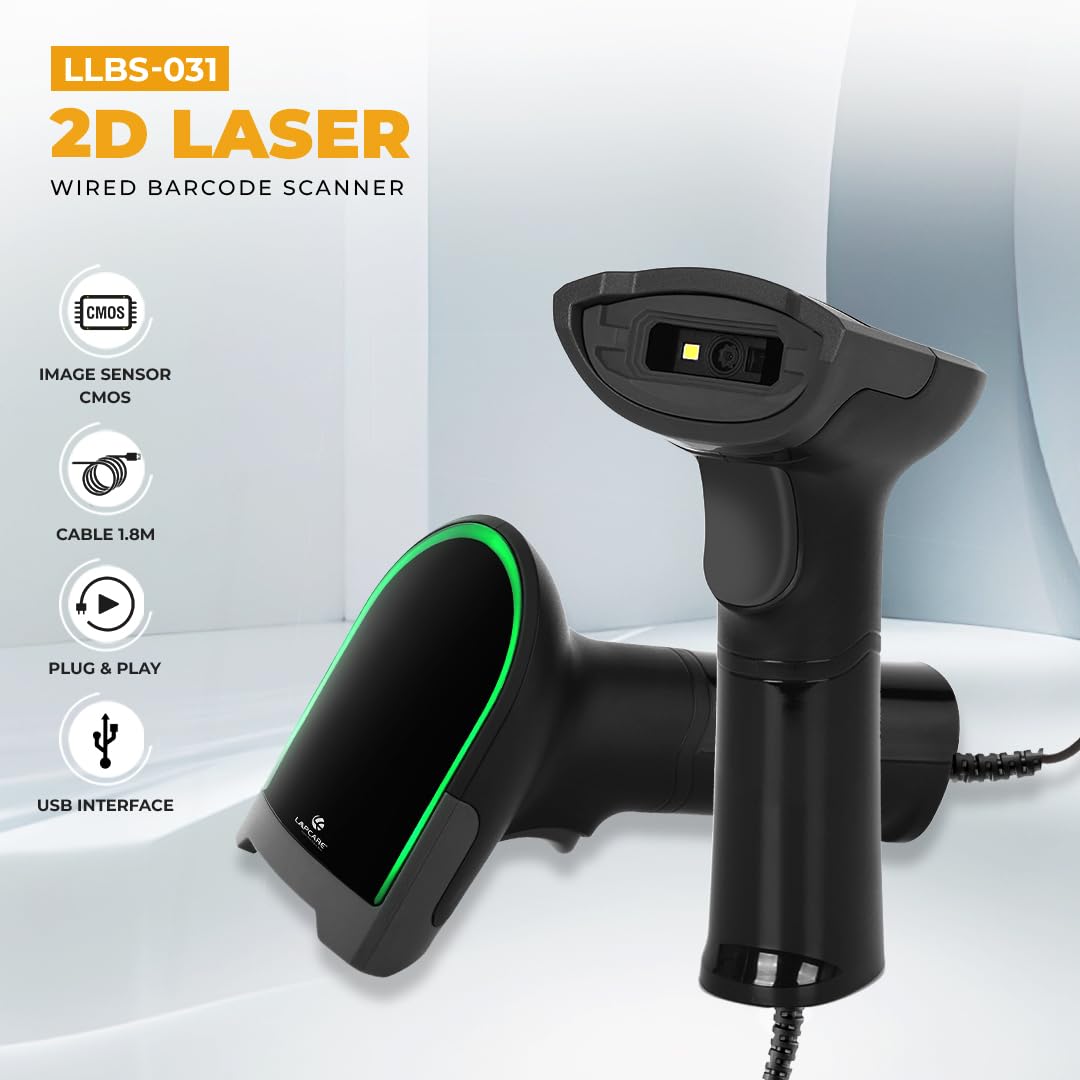


Setup
The LAPCARE 2D Wired Laser Barcode Scanner is designed for simple plug-and-play operation.
- Connect the Scanner: Insert the USB connector of the scanner's cable into an available USB port on your computer (Laptop or Desktop).
- Driver Installation: For most operating systems (Windows, Mac, Linux), the necessary drivers will install automatically. No additional software installation is typically required.
- Ready for Use: Once the drivers are installed, the scanner will emit a short beep and the indicator light will turn on, signifying it is ready for scanning.

Operating Instructions
The scanner supports various scanning modes and symbologies.
Scanning Barcodes
- Aim: Point the scanner's light beam directly at the barcode you wish to scan.
- Scan: Press the trigger button. A successful scan will be indicated by a beep and/or a change in the indicator light.
- Data Output: The scanned data will appear in the active application on your connected computer (e.g., a text editor, spreadsheet, or POS software).
Supported Symbologies
This scanner supports a wide range of 1D and 2D barcode types, including:
- 2D Codes: PDF417, QR code, Matrix 2 of 5, MicroPDF417, Australian Post, Canada Post, JapanPost, MaxiCode, Codablock, Aztec, Dutch Post, TLC 39, DataMatrix.
- 1D Codes: Codabar, Code 11, Code 39, Code 93, Code128/EAN128, EAN.UCC Composite, Interleaved 2 of 5, MSI Code, Planet, Plessey Code, Postnet, RSS, Standard 2 of 5, Telepen, UPC/EAN.

Advanced Decoding Capabilities
The scanner features super decoding ability, allowing it to read various challenging barcodes:
- Damaged Barcodes: Can read partially damaged or incomplete barcodes.
- Reflected Barcodes: Effective in scanning barcodes on reflective surfaces.
- Colorful Barcodes: Capable of decoding barcodes with various color combinations.
- Distorted Barcodes: Can read barcodes that are slightly distorted or wrinkled.

Maintenance
Proper maintenance ensures the longevity and optimal performance of your barcode scanner.
- Cleaning: Use a soft, dry cloth to clean the scanner's exterior. For the scanning window, use a lint-free cloth lightly dampened with a mild, non-abrasive cleaner. Do not spray cleaner directly onto the device.
- Storage: Store the scanner in a cool, dry place away from direct sunlight and extreme temperatures.
- Cable Care: Avoid bending or twisting the USB cable excessively, as this can damage the internal wires.
Troubleshooting
If you encounter issues with your scanner, refer to the following common problems and solutions:
| Problem | Possible Cause | Solution |
|---|---|---|
| Scanner does not power on. | USB cable not properly connected or faulty USB port. | Ensure the USB cable is securely plugged into both the scanner and the computer. Try a different USB port. |
| Scanner does not read barcodes. | Barcode damaged, incorrect scanning angle, or unsupported symbology. | Ensure the barcode is clear and undamaged. Adjust the scanning angle. Verify the barcode type is supported (refer to "Supported Symbologies"). |
| Scanned data is incorrect or incomplete. | Poor barcode quality, rapid scanning, or software issue. | Scan the barcode slowly and steadily. Ensure the barcode is flat and well-lit. Test with a different application or text editor. |
| No beep sound after successful scan. | Beeper setting might be off. | Refer to the scanner's programming guide (if available) to enable beeper feedback. |
If the problem persists after trying these solutions, please contact Lapcare customer support.
Specifications
| Feature | Detail |
|---|---|
| Model Number | LLBS-031 |
| Brand | Lapcare |
| Connectivity Technology | USB Cable (Wired) |
| Scanner Type | 2D Wired Laser Barcode Scanner (CMOS Image Sensor) |
| Supported Symbologies | 1D: Codabar, Code 11, Code 39, Code 93, Code128/EAN128, EAN.UCC Composite, Interleaved 2 of 5, MSI Code, Planet, Plessey Code, Postnet, RSS, Standard 2 of 5, Telepen, UPC/EAN. 2D: PDF417, QR code, Matrix 2 of 5, MicroPDF417, Australian Post, Canada Post, JapanPost, MaxiCode, Codablock, Aztec, Dutch Post, TLC 39, DataMatrix. |
| Operating System Compatibility | Linux, Mac, Windows |
| Color | Black |
| Dimensions (LxWxH) | 16.5 x 6.5 x 9 cm |
| Item Weight | 205 g |
| Power Source | Corded Electric |
| Real Angle of View | 55 Degrees |
| Material | High-strength ABS |
Warranty and Support
For warranty information and technical support, please refer to the official Lapcare website or contact their customer service directly.
- Manufacturer: LAPCARE INDIA P LTD.
- Importer: Rx Infotech P Ltd
- Lapcare Store: Visit the Lapcare Store on Amazon
Please retain your purchase receipt for warranty claims.