
1. Introduction
Thank you for choosing the B.K.Licht LED Panel. This versatile ceiling light is designed to provide efficient and customizable illumination for various indoor environments. It features adjustable light temperature (Correlated Color Temperature - CCT) from warm white to cool white, dimmable brightness, a night light function, and a convenient timer, all controlled via the included remote control.
Please read this instruction manual carefully before installation and operation to ensure safe and correct use of the product. Keep this manual for future reference.

Image 1.1: B.K.Licht LED Panel providing illumination in a living room setting.
2. Safety Instructions
- Always disconnect the power supply at the main circuit breaker before attempting any installation, maintenance, or cleaning.
- Installation should be performed by a qualified electrician if you are not confident in your ability to safely install electrical fixtures.
- This product is designed for indoor use only. Do not expose it to moisture or outdoor elements.
- Ensure the mounting surface is structurally sound and can support the weight of the fixture.
- Do not use external dimmers with this product. Dimming is exclusively controlled by the provided remote control.
- Keep the remote control and batteries out of reach of children.
3. Package Contents
Verify that all components are present and undamaged before proceeding with installation.
- 1x B.K.Licht LED Panel
- 1x Remote Control
- 2x AAA Batteries (for remote control)
- 4x Wall Plugs
- 4x Mounting Screws
- 2x Insulation Sleeves
- 1x Instruction Manual (this document)
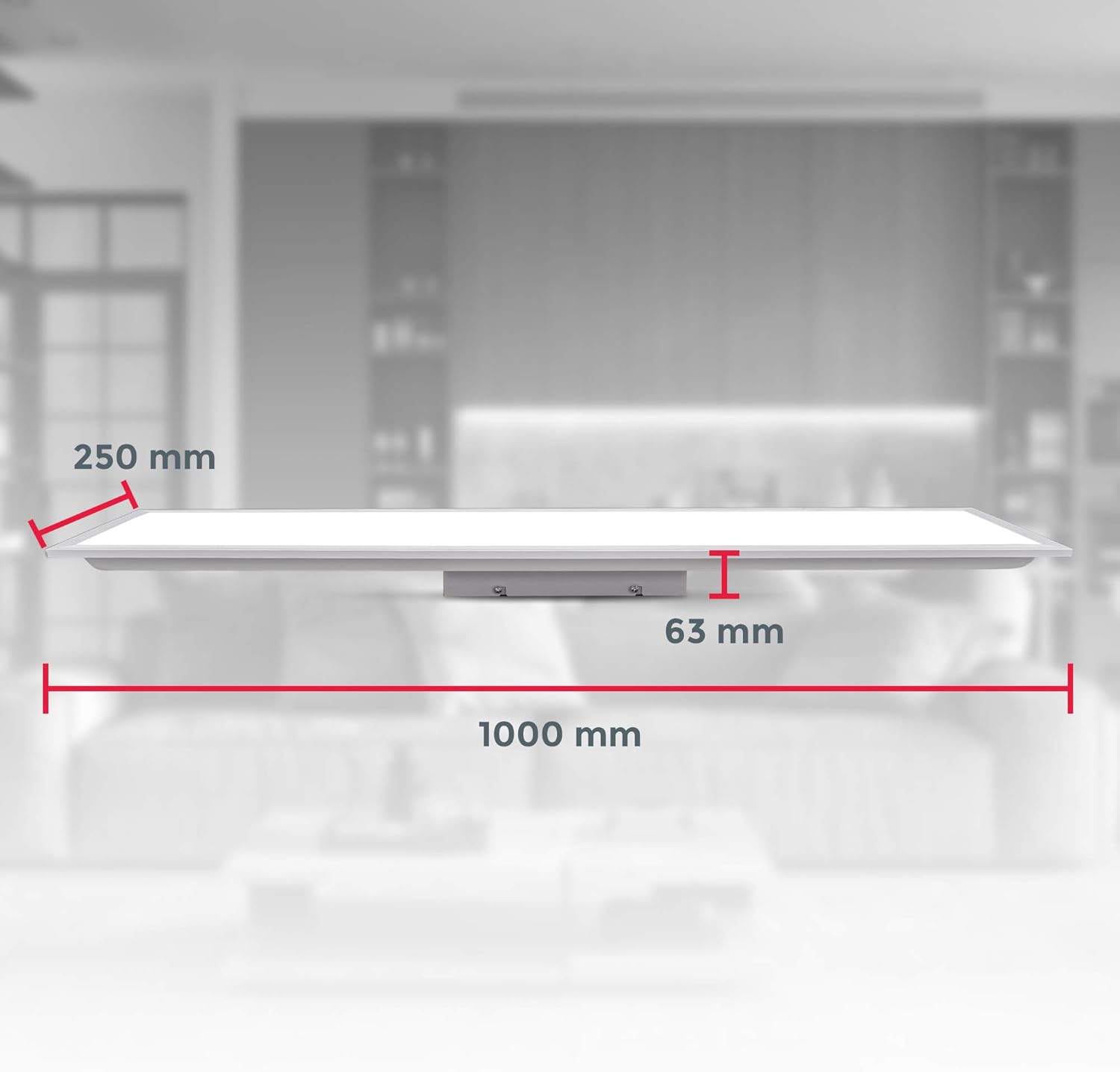
Image 3.1: Included accessories for the B.K.Licht LED Panel.
4. Setup and Installation
Follow these steps for safe and proper installation of your LED panel.
- Prepare for Installation: Ensure the power supply to the installation area is completely disconnected at the main circuit breaker.
- Mark Drilling Points: Position the mounting plate (usually attached to the back of the panel) on the ceiling where you intend to install the light. Mark the drilling points. The distance between the drilling holes is approximately 65mm.
- Drill Holes: Drill holes at the marked positions. Insert the provided wall plugs into the drilled holes.
- Secure Mounting Plate: Align the mounting plate with the wall plugs and secure it firmly to the ceiling using the provided mounting screws.
- Electrical Connection: Connect the household electrical wires to the corresponding terminals on the LED panel. Typically, the live wire (L) and neutral wire (N) should be connected. Use the insulation sleeves to cover any exposed wire connections. Ensure all connections are secure.
- Attach LED Panel: Carefully attach the LED panel to the secured mounting plate. Ensure it clicks or locks into place securely.
- Restore Power: Once the installation is complete and all connections are secure, restore power at the main circuit breaker.

Image 4.1: Dimensions of the LED Panel, useful for planning installation.
5. Operating Instructions
The B.K.Licht LED Panel is controlled using the included remote control. Insert the two AAA batteries into the remote control before first use.

Image 5.1: B.K.Licht LED Panel and its remote control.
Remote Control Functions:
- ON/OFF: Press to turn the light on or off.
- CCT Adjustment (Color Temperature):

Image 5.2: Color Temperature Range (3000K to 6500K).
- Buttons typically marked with sun/snowflake icons or specific Kelvin values (e.g., 3000K, 4000K, 6500K) allow you to switch between Warm White, Neutral White, and Cool White light.
- Some remotes may have buttons to gradually increase or decrease the color temperature.
- Dimming (Brightness Adjustment):

Image 5.3: Dimmable light feature.
- Buttons marked with '+' and '-' or brightness icons allow you to increase or decrease the light intensity.
- Important: The dimming function works exclusively with the provided remote control. Do not connect the LED panel to an external dimmer switch.
- Night Light Function: Activates a very low brightness setting, ideal for subtle illumination.
- Timer Function: Activates a 30-minute timer, after which the light will automatically turn off.
- Memory Function: The panel will remember the last used brightness and color temperature settings when turned off and on again via the remote control.
6. Maintenance
To ensure the longevity and optimal performance of your B.K.Licht LED Panel, follow these simple maintenance guidelines:
- Cleaning: Before cleaning, ensure the power supply to the fixture is disconnected. Use a soft, dry, or slightly damp cloth to wipe the surface of the panel. Do not use abrasive cleaners, solvents, or harsh chemicals, as these can damage the finish or electronic components.
- Remote Control Batteries: If the remote control's range decreases or it becomes unresponsive, replace the AAA batteries.
- Inspection: Periodically check the mounting screws to ensure they remain tight and secure.
7. Troubleshooting
If you encounter issues with your LED panel, refer to the following troubleshooting guide:
| Problem | Possible Cause | Solution |
|---|---|---|
| Light does not turn on. | No power supply. Remote control batteries are dead. Loose wiring connection. | Check the main circuit breaker. Replace remote control batteries. Ensure all wiring connections are secure (with power disconnected). |
| Remote control is unresponsive. | Dead batteries. Obstruction between remote and panel. Remote not paired (unlikely for this model, but possible). | Replace remote control batteries. Ensure clear line of sight to the panel. If issues persist, contact customer support. |
| Light flickers or dims unexpectedly. | Unstable power supply. Loose wiring. Interference from other devices. | Consult an electrician to check power supply stability. Check wiring connections (with power disconnected). Ensure no other devices are causing interference. |
| Color temperature or brightness cannot be adjusted. | Remote control issue. External dimmer connected. | Replace remote batteries. Ensure no external dimmer is used; this product requires the included remote for dimming. |
If the problem persists after attempting these solutions, please contact B.K.Licht customer support for further assistance.
8. Specifications
| Feature | Detail |
|---|---|
| Model Number | BKL1326 |
| Dimensions (L x W x H) | 100 x 25 x 6.3 cm |
| Weight | 1.66 Kilograms |
| Power Consumption | 24 Watts |
| Luminous Flux | 2200 Lumens |
| Color Temperature (CCT) | 3000K (Warm White), 4000K (Neutral White), 6500K (Cool White) - Adjustable |
| Voltage | 230 Volts |
| Material | Aluminum, Plastic |
| Control Method | Remote Control |
| Remote Control Batteries | 2x AAA (included) |
| Usage Environment | Indoor Use Only |
| Dimmable | Yes, via remote control |
| Energy Efficiency Class | F |
9. Warranty and Support
For warranty information, technical support, or any questions regarding your B.K.Licht LED Panel, please contact B.K.Licht customer service. Refer to the product packaging or the official B.K.Licht website for contact details.