
1. Product Overview
The FERM CDM1150 Cordless Multifunction Screwdriver is designed for various DIY tasks in and around your home. This compact and powerful tool features a 4V - 1.5Ah Lithium-Ion battery and an integrated LED worklight. Its ergonomic soft grip ensures comfortable handling, making it ideal for precision work, even in dimly lit areas. The CDM1150 comes complete with a robust storage case, a charger, and 10 essential accessories.
Key Features:
- Magnetic chuck - 1/4" for easy bit changes.
- Integrated LED worklight for improved visibility.
- LED battery charge indication for monitoring power levels.
- Left/right rotation for versatile screwing and unscrewing.
- Includes 10 accessories for various applications.

2. Safety Instructions
Always observe the following basic safety precautions when using electrical tools to reduce the risk of fire, electric shock, and personal injury.
- Read the entire manual: Understand all instructions before operating the tool.
- Wear eye protection: Always use safety goggles to protect against flying debris.
- Keep work area clean: Cluttered areas invite accidents.
- Avoid dangerous environments: Do not use power tools in damp or wet locations, or expose them to rain.
- Secure workpiece: Use clamps or a vise to hold the workpiece. This is safer than using your hand and it frees both hands to operate the tool.
- Do not overreach: Keep proper footing and balance at all times.
- Disconnect tools: Unplug the tool when not in use, before servicing, or when changing accessories.
- Store idle tools: When not in use, tools should be stored in a dry, high, or locked-up place, out of reach of children.
3. Package Contents
Upon opening the robust storage case, ensure all items are present and undamaged:
- Ferm CDM1150 Cordless Multifunction Screwdriver
- 4.0V - 1.5Ah Lithium-Ion Battery (integrated)
- Battery Charger
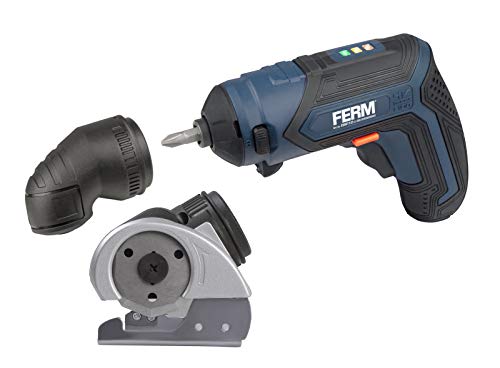
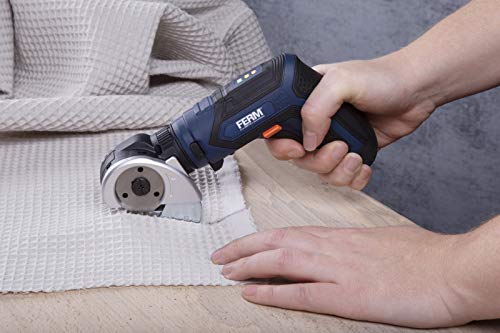
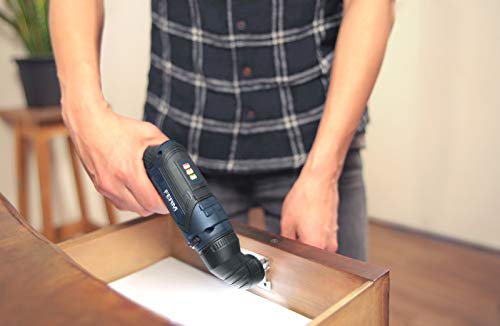
- 10 Assorted Accessories (e.g., screwdriver bits, angle attachment, cutting attachment)
- Storage Case
4. Setup
4.1. Charging the Battery
- Connect the charger to a standard power outlet.
- Plug the charger into the charging port on the screwdriver.
- The LED battery charge indicator will illuminate to show charging status. Allow sufficient time for a full charge before first use.
- Disconnect the charger once the battery is fully charged.
4.2. Attaching Accessories
The screwdriver features a 1/4" magnetic chuck for quick and easy accessory changes.
- Ensure the screwdriver is turned off.
- Insert the desired screwdriver bit or attachment firmly into the magnetic chuck until it clicks into place.
- To remove, simply pull the bit or attachment straight out.
5. Operating Instructions
5.1. Powering On/Off
To operate the screwdriver, press and hold the trigger switch. Release the trigger to turn off the tool.
5.2. LED Worklight
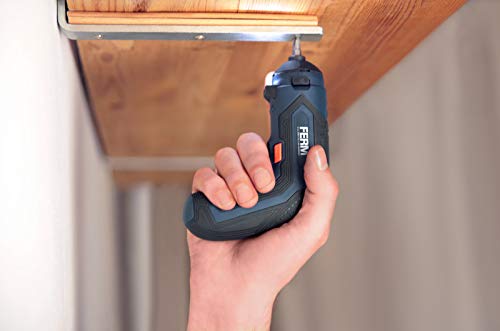
The integrated LED worklight automatically illuminates when the trigger is pressed, providing improved visibility in dark or confined work areas.
5.3. Battery Charge Indication
The LED indicators on the tool display the current battery charge level. Monitor these lights to determine when recharging is necessary.
5.4. Forward/Reverse Rotation
A switch located near the trigger allows you to select the direction of rotation (forward for screwing, reverse for unscrewing). Ensure the switch is fully engaged in the desired position before operating the tool.
6. Maintenance
6.1. Cleaning
Regularly clean the tool with a soft, damp cloth. Do not use harsh chemicals or abrasive cleaners. Keep ventilation openings free from dust and debris.
6.2. Storage
Store the screwdriver and its accessories in the provided storage case in a dry, secure location, away from direct sunlight and extreme temperatures. Ensure the battery is partially charged before long-term storage.
7. Troubleshooting
Refer to the table below for common issues and their solutions.
| Problem | Possible Cause | Solution |
|---|---|---|
| Screwdriver does not turn on. | Battery is discharged. | Charge the battery fully. |
| Screwdriver lacks power. | Low battery charge. | Recharge the battery. |
| Bit slips or does not engage. | Bit not properly inserted or worn. | Ensure bit is fully seated in the magnetic chuck. Replace worn bits. |
| Direction switch not working. | Switch not fully engaged. | Push the forward/reverse switch completely into position. |
8. Specifications
Technical data for the Ferm CDM1150 Cordless Multifunction Screwdriver:
| Specification | Value |
|---|---|
| Manufacturer | Ferm |
| Battery Voltage | 4.0V |
| Battery Capacity | 1.5Ah Lithium-Ion |
| Chuck Type | Magnetic 1/4" |
| Item Weight | 1 kg 110 g |
| Package Dimensions | 26 x 18 x 7 cm |
9. Warranty and Support
9.1. Warranty Information
This product is covered by a manufacturer's warranty. For detailed information regarding warranty terms, conditions, and duration, please refer to the separate warranty document included with your purchase or visit the official Ferm website.
9.2. Customer Support
Should you encounter any issues or require assistance with your Ferm CDM1150 screwdriver, please contact Ferm customer support. Contact details can typically be found on the product packaging, the official Ferm website, or in the warranty documentation.
