
1. Product Overview
This manual provides essential information for the installation, operation, and maintenance of your DB Electrical Alternator, model 400-52216. This high-quality aftermarket alternator is designed to meet OEM specifications and is compatible with various Carrier Transicold ComfortPro models, ensuring reliable power generation for your vehicle's electrical system.
Key Features:
- Voltage: 12V
- Amperage: 55 Amps
- Rotation: Clockwise (CW)
- Regulator: Internal Regulator (IR)
- Fan Type: Internal Fan (IF)
- 100% New aftermarket unit
Compatibility:
- Carrier Transicold ComfortPro PC6000, PC6002, PC6003, PC6006, PC6011, PC6012, PC6022, PC6024, PC6028, PC6112
- Replaces DIXIE: A-80410
- Replaces KUBOTA: 19630-64010, 19630-64012, 19630-64013
- Replaces LESTER: 12352
2. Safety Information
WARNING: Proposition 65 Warning: This product may contain chemicals known to the State of California to cause cancer and birth defects or other reproductive harm.
Always observe the following safety precautions when working with automotive electrical systems:
- Disconnect the vehicle's battery before beginning any installation or maintenance work to prevent electrical shock or short circuits.
- Wear appropriate personal protective equipment (PPE), including safety glasses and gloves.
- Ensure the vehicle is properly supported and secured before working underneath it.
- Do not touch hot engine components. Allow the engine to cool before servicing.
- Refer to your vehicle's specific service manual for detailed instructions and torque specifications.
- If you are unsure about any step, consult a qualified automotive technician.
3. Installation Instructions
The following are general steps for alternator replacement. Specific procedures may vary by vehicle model. Always consult your vehicle's service manual.
- Preparation:
- Ensure the engine is off and cool.
- Disconnect the negative (-) battery terminal, then the positive (+) terminal.
- Locate the alternator. It is typically driven by a serpentine belt.
- Remove Old Alternator:
- Loosen the tensioner pulley and remove the serpentine belt from the alternator pulley.
- Disconnect all electrical connections from the alternator (main power wire, regulator wires). Note their positions for reinstallation.
- Remove the mounting bolts securing the alternator to the engine block or bracket.
- Carefully remove the old alternator from the engine bay.
- Install New Alternator:
- Position the new DB Electrical Alternator 400-52216 into place.
- Secure it with the mounting bolts. Do not fully tighten yet.
- Reconnect all electrical connections. Ensure they are clean and secure.
- Place the serpentine belt back onto the alternator pulley and other pulleys.
- Adjust the belt tensioner to the manufacturer's specifications.
- Tighten all mounting bolts and the tensioner pulley bolt.
- Final Steps:
- Reconnect the positive (+) battery terminal, then the negative (-) terminal.
- Start the engine and check for proper charging system operation (e.g., battery light off, voltage reading around 13.5-14.5V).
- Listen for any unusual noises from the belt or alternator.

Figure 1: Main view of the DB Electrical Alternator 400-52216. This image shows the overall construction and mounting points of the alternator.
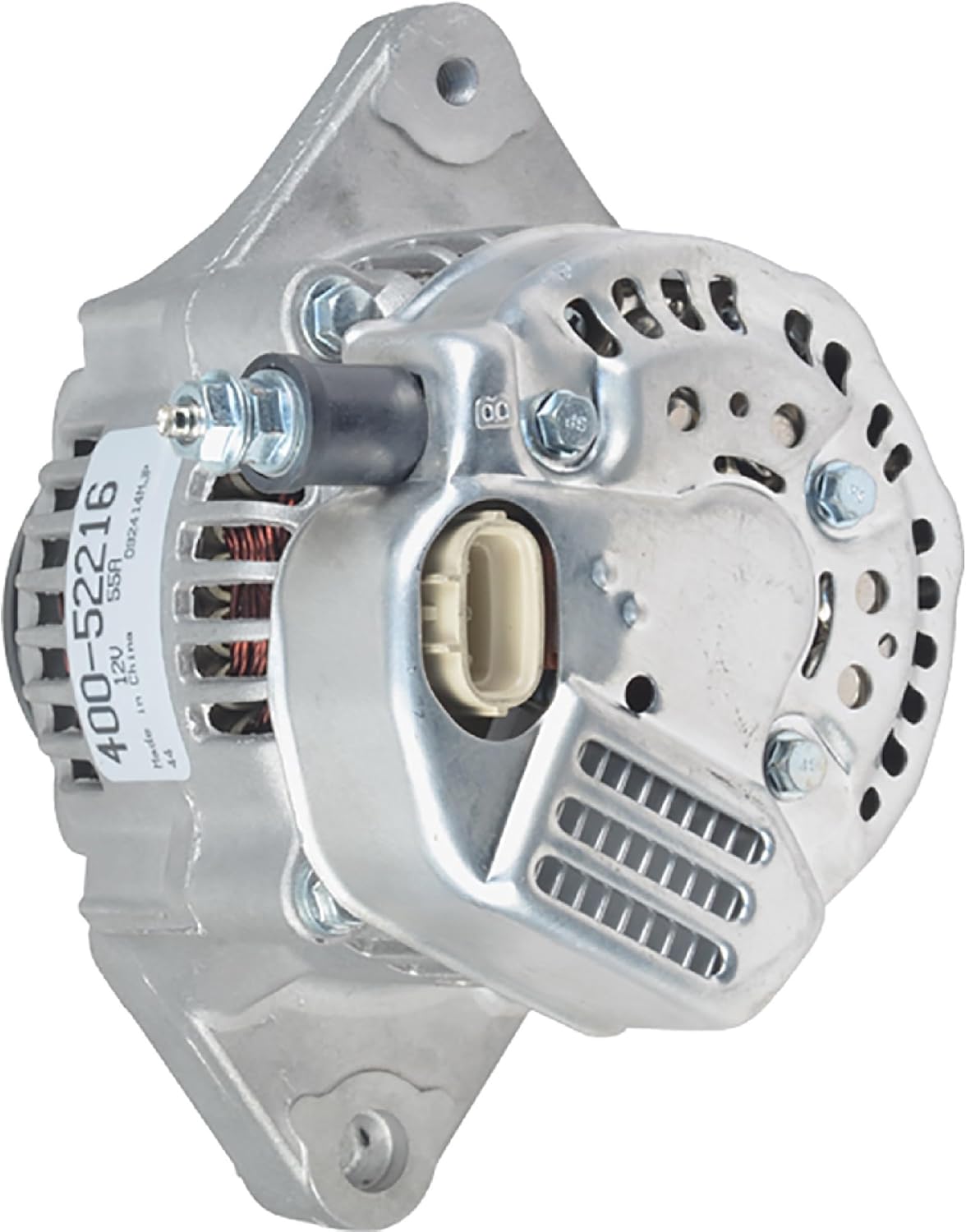
Figure 2: Side view of the DB Electrical Alternator 400-52216, highlighting the pulley and fan assembly.

Figure 3: Diagram of the alternator's electrical connector, showing the 'P', 'IGN', and 'L' terminals for proper wiring.
4. Operating Principles
The alternator is a key component of your vehicle's charging system. Once the engine starts, the serpentine belt spins the alternator pulley, which in turn rotates the internal rotor. This rotation generates an alternating current (AC) through electromagnetic induction. The internal rectifier then converts this AC into direct current (DC), which is used to power the vehicle's electrical systems and recharge the battery.
The internal voltage regulator maintains a consistent output voltage, typically between 13.5V and 14.5V, to prevent overcharging or undercharging the battery and protect sensitive electronic components.
Video 1: An informational video from DB Electrical showcasing various starter and alternator products. This video provides a general overview of the quality and range of electrical components offered by the brand.
5. Maintenance
Proper maintenance can extend the life of your alternator and ensure optimal performance:
- Belt Inspection: Regularly check the serpentine belt for cracks, fraying, or excessive wear. Ensure it has the correct tension. A loose belt can cause the alternator to undercharge, while an overly tight belt can damage bearings.
- Electrical Connections: Periodically inspect all electrical connections to the alternator for corrosion or looseness. Clean any corrosion with a wire brush and battery terminal cleaner. Ensure all connections are tight.
- Battery Health: A weak or failing battery can put extra strain on the alternator. Ensure your battery is in good condition and properly charged.
- Cleanliness: Keep the alternator free from excessive dirt, oil, and debris, which can hinder cooling and affect performance.
6. Troubleshooting Common Issues
| Symptom | Possible Cause | Solution |
|---|---|---|
| Battery Warning Light On | Failing alternator, loose/worn belt, faulty voltage regulator, wiring issue. | Check belt tension and condition. Inspect wiring. Test alternator output and battery voltage. Replace alternator if faulty. |
| Dim Headlights/Interior Lights | Alternator not charging sufficiently, weak battery. | Check alternator output. Test battery. Ensure all electrical connections are secure. |
| Battery Drains Frequently | Alternator not charging, parasitic draw, failing battery. | Verify alternator charging. Perform a parasitic draw test. Test and replace battery if necessary. |
| Grinding or Squealing Noise | Worn alternator bearings, loose/worn serpentine belt. | Inspect belt for wear and proper tension. If noise persists, alternator bearings may be failing, requiring replacement. |
If troubleshooting steps do not resolve the issue, it is recommended to seek professional assistance from a certified mechanic.
7. Product Specifications
| Specification | Value |
|---|---|
| Manufacturer | DB Electrical |
| Model Number | 400-52216 |
| Voltage | 12 Volts |
| Amperage | 55 Amps |
| Rotation | Clockwise (CW) |
| Regulator Type | Internal Regulator (IR) |
| Fan Type | Internal Fan (IF) |
| Item Weight | 9 pounds |
| OEM Part Numbers | 021080-1190, 101211-2960, 101211-2961 |
8. Warranty & Support
This DB Electrical Alternator 400-52216 comes with a 1-year warranty from the date of purchase, protecting you against manufacturing defects and material failures under normal use.
For warranty claims, technical assistance, or product inquiries, please contact DB Electrical customer support. Ensure you have your purchase receipt and product model number available when contacting support.
DB Electrical Customer Support:
- Website: www.dbelectrical.com (Hypothetical, as no direct link was provided in input)
- Email: Refer to the official DB Electrical website for contact information.
- Phone: Refer to the official DB Electrical website for contact information.
Always refer to the official DB Electrical website or your purchase documentation for the most current and accurate warranty terms and support contact details.