
1. Introduction
This manual provides essential instructions for the safe and efficient operation of your Energizer 150 Watts Power Inverter, Model EN150. This device converts 12V DC power from your vehicle's battery into 110V AC household power, and also provides USB charging ports. Please read this manual thoroughly before use and retain it for future reference.
2. Safety Information
WARNING: Failure to follow these instructions may result in serious injury or property damage.
Any operator or installer of this power inverter must read and follow all warnings, precautions, notes, and all installation and operation instructions detailed in this user manual.
- Do not open the inverter casing. There are no user-serviceable parts inside.
- Keep the inverter away from moisture, water, and flammable materials.
- Ensure adequate ventilation around the inverter to prevent overheating.
- Do not connect the inverter to AC distribution wiring.
- Always connect the inverter to a 12V DC power source only.
- Do not use the inverter with appliances that exceed its rated power output (150 Watts continuous).
- Disconnect the inverter from the power source when not in use.
3. Product Overview
The Energizer EN150 Power Inverter is designed to provide convenient AC and USB power on the go. It features a compact design, allowing it to fit in most vehicle cup holders.
3.1 Key Features
- 150 Watts continuous power, 300 Watts peak power.
- One 110V AC outlet (North American standard).
- Two USB Quick Charge 3.0 ports (30W total output).
- Direct cigarette lighter plug connection.
- Smart Chip Protection for safety.
- Ultra-silent thermal fan for efficient cooling.
- ETL Approved under UL Std 458.
3.2 Package Contents
- Energizer 150 Watts Power Inverter (Model EN150)
- Cigarette Lighter Power Cord (integrated)
- 1 Replacement Fuse
3.3 Product Diagram

Figure 1: Front view of the Energizer 150 Watts Power Inverter, showing the AC outlet, two USB ports, and the integrated cigarette lighter plug with a spare fuse.

Figure 2: Detailed diagram highlighting the key features and components of the inverter, including power output, USB ports, AC outlet, and cooling fan.

Figure 3: Power distribution diagram, indicating the maximum wattage for USB and AC outputs. Users should ensure connected devices do not exceed 150 Watts for the AC outlet.
4. Setup and Installation
The Energizer EN150 Power Inverter is designed for easy setup in your vehicle.
- Vehicle Compatibility: Ensure your vehicle has a 12V DC cigarette lighter socket.
- Placement: The inverter is designed to fit securely in most vehicle cup holders or can be placed on any flat, stable surface. Ensure the inverter is placed in a location with good airflow to prevent overheating.
- Connection: Insert the integrated cigarette lighter plug firmly into your vehicle's 12V accessory socket. The LED indicator on the inverter should illuminate, indicating it is receiving power.
- Powering On: The inverter typically powers on automatically when connected. If there's a power switch, ensure it's in the "ON" position.
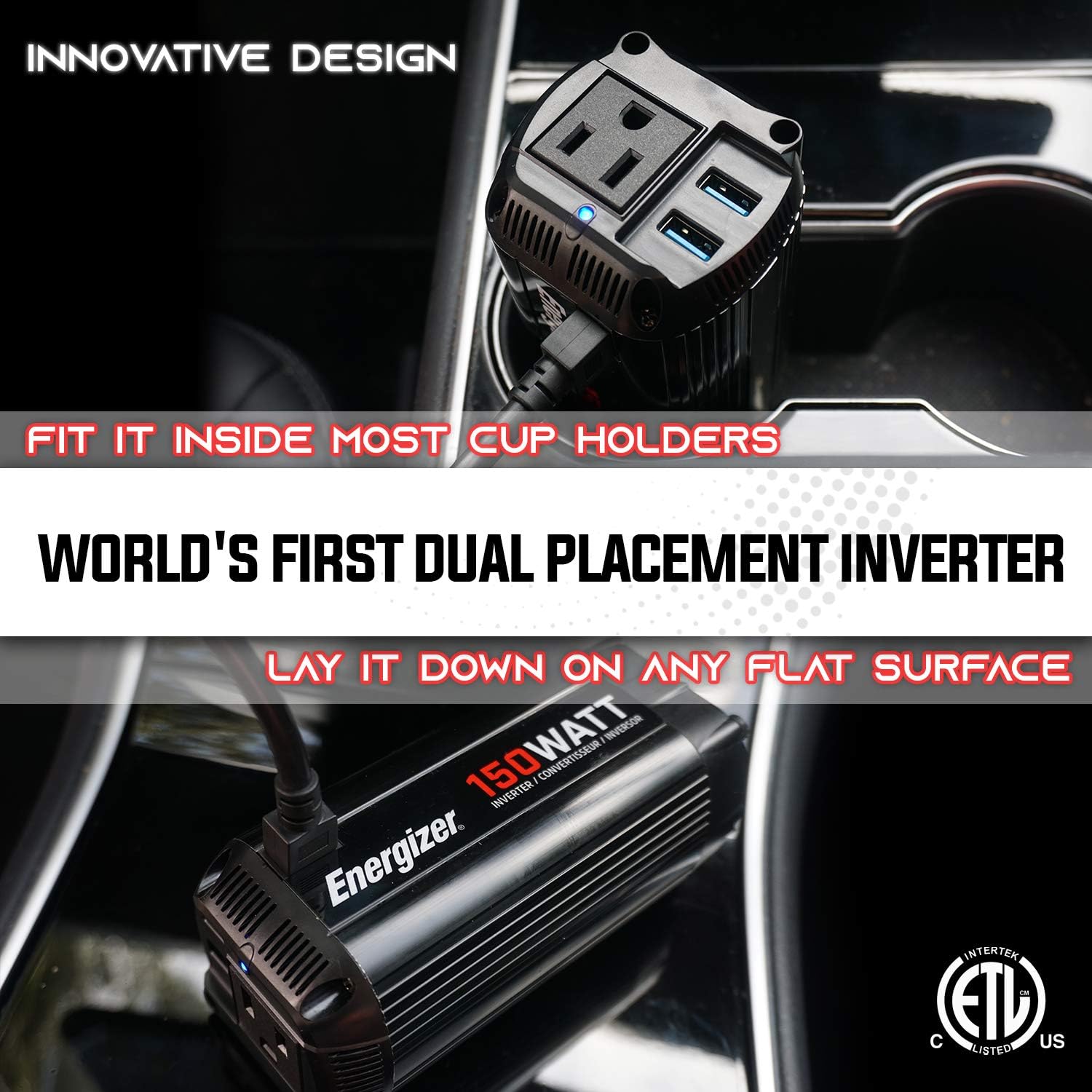
Figure 4: Illustration of the inverter's versatile placement options, fitting into a cup holder or resting on a flat surface.
5. Operating Instructions
Once the inverter is properly connected to your vehicle's 12V DC power source, you can begin powering your devices.
- Connecting AC Devices: Plug your 110V AC device into the standard North American AC outlet on the inverter. Ensure the device's power consumption does not exceed 150 Watts.
- Connecting USB Devices: Plug your USB-powered devices into the USB Quick Charge 3.0 ports. These ports provide up to 30W total output for fast charging compatible devices.
- Monitoring: The LED indicator will show the operational status. A green light typically indicates normal operation.
- Disconnection: When finished, disconnect your devices from the inverter, then unplug the inverter from the vehicle's accessory socket.
Note: For optimal performance and to prevent draining your vehicle's battery, it is recommended to operate the inverter with the vehicle's engine running, especially when powering higher-wattage devices.
6. Maintenance
Regular maintenance ensures the longevity and safe operation of your Energizer Power Inverter.
- Cleaning: Periodically clean the exterior of the inverter with a dry, soft cloth. Do not use liquid cleaners or solvents.
- Ventilation: Ensure the ventilation openings are clear of dust and debris. Blocked vents can lead to overheating.
- Fuse Replacement: The inverter comes with a spare fuse. If the inverter stops working, the fuse may need replacement. Refer to the specifications for the correct fuse type. To replace, carefully unscrew the tip of the cigarette lighter plug, remove the old fuse, and insert the new one.
- Storage: Store the inverter in a cool, dry place when not in use.
7. Troubleshooting
This section addresses common issues you might encounter with your power inverter.
| Problem | Possible Cause | Solution |
|---|---|---|
| Inverter not turning on (no LED light) |
|
|
| No power output from AC outlet or USB ports |
|
|
| Inverter fan is loud or constantly running |
|
|
8. Specifications
| Feature | Detail |
|---|---|
| Model | EN150 |
| Continuous Power | 150 Watts |
| Peak Power | 300 Watts |
| Input Voltage | 12 Volts DC |
| Output Voltage | 110 Volts AC |
| AC Outlet Type | Standard North American |
| USB Ports | 2 x Quick Charge 3.0 (30W max total) |
| Waveform | Modified Sine Wave |
| Dimensions (L x W x H) | 35.56 x 38.1 x 30.48 cm (approx. 14 x 15 x 12 inches) |
| Weight | 521.63 g (approx. 1.15 lbs) |
| Safety Certifications | ETL Approved Under UL Std 458 |
9. Warranty and Support
Energizer stands behind the quality of its products.
9.1 Warranty Information
This product is covered by a 2-year warranty on parts and labor. Please retain your proof of purchase for warranty claims. For detailed warranty terms and conditions, refer to the official Energizer product documentation or website.

Figure 5: The Energizer 150 Watts Power Inverter, highlighting its 2-year warranty.
9.2 Customer Support
For technical assistance, troubleshooting, or warranty inquiries, please visit the official Energizer website or contact their customer support. Contact information can typically be found on the product packaging or the brand's official online presence.
10. Product Video
Watch the official product video for a visual guide on the Energizer 150 Watts Power Inverter.
Video 1: Energizer 150 Watts Pure Sine Wave Power Inverter (EP150) overview. This video demonstrates the features and usage scenarios of the inverter, including its compact design and power capabilities.


