
Introduction
This manual provides essential instructions for the safe and effective operation of your SOCOTRAN T90 Walkie Talkies. These FRS two-way radios are designed for reliable communication, featuring IP67 waterproofing, NOAA weather alerts, and a long communication range. Please read this manual thoroughly before using the device.
Package Contents
Verify that all items are present in your package:
- 2 x SOCOTRAN T90 Walkie Talkies
- 1 x Seat Charger
- 2 x Belt Clips
- 2 x Lanyards
- 1 x USB Charging Line
- 1 x User’s Manual
- 6 x AA NiMH Rechargeable Batteries
Setup
1. Battery Installation
The SOCOTRAN T90 radios operate with either the included NiMH rechargeable batteries or standard AA alkaline batteries. To install batteries:
- Ensure the radio is powered off.
- Locate the battery compartment cover on the back of the radio.
- Open the cover and insert 3 AA batteries, observing the correct polarity (+/-) as indicated inside the compartment.
- Securely close the battery compartment cover.

Image: The SOCOTRAN T90 radio with its battery compartment open, showing the placement of AA batteries. A charging base is also visible.
2. Charging the Batteries
To charge the included NiMH rechargeable batteries:
- Place the walkie talkie into the seat charger.
- Connect the USB charging line to the seat charger and a compatible USB power source.
- Alternatively, you can charge the radio directly using the Micro-USB charging port on the side of the device.
3. Attaching Accessories
Attach the belt clip to the back of the radio for convenient carrying. Lanyards can be attached to the designated loop for added security.
Operating Instructions
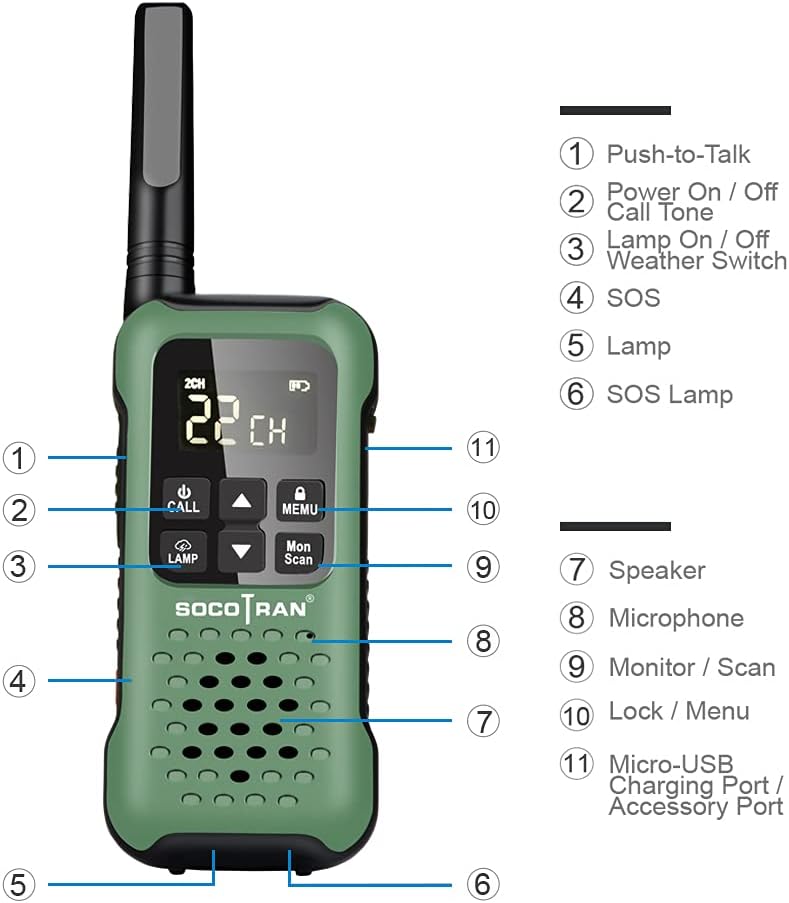
Image: A detailed diagram of the SOCOTRAN T90 walkie talkie, labeling its various buttons and ports, including Push-to-Talk, Power On/Off, Lamp, SOS, Speaker, Microphone, Monitor/Scan, Lock/Menu, and Micro-USB Charging Port.
1. Power On/Off
Press and hold the Power On/Off button (usually combined with the Call Tone button) to turn the radio on or off.
2. Channel Selection
The T90 features 22 FRS channels. Use the Up/Down arrow buttons to select your desired channel. Ensure all radios in your group are on the same channel for communication.
3. Push-to-Talk (PTT)
To transmit, press and hold the Push-to-Talk (PTT) button located on the side of the radio. Speak clearly into the microphone. Release the PTT button to listen.
4. VOX (Voice Operated Exchange)
The VOX function allows for hands-free communication. When activated, the radio transmits automatically when it detects your voice. Refer to the full user manual for detailed VOX sensitivity settings.
5. Keypad Lock
To prevent accidental changes to settings, activate the keypad lock function. This is typically done by pressing and holding the Lock/Menu button.
6. Call Tones
The radio offers 20 selectable call tones. These can be used to alert other users in your group before speaking. Consult the full manual for instructions on changing call tones.
7. NOAA Weather Alert
The SOCOTRAN T90 includes 11 NOAA Weather Channels and a Weather Alert function. When activated, the radio can detect and warn you of severe weather conditions in your area. Note that NOAA radio service availability varies by location.

Image: A SOCOTRAN T90 walkie talkie displayed against a scenic outdoor background, highlighting its NOAA Weather Scan & Alert capability.
8. SOS Function
The radio features an SOS button. Pressing this button for 2 seconds activates a red LED light, signaling for help in emergency situations.

Image: A SOCOTRAN T90 walkie talkie with its red SOS lamp illuminated, held by a person in a helmet and protective clothing, suggesting emergency use.
9. Flashlight
The T90 includes a built-in flashlight. It also features a water-activated LED that illuminates when the radio is submerged, aiding in retrieval.
10. Waterproof and Floating Design
The SOCOTRAN T90 is IP67 waterproof, designed to withstand immersion in water. Its floating capability ensures it remains on the surface if dropped in water.

Image: A SOCOTRAN T90 walkie talkie floating on the surface of water, with its front LED light shining, demonstrating its waterproof and floating features.
Video: This video demonstrates the SOCOTRAN T90 walkie talkie's features, including its waterproof capabilities, NOAA weather alerts, SOS function, and hands-free VOX operation in various outdoor environments like boating, skiing, and hiking. It also shows the radio floating and its water-activated LED light.
Maintenance
1. Cleaning
Clean the radio with a soft, damp cloth. Do not use harsh chemicals or abrasive cleaners. Ensure all ports are dry before charging or using in wet conditions.
2. Battery Care
For optimal battery life, fully charge the NiMH batteries before first use. If using alkaline batteries, replace them when power is low. Remove batteries if the radio will not be used for an extended period.
3. Water Exposure
While the radio is waterproof, always ensure the battery compartment and charging port covers are securely closed before exposing it to water.
Troubleshooting
- No Power: Check battery installation and charge level. Ensure batteries are correctly inserted and fully charged.
- Cannot Communicate: Verify that both radios are on the same channel and privacy code (if applicable). Ensure radios are within range.
- Poor Audio Quality: Check for obstructions between radios. Ensure the microphone and speaker are clear of debris. Adjust volume levels.
- Weather Alert Not Working: Confirm you are in an area with NOAA radio service coverage.
For more detailed troubleshooting, please refer to the comprehensive user manual included with your product.
Specifications
| Feature | Specification |
|---|---|
| Brand | SOCOTRAN |
| Model Number | T90 |
| Color | Green |
| Number of Channels | 22 |
| Special Feature | FRS |
| Frequency Range | FRS |
| Talking Range Maximum | 10 Miles (in open conditions) |
| Voltage | 5 Volts |
| Water Resistance Level | Waterproof (IP67) |
| Number of Batteries | 6 AA batteries required (included) |
| Item Weight | 1.5 Pounds |
| Audible Noise | 60 Decibels |
| Tuner Type | FM |
Warranty and Support
SOCOTRAN products are designed for reliability and performance. For warranty information and customer support, please refer to the warranty card included in your product packaging or visit the official SOCOTRAN website. Keep your purchase receipt as proof of purchase.