1. Introduction
This manual provides essential information for the safe and effective use of your Lenovo Smartwatch R1. Please read this manual thoroughly before using the device to ensure proper operation and to prevent damage.
2. Product Overview
The Lenovo Smartwatch R1 is a versatile wearable device designed to integrate seamlessly with your smartphone, offering features such as activity tracking, heart rate monitoring, and notification alerts. It features a 1.33-inch TFT touchscreen display and IP68 water resistance.

Figure 2.1: Front view of the Lenovo Smartwatch R1 displaying the time and date.

Figure 2.2: Side profile of the smartwatch, showcasing its design and strap texture.

Figure 2.3: Various colored straps and bezels, illustrating the customization options for the smartwatch.

Figure 2.4: Display of various watch faces and key features, including continuous heart rate monitoring.
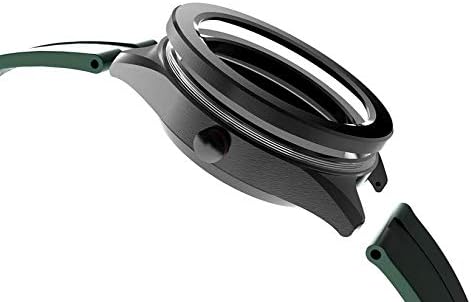
Figure 2.5: Detailed view of the watch casing and the strap attachment point.
3. Setup
3.1. Charging the Smartwatch
Before first use, fully charge your Lenovo Smartwatch R1. Connect the provided charging cable to the charging port on the back of the watch and plug the USB end into a standard USB power adapter (not included) or a computer USB port. The watch display will indicate charging status. A full charge typically takes approximately 2 hours.
3.2. Powering On/Off
- To Power On: Press and hold the side button until the Lenovo logo appears on the screen.
- To Power Off: Press and hold the side button, then select 'Power Off' from the options on the screen.
3.3. Pairing with Your Smartphone
- Download the official Lenovo Smartwatch application from your smartphone's app store (compatible with iOS 8.0+ and Android 4.4+).
- Ensure Bluetooth is enabled on your smartphone.
- Open the Lenovo Smartwatch app and follow the on-screen instructions to create an account or log in.
- Select 'Add Device' or 'Pair New Device' within the app.
- The app will search for available devices. Select 'Lenovo R1' from the list.
- Confirm the pairing request on both your smartphone and the smartwatch.
4. Operating Instructions
4.1. Basic Navigation
The Lenovo Smartwatch R1 features a 1.33-inch TFT touchscreen for navigation.
- Swipe Up/Down: Scroll through menus or notifications.
- Swipe Left/Right: Access different widgets or quick settings.
- Tap: Select an item or open an application.
- Press Side Button: Return to the home screen or wake the device.
4.2. Key Features
- Heart Rate Monitoring: The smartwatch provides 24-hour continuous heart rate monitoring. Access this feature from the main menu or a dedicated widget.
- Activity Tracking: Track steps, distance, calories burned, and sleep patterns. Data is synchronized with the companion app.
- Notifications: Receive call, message, and app notifications directly on your wrist after successful pairing with your smartphone.
- Watch Faces: Customize your watch face through the device settings or the companion app.
4.3. Using the Companion App
The Lenovo Smartwatch app on your smartphone provides a comprehensive overview of your health data, allows for device settings customization, and enables firmware updates. Ensure your watch is connected via Bluetooth to synchronize data and apply settings.
5. Maintenance
5.1. Cleaning the Smartwatch
Regularly clean your smartwatch to maintain its appearance and functionality.
- Wipe the screen and body with a soft, damp, lint-free cloth.
- For the strap, use mild soap and water, then rinse thoroughly and dry completely before wearing.
- Avoid using harsh chemicals, abrasive cleaners, or solvents.
5.2. Water Resistance (IP68)
The Lenovo Smartwatch R1 is rated IP68, meaning it is resistant to dust and can withstand immersion in water up to 1.5 meters for up to 30 minutes. It is suitable for daily use, such as hand washing or light rain. It is not recommended for swimming, diving, or high-pressure water activities.
5.3. Battery Care
- Avoid extreme temperatures, which can degrade battery life.
- Charge the device regularly, but avoid leaving it fully discharged for extended periods.
- Use only the provided charging cable.
6. Troubleshooting
6.1. Device Not Powering On
- Ensure the device is fully charged. Connect it to the charger for at least 30 minutes.
- Try pressing and holding the side button for 10-15 seconds to force a restart.
6.2. Unable to Pair with Smartphone
- Verify Bluetooth is enabled on your smartphone and the smartwatch.
- Ensure the smartwatch is within range of your smartphone.
- Restart both your smartphone and the smartwatch.
- Clear the Bluetooth cache on your smartphone (if applicable) and try pairing again.
- Ensure the Lenovo Smartwatch app is up to date.
6.3. Inaccurate Heart Rate Readings
- Ensure the watch is worn snugly on your wrist, about one finger-width above your wrist bone.
- Clean the sensor on the back of the watch.
- Avoid excessive movement during readings.
6.4. Screen Unresponsive
- Restart the smartwatch by holding the side button.
- Ensure the screen is clean and dry.
7. Specifications
| Feature | Specification |
|---|---|
| Brand | Lenovo |
| Model Name | R1 |
| Display | 1.33-inch TFT Touchscreen |
| Display Resolution | 240 x 240 pixels |
| Operating System | Wear OS |
| Connectivity | Bluetooth 4.0 |
| Battery Capacity | 280 mAh Lithium Polymer |
| Battery Life (Normal Use) | 7-10 days |
| Battery Life (Standby) | Up to 30 days |
| Water Resistance | IP68 |
| Compatibility | iOS 8.0+ / Android 4.4+ |
| Sensors | 24h Continuous Heart Rate Monitor |
| GPS | No GPS |
| Dimensions | 36.58 x 12.7 x 27.94 cm |
| Weight | 65 g |
| Included Components | Smartwatch, Charging Cables |
| Supported Languages | German, Spanish, French, English, Italian |
8. Warranty and Support
For warranty information and technical support, please refer to the warranty card included with your product or visit the official Lenovo support website. Keep your purchase receipt as proof of purchase.


