
1. Introduction
This manual provides essential information for the safe and effective operation, maintenance, and troubleshooting of your RYOBI 36V Lithium-ion Brushcutter (Model RBC36X26B) and the included RAC114 Trimmer Head. This powerful cordless tool is designed for various garden maintenance tasks, including trimming and brush cutting. It is powered by a 36V Lithium+ battery, compatible with the RYOBI 36V gardening tool range.
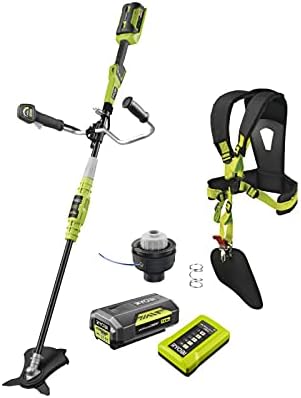
Figure 1: Complete RYOBI 36V Brushcutter Kit (RBC36X26B) with accessories.
2. Safety Instructions
Always read and understand all safety warnings and instructions before operating this product. Failure to follow the warnings and instructions may result in electric shock, fire, and/or serious injury.
General Safety Warnings:
- Keep children away: This product is not a toy. Keep children and bystanders away while operating the tool.
- Personal Protective Equipment (PPE): Always wear eye protection, hearing protection, long pants, and sturdy footwear when operating the brushcutter.
- Work Area: Ensure the work area is clear of debris, rocks, and other objects that could be thrown by the cutting attachment.
- Avoid Contact: Avoid contact with skin and eyes. In case of contact, rinse thoroughly with water.
- Ingestion Warning: If ingested, seek immediate medical attention.
- Secure Grip: Always maintain a firm and comfortable grip on the tool handles.
- Battery Safety: Use only the specified battery and charger. Do not expose batteries to extreme temperatures or water.
- Inspect Before Use: Before each use, inspect the tool for any damaged parts, loose fasteners, or worn cutting attachments. Do not operate if damaged.
3. Package Contents
Verify that all items listed below are included in your package. If any items are missing or damaged, contact your retailer.
- 1 x RYOBI 36V Lithium-ion Brushcutter (RBC36X26B)
- 1 x 36V Lithium-ion Battery (4.0 Ah)
- 1 x 36V Battery Charger
- 1 x Vertebrae Comfort Harness
- 1 x Semi-automatic Single Line Trimmer Head (Ø 1.6 mm) - RAC114
- 1 x Tri-Arc Blade (Ø 26 cm) - RAC117
- User Manual (this document)


Figure 2: Included 36V Battery and Charger (left), and RAC114 Trimmer Head (right).
4. Setup
4.1 Charging the Battery
- Connect the 36V charger to a standard power outlet.
- Slide the 36V Lithium-ion battery onto the charger until it clicks into place.
- Allow the battery to charge fully. The charger indicator lights will show the charging status. A full charge takes approximately 160 minutes.
- Once charged, disconnect the battery from the charger.
4.2 Assembling the Brushcutter
The brushcutter features a detachable shaft for easy transport and storage.
- Align the two sections of the shaft and twist to secure them together. Ensure the connection is firm.
- Attach the desired cutting tool (trimmer head or Tri-Arc blade) to the shaft. Refer to the specific instructions for each attachment.
- Adjust the bi-material GripZone handles for a comfortable and secure grip.
- Attach and adjust the Vertebrae Comfort Harness for balanced weight distribution and reduced fatigue during operation.

Figure 3: Assembled RYOBI 36V Brushcutter with the Tri-Arc blade.
5. Operating Instructions
5.1 Installing the Battery
Once charged, slide the battery into the battery compartment on the brushcutter until it locks securely in place.
5.2 Starting and Stopping
- To start the brushcutter, engage the safety switch and press the trigger. The tool features a progressive start for smooth operation.
- To stop, release the trigger.
5.3 Speed Control
The brushcutter is equipped with a variable speed control. Adjust the speed according to the task at hand. Lower speeds are suitable for light trimming, while higher speeds are for dense brush cutting.
5.4 Using the Cutting Attachments
- RAC114 Trimmer Head: Ideal for trimming grass and light weeds. The semi-automatic head feeds line with a tap on the ground.
- Tri-Arc Blade (RAC117): Designed for cutting thicker brush and small saplings. Ensure the blade is securely fastened before use.

Figure 4: Close-up of the cutting head with the Tri-Arc blade for brush cutting.
6. Maintenance
6.1 Cleaning
- Always remove the battery before cleaning or performing any maintenance.
- Clean the tool after each use. Wipe down the exterior with a damp cloth. Do not use harsh chemicals or abrasive cleaners.
- Clear any grass, dirt, or debris from the cutting head and ventilation openings.
6.2 Trimmer Line Replacement (RAC114)
When the trimmer line becomes too short or breaks, replace it with a 1.6 mm diameter line. Refer to the specific instructions provided with the RAC114 trimmer head for detailed replacement steps.
6.3 Blade Care (RAC117)
Inspect the Tri-Arc blade regularly for sharpness and damage. Sharpen or replace the blade as needed. Always wear heavy-duty gloves when handling the blade.
7. Troubleshooting
| Problem | Possible Cause | Solution |
|---|---|---|
| Tool does not start | Battery not installed correctly or not charged. | Ensure battery is fully charged and securely inserted. |
| Reduced cutting performance | Trimmer line too short or blade dull/damaged. | Advance trimmer line or replace it. Sharpen or replace the blade. |
| Excessive vibration | Blade or trimmer head not properly installed or damaged. | Check for proper installation. Inspect for damage and replace if necessary. |
| Battery not charging | Charger not plugged in or faulty battery/charger. | Check power connection. Test with another battery/charger if available. Contact support if issue persists. |
8. Specifications
- Model: RBC36X26B
- Battery Voltage: 36 V
- Battery Type: Lithium-ion
- Battery Capacity: 4.0 Ah
- Charger Charge Time: Approx. 160 minutes
- Cutting Diameter (Brushcutter): 26 cm (10.2 inches)
- Cutting Diameter (Trimmer): 30 cm (11.8 inches)
- Trimmer Line Diameter: 1.65 mm (0.065 inches)
- Blade Speed: 9000 rpm
- Weight with Battery: 5.1 kg (11.2 lbs)
- Weight without Battery: 3.7 kg (8.1 lbs)
- Product Dimensions (L x W x H): 3.6 x 2.6 x 0.03 cm (Note: These dimensions appear to refer to a component or packaging, not the full assembled tool.)
- Color: Black, Yellow
9. Warranty and Support
For warranty information, technical support, or to order replacement parts, please refer to the warranty card included with your product or visit the official RYOBI website. Keep your proof of purchase for warranty claims.


