
Naroote Simlugtzurcmsgg6
Naroote 4-Digit Mechanical Reset Counter User Manual
Model: Simlugtzurcmsgg6
1. Introduction
This manual provides detailed instructions for the proper use and maintenance of your Naroote 4-Digit Mechanical Reset Counter. Please read this manual thoroughly before operating the device to ensure correct functionality and longevity. This counter is designed for reliable, manual counting in various applications.
2. Product Overview
The Naroote 4-Digit Mechanical Reset Counter is a robust, hand-operated device used for tallying events or items. It features a durable metal construction, clear numerical display, and a simple reset mechanism. Its design ensures clear reading and stable operation in various environments.

Image 2.1: The Naroote 4-Digit Mechanical Reset Counter, highlighting its key features such as clear reading, anti-rust, anti-corrosion, wear-resistant properties, and suitability for a 20-60°C working environment.

Image 2.2: A top-down perspective of the counter, showing the six individual counting units and the base plate.
3. Setup
The Naroote Mechanical Reset Counter requires minimal setup. It is ready for use directly out of the packaging.
- Unpacking: Carefully remove the counter from its packaging. Inspect for any visible damage.
- Placement: Place the counter on a stable, flat surface or mount it securely using the pre-drilled holes on the base plate, if desired. Ensure it is positioned where it can be easily accessed for operation.
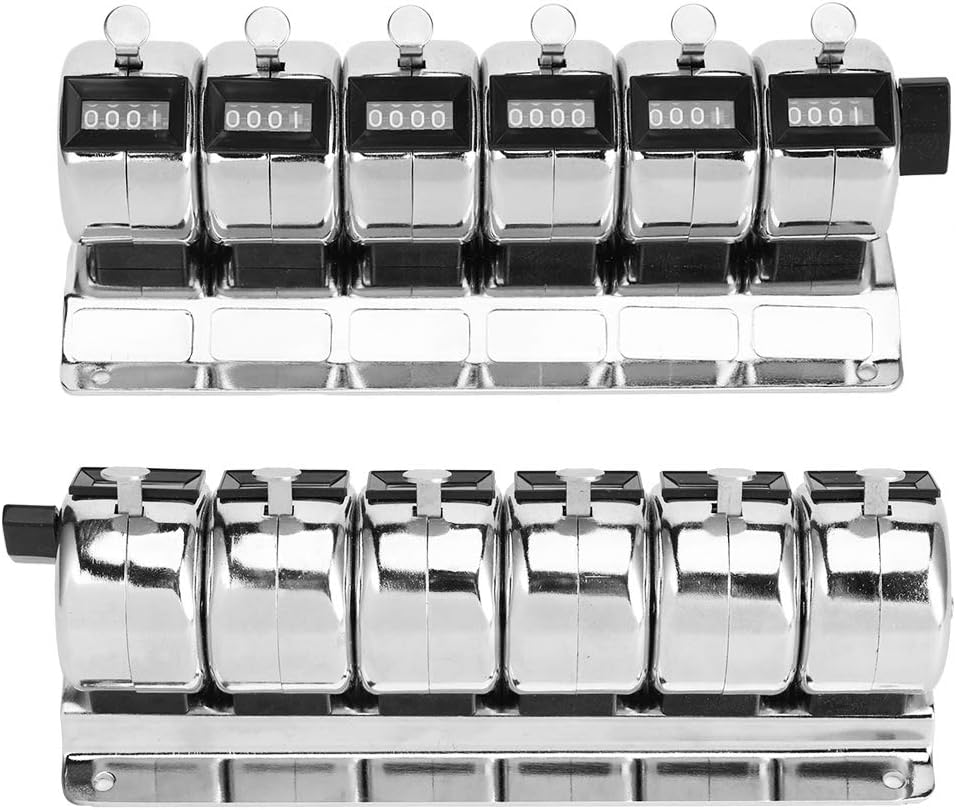
Image 3.1: A view of the counter's base, illustrating the mounting holes for secure installation.
4. Operating Instructions
Operating the mechanical counter involves two primary actions: counting and resetting.
4.1 Counting
- Each individual counting unit has a lever on top. To increment the count for a specific unit, press down firmly on its lever.
- The display will advance by one digit with each press.
- Ensure a full press and release for accurate counting.

Image 4.1: A close-up view of the individual counting units, showing the levers used for incrementing the count.
4.2 Resetting
- To reset a counting unit to zero, locate the reset knob on the right side of the unit.
- Turn the reset knob clockwise until all digits on the display return to '0000'.
- Repeat for each unit that needs to be reset.

Image 4.2: An angled view of the counter, clearly showing the black reset knob located on the right side of the device.
5. Maintenance
Proper maintenance ensures the longevity and accurate operation of your mechanical counter.
- Cleaning: Use a soft, dry cloth to wipe down the exterior of the counter. For stubborn dirt, a slightly damp cloth can be used, followed by immediate drying. Avoid abrasive cleaners or solvents.
- Lubrication: The internal mechanism is designed for long-term use without frequent lubrication. If the operation becomes stiff over time, a small amount of light machine oil can be applied to moving parts by a qualified technician.
- Storage: Store the counter in a clean, dry environment, away from extreme temperatures and direct sunlight.
- Inspection: Periodically check for any loose parts or signs of wear. Address any issues promptly to prevent further damage.
6. Troubleshooting
Most issues with a mechanical counter are related to physical obstruction or wear.
- Counter not advancing:
- Ensure the lever is being pressed fully and released completely.
- Check for any foreign objects obstructing the lever mechanism.
- If the mechanism feels stiff, it may require professional inspection or lubrication.
- Counter not resetting to zero:
- Ensure the reset knob is turned fully until all digits display '0000'.
- Check for any obstructions preventing the knob from turning freely.
- If the reset mechanism is jammed, do not force it. Contact support for assistance.
- Inaccurate counting:
- Verify that the counting action is deliberate and consistent. Rapid or partial presses may lead to missed counts.
- Ensure the counter is stable and not subject to vibrations that could affect the mechanism.
7. Specifications
| Feature | Specification |
|---|---|
| Brand | Naroote |
| Model Number | Simlugtzurcmsgg6 |
| Manufacturer | Simlug |
| Counting Range | 0-9999 per unit |
| Number of Units | 6 |
| Reset Mechanism | Manual knob reset |
| Material | Metal (Chrome plated) |
| Working Environment | 20-60°C |
| Batteries Required | No |
| Item Weight | 560 g |
| Key Features | Anti-rust, anti-corrosion, wear-resistant, long service life, clear reading, practical, stable use |
8. Warranty and Support
For warranty information, please refer to the terms provided by your retailer at the time of purchase. If you encounter any issues not covered in this manual or require further assistance, please contact the retailer or manufacturer's customer support. When contacting support, please have your product model number (Simlugtzurcmsgg6) and purchase details available.
Ask a question about this manual
Ask about setup, troubleshooting, compatibility, parts, safety, or missing instructions. Manuals+ will review the question and use this page’s manual context to help answer it.