1. Introduction
Thank you for choosing the CAMECHO DAB+ Car Radio. This manual provides detailed instructions for the installation, operation, and maintenance of your new car audio system. Please read this manual thoroughly before use to ensure proper functionality and to maximize your listening experience.
This 1 DIN car radio features DAB+ digital broadcasting, FM/AM/RDS radio, Bluetooth hands-free calling and music streaming, dual USB ports, SD/TF card support, and AUX input. It delivers 4x50W output, includes fast charging capabilities, and comes with a remote control for convenient operation.
2. Product Overview and Dimensions
The CAMECHO 1 DIN Car Radio is designed for standard single-DIN car openings. Below are the general dimensions of the unit.
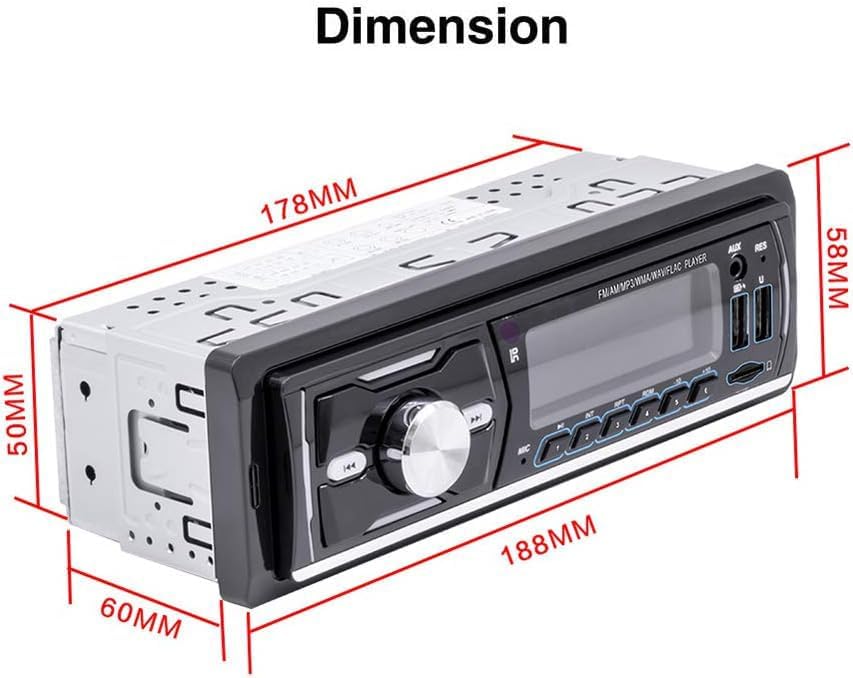
3. Installation
3.1 Wiring Diagram and Connections
Before installation, ensure the device is suitable for your vehicle. Confirm the product size and the wiring harness connections. The unit operates on DC 12V. Refer to the diagram below for proper wiring connections.

Key Connections:
- ISO Plug: Connects power and speaker cords.
- RCA Audio Output: For connecting to an external amplifier.
- Radio Antenna: For FM/AM reception.
- DAB HD Antenna: For DAB+ digital radio reception (antenna included).
- USB Ports (x2): For media playback and fast charging.
- AUX Input: 3.5mm jack for external audio devices.
- TF Card Slot: Supports TF and SD cards up to 32GB for media playback.
Ensure all connections are secure before powering on the unit.
4. Operating Instructions
4.1 Basic Controls
The front panel features various buttons and a rotary knob for controlling the unit. A remote control is also provided for convenience.
- POWER/MODE: Press to turn on/off or switch between audio sources (Radio, DAB+, Bluetooth, USB, SD, AUX).
- VOL/SEL (Rotary Knob): Rotate to adjust volume. Press to enter audio settings (Bass, Treble, Balance, Fader, EQ).
- CLK: Press to display or set the clock.
- MUTE: Press to mute/unmute audio.
- BAND/AMS: In radio mode, press to switch between FM/AM bands. Long press to auto-store stations.
- PREV/NEXT: Skip tracks or tune radio frequencies.
- Answer Call/End Call: Use dedicated buttons for Bluetooth calls.
- Numbered Buttons (1-6): Store and recall radio presets.
- RESET: A small button (often recessed) to reset the unit to factory settings. Use a thin object to press.
4.2 DAB+ Digital Radio
The unit supports European HD DAB+ digital broadcasting, offering CD-quality sound. Ensure the DAB antenna is connected.

- Switching to DAB+: Press the MODE button until DAB+ is selected.
- Scanning for Stations: The unit will automatically scan for available DAB+ stations upon first use or when in a new area.
- Selecting Channels: Use the PREV/NEXT buttons to navigate through available DAB+ channels.
- Volume Adjustment: Use the VOL/SEL rotary knob.
4.3 FM/AM/RDS Radio
Enjoy high-quality stereo FM/AM radio with RDS functionality for real-time traffic, news, and weather information.
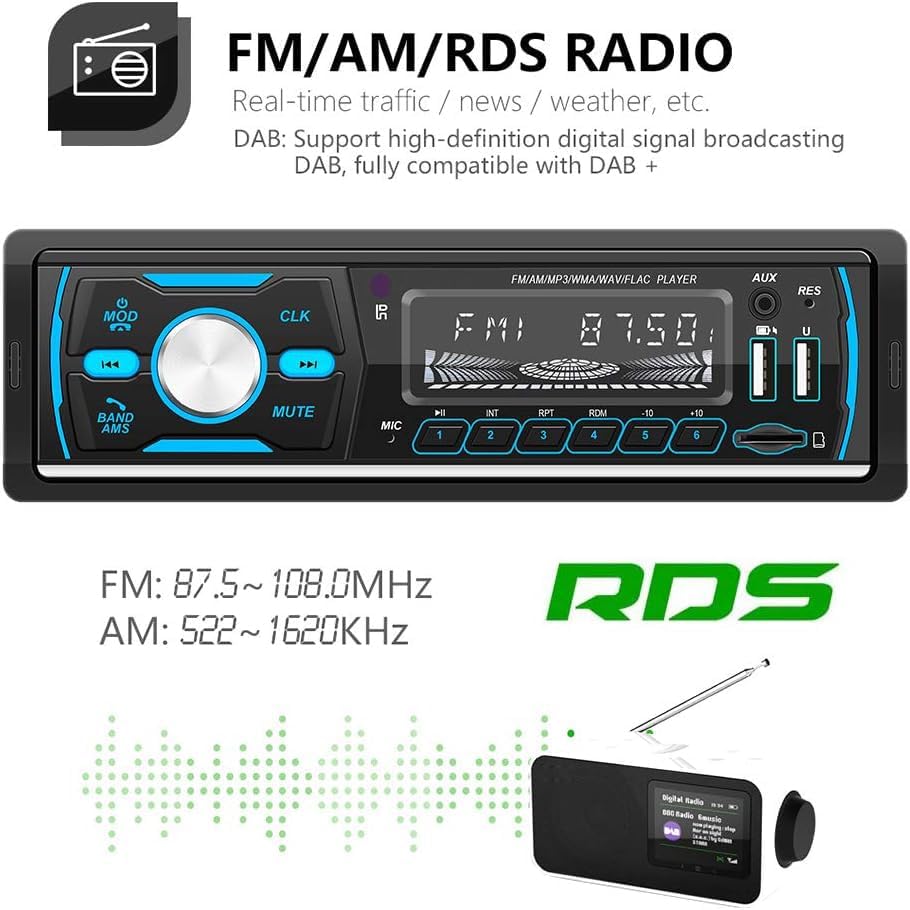
- Switching to FM/AM: Press the MODE button until FM or AM is selected.
- Band Selection: Press the BAND/AMS button to cycle through FM1, FM2, FM3, AM1, AM2.
- Tuning: Use the PREV/NEXT buttons for manual tuning. Long press PREV/NEXT for automatic station search.
- Auto Store: Long press the BAND/AMS button to automatically scan and store the strongest stations into presets.
- Presets: Use numbered buttons (1-6) to select stored stations.
4.4 Bluetooth Connectivity
The built-in Bluetooth module allows for hands-free calling and wireless music streaming.

- Pairing:
- Turn on the car radio and switch to Bluetooth mode (BT).
- Enable Bluetooth on your mobile device and search for available devices.
- Select "CAMECHO" (or similar name) from the list to pair. If prompted, enter PIN "0000".
- Hands-Free Calling: Once paired, you can answer, reject, or end calls directly from the car radio using the dedicated buttons or remote control. The built-in microphone ensures clear communication.
- Bluetooth Music: Play audio from your paired device wirelessly. Use the PREV/NEXT buttons to skip tracks.
4.5 Media Playback (USB/SD/TF/AUX)
The unit supports various media inputs for playing your favorite music.
- USB Playback: Insert a USB drive into one of the two USB ports. The unit will automatically switch to USB mode and begin playing compatible audio files (MP3/WMA/WAV/FLAC). One USB port supports fast charging.
- SD/TF Card Playback: Insert an SD or TF card (up to 32GB) into the designated slot. The unit will switch to card mode and play compatible audio files.
- AUX Input: Connect an external audio device (e.g., smartphone, MP3 player) to the 3.5mm AUX input jack using an audio cable. Select AUX mode via the MODE button.
5. Maintenance
To ensure the longevity and optimal performance of your CAMECHO car radio, follow these maintenance guidelines:
- Cleaning: Use a soft, dry cloth to clean the front panel. Do not use abrasive cleaners, solvents, or chemical sprays, as they may damage the surface.
- Temperature: Avoid exposing the unit to extreme temperatures, direct sunlight for prolonged periods, or high humidity.
- Connections: Periodically check all wiring connections to ensure they are secure and free from corrosion.
- Software Updates: While software updates are not guaranteed, check the manufacturer's website for any available firmware updates that may improve performance or add features.
6. Troubleshooting
If you encounter issues with your car radio, refer to the following common problems and solutions:
| Problem | Possible Cause | Solution |
|---|---|---|
| No power | Incorrect wiring; Blown fuse; Vehicle battery issue | Check power and ground connections. Inspect vehicle fuses. Ensure battery is charged. |
| No sound | Speaker wires disconnected; Volume too low; Mute activated | Check speaker connections. Increase volume. Deactivate mute function. |
| Poor radio reception (FM/AM) | Antenna not connected; Weak signal area; Damaged antenna | Ensure antenna is securely connected. Try tuning in a different location. Check antenna for damage. |
| Poor DAB+ reception | DAB antenna not connected or faulty; Weak DAB signal | Verify DAB antenna connection. Ensure DAB antenna is correctly installed. |
| Bluetooth not connecting | Bluetooth not enabled on device; Incorrect pairing; Interference | Ensure Bluetooth is on and discoverable on your phone. Delete previous pairings and re-pair. Move away from other Bluetooth devices. |
| USB/SD/TF not playing | Incompatible file format; Corrupted media; Incorrect mode selected | Ensure media contains supported file types (MP3/WMA/WAV/FLAC). Try a different USB/SD/TF card. Select correct source mode. |
If the problem persists after trying these solutions, please contact customer support.
7. Specifications
Below are the technical specifications for the CAMECHO DAB+ Car Radio:
| Feature | Specification |
|---|---|
| Brand | CAMECHO |
| Model Number | 1 |
| Color | Black |
| Connectivity Technology | Auxiliary, Bluetooth, USB |
| Connections | 3.5 mm Jack, RCA, USB |
| Special Features | DAB+ HD Broadcasting, Bluetooth, FM Radio, Audio Input/Output, Phone Charging, Colored Buttons, Remote Control |
| Total USB Ports | 2 |
| Compatible Devices | Speaker |
| Controller Type | Remote Control |
| Audio Encoding | Stereo |
| Audio Output Mode | Stereo |
| Surround Sound Channel Configuration | 4.0 |
| Max Output Power | 4x50W |
| FM Tuning Range | 87.5~108.0MHz |
| AM Tuning Range | 522~1620KHz |
| TF/SD Card Support | Max 32G |
| Country of Origin | China |
8. Warranty and Support
8.1 Manufacturer's Warranty
This CAMECHO product comes with a 1-YEAR MANUFACTURER'S WARRANTY from the date of purchase. This warranty covers defects in materials and workmanship under normal use. It does not cover damage caused by improper installation, accident, misuse, abuse, negligence, or unauthorized modification.
Please retain your proof of purchase for warranty claims. Information regarding spare parts availability and guaranteed software updates is not available at this time.
8.2 Customer Support
For technical assistance, troubleshooting, or warranty inquiries, please contact CAMECHO customer support.
Email: CAMECHOVIP@126.com
Our support team is available to help you with any questions or issues you may have regarding your CAMECHO car radio.


