
1. Product Overview
The Genkins GK2300i is a portable inverter generator designed to provide clean and reliable power for various applications, including camping, RV use, and emergency backup. It features a 79cc 4-stroke OHV engine, delivering 2300 starting watts and 1900 running watts. Its ultra-quiet operation (57dB at 7 meters) and lightweight design (48 lbs) make it highly portable and user-friendly. The generator includes pure sine wave output (less than 2% THD), ensuring safe operation for sensitive electronics. It is equipped with 120V AC outlets, dual USB ports, and an RV adapter for versatile power options. The Load Based Speed Control (LBSC) technology automatically adjusts engine speed to match the load, optimizing fuel efficiency and reducing noise.

2. Safety Information
Read and understand all safety precautions before operating the generator. Failure to follow these instructions can result in serious injury or death.
- Carbon Monoxide Hazard: Generators produce carbon monoxide, a colorless, odorless, poisonous gas. Operate the generator outdoors only, far away from windows, doors, and vents. Never operate indoors or in partially enclosed spaces.
- Electrical Shock Hazard: Do not operate the generator in wet conditions. Ensure all electrical connections are dry and properly insulated. Never touch electrical components with wet hands.
- Fire Hazard: Gasoline is highly flammable. Refuel in a well-ventilated area with the engine off and cool. Do not smoke or allow open flames near the generator. Store fuel in approved containers.
- Hot Surfaces: The generator's engine and muffler become very hot during operation and remain hot for some time after shutdown. Avoid touching hot surfaces to prevent burns.
- Proper Grounding: Always ensure the generator is properly grounded before operation to prevent electrical shock.
3. Setup
Before first use, the generator requires initial setup, including adding engine oil and fuel.
3.1 Add Engine Oil
- Place the generator on a level surface.
- Locate the oil fill cap/dipstick on the side of the engine.
- Remove the oil fill cap/dipstick.
- Using the provided oil funnel, slowly add the recommended engine oil (refer to specifications for type and capacity) until it reaches the upper mark on the dipstick. Do not overfill.
- Securely replace the oil fill cap/dipstick.

3.2 Add Fuel
- Ensure the generator is off and cool.
- Open the fuel tank cap.
- Carefully pour fresh, unleaded gasoline (minimum 87 octane) into the fuel tank. Do not overfill.
- Securely close the fuel tank cap.
4. Operating Instructions
Follow these steps to safely start and operate your Genkins GK2300i generator.
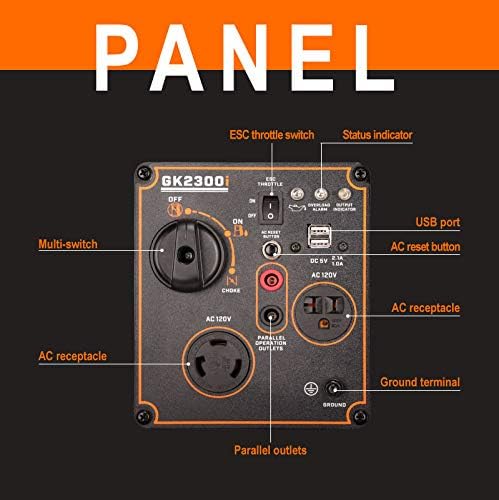
4.1 Starting the Generator
- Ensure the generator is on a level surface and properly grounded.
- Turn the multi-switch to the 'ON' position (fuel valve open).
- If starting a cold engine, turn the multi-switch to the 'CHOKE' position. For a warm engine, proceed directly to step 4.
- Pull the recoil starter handle firmly and smoothly until the engine starts.
- Once the engine starts, slowly move the multi-switch from 'CHOKE' to 'ON' (run position).
- Allow the engine to run for a few minutes to warm up. The green 'Output Indicator' light should illuminate, indicating power is available.
4.2 Connecting Electrical Devices
Once the generator is running and the 'Output Indicator' light is green, you can connect your electrical devices to the 120V AC outlets or USB ports. Ensure the total wattage of connected devices does not exceed the generator's running wattage (1900W).
4.3 Using the ESC Throttle (Economy Mode)
The ESC Throttle switch allows the generator to automatically adjust engine speed based on the electrical load. This reduces fuel consumption and noise when less power is required.
- To activate economy mode, set the 'ESC THROTTLE' switch to 'ON'.
- For full power output or when starting high-load devices, set the 'ESC THROTTLE' switch to 'OFF'.
4.4 Parallel Operation
The Genkins GK2300i supports parallel operation, allowing you to connect two identical generators for increased power output. This requires an optional parallel kit (sold separately). Refer to the parallel kit's instructions for detailed setup and operation.
4.5 Stopping the Generator
- Disconnect all electrical devices from the generator.
- Allow the generator to run for a few minutes without load to cool down.
- Turn the multi-switch to the 'OFF' position.
5. Maintenance
Regular maintenance is crucial for the longevity and optimal performance of your generator. Always ensure the generator is off and cool before performing any maintenance.
5.1 Engine Oil Change
Change the engine oil after the first 20 hours of operation, and then every 50-100 hours or annually, whichever comes first. Use recommended oil type (e.g., 10W-30).
5.2 Air Filter Inspection and Cleaning
Inspect the air filter every 50 hours or more frequently in dusty conditions. Clean or replace as necessary to ensure proper engine airflow.

5.3 Spark Plug Inspection
Inspect the spark plug every 100 hours or annually. Clean or replace if fouled or worn.
5.4 Storage
For long-term storage, drain the fuel tank and carburetor, or add a fuel stabilizer. Change the engine oil, clean the generator, and store it in a dry, well-ventilated area.
6. Troubleshooting
This section addresses common issues you might encounter with your Genkins GK2300i generator.
6.1 Engine Does Not Start
- Check Fuel Level: Ensure there is sufficient fresh fuel in the tank.
- Check Oil Level: The generator has a low-oil automatic shutdown feature. If the oil level is too low, the engine will not start. Add oil if necessary.
- Choke Position: Ensure the multi-switch is in the 'CHOKE' position for cold starts and moved to 'ON' after starting.
- Spark Plug: Inspect the spark plug for fouling or damage. Clean or replace if needed.
6.2 No Power Output
- Output Indicator: Check if the green 'Output Indicator' light is on. If not, power is not being generated.
- Overload Alarm: If the red 'Overload Alarm' light is on, the generator has been overloaded. Disconnect devices, press the 'AC Reset Button', and restart the generator. Connect fewer devices or devices with lower wattage.
- AC Reset Button: Press the 'AC Reset Button' if the overload alarm has been triggered.
7. Specifications
| Brand | Genkins |
| Model Number | GK2300i |
| Engine Type | 79cc 4-Stroke OHV |
| Starting Wattage | 2300 Watts |
| Running Wattage | 1900 Watts |
| Fuel Type | Gasoline |
| Fuel Tank Volume | 1.36 Gallons |
| Run Time (at 50% load) | Up to 8 hours |
| Noise Level | 53-56 dBA (at 13 feet) |
| Output Voltage | 120 Volts AC |
| Special Feature | Pure Sine Wave |
| Item Weight | 48 lbs (approx. 51 lbs packaged) |
| Product Dimensions (L x W x H) | 21" x 11" x 19" |
| Included Components | Battery (for ignition system), RV adapter |

8. Warranty and Support
The Genkins GK2300i Portable Inverter Generator comes with a 2-year limited warranty. Additionally, Genkins provides free lifetime technical support from dedicated experts.
For warranty claims, technical assistance, or any product-related inquiries, please contact Genkins Direct customer support. Refer to your purchase documentation for specific contact details.
