
Metrel MI 3152
Metrel MI 3152 EurotestXC Multifunction Tester
User Instruction Manual
1. Introduction
The Metrel MI 3152 EurotestXC is a state-of-the-art multifunctional measuring instrument designed for comprehensive electrical installation safety testing. It incorporates a new user interface with a large color touch screen display for intuitive operation. This instrument performs a wide range of tests, including on-line voltage monitoring, phase sequence testing, varistor testing, earth resistance measurement, illuminance measurement, TRMS current measurement, RCD tests, line and loop impedance tests, specific earth resistance measurements, ISFL measurements, and IMD tests.
This manual provides essential information for the safe and effective use of your MI 3152 EurotestXC. Please read it thoroughly before operating the device.
2. Package Contents
Verify that all items listed below are present in your package:
- Instrument MI 3152 EurotestXC
- Plug commander, 1.5 m
- Test lead, 3 x 1.5 m
- Power supply adapter + 6 NiMH rechargeable batteries, type AA
- Test probe, 3 pcs (blue, black, green)
- Crocodile clip, 3 pcs (blue, black, green)
- Earth set 20 m
- RS232 - PS/2 cable
- USB cable
- Soft carrying bag
- Soft carrying neck belt
- Metrel ES Manager BASIC license
- Short instruction manual

Figure 2.1: Overview of the MI 3152 EurotestXC instrument and its included accessories, such as test leads, probes, earth set, and carrying bags.
3. Setup and Initial Use
3.1. Battery Installation and Charging
The MI 3152 EurotestXC is powered by 6 NiMH rechargeable AA batteries. Before first use, ensure the batteries are fully charged.
- Locate the battery compartment on the rear of the instrument.
- Open the compartment cover.
- Insert the 6 NiMH AA batteries, observing correct polarity.
- Close the battery compartment cover securely.
- Connect the power supply adapter to the instrument and a suitable power outlet to begin charging. The charging indicator will illuminate.
3.2. Connecting Test Leads
Proper connection of test leads is crucial for accurate measurements and safe operation.
- Identify the input terminals on the instrument.
- Connect the colored test leads (blue, black, green) to their corresponding terminals.
- Attach the test probes or crocodile clips to the ends of the test leads as required for your specific measurement.
4. Operating the Instrument
The MI 3152 EurotestXC features a 4.3-inch TFT color touch screen for navigation and operation.
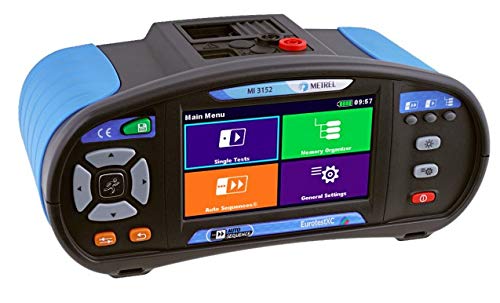
Figure 4.1: The main menu interface of the MI 3152 EurotestXC, showing options for Single Tests, Memory Organizer, Auto Sequences, and General Settings.
4.1. Navigating the User Interface
- Use the touch screen to select menu options and input data.
- The main menu provides access to various functions: Single Tests, Memory Organizer, Auto Sequences, and General Settings.
- Context-sensitive help screens are available directly on the instrument for on-site referencing.
4.2. Key Measurement Functions
The MI 3152 EurotestXC offers a comprehensive suite of measurement capabilities:
- Insulation Resistance: Measures with DC voltage from 50 V to 1000 V.
- Varistor Test: Checks varistor functionality.
- Continuity of PE Conductors: Performed with 200 mA DC test current (with polarity change) or 7 mA test current (without RCD tripping).
- Line/Loop Impedance: Includes combined Z AUTO and Loop impedance with Trip Lock RCD function.
- TRMS Voltage and Frequency: True RMS measurements for voltage and frequency.
- Phase Sequence: Determines the correct phase rotation.
- Power and THD Measurement: Measures power and Total Harmonic Distortion (up to the 12th harmonic).
- RCD Testing: Supports general and selective RCDs (Type AC, A, F, B, B+, MI RCD, EV RCD, PRCD, PRCD-K, PRCD-S).
- Earth Resistance: Utilizes 3-wire and 2-clamps methods. Specific earth resistance can be measured with an optional Ro-adapter.
- TRMS Leakage and Load Currents: Requires optional accessories.
- First Fault Leakage Current (ISFL): Detects initial leakage currents.
- Insulation Monitoring Devices (IMDs) Testing: For monitoring insulation systems.
- Illumination: Requires optional accessories.
- High Resolution Loop Impedance (mΩ): Requires optional accessories.
- EVSE AUTO SEQUENCES and Function Inspections: For electric vehicle supply equipment testing.
- Cable Location: Requires optional accessories for determining cable locations.
4.3. Automated Test Procedures
The instrument includes predefined automatic test sequences for efficiency:
- Auto TT: (U, Zln, Zs, Uc)
- Auto TN/RCD: (U, Zln, Zs, Rpe)
- Auto TN: (U, Zln, Zlpe, Rpe)
- Auto IT: (U, Zln, Isc, Isfl, IMD)
Automated RCD and Impedance testing procedures streamline common tasks.
5. Maintenance and Care
To ensure the longevity and accuracy of your MI 3152 EurotestXC, follow these maintenance guidelines:
- Cleaning: Wipe the instrument with a soft, damp cloth. Do not use abrasive cleaners or solvents. Ensure the instrument is dry before storage or next use.
- Storage: Store the instrument in its soft carrying bag in a dry, cool place, away from direct sunlight and extreme temperatures.
- Battery Care: If the instrument will not be used for an extended period, remove the batteries to prevent leakage. Recharge batteries regularly to maintain their capacity.
- Calibration: Regular calibration by an authorized service center is recommended to maintain measurement accuracy, typically every 12 months.
- Inspection: Periodically inspect test leads, probes, and connectors for any signs of damage or wear. Replace damaged accessories immediately.
6. Troubleshooting
This section provides solutions to common issues you might encounter with your MI 3152 EurotestXC.
| Problem | Possible Cause | Solution |
|---|---|---|
| Instrument does not power on. | Low or depleted batteries; Incorrect battery installation. | Charge or replace batteries. Ensure batteries are inserted with correct polarity. |
| Inaccurate measurement readings. | Damaged test leads/probes; Instrument out of calibration; Environmental interference. | Inspect and replace damaged accessories. Arrange for calibration. Perform tests in a stable environment. |
| Touch screen unresponsive. | Temporary software glitch; Extreme temperature. | Restart the instrument. Allow instrument to return to operating temperature range. |
| Error message displayed. | Specific test condition not met; Internal fault. | Refer to the instrument's on-screen help for the specific error code. If persistent, contact technical support. |
7. Technical Specifications
Below are the key technical specifications for the Metrel MI 3152 EurotestXC.
- Model Number: MI 3152
- Brand: Metrel
- Power Source: Battery Powered (NiMH AA rechargeable batteries)
- Min. Operating Voltage: 50 Volts (DC)
- Color: Blue
- Display: 4.3" TFT High Resolution Color Touch Screen
- Safety Standards: IEC/EN 61557, IEC/EN 61010-1, IEC/EN 61010-2-030, IEC/EN 61010-2-032
- EMC Compatibility: IEC/EN 61326-1
- Connectivity: RS232, USB, Bluetooth (for PC and Android tablet communication)
8. Warranty and Support
8.1. Warranty Information
The Metrel MI 3152 EurotestXC comes with a two-year (24 month) warranty from the manufacturer, covering defects in materials and workmanship under normal use.
For warranty claims, please retain your proof of purchase and contact the authorized dealer or Metrel customer service.
8.2. Technical Support
For technical assistance, troubleshooting beyond this manual, or service inquiries, please contact your authorized Metrel distributor or visit the official Metrel website for support resources.
Metrel ES Manager BASIC license is included for data management and reporting. Software updates and additional resources may be available online.
Related documentsMI 3152


Ask a question about this manual
Ask about setup, troubleshooting, compatibility, parts, safety, or missing instructions. Manuals+ will review the question and use this page’s manual context to help answer it.