Introduction
This manual provides instructions for the safe and effective use of your Waterpik Cordless Advanced 2.0 Water Flosser bundle. Please read all instructions before operating the device to ensure proper function and longevity of your product.
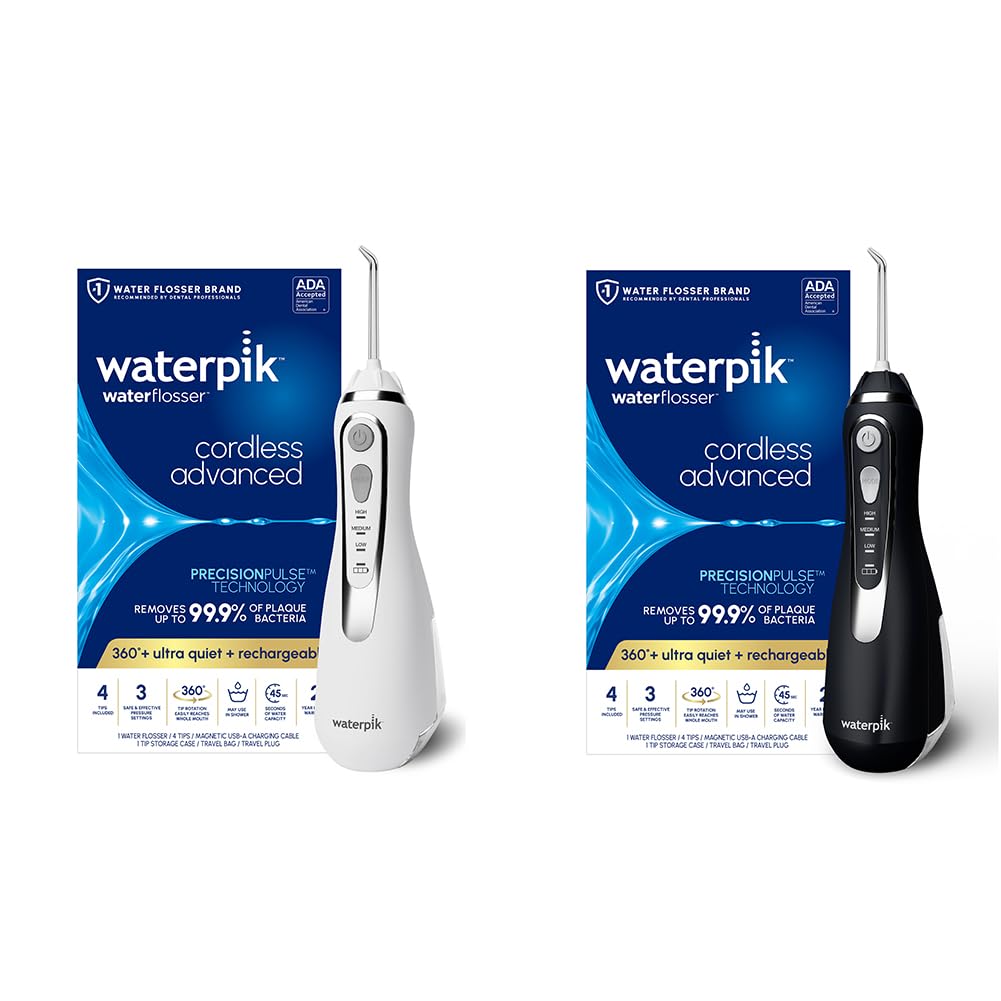
Image: Waterpik Cordless Advanced 2.0 Water Flosser bundle, featuring both the white (WP-580) and black (WP-582) units alongside their respective packaging. Each unit is a portable, rechargeable oral irrigator designed for effective plaque removal and gum health.
Important Safety Information
For oral use only. Keep out of reach of children. Use with care around water. Always follow manufacturer instructions for charging and use. Do not operate this device if it has a damaged cord or plug, if it is not working properly, or if it has been dropped into water.
Package Contents
- Waterpik Cordless Advanced 2.0 Water Flosser (White, Model WP-580)
- Waterpik Cordless Advanced 2.0 Water Flosser (Black, Model WP-582)
- 4 Water Flosser Tips (per unit)
- Magnetic USB-A Charging Cable (per unit)
- Tip Storage Case (per unit)
- Travel Bag (per unit)
- Travel Plug (per unit)
Setup
- Initial Charge: Before first use, fully charge the Waterpik Cordless Water Flosser. Connect the magnetic USB-A charging cable to the unit and a compatible USB power adapter (not included). The LED recharge indicator will show charging status. A full charge provides up to 4 weeks of use.
- Attach Tip: Insert the desired flosser tip into the handle until it clicks into place. To remove, press the tip eject button and pull the tip out.
- Fill Reservoir: Open the reservoir cap and fill the reservoir with warm water. Ensure the cap is securely closed before use. The reservoir holds approximately 7 ounces, providing up to 45 seconds of flossing time. The reservoir is top-rack dishwasher safe for cleaning.
Operating Instructions
- Select Pressure Setting: The unit features 3 pressure settings: Low, Medium, and High. Press the mode button to cycle through the settings and select your preferred intensity. Start with the lowest setting and gradually increase as comfortable.
- Positioning: Lean over a sink. Place the flosser tip into your mouth, aiming the tip towards your gumline at a 90-degree angle.
- Start Flossing: Press the power button to turn the unit on. Allow the water to flow from your mouth into the sink.
- Flossing Technique: Guide the tip along your gumline, pausing briefly between teeth. Ensure you clean both the front and back surfaces of your teeth. The 360-degree rotating tip allows for easy reach, even to back teeth.
- Completion: Turn off the unit by pressing the power button. Empty any remaining water from the reservoir.
Maintenance
- Daily Cleaning: After each use, empty the reservoir. If desired, rinse the reservoir with clean water. The reservoir is top-rack dishwasher safe.
- Tip Cleaning: Rinse flosser tips under running water. Replace tips every 3 months or sooner if they show signs of wear to maintain optimal performance.
- Unit Cleaning: Wipe the exterior of the unit with a soft, damp cloth. Do not immerse the main unit in water, although it is waterproof for shower use.
- Descaling: If mineral deposits build up, fill the reservoir with warm water and 2 tablespoons of white vinegar. Run the unit until the reservoir is empty. Rinse by running a full reservoir of clean water through the unit.
Troubleshooting
| Problem | Possible Cause | Solution |
|---|---|---|
| Unit does not turn on. | Battery is low or depleted. | Charge the unit for at least 4 hours. Ensure the charging cable is properly connected. |
| Low water pressure. | Reservoir is low or empty; tip is clogged; mineral buildup. | Refill reservoir. Clean or replace tip. Perform descaling procedure. |
| Water leaks from unit. | Reservoir cap not sealed; tip not properly seated. | Ensure reservoir cap is securely closed. Re-insert tip until it clicks. |
| Unit stops unexpectedly. | Battery depleted. | Recharge the unit. |
Specifications
- Brand: Waterpik
- Models: WP-580 (White), WP-582 (Black)
- Power Source: Battery Powered (Rechargeable)
- Special Features: Portable, Rechargeable, Waterproof (for shower use), 360-degree tip rotation, 3 pressure settings (Low, Medium, High)
- Reservoir Capacity: 7 oz (approximately 45 seconds flossing time)
- Charge Time: Approximately 4 hours for rapid charge
- Product Benefits: Improves gum health, removes plaque
Warranty and Support
The Waterpik Cordless Advanced 2.0 Water Flosser is backed by a 2-year limited manufacturer's warranty. For warranty claims or product support, please refer to the contact information provided with your product packaging or visit the official Waterpik website. Waterpik's support team is available to assist with any product questions or needs.
Compliance and Certifications
This product is accepted by the American Dental Association (ADA) for safety and effectiveness, indicating it meets their criteria for efficacy and safety in oral care.


