AQUAPICK AQ-350 Water Flosser Instruction Manual
Model: AQ-350 | Brand: AQUAPICK
Introduction
This manual provides detailed instructions for the safe and effective use of your AQUAPICK AQ-350 Water Flosser. Please read this manual thoroughly before operating the device and retain it for future reference. The AQUAPICK AQ-350 is designed to provide a powerful and effective oral cleaning experience, featuring a 0.66mm ultra-fine pulsating water vein (2400 pulses/min) and 12 pressure settings (10-100 psi).

Image: The AQUAPICK AQ-350 Water Flosser unit, showcasing its large water tank, control dial, handle, and included jet tips with their storage holders.
Safety Information
To ensure safe operation and prevent injury or damage, please adhere to the following safety guidelines:
- Always follow the instructions provided with the product.
- Keep the device away from water when not in use.
- Do not use the device if you have any medical conditions that may be affected by water pressure. Consult your dentist or physician if you have concerns.
- Keep the device out of reach of children.
- Always unplug the device from the power source when not in use.
- Do not use hot water above 104 Fahrenheit (40 Celsius) as it may cause injury to gums.
Setup Guide
Follow these steps to set up your AQUAPICK AQ-350 Water Flosser for first use:
Video: Official guide on how to use the AQUAPICK AQ-350 Professional Oral Irrigator, demonstrating key setup and usage steps.
1. Jet Tip Connection
- Select a jet tip. The AQ-350 comes with four color-coded jet tips for family members.
- Insert the chosen jet tip into the handle. Ensure it clicks securely into place.
- Lower the colored ring (gray) at the top of the handle to firmly secure the jet tip.

Image: Step-by-step visual instructions for connecting the jet tip, filling the water tank, and adjusting water pressure.
2. Filling Water Tank
- Remove the 600ml water tank from the unit.
- Fill the tank with lukewarm water. Do not use hot water above 104 Fahrenheit (40 Celsius) as it may cause injury to gums.
- Re-attach the filled water tank securely to the unit.
3. Water Pressure Control
- Turn the dial on the front of the unit to adjust the water pressure to your desired level. The unit offers 12 pressure settings (10-100 psi). Start with a lower setting and gradually increase as you become comfortable.
Operating Instructions
Learn how to effectively use your AQUAPICK AQ-350 for optimal oral hygiene.
1. Power Operation (Auto Start) & Test
- The unit features a Smart Start sensor detection technology. When you lift the handle from its cradle, the motor automatically starts.
- Point the jet tip into the sink. Slide the handle switch up to the ON position to initiate water flow and check the water pressure level.

Image: Step-by-step visual instructions for using the AQ-350, removing water after use, and storing the jet tip and handle.
2. Daily Use
- Lean over a sink and place the jet tip in your mouth. Close your lips slightly to prevent splashing, but allow water to drain from your mouth into the sink.
- Aim the water jet at the gumline at a 90-degree angle.
- Move the tip along the gumline, pausing briefly between teeth. Ensure you clean both the inside and outside surfaces of your teeth.
- The 2400 pulses per minute effectively remove plaque and food debris.
- Continue until you have cleaned all areas of your mouth. The 600ml tank provides approximately 70 seconds of continuous cleaning time.
Image: Illustration demonstrating the powerful 2400 pulses per minute water stream effectively cleaning teeth and gums.
Maintenance
Proper maintenance ensures the longevity and hygiene of your water flosser.
1. Water Removal After Use
- Detach the water tank from the unit and empty any remaining water completely.
- Point the handle downward into the sink. Slide the switch to the ON position to drain all remaining water from the hose and handle. This prevents water stagnation and bacterial growth.
2. Cleaning and Care
- Wipe the exterior of the unit with a soft, damp cloth. Do not immerse the main unit in water.
- The water tank is removable for easy cleaning. Wash it with mild soap and water, then rinse thoroughly.
- Jet tips are consumables. Replacement is recommended every 6 months for optimal hygiene and performance.
- The handle is also a consumable part, and replacement is recommended every 12 months.
- When returning the handle to the unit, make sure the switch is facing the front. This ensures a correct fit and proper drainage.
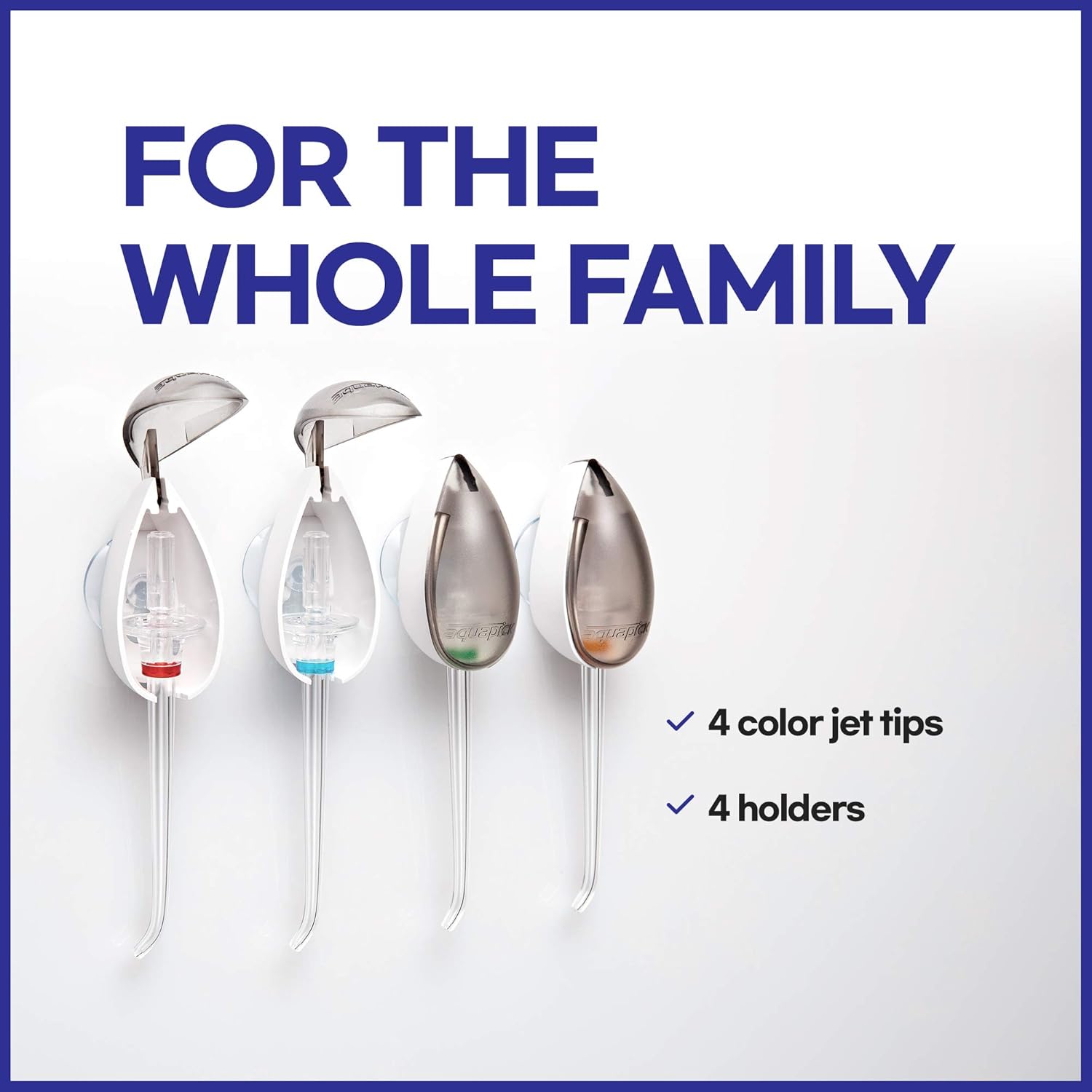
Image: The four color-coded jet tips and their convenient holders, designed for family use and easy storage.
Troubleshooting
If you encounter any issues with your AQUAPICK AQ-350, refer to the following common problems and solutions:
| Problem | Possible Cause | Solution |
|---|---|---|
| No water flow or weak pressure | Water tank empty; jet tip clogged; hose kinked; pump issue. | Refill water tank; clean or replace jet tip; straighten hose; contact customer support if pump issue persists. |
| Unit not turning on | Not plugged in; power switch off; power outlet issue. | Ensure unit is securely plugged into a working outlet; check power switch on handle is in ON position; try a different outlet. |
| Water leaking from unit | Water tank not properly seated; hose or connection loose/damaged. | Ensure water tank is securely attached; check all connections for tightness; inspect hose for damage. |
| Excessive noise during operation | Air in pump; unit not on a stable surface. | Run unit with full tank to clear air; place unit on a flat, stable surface. |
Specifications
| Feature | Detail |
|---|---|
| Product Dimensions | 6 x 3.5 x 8.2 inches |
| Item Model Number | AQ-350 |
| Weight | 2.46 Pounds |
| Manufacturer | aquapick |
| Power Source | Corded Electric |
| Special Feature | Waterproof (IPX7) |
| Product Benefits | Gum Health, Prevents Cavities |
| Color | Pink |
| Water Tank Capacity | 600ml (20oz) |
| Pulsations per Minute | 2400 |
| Pressure Settings | 12 (10-100 psi) |
Warranty and Support
Specific warranty information for the AQUAPICK AQ-350 Water Flosser is typically provided with the product packaging or available on the manufacturer's official website. For detailed warranty terms, technical support, or to purchase replacement parts, please refer to the contact information provided by AQUAPICK or visit their official brand store on Amazon: AQUAPICK Store.


