
1. Introduction
Thank you for choosing the Fancy Buying M5Y1K Laptop Battery. This battery is designed to provide reliable power for your compatible Dell Inspiron laptop. This manual provides essential information for safe installation, optimal usage, and maintenance to ensure the longevity and performance of your new battery.
Important: Please verify your laptop model and original battery part number carefully before installation to ensure compatibility. This battery is not compatible with 11.1V versions or XCMRD batteries.

Figure 1: M5Y1K Battery vs. XCMRD Battery Comparison. Note the size differences and compatibility details.
2. Safety Information
- Do not disassemble, crush, or puncture the battery.
- Avoid exposing the battery to high temperatures (above 60°C/140°F) or direct sunlight.
- Keep the battery away from water and moisture.
- Use only the original or certified compatible charger for your laptop.
- Dispose of used batteries according to local regulations. Do not dispose of in household waste.
3. Setup and Installation
Follow these steps to safely replace your laptop battery. If you are unsure, consult a professional technician.
- Power Off and Disconnect: Completely shut down your laptop and disconnect it from the power adapter.
- Remove Old Battery: Turn the laptop over. Locate the battery release latches or screws. Slide the latches or unscrew the retaining screws to remove the old battery.
- Insert New Battery: Carefully align the Fancy Buying M5Y1K battery with the battery compartment. Ensure the power connector aligns correctly.
- Secure Battery: Gently push the battery into place until it clicks or the retaining screws are tightened.
- Power On: Connect the power adapter and turn on your laptop.
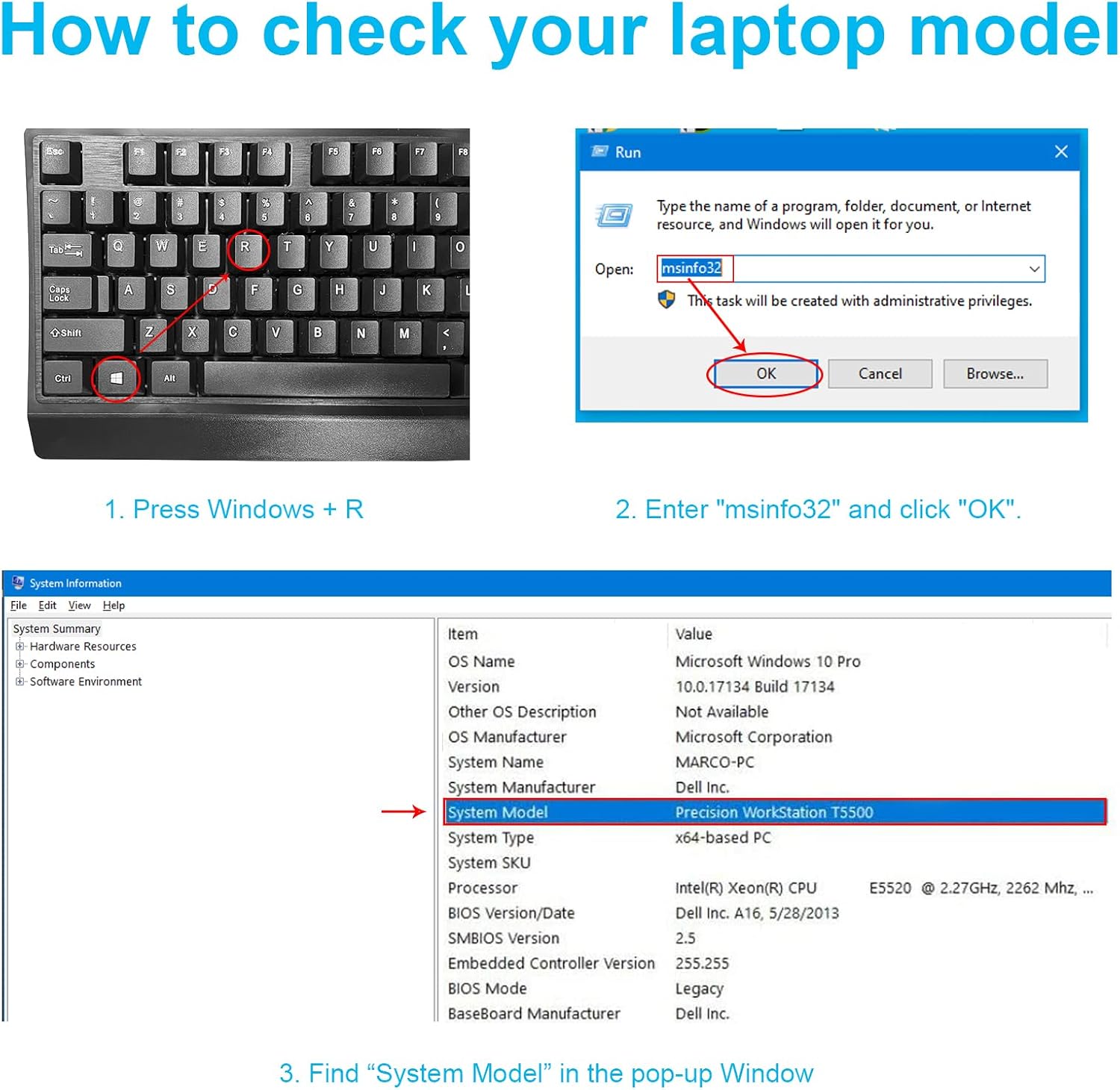
Figure 2: How to check your laptop model for compatibility.

Figure 3: The battery's power connector ensures a stable and secure connection.
4. Operating Instructions
For optimal performance and battery life, follow these guidelines:
- Initial Charge: Fully charge the new battery before its first use. It is recommended to perform a full charge and discharge cycle 2-3 times to calibrate the battery.
- Regular Use: Avoid frequently discharging the battery completely. Partial discharges and charges are generally better for Li-ion batteries.
- Storage: If storing the laptop or battery for an extended period, ensure the battery is charged to about 50-70% and stored in a cool, dry place.
5. Maintenance
Proper maintenance can extend the life of your battery:
- Temperature Control: Avoid using or storing your laptop in extreme temperatures. High heat can degrade battery performance and lifespan.
- Clean Contacts: Periodically check and gently clean the battery contacts on both the battery and the laptop with a dry cloth to ensure good conductivity.
- Software Updates: Keep your laptop's operating system and drivers updated, as power management software can impact battery efficiency.
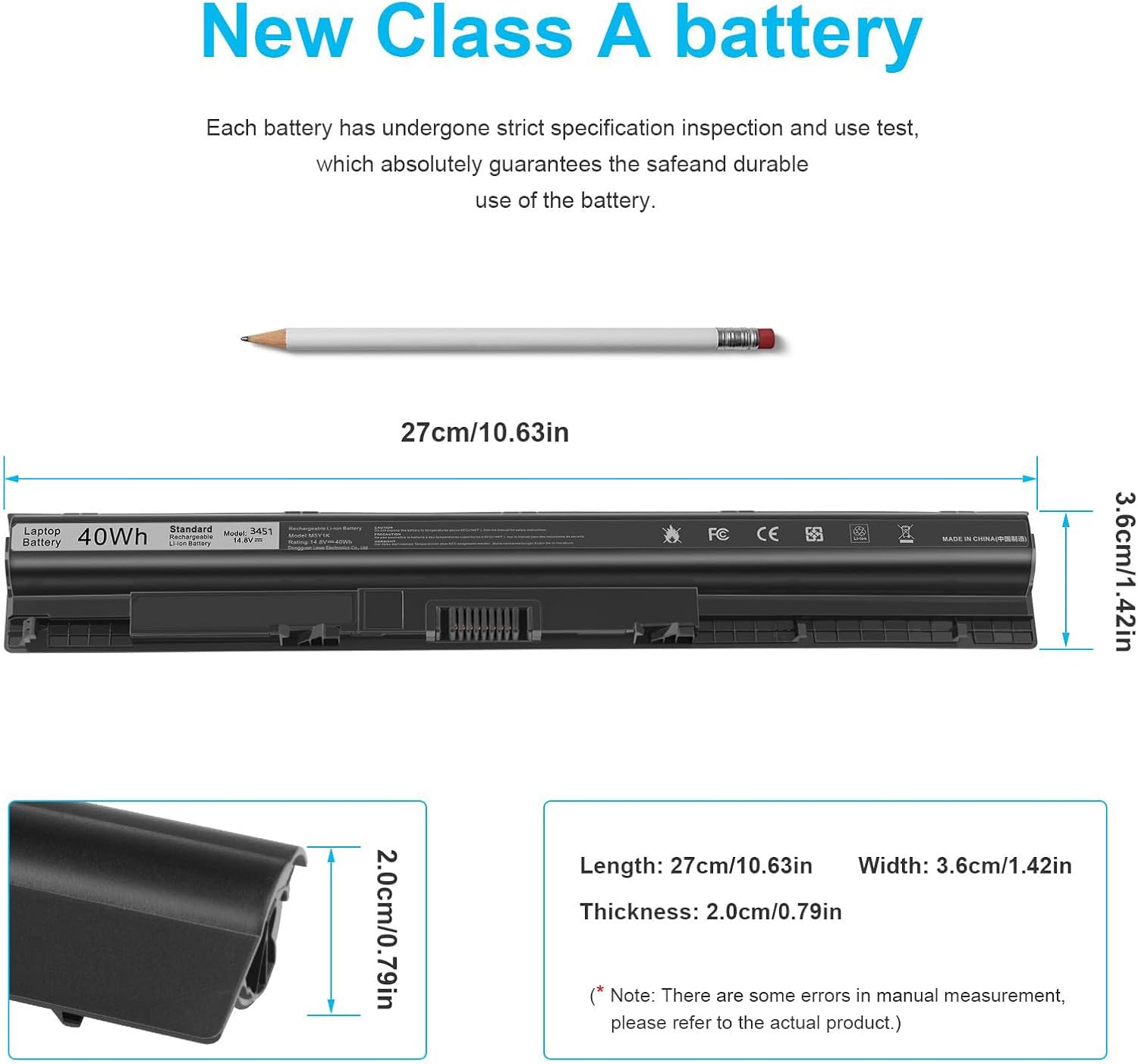
Figure 4: The M5Y1K battery features high-quality 'New Class A' cells for reliable performance.
6. Troubleshooting
If you encounter issues with your battery, consider the following:
- Battery Not Detected: Ensure the battery is correctly seated in its compartment and the connectors are clean. Restart your laptop.
- Battery Not Charging: Verify that your power adapter is working correctly and is securely connected. Check your laptop's power settings.
- Short Battery Life: Review your laptop's power management settings. Close unnecessary applications running in the background. Ensure the battery has been calibrated (full charge/discharge cycles).
- Compatibility Issues: Double-check that the M5Y1K battery is the correct model for your specific Dell Inspiron laptop and that your original battery was not an 11.1V version or XCMRD.

Figure 5: Comparison of Fancy Buying battery features with other brands.
7. Specifications
| Feature | Specification |
|---|---|
| Battery Type | Li-ion |
| Voltage | 14.8V |
| Capacity | 40Wh (2200 mAh) |
| Cells | 4 Cells |
| Recharge Cycles | Up to 500 |
| Dimensions | 10.63 x 1.42 x 0.79 inches (approx. 27 x 3.6 x 2.0 cm) |
| Weight | 0.62 Pounds (approx. 0.27 kg) |
| Compatible P/N | M5Y1K, GXVJ3, HD4J0, K185W, WKRJ2, VN3N0, 451-BBMG, 453-BBBP, W6D4J, 6YFVW, 78V9D, 1KFH3, P51F, P51F004, P47F, P63F, P60G, P64G, P28E, P65G, P52F |
| Compatible Dell Inspiron Models | 14 3000 series (3451, 3452, 3458, 3459, 3462, 3467), 14 5000 series (5451, 5452, 5455, 5458, 5459), 15 3000 series (3551, 3552, 3558, 3559, 3565, 3567), 15 5000 series (5545, 5551, 5552, 5555, 5558, 5559, 5758), 17 5000 series (5755, 5756, 5758, 5759), N3451, N3452, N3458, N3551, N3552, N3558, N5451, N5458, N5551, N5555, N5558, N5559, N5755, N5758, N5455, N5459, Vostro 3458, 3459, 3558, 3559, Latitude 3460, 3560 |
8. Warranty and Support
Fancy Buying provides a 12-month warranty for this product. If you encounter any issues or have questions, please contact the seller directly through the 'ask a question' option on the product page. Do not worry about the Amazon return window closing; direct seller support is available for warranty claims.