
1. Introduction
The Tribit MaxSound Plus Portable Bluetooth Speaker (Model: BTS25S) delivers powerful, clear audio with enhanced bass, designed for both indoor and outdoor use. This speaker features IPX7 waterproofing, ensuring durability in various environments, and offers extended playtime for continuous music enjoyment. This manual provides detailed instructions for setting up, operating, and maintaining your speaker.
2. What's in the Box
- Tribit MaxSound Plus Portable Bluetooth Speaker
- USB-C Charging Cable
- 3.5mm Auxiliary Audio Cable
- Lanyard
- User Manual
3. Product Overview
3.1 Speaker Layout
Familiarize yourself with the buttons and ports on your Tribit MaxSound Plus speaker.

Image: Top view of the Tribit MaxSound Plus speaker, displaying the power, Bluetooth, play/pause, volume up/down, and XBass buttons. A smartphone and a smart speaker are visible in the background, suggesting connectivity options.
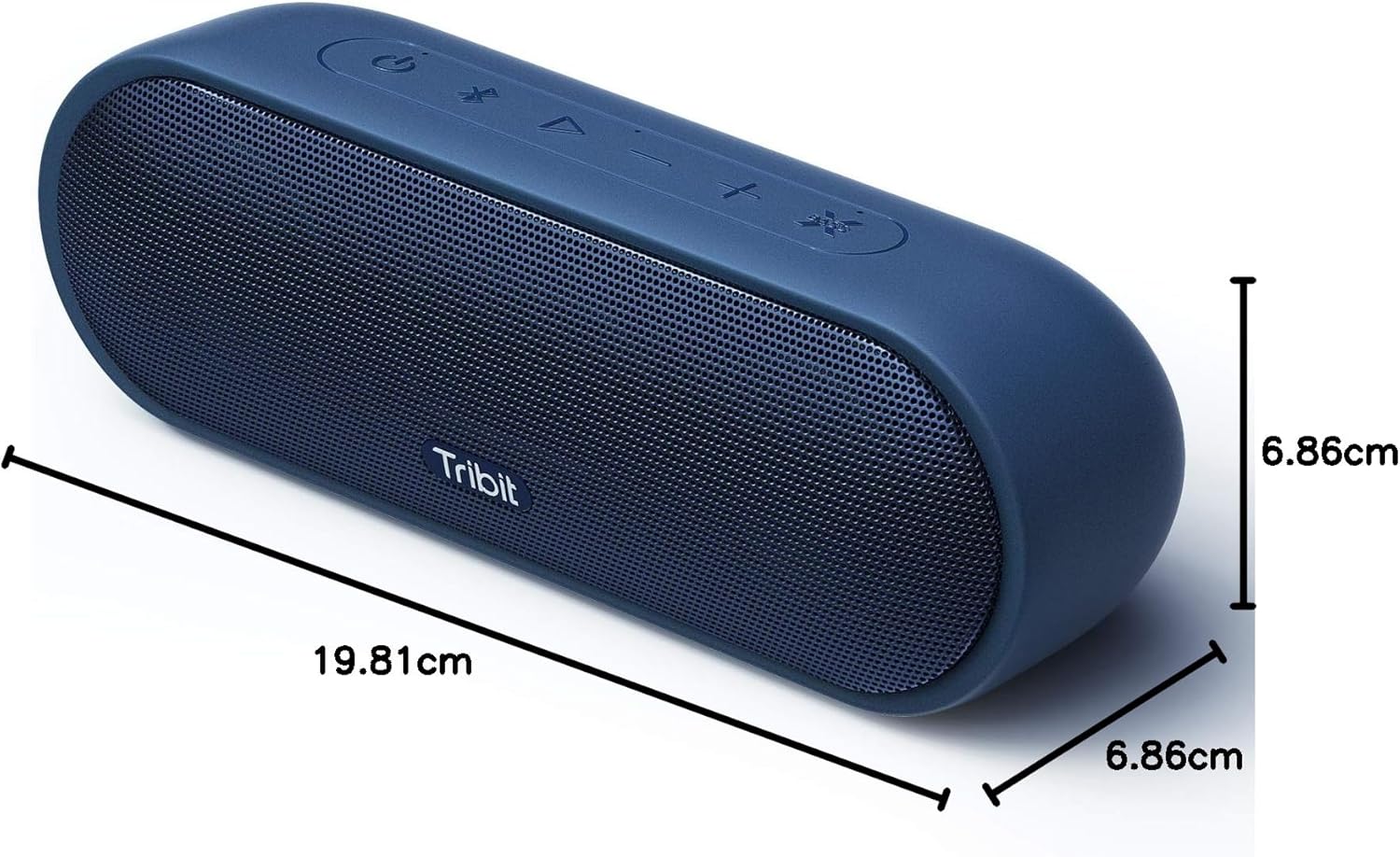
Image: Side view of the Tribit MaxSound Plus speaker, highlighting the USB-C charging port, 3.5mm auxiliary input, and the attachment point for the lanyard, all protected by a rubber flap.
3.2 Button Functions
- Power Button (⏻): Press and hold to power on/off.
- Bluetooth Button (☋): Press to enter pairing mode.
- Play/Pause Button (▶): Press to play or pause music. Press twice to skip forward. Press three times to skip backward.
- Volume Down Button (-): Press to decrease volume. Hold to skip to the previous track.
- Volume Up Button (+): Press to increase volume. Hold to skip to the next track.
- XBass Button (✕): Press to activate or deactivate XBass mode for enhanced bass.
4. Setup
4.1 Charging the Speaker
Before first use, fully charge your Tribit MaxSound Plus speaker.
- Open the rubber flap on the side of the speaker to expose the charging port.
- Connect the USB-C charging cable to the speaker's charging port.
- Connect the other end of the USB-C cable to a compatible USB power adapter (not included) or a computer's USB port.
- The charging indicator light will illuminate. A full charge typically takes approximately 4 hours.
The speaker offers up to 20 hours of playtime on a single charge, depending on volume levels and audio content.

Image: The Tribit MaxSound Plus speaker is shown against a clock face, with the hands pointing to a 20-hour duration, illustrating its extended battery life.
4.2 Bluetooth Pairing
Pair your speaker with a Bluetooth-enabled device to stream audio wirelessly.
- Press and hold the Power button (⏻) for 2 seconds to turn on the speaker. The Bluetooth indicator light will flash blue, indicating it's in pairing mode.
- On your device (smartphone, tablet, etc.), enable Bluetooth and search for available devices.
- Select "Tribit MaxSound Plus" from the list of devices.
- Once connected, the Bluetooth indicator light will turn solid blue.
The speaker maintains a robust Bluetooth 5.0 connection with a range of up to 100 feet (30 meters).

Image: A person is shown holding the Tribit MaxSound Plus speaker by its attached lanyard, walking on a paved surface, emphasizing its portability and ease of carrying.
5. Operating Instructions
5.1 Power On/Off
- To power on, press and hold the Power button (⏻) for 2 seconds.
- To power off, press and hold the Power button (⏻) for 2 seconds.
5.2 Volume Control
- Press the Volume Up (+) button to increase the volume.
- Press the Volume Down (-) button to decrease the volume.
5.3 Music Playback
- Press the Play/Pause button (▶) once to play or pause the current track.
- Press the Play/Pause button (▶) twice quickly to skip to the next track.
- Press the Play/Pause button (▶) three times quickly to go back to the previous track.
5.4 XBass Function
The XBass feature enhances low-frequency output for a deeper, more impactful bass sound.
- Press the XBass button (✕) once to activate XBass mode.
- Press the XBass button (✕) again to deactivate XBass mode.

Image: The Tribit MaxSound Plus speaker is depicted with a glass of water splashing over it, symbolizing the powerful and immersive bass experience provided by the XBass technology.
5.5 Hands-Free Calling
The speaker includes a built-in microphone for hands-free calls.
- When a call comes in, press the Play/Pause button (▶) once to answer.
- During a call, press the Play/Pause button (▶) once to end the call.
- To reject an incoming call, press and hold the Play/Pause button (▶) for 2 seconds.
6. Connectivity
6.1 Bluetooth Connection
Refer to Section 4.2 for detailed Bluetooth pairing instructions. The speaker will automatically attempt to reconnect to the last paired device when powered on.
6.2 Auxiliary Input
For devices without Bluetooth, use the 3.5mm auxiliary audio cable.
- Open the rubber flap on the side of the speaker.
- Connect one end of the 3.5mm auxiliary audio cable to the speaker's AUX-in port.
- Connect the other end of the cable to the audio output jack of your device.
- The speaker will automatically switch to AUX mode.
7. IPX7 Waterproofing
The Tribit MaxSound Plus speaker features an IPX7 waterproof rating, meaning it can be submerged in water up to 1 meter (3 feet) for 30 minutes. This makes it suitable for use near pools, beaches, or in rainy conditions.
- Ensure the rubber flap covering the charging and AUX ports is securely closed before exposing the speaker to water.
- Do not expose the speaker to saltwater or other chemicals, as this may damage the device.
- After exposure to water, wipe the speaker dry before charging.

Image: The Tribit MaxSound Plus speaker is shown partially submerged in clear water, with bubbles rising, demonstrating its IPX7 waterproof capability.
8. Battery Life
The Tribit MaxSound Plus is equipped with a long-lasting battery, providing up to 20 hours of continuous music playback on a single charge. Actual battery life may vary based on volume level, audio content, and usage patterns.
9. Maintenance
- Clean the speaker with a soft, damp cloth. Do not use abrasive cleaners or solvents.
- Store the speaker in a cool, dry place when not in use.
- Avoid exposing the speaker to extreme temperatures or direct sunlight for prolonged periods.
- Keep the ports free of dust and debris.
10. Troubleshooting
10.1 Speaker Not Turning On
- Ensure the speaker is charged. Connect it to a power source using the USB-C cable.
- Press and hold the Power button (⏻) for at least 2 seconds.
10.2 Cannot Pair with Bluetooth Device
- Make sure the speaker is in pairing mode (flashing blue Bluetooth indicator). If not, press the Bluetooth button (☋).
- Ensure your device's Bluetooth is enabled and within 100 feet (30 meters) of the speaker.
- Try forgetting "Tribit MaxSound Plus" from your device's Bluetooth settings and re-pairing.
- Restart both the speaker and your device.
10.3 No Sound or Low Volume
- Increase the volume on both the speaker and your connected device.
- Ensure the speaker is properly connected via Bluetooth or auxiliary cable.
- If using AUX, check that the cable is fully inserted and not damaged.
10.4 Sound Distortion
- Reduce the volume on both the speaker and your connected device.
- Ensure the audio source is of good quality.
- If XBass is enabled, try disabling it to see if the distortion improves.
11. Specifications
| Model Name | Tribit MaxSound Plus (BTS25S) |
| Speaker Type | Portable Outdoor Speaker |
| Output Power | 24 Watts |
| Connectivity Technology | Bluetooth 5.0 |
| Bluetooth Range | Up to 100 feet (30 meters) |
| Waterproof Rating | IPX7 |
| Playtime | Up to 20 hours |
| Recharge Time | Approx. 4 hours |
| Input Voltage | 5 Volts (DC) |
| Special Features | XBass, Built-in Microphone, USB-C Port, Waterproof |
| Product Dimensions | 19.81 x 6.86 x 6.86 cm (7.7D x 25W x 10H Centimetres) |
| Item Weight | 590 g |
12. Warranty & Support
Tribit provides an 18-month replacement warranty for the MaxSound Plus speaker. An additional year of warranty coverage can be obtained by registering your product on the official Tribit website. For support, please visit the Tribit website or contact their customer service.
12.1 Product Demonstration Video
Video: This video provides a comprehensive demonstration of the Tribit MaxSound Plus speaker. It showcases the speaker's design, button functions (power, play/pause, volume, XBass), and connectivity options including Bluetooth and auxiliary input. The video also highlights the speaker's portability with the included lanyard, its charging process, and its IPX7 waterproof capabilities by showing it submerged in snow and water. It concludes by demonstrating the hands-free calling feature using the built-in microphone.


