1. Introduction
Thank you for choosing the CITYSPORTS CS-WP5 Folding Treadmill. This manual provides essential information for the safe and effective use, assembly, operation, and maintenance of your new fitness equipment. Please read this manual thoroughly before operating the treadmill and retain it for future reference.

Image 1.1: The CITYSPORTS CS-WP5 Folding Treadmill in operation and its compact folded state.
2. Safety Instructions
To ensure your safety and prolong the life of your treadmill, please adhere to the following safety guidelines:
- Safety Key: Always attach the safety key clip to your clothing before starting the treadmill. The treadmill will only operate when the magnetic safety key is correctly placed on the console. In case of an emergency or if you fall, the safety key will detach, immediately stopping the machine.
- Placement: Place the treadmill on a flat, stable surface with adequate clear space around it (at least 2 meters behind and 0.5 meters on each side).
- Power Supply: Connect the treadmill to a grounded electrical outlet. Do not use extension cords or adapters.
- Children and Pets: Keep children and pets away from the treadmill, especially during operation.
- User Weight: Do not exceed the maximum user weight capacity of 100 kg (220 lbs).
- Footwear: Always wear appropriate athletic footwear when using the treadmill.
- Medical Conditions: Consult a physician before starting any new exercise program, especially if you have pre-existing medical conditions.
- Maintenance: Unplug the treadmill before cleaning or performing any maintenance.

Image 2.1: The safety key clip must be attached to clothing during operation for user safety.
3. Setup and Assembly
The CITYSPORTS CS-WP5 treadmill arrives largely pre-assembled. Follow these steps to prepare it for use:
- Unpacking: Carefully remove the treadmill from its packaging.
- Unfolding: Gently lift the console and handlebars into the upright position until they lock securely. Ensure all locking mechanisms are engaged.
- Placement: Position the treadmill on a level surface.
- Power Connection: Plug the power cord into a standard grounded electrical outlet.
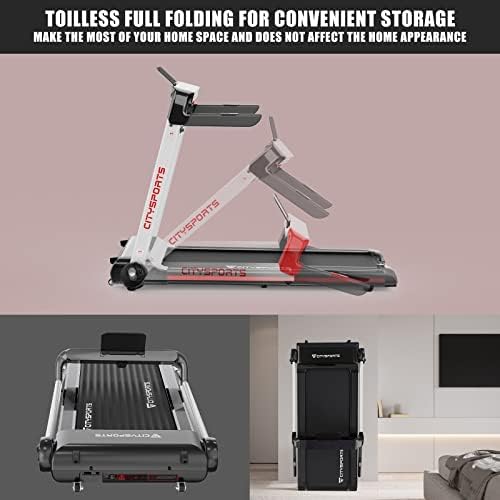
Image 3.1: The treadmill can be easily unfolded for use and folded for compact storage.

Image 3.2: The integrated transport wheels facilitate easy movement and storage of the folded treadmill.
4. Operating Instructions
Familiarize yourself with the control panel and operating modes before beginning your workout.
4.1 Control Panel Overview

Image 4.1: The LED display shows key workout metrics and features a Bluetooth connection.

Image 4.2: The control panel features an ambient light strip for enhanced user experience.
The LCD touchscreen display provides real-time data including:
- Time: Duration of your workout.
- Speed: Current running/walking speed (km/h).
- Distance: Total distance covered.
- Calories: Estimated calories burned.
- Heart Rate: (If applicable, via sensors on handlebars).
4.2 Starting a Workout
- Ensure the treadmill is plugged in and the safety key is correctly placed on the console and clipped to your clothing.
- Press the 'START' button on the control panel. The treadmill will begin at a low speed.
- Adjust the speed using the '+' and '-' buttons on the console or handlebars. The speed range is 1-15 km/h.
4.3 Operating Modes
The CS-WP5 offers two primary operating modes:

Image 4.3: The treadmill supports both walking and running modes with distinct speed ranges.
- Walking Mode: Ideal for light exercise or warm-ups, typically 1-4 km/h.
- Running Mode: For more intense workouts, with speeds ranging from 4-15 km/h.
4.4 Bluetooth Connectivity
The treadmill features integrated Bluetooth speakers:
- Activate Bluetooth on your mobile device.
- Search for and connect to the treadmill's Bluetooth signal (usually named 'CITYSPORTS' or similar).
- Once connected, you can play music through the treadmill's speakers.
4.5 Stopping a Workout
To stop the treadmill, press the 'STOP' button on the control panel. The treadmill will gradually slow down and come to a complete stop. Alternatively, detaching the safety key will immediately stop the treadmill.
5. Maintenance
Regular maintenance ensures optimal performance and longevity of your treadmill.
- Cleaning: Wipe down the treadmill with a damp cloth after each use to remove sweat and dust. Do not use abrasive cleaners.
- Lubrication: Periodically check the running belt for proper lubrication. Refer to the separate lubrication guide (if provided) or contact customer support for instructions.
- Belt Tension and Alignment: Inspect the running belt for proper tension and alignment. Adjust as needed according to the instructions in the full manual or by contacting customer support.
- Storage: When not in use, fold the treadmill for compact storage. Ensure it is stored in a dry, clean environment.
6. Troubleshooting
If you encounter any issues with your treadmill, refer to the following common troubleshooting tips:
- Treadmill Not Starting:
- Ensure the power cord is securely plugged into a grounded outlet.
- Verify the safety key is correctly placed on the console.
- Check the power switch (if present) is in the 'ON' position.
- Running Belt Slipping:
- The running belt may require tension adjustment.
- The running deck may need lubrication.
- Unusual Noise:
- Check for loose parts or foreign objects under the belt.
- Ensure the treadmill is on a level surface.
For persistent issues or problems not listed here, please contact CITYSPORTS customer support.
7. Specifications
Key technical specifications for the CITYSPORTS CS-WP5 Folding Treadmill:

Image 7.1: The treadmill's compact design and key specifications.
| Feature | Specification |
|---|---|
| Model Number | CS-WP5 |
| Motor Horsepower | 2 HP |
| Speed Range | 1-15 km/h |
| Max Weight Capacity | 100 kg |
| Display Type | LCD Touchscreen |
| Connectivity | Bluetooth |
| Material | Aluminum, Alloy Steel |
| Product Dimensions (L x W x H) | 130 x 65 x 13 cm |
| Folded Dimensions (L x W x H) | 60 x 30 x 40 cm (approximate) |
| Net Product Weight | 21.2 kg |
| Power Source | Electric Corded |

Image 7.2: The powerful 2HP motor provides consistent performance.

Image 7.3: The multi-layer running belt is designed for shock absorption and anti-slip performance.
8. Warranty and Support
For warranty information, technical support, or replacement parts, please refer to the warranty card included with your purchase or visit the official CITYSPORTS website. Please have your model number (CS-WP5) and purchase date available when contacting support.


