1. Introduction
This manual provides comprehensive instructions for the safe and efficient operation, setup, and maintenance of your OLYMPIA NC 455 Money Counting Machine. Please read this manual thoroughly before using the device to ensure proper functionality and to prevent damage.
2. Safety Instructions
- Ensure the power supply matches the voltage specified on the device label.
- Do not operate the machine with wet hands or in damp environments.
- Keep the device away from direct sunlight, heat sources, and excessive dust.
- Do not attempt to disassemble or repair the machine yourself. Contact qualified service personnel.
- Keep loose clothing, hair, and jewelry away from moving parts during operation.
- Unplug the device from the power outlet before cleaning or when not in use for extended periods.
3. Package Contents
Verify that all items are present in the package:
- OLYMPIA NC 455 Money Counting Machine
- Power Cable
- External Customer Display (if included with your model)
- Cleaning Brush
- User Manual
4. Product Overview
Familiarize yourself with the main components of the OLYMPIA NC 455.

Figure 4.1: Front view of the OLYMPIA NC 455 Money Counting Machine, showing the input hopper, output stacker, control panel, and LCD display. An external customer display is also visible on the right.
- Input Hopper: Area where banknotes are placed for counting.
- Output Stacker: Area where counted banknotes are collected.
- Control Panel: Buttons for various functions and settings.
- LCD Display: Shows counting results, modes, and error messages.
- External Customer Display Port: Connection for an optional external display.
- Power Inlet: For connecting the power cable.

Figure 4.2: Close-up of the blue LCD display and control panel. The display shows counting results and modes, while the buttons allow selection of functions like CF, MG, UV, IR, MT, DD, COUNT, RESET, BATCH, and ADD.
5. Setup
- Unpacking: Carefully remove the machine from its packaging. Retain packaging for future transport or storage.
- Placement: Place the machine on a stable, flat, and dry surface. Ensure adequate ventilation around the device.
- Power Connection: Connect the power cable to the power inlet on the machine and then to a suitable electrical outlet.
- External Display (Optional): If using an external customer display, connect its cable to the designated port on the main unit.
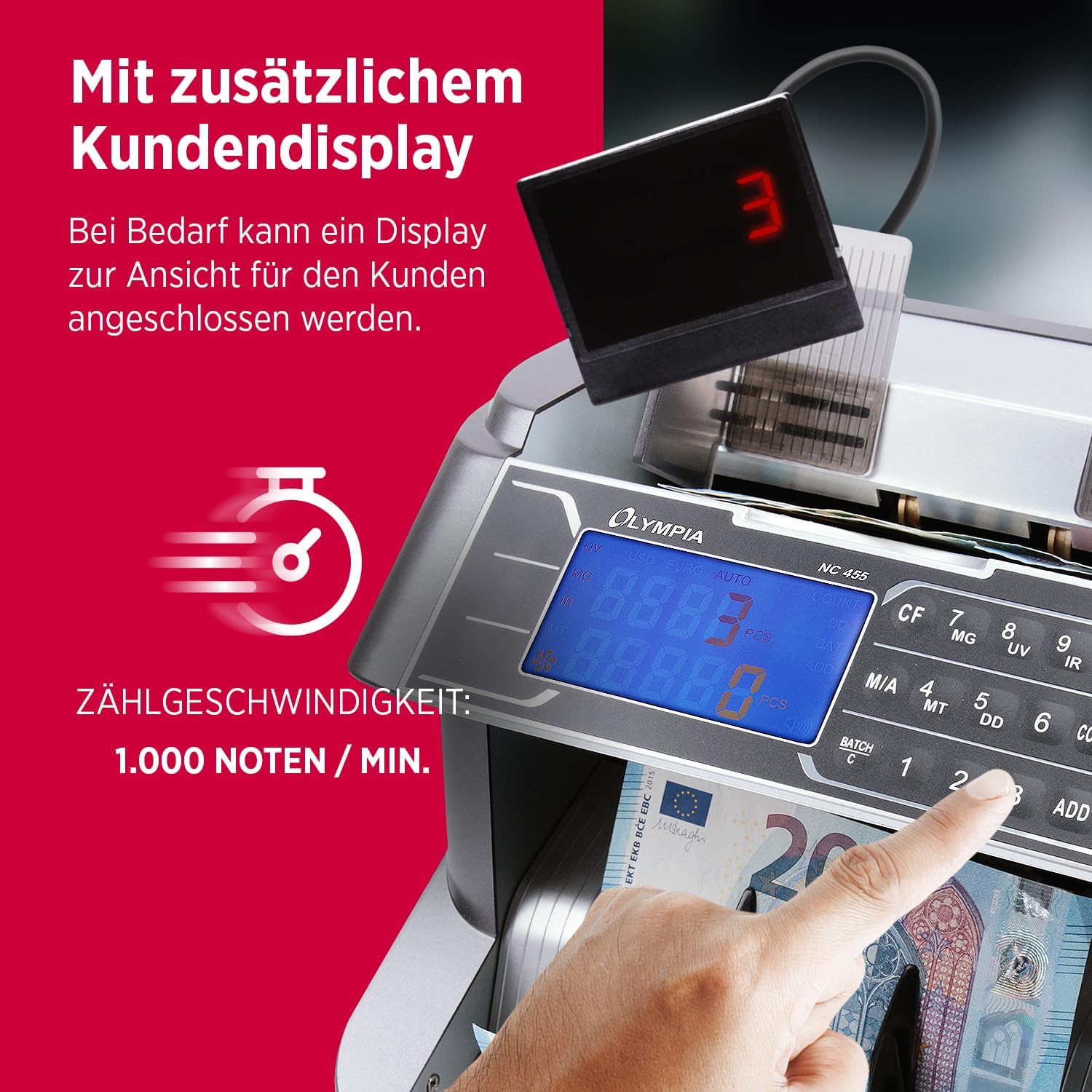
Figure 5.1: The OLYMPIA NC 455 connected to an external customer display, which provides a clear view of the count for customers. The image also highlights the counting speed of 1,000 notes per minute.
- Power On: Flip the power switch (usually located at the back or side) to the 'ON' position. The machine will perform a self-test.
6. Operating Instructions
The OLYMPIA NC 455 offers various counting and detection functions.
6.1. Basic Counting
- Ensure the machine is powered on and in the default counting mode (usually indicated by "COUNT" on the display).
- Straighten the banknotes and place them neatly into the input hopper. Ensure they are not folded or crumpled.
- The machine will automatically start counting. The count will be displayed on the LCD.
- Once counting is complete, remove the stack from the output stacker.
- Press the RESET button to clear the count for a new batch.

Figure 6.1: The OLYMPIA NC 455 in operation, demonstrating its comprehensive functionality including free counting, batch counting (1-999), addition function, and automatic start.
6.2. Authenticity Detection
The NC 455 is equipped with multiple detection methods to identify counterfeit banknotes:
- UV (Ultraviolet) Detection: Checks for UV security features on banknotes.
- MG (Magnetic) Detection: Detects magnetic ink present in genuine banknotes.
- IR (Infrared) Detection: Verifies infrared security patterns.
- MT (Magnetic Thread) Detection: Checks for magnetic security threads.
- DD (Dimension Detection): Detects variations in banknote dimensions (width).
These functions are typically active by default. If a suspicious banknote is detected, the machine will stop, display an error code, and emit an alert sound. Remove the suspicious note and press RESET to continue counting.
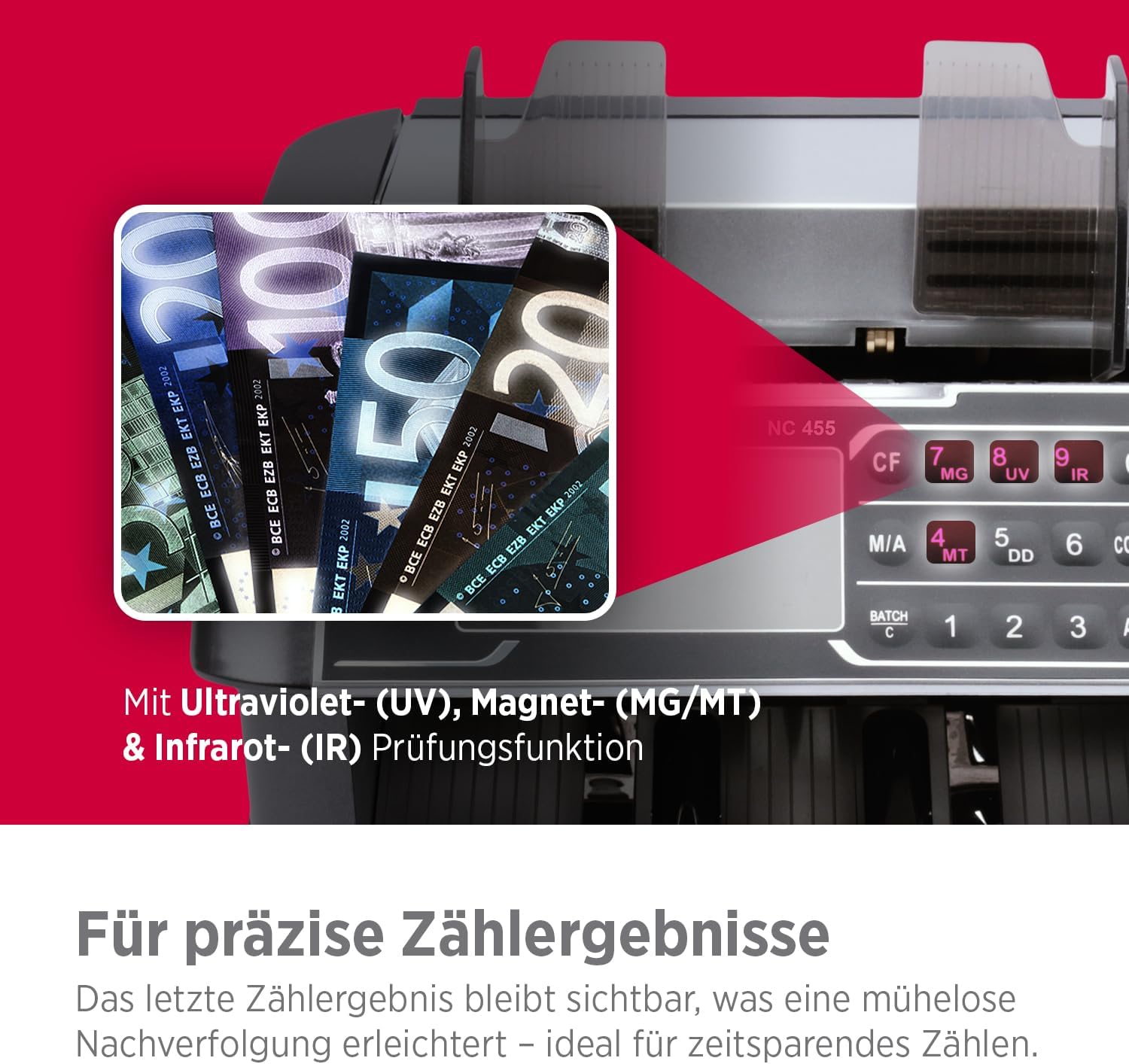
Figure 6.2: Illustration of the OLYMPIA NC 455's advanced detection capabilities, including Ultraviolet (UV), Magnetic (MG/MT), and Infrared (IR) examination functions for precise counting results.
6.3. Batch Function
To count banknotes in specific batches:
- Press the BATCH button.
- Use the number keys (1, 2, 3) or other designated buttons to set the desired batch size (e.g., 10, 20, 50, 100).
- Place the banknotes in the input hopper. The machine will count until the set batch size is reached, then stop.
- Remove the batch and the machine will automatically resume counting for the next batch.
- Press RESET to exit batch mode.
6.4. Add Function
To accumulate the total count of multiple batches:
- Press the ADD button. The "ADD" indicator will light up on the display.
- Count your first stack of banknotes. The total will be displayed.
- Place subsequent stacks into the hopper. The machine will add each new count to the previous total.
- Press RESET to clear the accumulated total and exit add mode.
7. Maintenance
7.1. Cleaning
Regular cleaning ensures optimal performance and longevity of your machine.
- Power Off: Always turn off and unplug the machine before cleaning.
- Dust Removal: Use the provided cleaning brush or a soft, dry cloth to remove dust and paper residue from the input hopper, output stacker, and internal sensors.
- Exterior Cleaning: Wipe the exterior surfaces with a soft, slightly damp cloth. Do not use abrasive cleaners or solvents.
- Sensor Cleaning: Gently clean the sensors (located inside the counting path) with a cotton swab lightly dampened with isopropyl alcohol. Allow to dry completely before use.
7.2. Storage
When not in use for extended periods, store the machine in a cool, dry place, away from direct sunlight and extreme temperatures. It is recommended to cover the machine to prevent dust accumulation.
8. Troubleshooting
Refer to the table below for common issues and their solutions.
| Problem | Possible Cause | Solution |
|---|---|---|
| Machine does not power on. | Power cable not connected; power switch off; power outlet fault. | Check power cable connection; ensure power switch is ON; test power outlet with another device. |
| Error message (e.g., "DD", "UV", "MG") or machine stops. | Counterfeit detection; double, half, or chained notes; dirty sensors. | Remove the suspicious note; re-stack notes neatly; clean sensors as per maintenance section. Press RESET to clear. |
| Inaccurate counting. | Banknotes are not neatly stacked; worn or dirty rollers; incorrect mode selected. | Ensure notes are flat and aligned; clean rollers and sensors; verify correct counting mode. |
| Notes jam frequently. | Worn or damaged banknotes; improper feeding; dirty rollers. | Remove damaged notes; ensure notes are fed correctly; clean rollers. |
9. Specifications
| Feature | Detail |
|---|---|
| Model Number | NC 455 |
| Brand | OLYMPIA |
| Counting Speed | Up to 1,000 notes/minute |
| Detection Methods | UV (Ultraviolet), MG (Magnetic), IR (Infrared), MT (Magnetic Thread), DD (Dimension) |
| Hopper Capacity | Approx. 300 notes |
| Stacker Capacity | Approx. 200 notes |
| Countable Note Size | 50 x 110 mm to 85 x 180 mm |
| Display | Blue LCD Display |
| Item Weight | 13.01 pounds (approx. 5.9 kg) |
| Product Dimensions (LxWxH) | 12.6 x 12.2 x 12.2 inches (approx. 32 x 31 x 31 cm) |

Figure 9.1: Illustration detailing the countable note sizes (50 x 110 mm to 85 x 180 mm) and the machine's large capacity, holding 300 notes in the hopper and 200 in the stacker.
10. Warranty and Support
The OLYMPIA NC 455 Money Counting Machine comes with a standard manufacturer's warranty. Please refer to the warranty card included in your package for specific terms and conditions.
For technical support, service, or inquiries regarding your product, please contact OLYMPIA customer service through their official website or the contact information provided with your purchase documentation.
Manufacturer: GO Europe GmbH
UPC: 4030152950843


